Redwood: Allow Supplier Portal Users to Access Redwood Pages
Supplier portal users can now access Redwood pages within Product Management directly through the supplier portal. These Redwood pages are compliant with a web application firewall and support single sign-on bypass. The portal includes a Product Management card, that allows users to easily navigate to the internal Product Management Search page. Additionally, you can enable access to guided journeys to assist supplier portal users.
Data security for your Product Management pages must be provided using FND security or access control lists.
When supplier portal users click the Product Management card (after logging in to the portal), they’re directed to the Product Management Search page that honors data security.
Here’s what supplier portal users can do on the search page:
- Search for objects that have been enabled for them.
- View attributes that are configured with the Application field set to a new value Supplier Product Management.
- Add the objects to clipboard and access the Recently Visited panel.
- Use the Saved Searches panel.
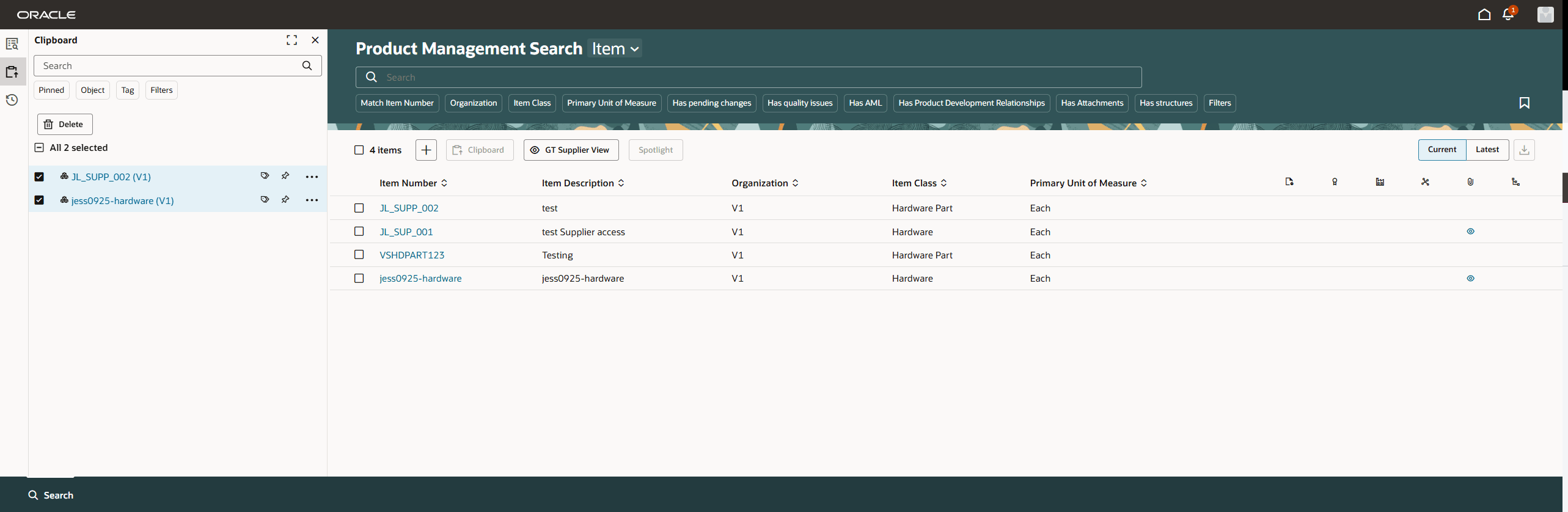
Item Search on Supplier Portal
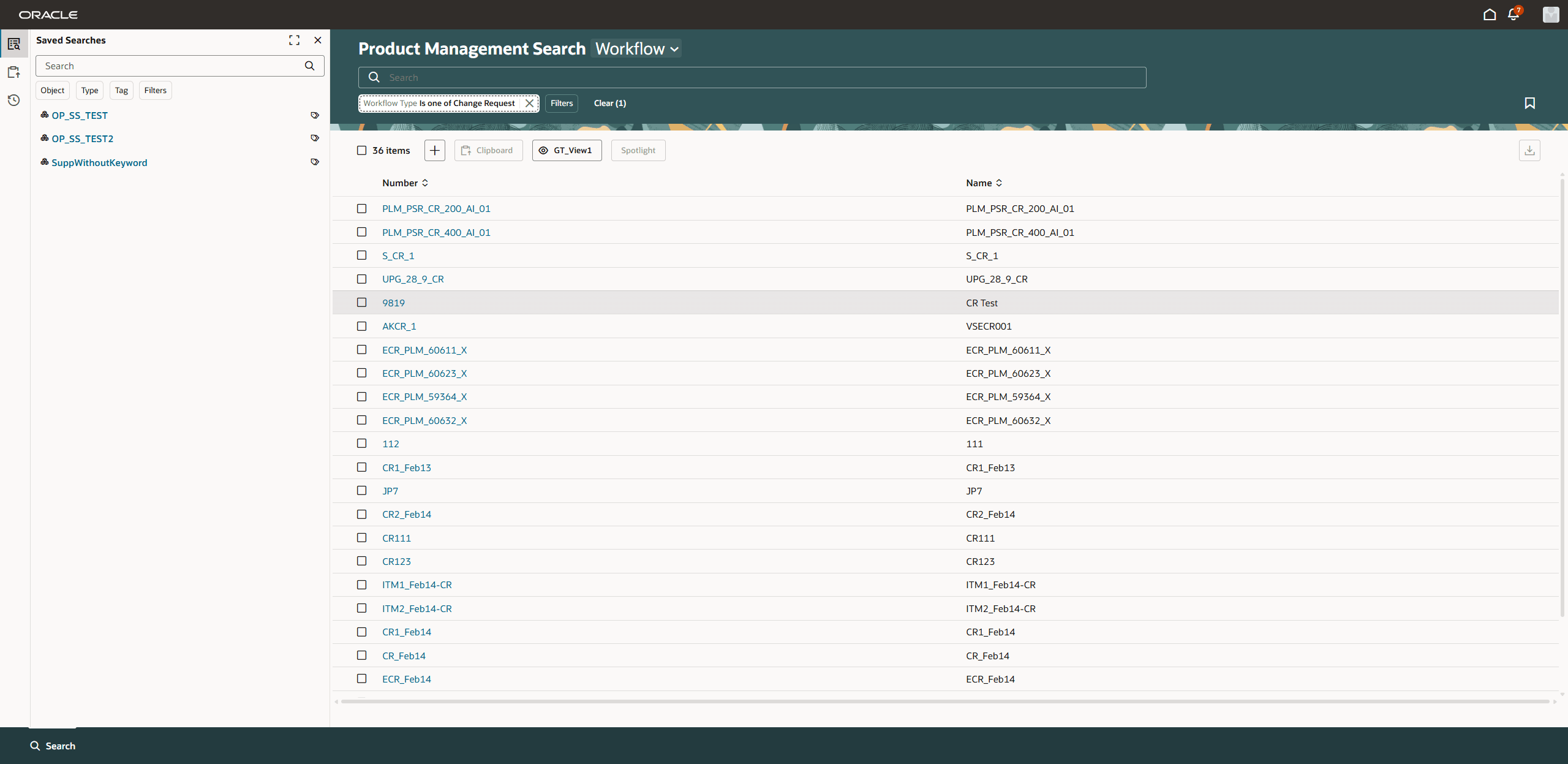
Workflow Search on Supplier Portal
When supplier portal users navigate through the item tabs, the fields appear based on access control lists or business rules (configured using Oracle Visual builder studio).
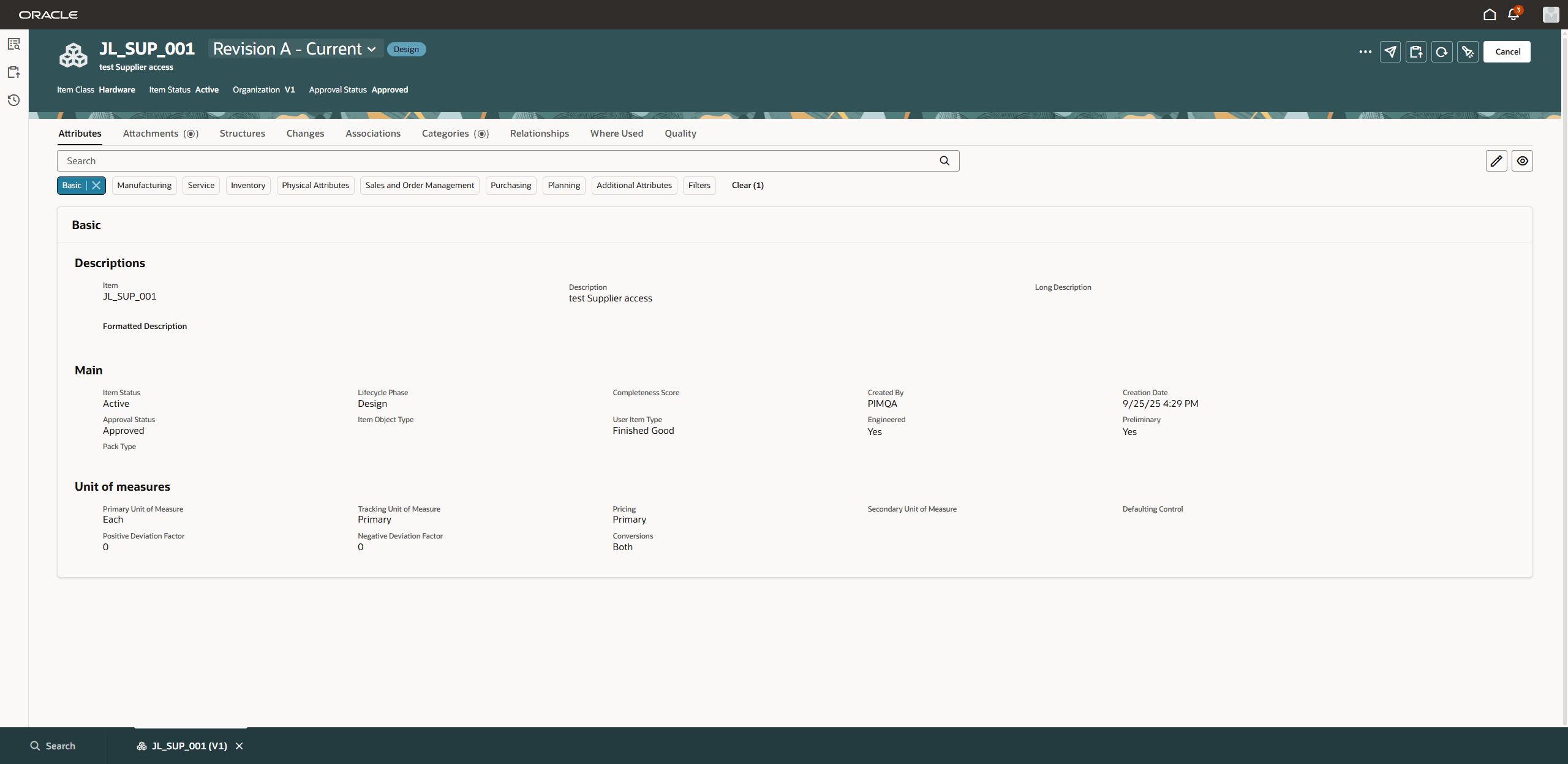
Read-Only Item View on Supplier Portal
When supplier portal users navigate through the change order, there are no restrictions on viewing its details. Unless business rules or access control lists have been configured to restrict data access, users can view the same details as any user with access to Product Management.
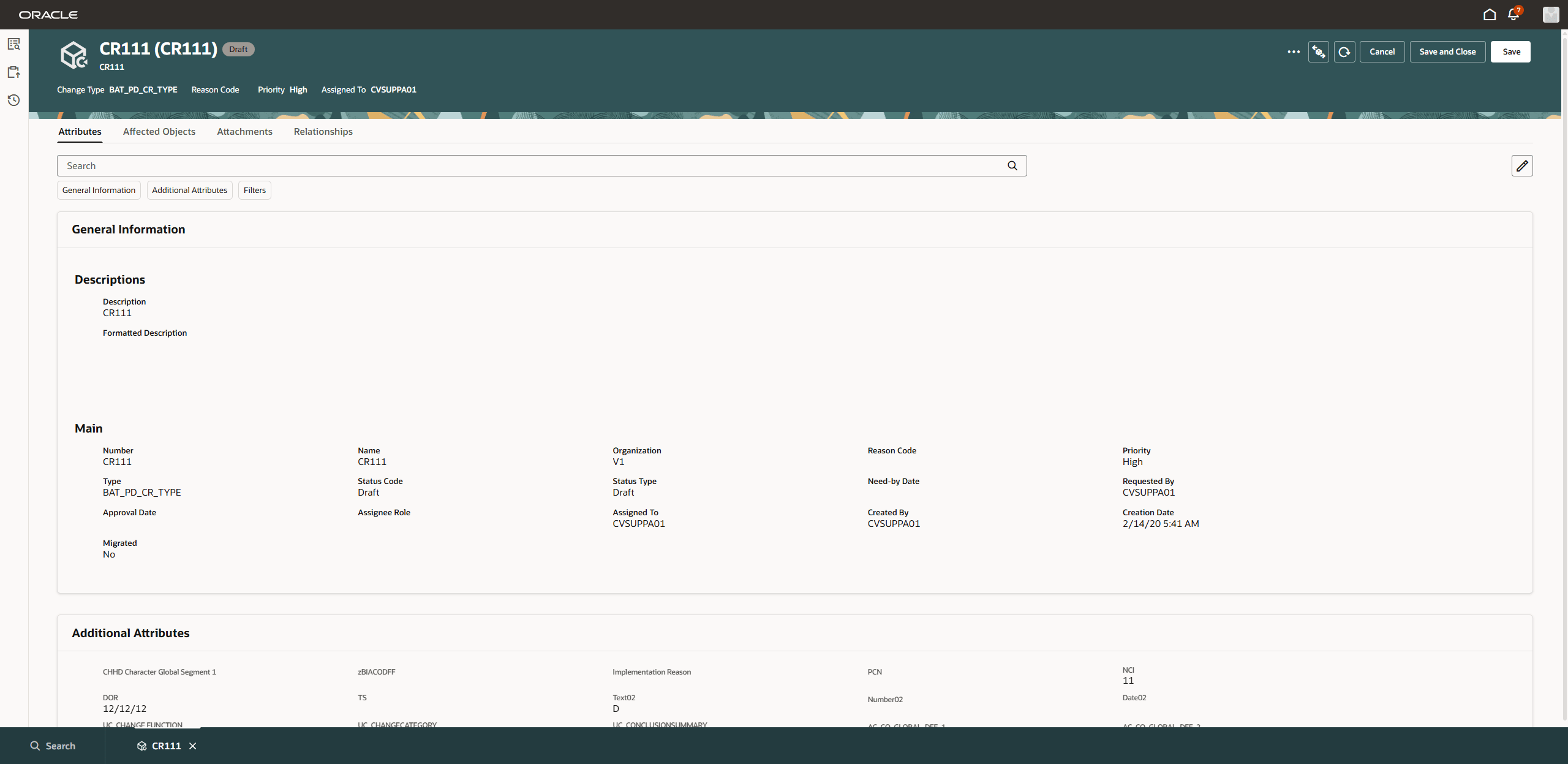
Change Request with History Tab Hidden Using Business Rules on Supplier Portal
The new Redwood supplier portal benefits your business for the following reasons:
-
Improved supplier collaboration and productivity through direct access to Product Management supplier item and workflow objects through the supplier portal streamlines supplier interactions, reducing communication delays and enabling faster issue resolution.
-
Modern, consistent user experience through the Redwood pages provides a modern, intuitive experience for suppliers and internal users, improving user satisfaction and adoption.
-
Enhanced security and compliance through integration with a web app firewall and enforcement of data security (via FND security or access control lists) helps ensure only authorized suppliers view sensitive product data, supporting Oracle’s commitment to security and regulatory compliance.
-
Simplified access management with single sign-on bypass allows for secure, flexible authentication scenarios without compromising convenience for external supplier users.
-
Faster navigation and access to relevant data with the Product Management card and efficient search functionalities (including saved searches and recently visited panels) empower suppliers to quickly find and manage relevant product objects, increasing efficiency.
-
Guided journeys for supplier enablement provides guided experiences to help suppliers complete processes accurately and independently, reducing support overhead and onboarding time.
-
Flexible, configurable, and granular data visibility allows suppliers to view only the objects and attributes configured for them, ensuring targeted collaboration while protecting internal business information.
Here's the demo of these capabilities:
Steps to enable and configure
- Enable Redwood pages for items, manufacturers, and workflows.
- Opt in to the feature "Redwood: Enable the New Supplier Portal Home Page Experience", if you haven't opted in earlier.
- Configure a view for supplier portal users with the Application field set to Supplier Product Management.
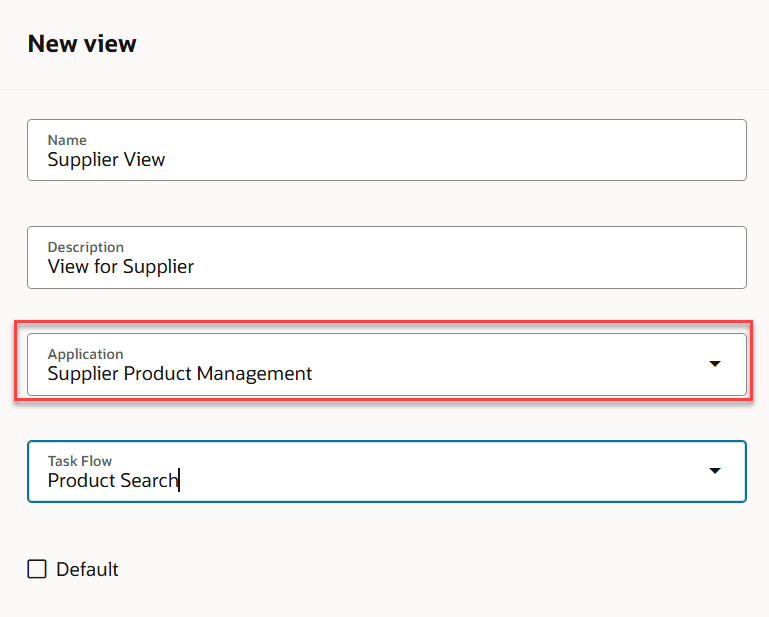
Create View with Application Set to Supplier Product Management for Supplier Portal Users
Tips and considerations
-
If you've enabled supplier portal in the classic interface, and intend to use the same FND security capabilities to restrict access to suppliers on Redwood pages, you must take the following actions:
-
Explicitly add users on the Security tab of the changes.
Supplier portal users will now be able to view all changes (such as change orders, change requests, problem reports, and corrective actions) that don’t have any users added in the Security tab of the change. In short, all such changes will become public. So, you must explicitly add users to restrict access to changes.
-
-
-
Secure access to items that have Public option selected in the item class.
Supplier portal users will now be able to see items on search pages that have the Public option selected in the item class.
-
-
-
Use business rules to hide tabs on workflows as per your business needs.
Supplier portal users will now be able to see all actions and tabs across all workflows available to your internal users.
-
Alternatively, you can restrict access to objects for supplier portal users using access control lists. For more information, see the Key Resources section.
-
To allow supplier portal users to access Redwood pages, you must assign the privileges listed in the Access Requirements section in this document. Please note that these privileges are different from the ones you assigned to users in the classic supplier portal These privileges will provide similar capabilities to the Supplier User as those provided in the classic interface.
Here are the capabilities available to supplier portal users that are similar to those provided in the classic interface when privileges listed in Access Requirements section are assigned.
-
Actions
Items and Documents
Change Orders
Change Requests
Problem Reports
Corrective Actions
Search
Yes
Yes
Yes
Yes
Yes
Create
No
No
Yes
Yes
No
View
Yes
Yes
Yes
Yes
Yes
Manage
No
No
Yes
Yes
No
Approve
Not Applicable
Yes
Yes
Yes
Yes
-
Configure new views for item search, workflow search, and structures to ensure that supplier portal users can see only the attributes relevant to them. When creating the view, select the newly created application Supplier Product Management.
-
The main difference between the supplier portal for classic and Redwood pages is that, in the classic supplier portal, the item and change tabs were accessible as direct links, and certain tabs were hidden for specific objects. In contrast, the Redwood supplier portal pages display all the tabs that are available to your internal users by default, unless they’re explicitly hidden through configurations.
- The Additional Workflow Controls (AWC) configured in the Portal User column as part of change type setup will continue to be applicable Redwood.
- Supplier portal users can be granted a higher-level access by adding a new role and assigning permissions to that role through additional workflow controls.
- Between the permissions in the Portal User column and the new role, the functionality that’s higher of the two will be applicable. For example, for the Promote Manually action, if the Portal User is set as No, and New Role is set as To next status, the portal user can promote the workflow to the next status. If you don't want the permission in Portal User column to be applied, you can set all actions in that column as No.
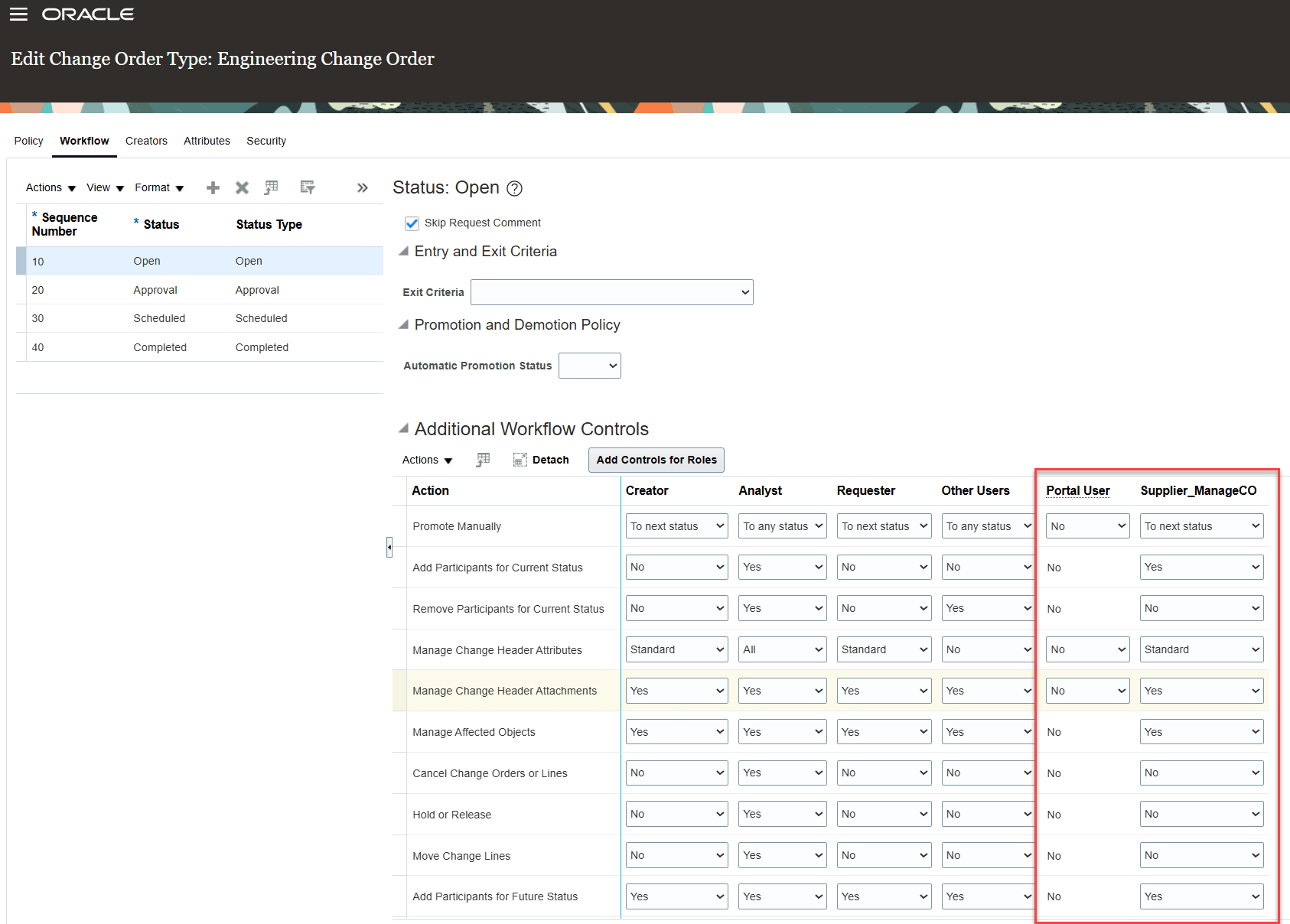
Example of the Configuration in the Additional Workflow Controls
-
Supplier portal users won't be able to navigate to the Product Management landing page like any other users of Product Management.
-
Supplier won’t have access to the Navigator icon available for Fusion application pages.
Key resources
- Oracle Fusion Cloud SCM Using Product Development Guide, available on the Oracle Help Center.
- Oracle Fusion Cloud SCM Using Product Master Data Management Guide, available on the Oracle Help Center.
- The topic Overview of Access Control Lists in Oracle Fusion Cloud SCM Implementing Product Management Guide, available on the Oracle Help Center.
Access requirements
Users who are assigned a configured job role that contains these functional privileges can access this feature:
To access supplier portal using Redwood pages:
-
Access Supplier Portal Overview (POS_ACCESS_SUPPLIER_PORTAL_OVERVIEW_PRIV)
To access the Saved Searches, Clipboard, and Recently Visited panels on Redwood pages:
- Access Clipboard (ACA_ACCESS_CLIPBOARD_PRIV)
- Access HCM Common Components (HRC_ACCESS_HCM_COMMON_COMPONENTS_PRIV)
- Access Object Tag Set Repository (ACA_ACCESS_OBJECT_TAG_SETS_PRIV)
- Access Object Tags Repository (ACA_ACCESS_OBJECT_TAGS_PRIV)
- Use REST Service - Saved Searches (HRC_REST_SERVICE_ACCESS_SAVED_SEARCHES_PRIV)
To access item global searches:
-
Manage Item Global Search (EGP_MANAGE_ITEM_GLOBAL_SEARCH_PRIV)
To access workflows in Product Management Search page on Redwood:
- Access Product Management Change Search (EGO_VIEW_PRODUCT_MANAGEMENT_CHANGE_SEARCH_PRIV)
- Get Search View REST (EGP_GET_SEARCH_VIEW_REST_PRIV)
- GET Product Management Index REST (EGP_GET_PM_INDEX_REST_PRIV)
- Monitor Product Management Workflow Objects (ACA_MONITOR_PRODUCT_MANAGEMENT_WORFLOW_OBJECTS_PRIV)
To search for items on Redwood Product Management Search pages:
-
Product Search (ORA_EGI_PRODUCT_SEARCH_DUTY)
To create workflows from the Product Management search page:
- Create Change Order (EGO_CREATE_CHANGE_ORDER_PRIV)
- Access Change Types Using a REST Service (EGO_GET_CHANGE_TYPES_REST_PRIV)
To create, view, and manage workflows:
- Create Change Order (EGO_CREATE_CHANGE_ORDER_PRIV)
- Manage Change Requests (ACA_MANAGE_CHANGE_REQUESTS_PRIV)
- Manage Problem Report (ACA_MANAGE_PROBLEM_REPORT_PRIV)
- View Change Order (ACA_VIEW_CHANGE_ORDERS_PRIV)
- View Change Request (ACA_VIEW_CHANGE_REQUESTS_PRIV)
- View Problem Report (ACA_VIEW_PROBLEM_REPORTS_PRIV)
- View Corrective Actions (ACA_VIEW_CORRECTIVE_ACTIONS_PRIV)
To approve or reject workflows:
-
Approve Item Change Order (EGO_APPROVE_ITEM_CHANGE_ORDER_PRIV)
To run the change order details report:
- Generate Item Change Order Report (EGO_GENERATE_ITEM_CHANGE_ORDER_REPORT_PRIV)
- Generate Item Change Order Report (EGO_GENERATE_ITEM_CHANGE_ORDER_REPORT_PRIV_OBI)
- Get Report Definitions Using REST (EGI_GET_BIP_REPORT_DEFINITIONS_REST)
To send an item or workflow object:
- Use REST Service - Users and Roles Lists of Values (PER_REST_SERVICE_ACCESS_USERS_AND_ROLES_LOVS_PRIV)
- Manage HR Name Format (PER_MANAGE_HR_NAME_FORMAT_PRIV) (optional)
To select users who can manage participants and change workflow status:
- Access Users (EGP_ACCESS_USERS_PRIV)
- Use REST Service - Users and Roles Lists of Values (PER_REST_SERVICE_ACCESS_USERS_AND_ROLES_LOVS_PRIV)
- Manage HR Name Format (PER_MANAGE_HR_NAME_FORMAT_PRIV) (optional)
To view items on Redwood pages:
- View Item (EGP_VIEW_ITEM_PRIV)
- View Item Redwood Items (EGP_VIEW_REDWOOD_ITEM_PRIV)
- View Item Redwood Attachments (EGP_VIEW_REDWOOD_ITEM_ATTACHMENT_PRIV)
- View Item Redwood Associations (EGP_VIEW_REDWOOD_ITEM_ASSOCIATION_PRIV)
- View Item Redwood Structures (EGP_VIEW_REDWOOD_ITEM_STRUCTURE_PRIV)
- View Item Redwood Changes (EGP_VIEW_REDWOOD_ITEM_CHANGE_PRIV)
- View Item Redwood Item Categories (EGP_VIEW_REDWOOD_ITEM_CATEGORIES_PRIV)
- View Item Redwood Relationships (EGP_VIEW_REDWOOD_ITEM_RELATIONSHIP_PRIV)
- View Item Redwood Quality (EGP_VIEW_REDWOOD_ITEM_QUALITY_PRIV)
- View Item Organization Association (EGP_VIEW_ITEM_ORGANIZATION_ASSOCIATION_PRIV)
To manage item entities:
- Manage Item Attachment (EGP_MANAGE_ITEM_ATTACHMENT_PRIV))
- Manage Trading Partner Item Reference (EGP_MANAGE_TRADING_PARTNER_ITEM_REFERENCE_PRIV)
- Manage Unit of Measure (INV_MANAGE_UNIT_OF_MEASURE_PRIV)
These privileges were available prior to this update.
Additionally, you must create a Data Security Policy when you create a role for supplier portal user. Here are the policy details:
- Policy Name: provide unique name.
- Data Resource: Add the resource named EGO_ENGINEERING_CHANGES_B.
- Data Set: Select Select by Instance Set.
- Condition Name: Access the item changes for table EGO_ENGINEERING_CHANGES_B for the item changes they have access to.
- Actions: Select all the actions.