Redwood: Extend Formula Management Capabilities
The Redwood user experience for Formula functionality has been extended to support the following new capabilities:
- Easily distinguish between products and ingredients.
- Associating a formula name on a co-product or by-product automatically commons the primary product’s formula structure to this co-product or by-product.
- Associate the formula name with formula ingredients to ensure the correct components are selected during the formula expansion.
- Apply change controls on primary product attributes.
- Delete primary formulas when required.
- Support formula attributes in Business Intelligence Cloud Connector (BICC) view objects and REST API/ SOAP web services.
Advanced View
- The updated Redwood page provides separate header rows, making it easier to distinguish between products and ingredients.
- You can also view formula details in hierarchy view, you can expand or collapse any formula that contains ingredients and products.
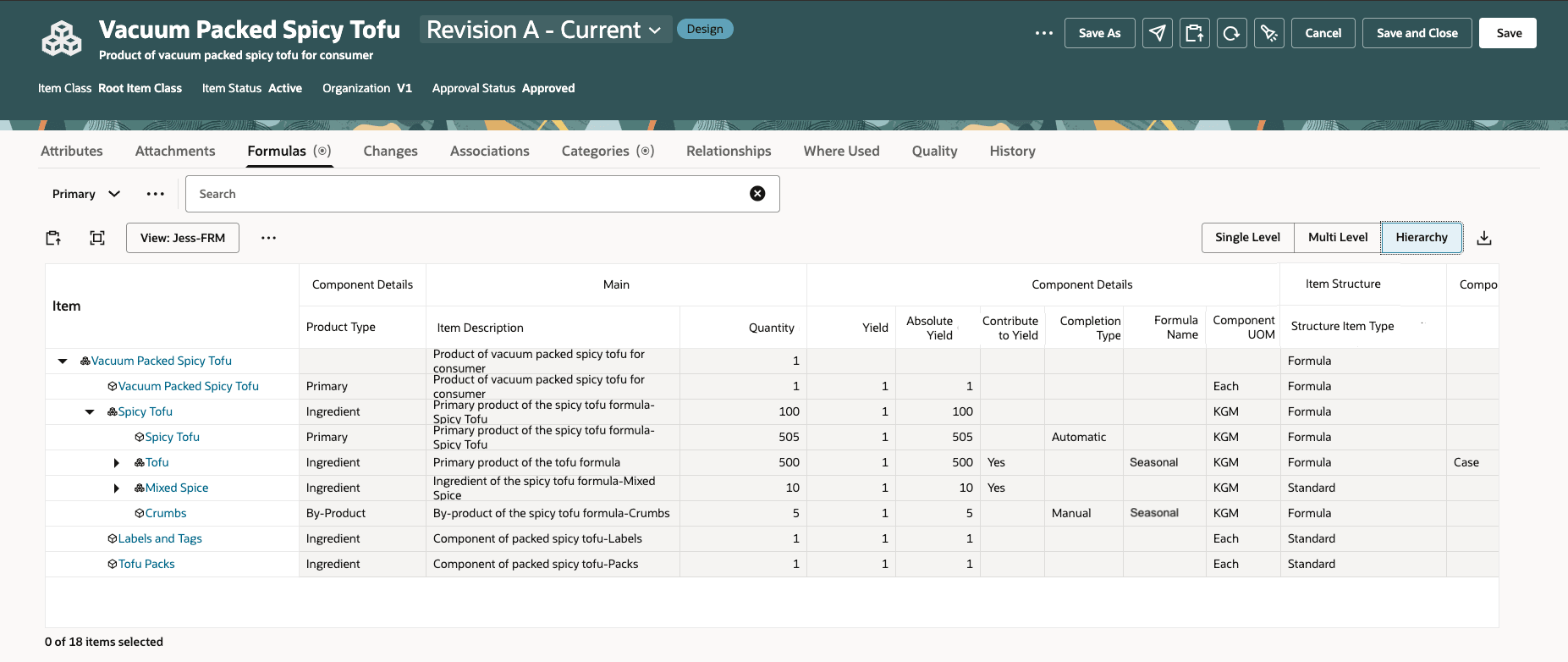
Caption: Formula Structure Hierarchy View
Commoning of Primary Product Formula Structure
- You can common the primary product formula structure into co-products or by-product by simply selecting the formula name. This enables you to view co-products and by-products separately, making it easier for you to identify the primary products in which this formula is used as a co-product or by-product.
- As a best practice, you may chose a formula name other than Primary, as shown in the following image for the by-product.
Note: This is an optional step, and you can chose to leave the formula name blank, in which case, no common will occur.
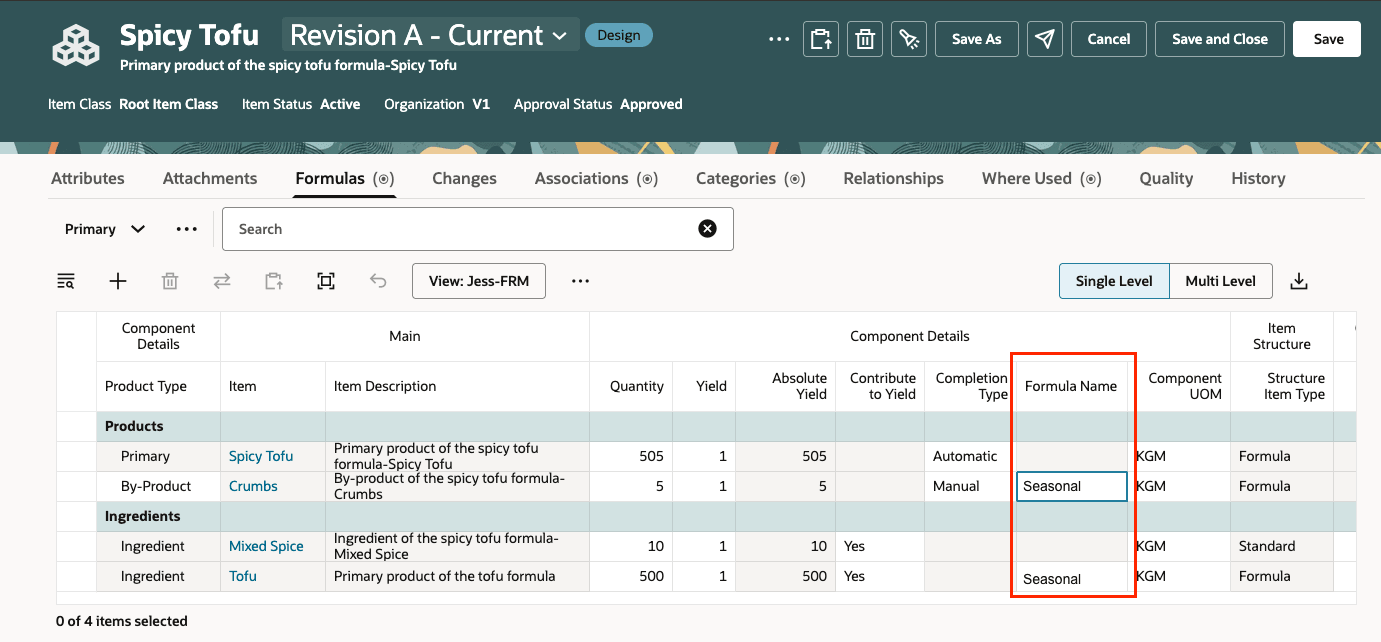
Separate Header Rows and Associating a Formula Name with a By-Product
Expansion on Ingredient
-
In the Ingredients section, you can select formula names for rows that are formula (and not standard items). You can select any of the existing formula names available on the ingredient. The selected Formula Name determines which child components are displayed in the multi-level and hierarchy view.
Enhanced Change Control on Formula
- You can redline formula name selection in co-products, by-products and ingredients.
- You can redline primary product, including formula specific attributes like 'Completion Type'.
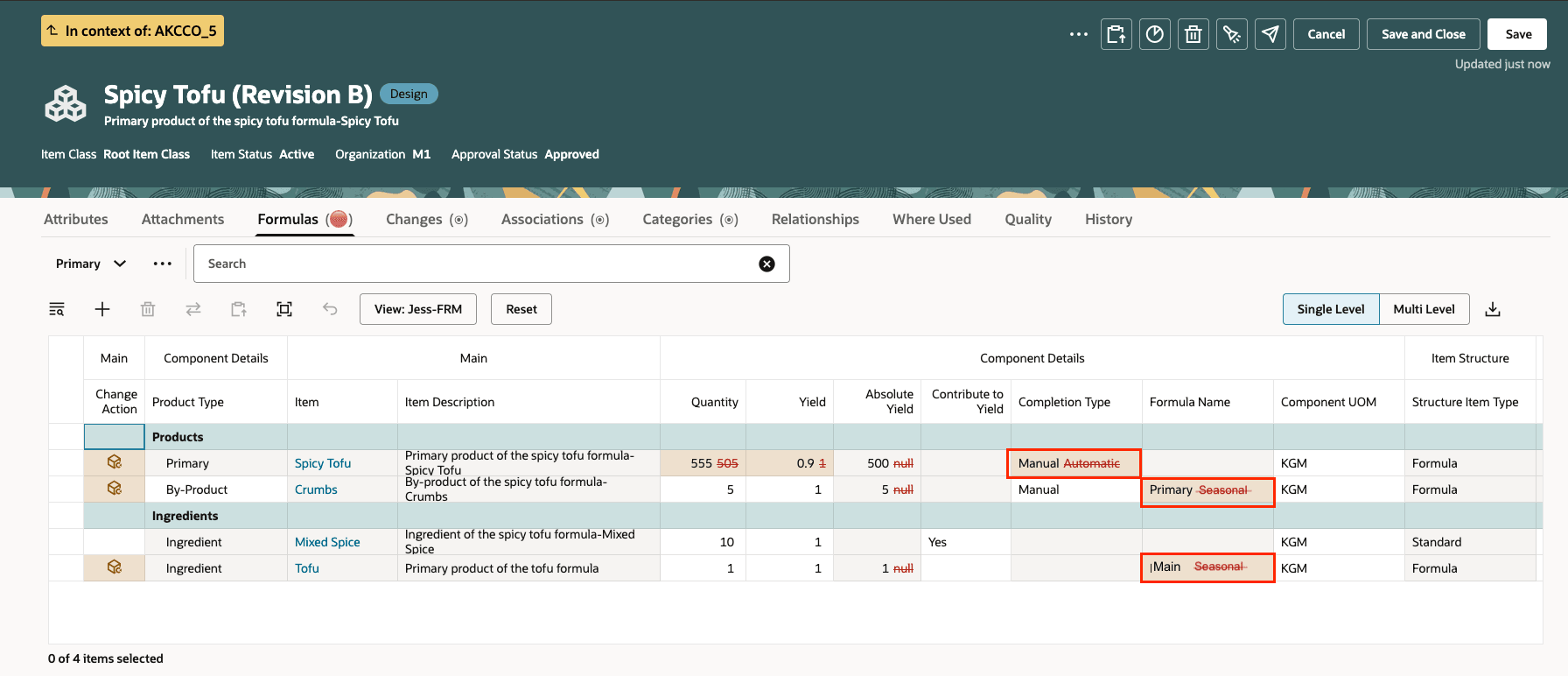
Caption: Redline Completion Type on a Primary Product and Formula Name on By-Product and Ingredient
-
You can view formula specific attributes in Change Order Summary Report. When redline exists, you can see both the old value and new value for formula specific attributes in the report.

Caption: Formula Attributes in Change Order Summary Report
Delete Primary Formula
-
You can delete a primary formula by adding it to delete group. Before deleting, ensure that the primary formula is not referenced in any other structure or formula as a component, then you are able to delete the primary formula. If a formula is used in another formula as co-product, by-product or ingredient, deleting this formula will result in an error message. You need to first remove the reference and make sure this formula hasn't been used anywhere as a component in structure or ingredient or product in formula.
Support in other clients
-
You can access formula attributes in Business Intelligence Cloud Connector view objects and REST API/ SOAP web service.
- The new formula related attributes Component Absolute Yield, Component Contribute to Yield, Component Completion Type, Component Product Type and Component Type within structure components are now available for Business Intelligence Cloud Connector extraction through 'componentsextractpvo'.
- In REST, you will find the new Formula Name attributes (CompAlternateBomDesignator) under Item Structures. Associate a Formula Name on co-product and by-product will also enable automatically common to primary product formula structure.
This feature benefits your business by the following:
- Provides an enhanced user interface to quickly differentiate and manage products versus ingredients, accelerating formula development and reducing errors.
- Enables your design engineers to easily common product formulas to co-products and by-products, streamlining maintenance and boosting efficiency.
- Provides ability to assign formula names to aid in formula commoning across related components and organizations.
- Aligns enterprise governance with consistent change control across formula attributes with organizational best practices.
- Expanded support in Business Intelligence Cloud Connectors (BICC) and APIs allows for richer reporting and seamless integration with downstream systems.
Steps to enable and configure
You need to opt-in to Redwood: Create and Edit Formulas released in 25D to leverage this feature.
Tips and considerations
- This feature is only available in item when Structure Item Type equals to Formula.
- When selecting the formula name of a co-product or a by-product, you can only select one that has not been previously used for that same co-product or by-product.
- For co-product and by-product, if you remove the formula name from the component table, it doesn't remove the formula that has been made common. You need to navigate to the formula item to remove the common formula.
- If an ingredient is a formula and no formula name is selected, by default, the application uses the primary product’s formula name (if available on the ingredient) to expand it in the multi-level and hierarchy view. If that formula name doesn't exist on the ingredient, it will not be expanded.
Key resources
- Oracle Fusion Cloud SCM Using Product Development Guide, available on the Oracle Help Center.
- Oracle Fusion Cloud SCM Using Product Master Data Management Guide, available on the Oracle Help Center.
- Oracle Fusion Cloud SCM Implementing Product Management Guide, available on the Oracle Help Center.
Access requirements
Users who are assigned a configured job role that contains these functional privileges can access this feature:
- View Item Redwood Items (EGP_VIEW_REDWOOD_ITEM_PRIV)
- View Item Redwood Attachments (EGP_VIEW_REDWOOD_ITEM_ATTACHMENT_PRIV)
- View Item Redwood Associations (EGP_VIEW_REDWOOD_ITEM_ASSOCIATION_PRIV)
- View Item Redwood Structures (EGP_VIEW_REDWOOD_ITEM_STRUCTURE_PRIV)
- View Item Redwood Changes (EGP_VIEW_REDWOOD_ITEM_CHANGE_PRIV)
- View Item Redwood Item Categories (EGP_VIEW_REDWOOD_ITEM_CATEGORIES_PRIV)
- View Item Redwood Relationships (EGP_VIEW_REDWOOD_ITEM_RELATIONSHIP_PRIV)
- View Item Redwood Quality (EGP_VIEW_REDWOOD_ITEM_QUALITY_PRIV)
- Supply Chain Common View Web Service (ORA_RCS_SCM_COMMON_VIEW_WEB_SERVICE_DUTY)
- Enter Trading Community Organization Information (HZ_ENTER_TRADING_COMMUNITY_ORGANIZATION_INFORMATION_PRIV)
- Get Failure Condition Event Codes (MNT_GET_FAILURE_CONDITION_EVENT_CODE_BY_SERVICE_PRIV)
- Get Item Attribute Control REST (EGP_ITEM_ATTRIBUTE_CONTROL_READ_PRIV)
- Get Item Lifecycle Phases Read Rest (EGP_ITEM_LIFECYCLE_PHASES_READ_REST_PRIV)
- Get Item Status REST (EGP_ITEM_STATUSES_READ_PRIV)
- Get New Item Request Rest (EGI_NEW_ITEM_REQUEST_REST_PRIV)
- Get Template REST (EGP_TEMPLATE_READ_PRIV)
- Manage Material Planner (MSP_MANAGE_MATERIAL_PLANNER_PRIV)
- Manage Subscription Setup (OSS_MANAGE_SUBSCRIPTION_SETUP_PRIV)
- Remove Trading Community Organization (HZ_REMOVE_TRADING_COMMUNITY_ORGANIZATION_PRIV)
- Set Up Receivables Payment Terms (AR_SET_UP_RECEIVABLES_PAYMENT_TERM_PRIV)
- Update Trading Community Organization (HZ_UPDATE_TRADING_COMMUNITY_ORGANIZATION_PRIV)
- Verify Tax Configuration (ZX_VERIFY_TAX_CONFIGURATION_PRIV)
- View Procurement Buyers List of Values using REST Service (PO_VIEW_BUYER_LOV_REST_SERVICE_PRIV)
- View Purchasing Hazard Classes List of Values using REST Service (PO_VIEW_HAZARD_CLASSES_LOV_REST_SERVICE_PRIV)
- View Purchasing UN Numbers List of Values using REST Service (PO_VIEW_UNNUMBER_LOV_REST_SERVICE_PRIV)
- View Trading Community Organization (HZ_VIEW_TRADING_COMMUNITY_ORGANIZATION_PRIV)
- View Trading Community Person (HZ_VIEW_TRADING_COMMUNITY_PERSON_PRIV)
- Manage Item Redwood Items (EGP_MANAGE_REDWOOD_ITEM_PRIV)
- Manage Item Redwood Attachments (EGP_MANAGE_REDWOOD_ITEM_ATTACHMENT_PRIV)
- Manage Item Redwood Associations (EGP_MANAGE_REDWOOD_ITEM_ASSOCIATION_PRIV)
- Manage Item Redwood Item Categories (EGP_MANAGE_REDWOOD_ITEM_CATEGORY_PRIV)
- Manage Item Redwood Relationships (EGP_MANAGE_REDWOOD_ITEM_RELATIONSHIP_PRIV)
- Manage Item Redwood Structures (EGP_MANAGE_REDWOOD_ITEM_STRUCTURE_PRIV)
- Get New Item Request Rest (EGI_NEW_ITEM_REQUEST_REST_PRIV)
- Manage Item Status REST (EGP_ITEM_STATUSES_PRIV)
These privileges were available prior to this update.