Redwood: Manage Supplier Profile
If managing a supplier’s company profile isn’t easy and intuitive, it results in more mistakes and longer cycle time for supplier profile maintenance tasks. This leads to transaction problems and an increased support burden for your procurement team. The redesigned Redwood user experience delivers intuitive supplier profile management with increased change controls providing improved supplier data quality. It also includes guided journeys for embedding your own training resources and business process content.
In Redwood internal supplier profile, change control is expanded to include the following areas: organization details, addresses, contacts, sites (including site assignments and regional information), payments (including payment methods, bank accounts, and payment attributes), business classifications, and products and services. This broader change control capability assures that important supplier information is correctly captured, isn't fraudulent, and your supplier data management processes meet audit compliance requirements.
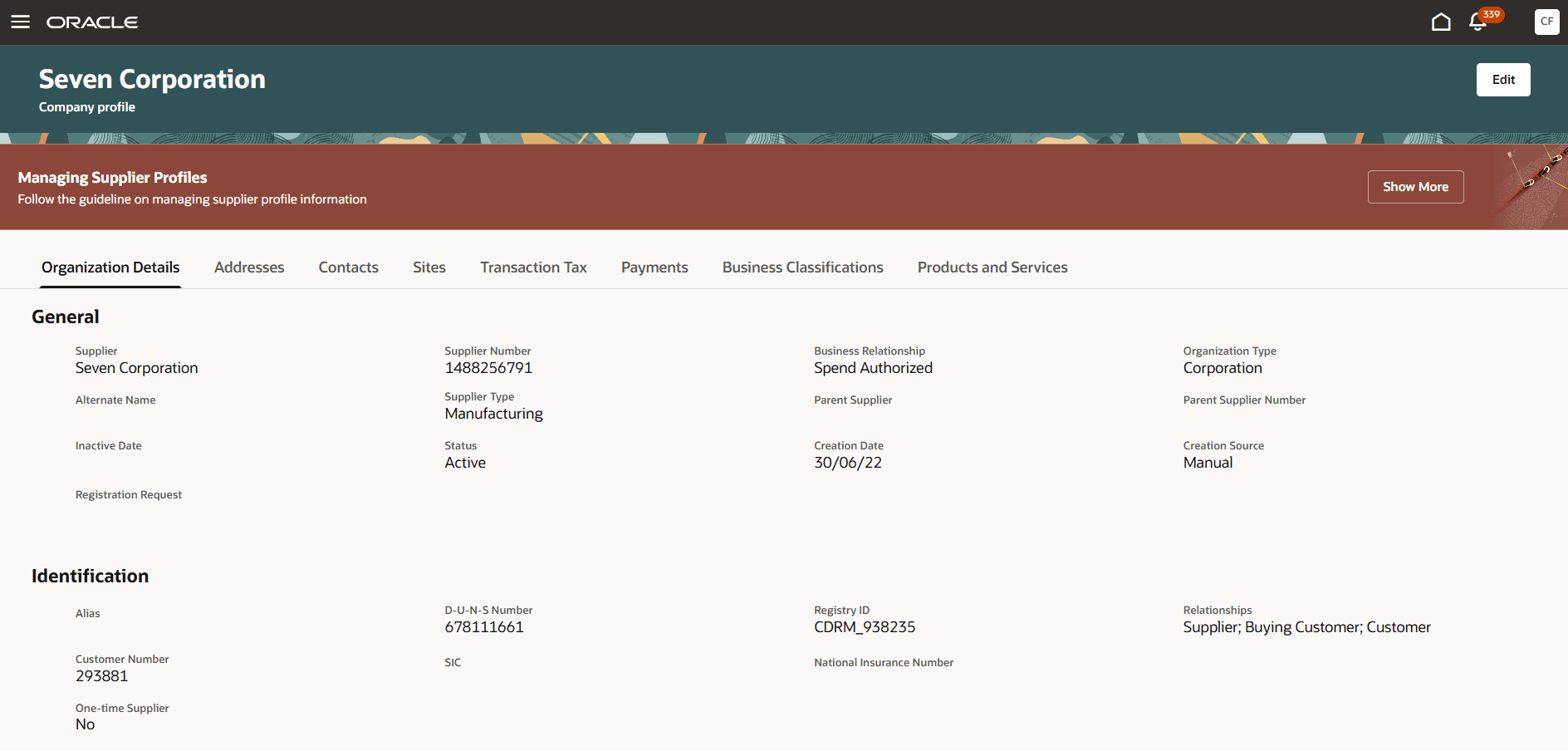
View Supplier Profile
The supplier manager and supplier administrator roles provide access to this redesigned flow from the Supplier Management landing page. From here, you have a few options to open a supplier profile:
- Click on the supplier's name link under the Recent Suppliers tab
- Use quick access to look up the supplier's name
- Click the Suppliers (New) task under Actions and search for the supplier
You're navigated to the view supplier profile page, where all supplier profile information is organized and presented in a simple tab layout: organization details, addresses, contacts, sites, transaction tax, payments (includes payment methods, bank accounts, and payment attributes), business classifications, and products and services.
You can initiate updates to the supplier profile using the Edit action, which presents the profile in edit mode allowing you to update profile information, or submit updates for approval if change management is enabled.
Bank account maintenance is significantly improved and follows the same user experience in the new registration flow, which supports country driven UI layouts. A seeded configuration is delivered for most countries out of the box, such as, showing routing number for United States and sort code for United Kingdom. You can modify or add country-specific rules to show or hide attributes, make them required or relabel them.
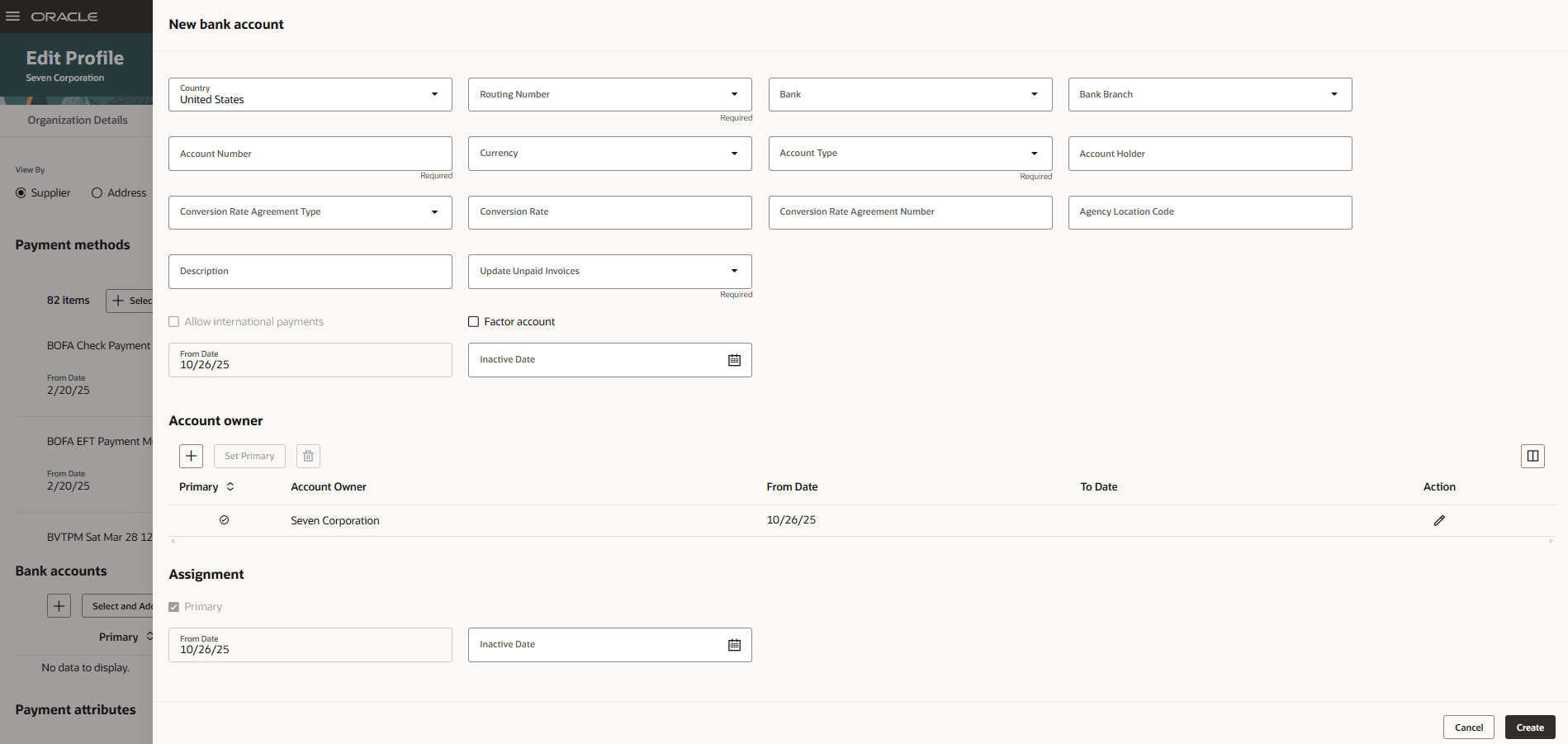
New Bank Account
The management of a supplier's transaction tax and payment settings (includes payment methods, bank accounts, and payment attributes) are now centralized under single tabs: Transaction Tax and Payments respectively. You can use the View By toggle to switch the level and search for the address or site that you would like to manage transaction tax or payments information for.
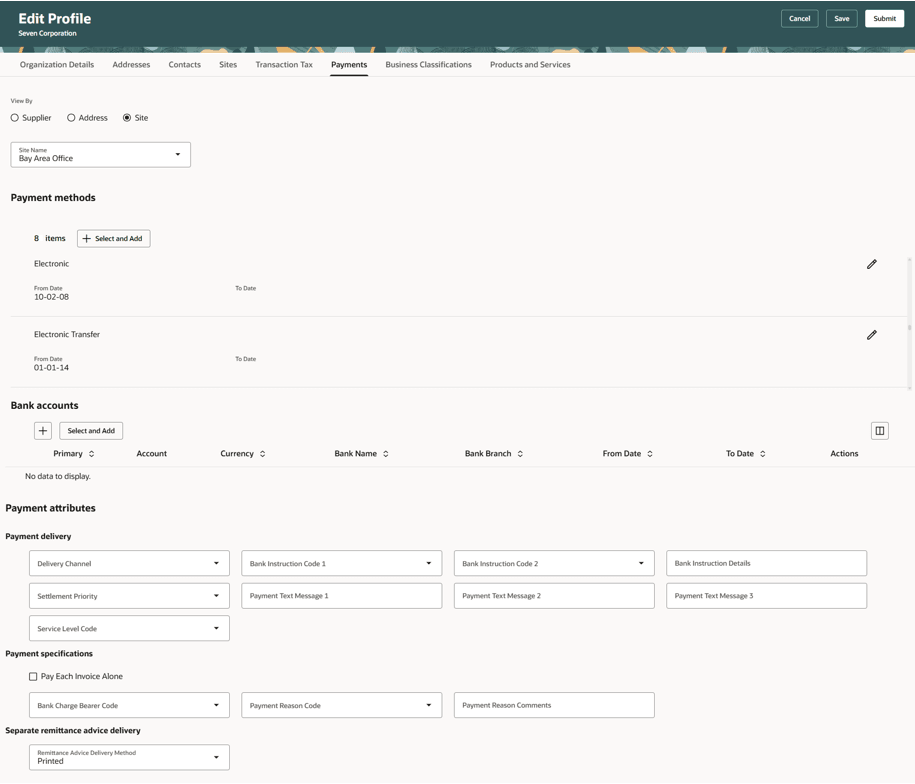
Update Payments Information for a Site
After finishing the profile edits, click Submit. If the profile changes were made only to supplier entities that don't require approval, then the changes are applied right away. Otherwise, the changes will go through approval based on approval rule configuration. You can use the View Change Request action to see the change details.
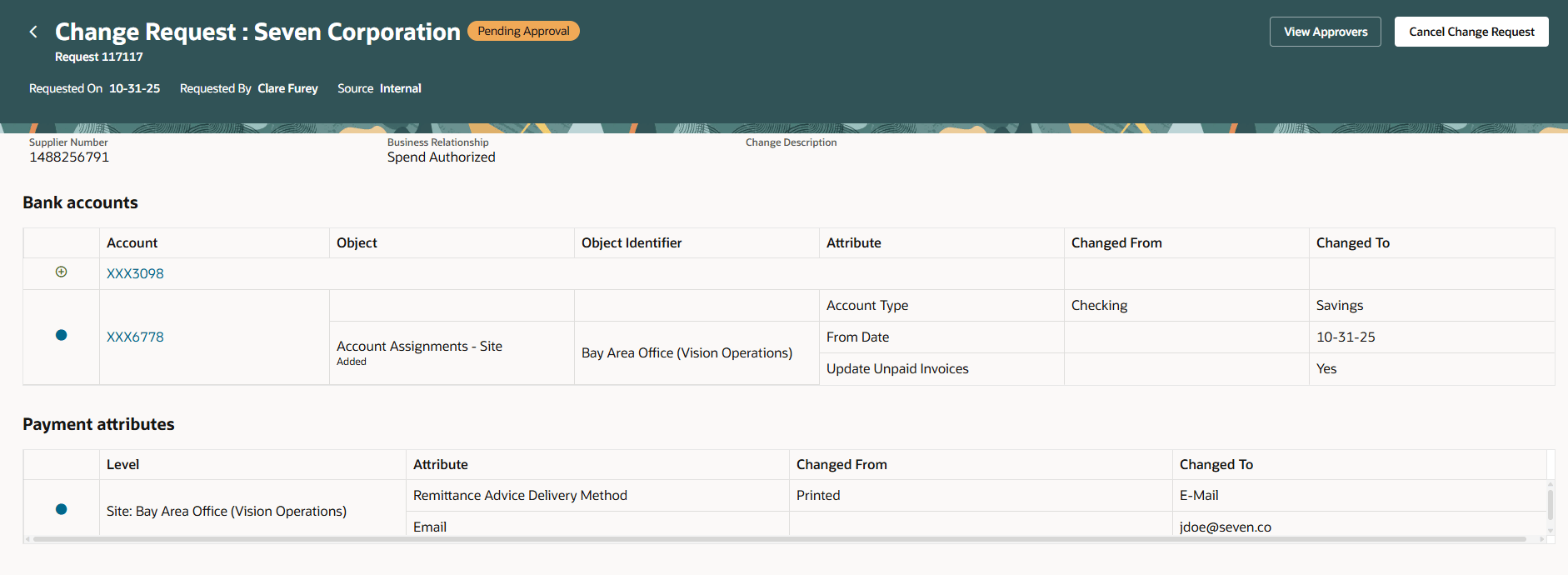
View Change Request with Bank Account and Payment Attribute Changes
Built-in support for guided journeys and business rules throughout the flow gives you the flexibility to present your administration users with a supplier profile management solution that caters to your specific business needs. For example, you can publish guidelines on the view profile page that instructs on the standards for updating supplier profile information. Similarly, business rules allow you to configure different properties for attributes on organization details, addresses, contacts, sites, transaction tax, payments, and business classifications. Also attribute properties can be set conditionally based on the supplier's tax country, tax registration country, supplier type, business relationship, and organization type. For example, specific attributes associated to tax details can be hidden when tax country is United States.
Steps to enable and configure
To use this feature, you must enable the following profile options. For instructions on enabling a profile option, refer to the Set Profile Option Values topic.
- Redwood Page for Supplier Management Enabled (ORA_POZ_SUPPLIER_MANAGEMENT_REDWOOD_ENABLED). Enable this existing profile option if you haven't already.
- Redwood Pages for Supplier Profile Enabled (ORA_POZ_SUPPLIER_PROFILE_REDWOOD_ENABLED). By default, this new profile option is disabled.
The following setup task is new and required:
- Configure Supplier Profile Change Request: Access the Internal Profile Management tab of this setup task to update configuration options to meet your business process objectives. This task allows you to enable or bypass approvals when changes are submitted for specific entities of the supplier profile such as organization details and income tax, addresses, contacts, and so on. You can also configure bank account attachments as mandatory using this task.
Note: By default, no entity is selected for approval required and therefore any change on the supplier profile will get processed without going through approval.
If you configure any profile entity to require approval, the following existing setup steps are required:
- Manage Internal Supplier Profile Change Approvals: Access this setup task to configure the approval routing rules to route changes made by internal users for approval. The following new attributes have been added, which allow you to configure approval rules. It's recommended for you to review any existing approval rules and make changes if needed.
- Business Classifications Changed
- Contact Changed
- Contact User Accounts Changed
- Payment Methods Changed
- Payment Attributes Changed
- Products and Services Categories Changed
Note: These approval attributes are applicable only when this feature is enabled. Therefore, they should not be used to configure approval rules if the feature isn't in use.
- Opt in to the existing Redwood: Use and Configure Redwood-Style Supplier Profile Change Request Approval Notifications feature. This change request approval notification has been enhanced to include all the profile entities that support change management.
Note: If you have already opted in to this feature and modified the Oracle Analytics Publisher template, review your existing modifications and reapply them to the latest version of the template.
The following existing setup steps are optional. You can configure and make changes depending on your requirements:
- Manage Supplier Descriptive Flexfields, Manage Trading Community Organization Site Descriptive Flexfields, and Manage Trading Community Person Descriptive Flexfields setup tasks: Access these setup tasks to configure descriptive flexfields for supplier profile and sites, addresses, and contacts respectively.
- Use Country-Specific Bank Account Rules: You can create or update the country-specific bank account rules using the Bank Account User Rules REST API directly or by the Oracle Visual Builder Add-in for Excel. You can refer to Customer Connect post to learn how these rules can be configured.
Note: These rules are shared with the Redwood: Next Generation User Experience for Supplier Registration (both internal and external registration flows) and Redwood: Enable Suppliers to Manage Company Profile features. Any changes made to the Bank Account User Rules REST API will be applied to both features.
- Opt in to the Smart Data Service for Supplier Addresses feature. This address service will auto-suggest validated addresses when searching. This feature requires a separate subscription to Oracle Address, Email and Phone Verification Cloud Service.
- SKU: Oracle Address, Email and Phone Verification Cloud Service
- Opt in: Smart Data Service for Supplier Addresses. Choose Internal users option.
Tips and considerations
- This feature introduces change control for new supplier profile entities, such as contacts, business classifications etc., that were not supported previously in classic supplier profile change requests.
- This feature is not controlled by the opt in feature: Approve Internal Changes on Supplier Profile for Classic UI. After enabling this feature, all internal supplier profile changes, except for transaction tax, can be routed for approval if configured in the Redwood setup task, Configure Supplier Profile Change Request (Internal Profile Management tab).
- It's recommended to process all saved or pending internal supplier profile change requests before enabling this feature.
- Extensibility:
- Extensibility using VB Studio can be achieved using Business Rules available in express mode.
- Use the Suppliers - Profile - View page to personalize view company profile page and the Suppliers - Profile - Edit page to personalize edit company profile page. Both pages can be found under Supplier Management in VB Studio. If you've existing extensions on the classic pages, you need to redo them using VB Studio.
- Guided journeys are supported on all the pages, tabs, sections and panel drawers. If needed, you can configure them separately for the view and edit profile pages.
- Individual supplier profile attributes are available for personalization in VB Studio. These include organization details, addresses, contacts and sites descriptive flexfields (DFFs).
- DFFs are delivered as hidden by default, that is, even after setting them, they need to be enabled using VB Studio.
- Create supplier task can be launched from the Redwood Suppliers (New) page. Access the Redwood Suppliers (New) page from the Actions section on the Supplier Management landing page.
- The following functionalities aren't yet supported, but are planned for future updates:
- Transaction Tax: Classifications, tax reporting codes, taxpayer identifiers, and withholding tax exemptions
- Bank Accounts: Intermediary accounts and descriptive flexfields. Also, these bank account attributes aren't available for view: Conversion rate agreement type, conversion rate, conversion rate agreement number, agency location code, description, and factor account flag.
- Payment Attributes: View country information in payment delivery channel, bank instruction code 1, bank instruction code 2, and payment reason code
- Virtual card-based payment methods and digital payment accounts
- View qualifications
- View merge history
- If you are using the Allow Taxpayer ID Sharing Across Suppliers feature and the taxpayer ID is enabled for change control, then validation errors for duplicate taxpayer IDs aren't displayed immediately. However, any change with duplicate IDs won't be processed post approval, ensuring data quality is maintained. When the taxpayer ID isn't enabled for change control, duplicate ID validation occurs upon submitting the change.
- The following functionalities are no longer supported:
- Reset passwords for contacts. Forgot password link on the login page can be used instead.
- Mark supplier addresses, contacts, or both as shared addresses, contacts, or both.
- Use Oracle Fusion Data Quality Cloud Service to find potential matches during supplier creation.
- Approvers editing change requests raised by suppliers.
- Collaboration documents associated with B2B communication are no longer managed on the supplier site, you can only enable the supplier site for B2B messaging. For more details on managing documents for B2B communication, refer to the Redwood: Simplify Configuration and Processing for B2B Messaging feature in update 25C.
Key resources
- For information about using Oracle Visual Builder Studio to extend your Redwood application pages, see Oracle Fusion Cloud HCM and SCM: Extending Redwood Applications for HCM and SCM Using Visual Builder Studio.
- For details on the Configure Supplier Profile Change Request setup task, refer to the Redwood: Set up Supplier Registration and Profile Change Request feature in this What's New.
Access requirements
Internal users who are assigned a configured job role that contains this new privilege can edit supplier organization details.
- Maintain Supplier Organization Details (POZ_MAINTAIN_SUPPLIER_ORG_DETAILS_PRIV)
Internal users who are assigned a configured job role that contains these existing privileges and who meet any of the following data security conditions can manage the supplier profile.
- Privilege to edit supplier profile
- Maintain Supplier (POZ_MAINTAIN_SUPPLIER_PRIV)
- Privileges to manage organization details and income tax details
- View Supplier (POZ_VIEW_SUPPLIER_PRIV)
- View Supplier Income Tax (POZ_VIEW_SUPPLIER_INCOME_TAX_PRIV)
- Maintain Supplier Income Tax (POZ_MAINTAIN_SUPPLIER_INCOME_TAX_PRIV)
- Data security conditions:
- Maintain Supplier Individual Identifiers PII (manage and view PII data for all suppliers including individual/foreign individual ones)
- Maintain Supplier Corporate Identifiers (manage and view PII data for corporate suppliers only)
- Privileges to manage addresses
- View Supplier Address (POZ_VIEW_SUPPLIER_ADDRESS_PRIV)
- Maintain Supplier Address (POZ_MAINTAIN_SUPPLIER_ADDRESS_PRIV)
- Privileges to manage contacts and user accounts
- View Supplier Contact (POZ_VIEW_SUPPLIER_CONTACT_PRIV)
- View Supplier Contact User Account (POZ_VIEW_SUPPLIER_CONTACT_USER_ACCOUNT_PRIV)
- Maintain Supplier Contact (POZ_MAINTAIN_SUPPLIER_CONTACT_PRIV)
- Maintain Supplier Contact User Account (POZ_MAINTAIN_SUPPLIER_CONTACT_USER_ACCOUNT_PRIV)
- Data security condition:
- Manage Trading Community Person Mobile Phone Number
- View Trading Community Person Mobile Phone Number
- Privileges to manage transaction tax
- View Supplier Transaction Tax (POZ_VIEW_SUPPLIER_TRANSACTION_TAX_PRIV)
- Maintain Supplier Transaction Tax (POZ_MAINTAIN_SUPPLIER_TRANSACTION_TAX_PRIV)
- To manage address level transaction tax, add View Supplier Address (POZ_VIEW_SUPPLIER_ADDRESS_PRIV) or Maintain Supplier Address (POZ_MAINTAIN_SUPPLIER_ADDRESS_PRIV).
- Privileges to manage payments
- View Supplier Payment (POZ_VIEW_SUPPLIER_PAYMENT_PRIV)
- Maintain Supplier Payment (POZ_MAINTAIN_SUPPLIER_PAYMENT_PRIV)
- Manage External Payee Payment Details (IBY_MANAGE_EXTERNAL_PAYEE_PAYMENT_DETAILS_PRIV)
- To manage bank accounts, add View Third Party Bank Account (IBY_VIEW_THIRD_PARTY_BANK_ACCOUNT_PRIV or Manage Third Party Bank Account (IBY_MANAGE_THIRD_PARTY_BANK_ACCOUNT_PRIV).
- To manage address level payment information, add View Supplier Address (POZ_VIEW_SUPPLIER_ADDRESS_PRIV) or Maintain Supplier Address (POZ_MAINTAIN_SUPPLIER_ADDRESS_PRIV).
- To manage site level payment information, add View Supplier Site (POZ_VIEW_SUPPLIER_SITES_PRIV) or Maintain Supplier Site (POZ_MAINTAIN_SUPPLIER_SITES_PRIV).
- Privileges to manage sites
- View Supplier Site (POZ_VIEW_SUPPLIER_SITES_PRIV)
- Maintain Supplier Site (POZ_MAINTAIN_SUPPLIER_SITES_PRIV)
- Maintain Supplier Site B2B Communication Information (POZ_MAINTAIN_SUPPLIER_SITE_TRADING_PARTNER_INFORMATION_PRIV)
- View Supplier Site Purchasing Information (POZ_VIEW_SUPPLIER_PURCHASING_INFORMATION_PRIV)
- Maintain Supplier Site Purchasing Information (POZ_MAINTAIN_SUPPLIER_PURCHASING_INFORMATION_PRIV)
- View Supplier Site Receiving Information (POZ_VIEW_SUPPLIER_RECEIVING_INFORMATION_PRIV)
- Maintain Supplier Site Receiving Information (POZ_MAINTAIN_SUPPLIER_RECEIVING_INFORMATION_PRIV)
- View Supplier Site Invoicing Information (POZ_VIEW_SUPPLIER_INVOICING_INFORMATION_PRIV)
- Maintain Supplier Site Invoicing Information (POZ_MAINTAIN_SUPPLIER_INVOICING_INFORMATION_PRIV
- View Supplier Site Assignment (POZ_VIEW_SUPPLIER_SITE_ASSIGNMENTS_PRIV)
- Maintain Supplier Site Assignment (POZ_MAINTAIN_SUPPLIER_SITE_ASSIGNMENTS_PRIV)
- Data security condition for editing sites:
- procurement agent access to manage suppliers for procurement business unit
- Privileges to manage business classifications
- View Supplier Business Classification (POZ_VIEW_SUPPLIER_BUSINESS_CLASSIFICATION_PRIV)
- Maintain Supplier Business Classification (POZ_MAINTAIN_SUPPLIER_BUSINESS_CLASSIFICATIONS_PRIV)
- Privileges to manage products and services
- View Supplier Products and Services Categories (POZ_VIEW_SUPPLIER_PRODUCT_AND_SERVICE_CLASSIFICATION_PRIV)
- Maintain Supplier Products and Services Categories (POZ_MAINTAIN_SUPPLIER_PRODUCT_AND_SERVICE_CLASSIFICATION_PRIV)
- Privileges to manage attachments for supplier header and sites
- View Supplier Attachment (POZ_VIEW_SUPPLIER_ATTACHMENT_PRIV)
- Maintain Supplier Attachment (POZ_MAINTAIN_SUPPLIER_ATTACHMENT_PRIV)
Internal users who are assigned a configured job role that contains both of these existing privileges can create a new supplier.
- Create Supplier (POZ_CREATE_SUPPLIER_PRIV)
- Maintain Supplier (POZ_MAINTAIN_SUPPLIER_PRIV)
To setup this feature, you'll need a configured job role that contains these existing privileges:
- Manage Bank (CE_MANAGE_BANK_PRIV) to create or update bank account rules
- Administer Sandbox (FND_ADMINISTER_SANDBOX_PRIV) to personalize the company profile pages in VB Studio
- Configure Supplier Registration (POZ_CONFIGURE_SUPPLIER_REGISTRATION_PRIV) to access Configure Supplier Profile Change Request setup task