Redwood: Manage Default Line Attributes
Set default line attributes when creating a negotiation in the Redwood experience. When default line attributes are set, any new lines added to the negotiation online or using the lines import spreadsheet will have these attributes automatically applied. The attributes can carry scoring information if multi-attribute scoring is enabled.
From the Overview and Lines step, click Default Line Attributes to launch the panel drawer.
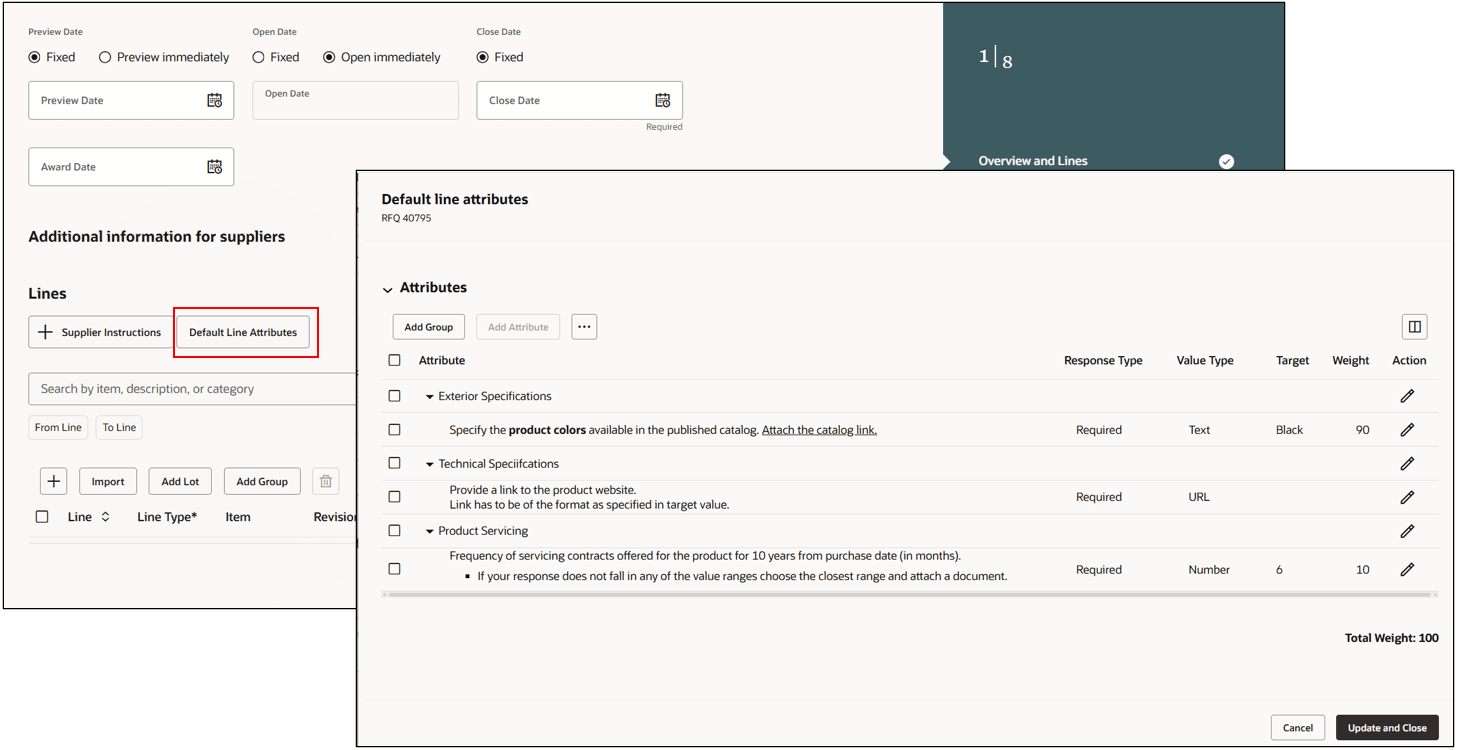
Manage Default Attributes
Add individual attributes across different attribute groups or insert predefined attribute lists. When adding a list, duplicate attributes are automatically skipped. If multi-attribute scoring is enabled, the total weight must equal 100. You can adjust weights by editing individually, deleting, or using equalize weights.
Using default line attributes, category managers can define attributes once and automatically apply them to all lines in a negotiation. You can still make line-level edits as needed. This streamlines setup and improves efficiency, especially when many lines share a common set of attributes.
Steps to enable and configure
To use this feature, you must enable these profile options if you haven't already.
- Redwood Pages for Sourcing Enabled (ORA_PON_SOURCING_REDWOOD_ENABLED).
- Redwood Page to Create Negotiation Enabled (ORA_PON_CREATE_NEGOTIATION_REDWOOD_ENABLED)
For instructions on enabling a profile option, refer to the Set Profile Option Values topic.
Tips and considerations
Extensibility by using business rules is enabled for the Default Line Attributes drawer.
Key resources
- For information about using Oracle Visual Builder Studio to extend your Redwood application pages, see Oracle Fusion Cloud HCM and SCM: Extending Redwood Applications for HCM and SCM Using Visual Builder Studio.
Access requirements
Users who are assigned a configured job role that contains this privilege can access this feature:
- Manage Negotiation Line Default (PON_MANAGE_LINE_DEFAULT_PRIV)
This privilege was available prior to this update.