Redwood: Navigate to Procurement Contract from Purchasing Documents
Streamline your contract compliance and review process by navigating directly from a purchasing document to its source procurement contract using the Redwood experience. When a purchase order or purchase agreement is generated from a contract, the associated contract number is displayed on the Additional Order Details or Additional Agreement Details tab of the purchasing document. You can drill down to the procurement contract by selecting the Contract value, eliminating the need for manual contract searches.
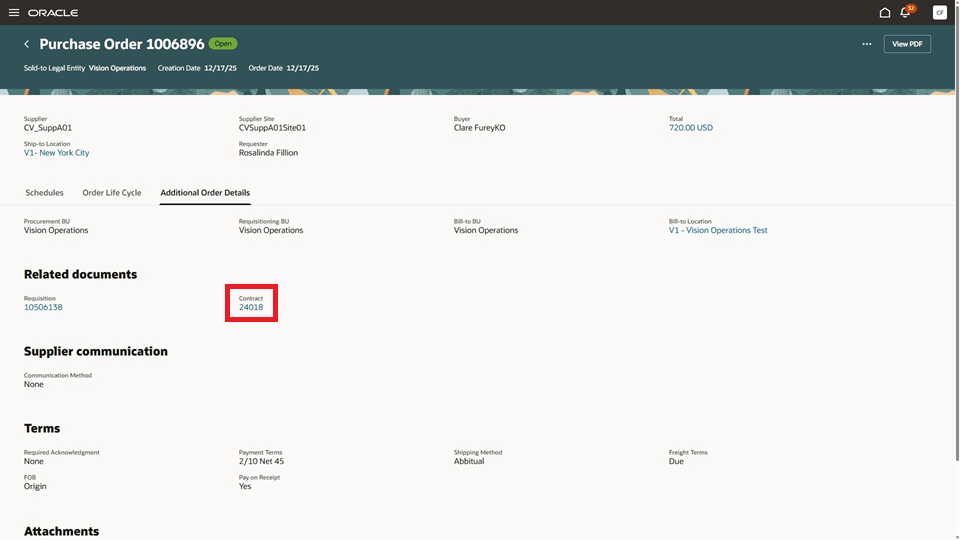
Contract Reference on the Additional Order Details Tab of a Purchase Order
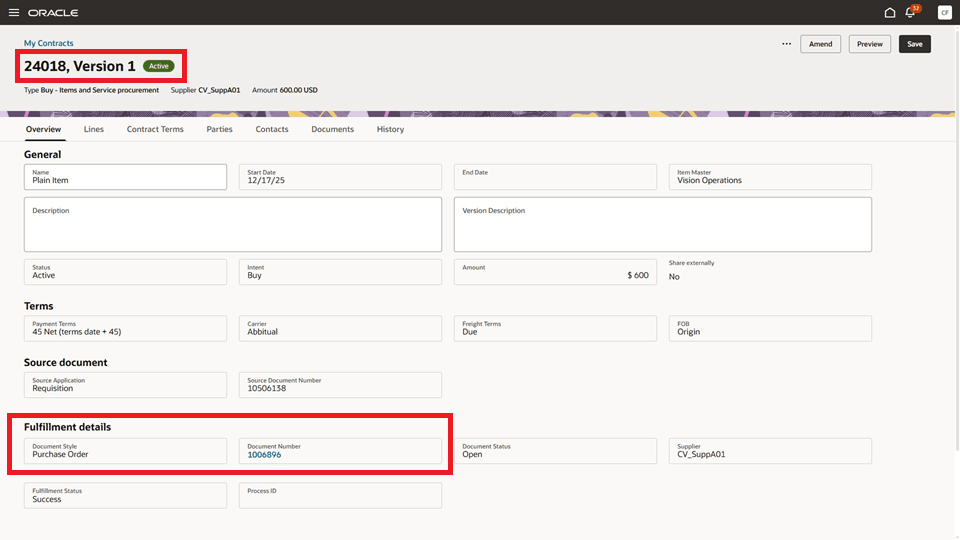
Source Procurement Contract Is Displayed After Drilling Down from the Associated Purchasing Document
Steps to enable and configure
You don't need to do anything to enable this feature.
Tips and considerations
- The drill down capability to the source contract is available for purchase orders, blanket purchase agreements, and contract purchase agreements created from procurement contracts.
- For purchasing documents created from contracts in the classic UI, the classic Purchasing UI displays the contract identifier as the Reference Number. In the Redwood experience, this is displayed as Contract within the Additional Order Details tab (for purchase orders) or the Additional Agreement Details tab (for agreements).
- When you drill down to a contract from a purchasing document, the contract opens in the classic Contracts page if it meets any of these conditions, otherwise, it will open in the Redwood Enterprise Contracts page:
- Contract with structured or simplified terms
- Contract has fulfillment lines created from classic UI
- Contract status is HOLD
- Contract types with AdobeSign and OneSpan E-signature enabled
- Contract has deliverables
- You must have appropriate privileges to view the source procurement contract.
Key resources
- For details on creating purchasing documents from a contract to fulfill requisition demand, refer to the Redwood: Release a Purchase Order from a Contract That Fulfills Requisition Demand feature, available in Oracle Fusion Cloud Procurement What’s New, update 26A.
- For details on creating purchasing documents from a contract, refer to the Redwood: Create and Manage Procurement Contracts feature, available in Oracle Fusion Cloud Procurement What’s New, update 26A.
Access requirements
Users who are assigned a configured job role that contains any of these privileges can access this feature:
- Create Contract (OKC_CREATE_CONTRACT_PRIV)
- Edit Contract (OKC_EDIT_CONTRACT_PRIV)
- View Contract (OKC_VIEW_CONTRACT_PRIV)
These privileges were available before this update.