Redwood: Review Demand Classes Using a New User Experience
You can use the Redwood user experience to review the demand classes for planning. The Demand Classes page provides a streamlined, read-only view of the collected demand classes. This page is available from plans of all types, the Plan Inputs, and simulation sets.
To open the page, follow these steps:
- In your demand, demand and supply, replenishment, sales and operations, or supply plan, a simulation set, or the Plan Inputs, on the More Actions menu, select View More.
The Actions drawer opens.
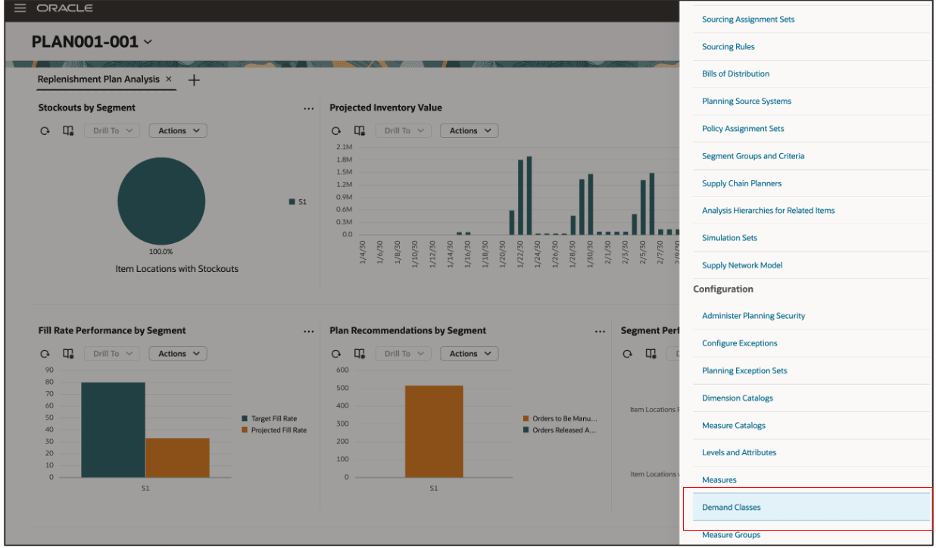
Actions Drawer
- In Configuration, select Demand Classes.
The Demand Classes page opens.
On the page, you can do these tasks:
- View demand classes.
- Search for demand classes.
- Filter the search results.
- Sort demand classes in the ascending or descending order using the columns.
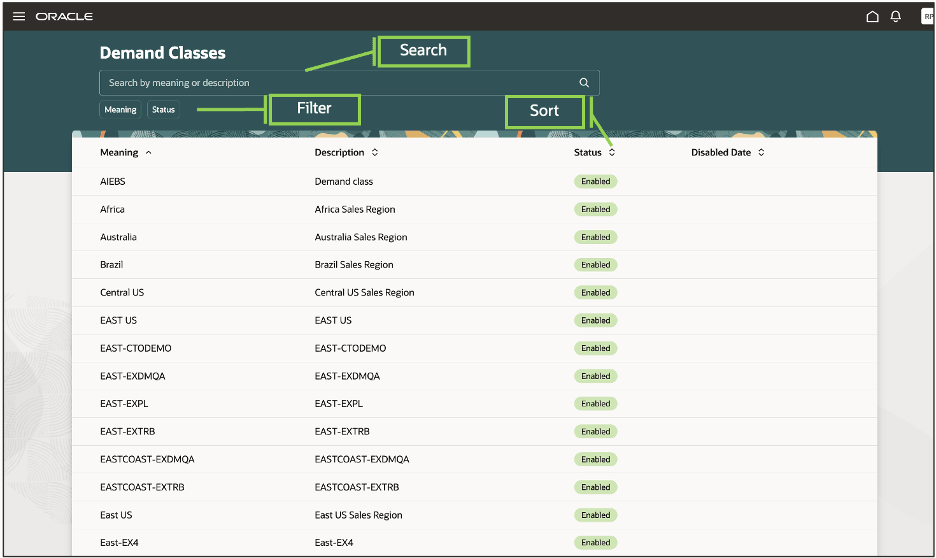
Demand Classes Page
Steps to enable and configure
Use the Opt In UI to enable this feature. For instructions, refer to the Optional Uptake of New Features section of this document.
Offering: Supply Chain Planning
Tips and considerations
If you want to use the Redwood: Review Demand Classes Using a New User Experience feature, then you must opt in to its parent feature: Replenishment Planning. If you’ve already opted in to this parent feature, then you don’t have to opt in again
Key resources
Visit https://redwood.oracle.com/ for more information about the Redwood experience.
Access requirements
Users who are assigned a configured job role that contains this privilege can access this feature:
- Review Planning Demand Class (MSP_REVIEW_PLANNING_DEMAND_CLASS_PRIV)
This privilege was available prior to this update.