AI Agent: Gross Margin Analyst
In today’s complex supply chains and global order networks, organizations face increasing pressure to protect profitability while ensuring customer satisfaction. Users often lack real-time, actionable visibility into gross margin at the point of decision, which can lead to sales representatives unknowingly booking low-margin or negative-margin orders, planners sourcing from high-cost locations, and finance teams only discovering margin erosion after shipments are completed. Existing reports and dashboards are reactive, fragmented across modules, and require manual navigation. This results in delayed interventions, missed revenue optimization opportunities, and inconsistent decision-making across sales, supply chain, and finance.
Now with the Gross Margin Analyst AI Agent, cross-functional users can easily interact and get real-time, contextual, and automated gross margin intelligence during critical operational processes. The agent embeds margin estimation directly within order entry and quoting workflows, automatically computes margins based on the dynamic cost and the price data for a specific item on the order or at the order bucket level. Users can also leverage the agent to get insights into the cost decomposition, which helps to:
-
Identify low-margin or unprofitable orders very early in the fulfillment life cycle, and thus guiding mindful financial performance fulfillment.
-
Identify margin fluctuations across customers, items, or at sourcing locations, which could signal pricing, cost, or sourcing issues.
-
Support margin-aware sourcing options bringing gross margin consideration in order promising in addition to the availability and lead time, helps in informed choices mitigating the profitability impact.

Shows Complete Order Details of the Sales Order Provided by User
After providing the order details, a follow-up question will be asked whether the user wants to know the estimated gross margin for a specific item or for the total order.

Estimated Gross Margin for the Total Order Along with Item Level Profitability
Users can optionally interact with the agent to get additional insights into the cost element decomposition of the estimated COGS value.
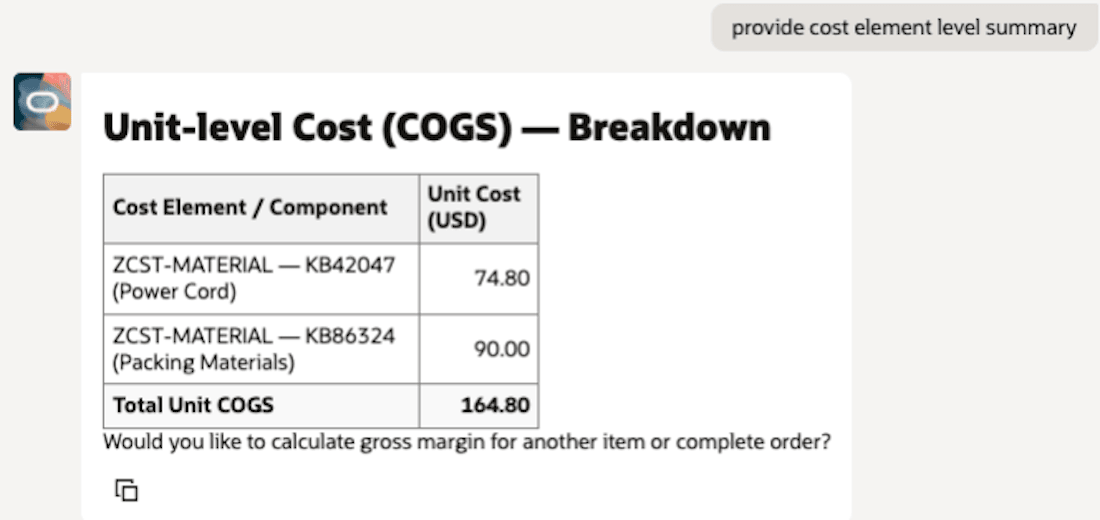
Unit Level Cost of Goods Sold with Cost Element Level Break-up
Sample Prompts
- Estimate the gross margin for sales order 12345.
- Estimate the gross margin for a newly created sales order 2345.
- Estimate the gross margin for a specific item/product in sales order 1234.
- Estimate the gross margin for the complete sales order 12345 and give unit level cost details.
Business Benefits
-
Transforms margin management from a reactive financial activity into a proactive operational control mechanism.
-
Enables business users to view real-time profitability before order confirmation, preventing low or negative-margin transactions.
-
Reduces financial leakage and ensures compliance with pricing and margin policies.
-
Automates post-shipment audits and detects margin anomalies, significantly decreasing manual review efforts for finance teams.
-
Provides supply chain planners with margin-aware sourcing insights, allowing them to balance cost, service level, and profitability.
-
Empowers sales teams to simulate pricing or sourcing changes and assess margin impact instantly before quote approval.
-
Enhances organizational performance through higher profit integrity, improved governance, and faster decision-making.
Steps to enable and configure
To enable permission groups for roles, take these steps:
- In the Setup and Maintenance work area, search for the Manage Administrator Profile Values task using the search link in the Tasks panel tab.
- Search for the Enable Security Console External Application Integration (ORA_ASE_SAS_INTEGRATION_ENABLED) profile option and set the Site profile level to Yes.
You can use AI Agent Studio to use or copy a preconfigured agent template to create agents for your business processes. To automatically add a suffix to all artifacts in your agent team, you can use the Copy Template instead of Use Template button. When you copy a template, you're taken directly to the agent team canvas where you can edit the agent team settings, agents, tools, and topics. The Use Template option takes you through a step-by-step process for configuring each artifact in the agent team.
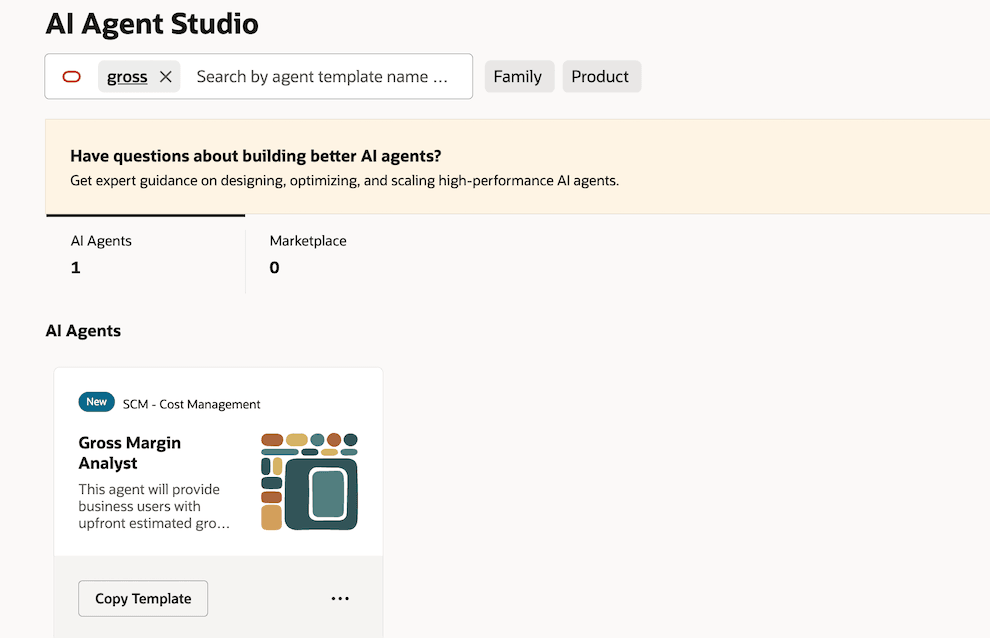
Gross Margin Estimator Agent Template
For information on using AI Agent Studio, see How do I use AI Agent Studio?
Tips and considerations
- To ensure your cost of goods sold value is up-to-date and available for the agent to analyze and present, schedule the Cost Accounting Report Processor scheduled process as per the required frequency.
- You can call the agent to get the gross margin details for a newly created sales order or an earlier fulfilled order.
- Complex configured items are not in scope.
- After publishing your agent, you can add it to a page such as the Order Creation or Gross Margin page by including it in the guided journey of that page. To do this, create an Agent task of type Workflow Agent for the agent, and add it to the guided journey.
Key resources
- Oracle Fusion Cloud SCM: Using Supply Chain Cost Management guide, available on the Oracle Help Center.
- Oracle Fusion Cloud SCM: Implementing Manufacturing and Supply Chain Materials Management guide, available on the Oracle Help Center.
- Oracle Fusion Cloud SCM: Security Reference for Manufacturing and Supply Chain Materials Management guide, available on the Oracle Help Center.
- Access Requirements for AI Agent Studio
- How can I give users access to AI agents?
- Create AI Agents
Access requirements
To access the Oracle AI Agent Studio for Fusion Applications and manage SCM AI agents, users must be assigned a configured job role that contains these duty roles:
- SCM Intelligent Agent Management Duty (ORA_RCS_SCM_AI_AGENT_MANAGEMENT_DUTY)
- SCM Intelligent Agent Management Duty (ORA_RCS_SCM_AI_AGENT_MANAGEMENT_DUTY_HCM)
- Fai Genai Agent SCM Administrator Duty (ORA_DR_FAI_GENERATIVE_AI_AGENT_SCM_ADMINISTRATOR_DUTY)
To interact with AI agents in product pages, users must be assigned a configured job role that contains this duty role:
- Fai Genai Agent Runtime Duty (ORA_DR_FAI_GENERATIVE_AI_AGENT_RUNTIME_DUTY)
To allow users to interact with agents, you must also enable permission groups in the Security Console on those users' configured job roles that contain the Fai Genai Agent Runtime Duty role. You can enable permission groups when you manage the basic information of your configured job roles.
See Access Requirements for AI Agent Studio (for administrators) and How can I give users access to AI agents (for end-users) for more information.
To interact with the Gross Margin Estimator Agent agent, users must be assigned a configured job role that contains this privilege:
- Review Item Cost Element Details REST (CST_ANALYZE_PRODUCT_GROSS_MARGINS_WEB_SERVICE_PRIV)