Redwood: Track Asset Costs for Maintenance Work Orders
The new Asset Costs page delivers a comprehensive and intuitive experience for tracking the maintenance asset costs. It enables you to easily filter, analyze, and review asset cost data in the Cost Accounting work area, improving visibility and control over maintenance-related expenses. Some of the key features of the new Asset Costs page are:
- Filter and view asset transactions by period: You can analyze the maintenance asset costs for a selected accounting period, helping you review period-wise cost trends, support period close activities, and perform accurate cost reconciliation.
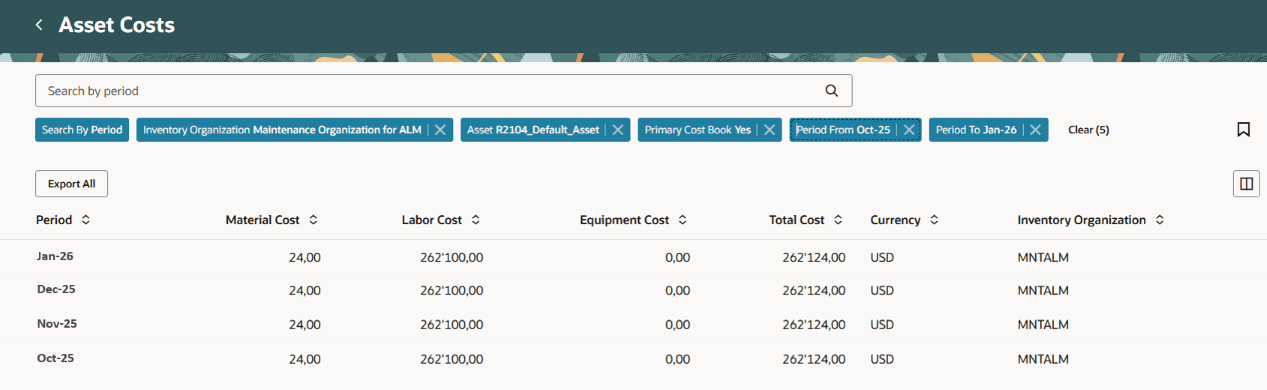
Periods View on the Asset Costs Page
- Filter and view asset transactions by work order: You can view and track asset-related costs at the work order level, enabling better traceability of maintenance expenses and improved insight into work order-specific cost drivers.
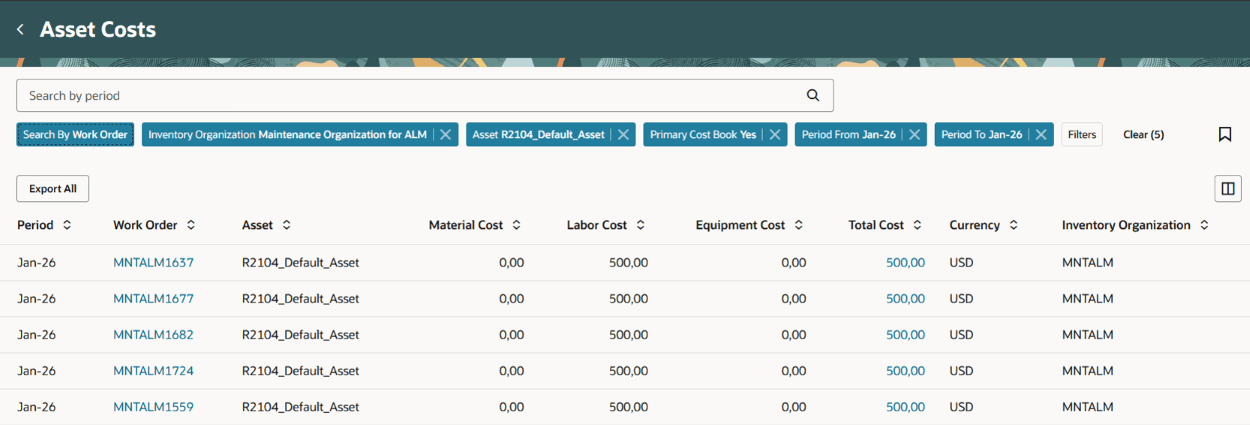
Work Order View on the Asset Costs Page
- Download and export asset cost data for offline analysis: You can download detailed asset cost information in spreadsheet formats to support offline analysis, reporting, audits, and data sharing.
The page displays data only for the cost organizations that you are authorized to access.
Steps to enable and configure
- In the Setup and Maintenance work area, search for and select the Manage Administrator Profile Values task.
- On the Manage Administrator Profile Values page, search for and select the ORA_CST_MNT_ASSET_COSTS_REDWOOD_ENABLED profile option code.
- In the Profile Values section, set the Site level to Yes. The default value is No.
- Yes = enables the feature
- No = disables the feature
- Click Save and Close. Changes in the profile value will take effect the next time you sign in.
After you've set the profile value correctly, the task pane under Cost Accounting would show the task menu link as Asset Costs. Using this link, you can access the Asset Costs page.
Tips and considerations
- Use saved searches to easily apply filters and quickly access the asset cost records you need.
- You can provide guidance such as tutorials, company policies, and best practices in the context of asset costs using guided journey tasks.
- When the cost date and GL date belong to different periods, transactions are reported according to the GL date.
Key resources
- Oracle Fusion Cloud SCM: Implementing Manufacturing and Supply Chain Materials Management guide, available on the Oracle Help Center.
- Oracle Fusion Cloud SCM: Using Supply Chain Cost Management guide, available on the Oracle Help Center.
Access requirements
Users who are assigned a configured job role that contains the following privileges can access this feature:
- View Maintenance Work Order Costs (CST_REVIEW_MAINTENANCE_WORK_ORDER_COSTS_PRIV)
- Review Maintenance Work Order Costs by Web Service (CST_REVIEW_MAINTENANCE_WORK_ORDER_COSTS_WEB_SERVICE_PRIV)
These privileges were available prior to this update.