AI Agent: Inventory Shortages Assistant
The Inventory Shortages Assistant AI agent helps inventory managers analyze item shortages and stockouts, evaluate available replenishment options, and execute recommended actions to prevent disruptions caused by missing critical supplies. Unlike the existing Item Shortages Analysis Advisor, which requires users to manually act on the recommendations, the Inventory Shortages Assistant provides the ability to approve and automatically execute the recommended replenishment actions.
The Inventory Shortages Assistant AI agent can assist you with these tasks:
- Identify items currently in stockout or shortage within a specified organization.
- Identify items in stockout or shortage across PAR and Kanban locations for an organization.
- Retrieve current item availability and substitute item availability for a specific item in an organization.
- Recommend replenishment options for a specific stockout or shortage item within a given subinventory and organization by:
- Evaluating inbound supply and recommending the expedition of existing receipts before creating any new replenishment.
- Evaluating substitute item availability within the same subinventory and recommending use of substitutes without creating new replenishment.
- Evaluating availability of the same item in other subinventories within the organization and recommending an intersubinventory transfer or movement request.
- Evaluating substitute item availability in other subinventories and recommending an intersubinventory transfer or movement request.
- Evaluating availability of the item in other organizations and recommending an interorganization transfer.
- Recommending the creation of a purchase requisition if no internal options can fulfill the shortage.
These replenishment options are recommended to restore the quantity to meet the minimum level defined for the item in the location.
The assistant requests approval before executing the recommended actions. Once approved, all recommended actions are processed.
Selecting and approving individual recommendations from the list of options isn’t currently supported.
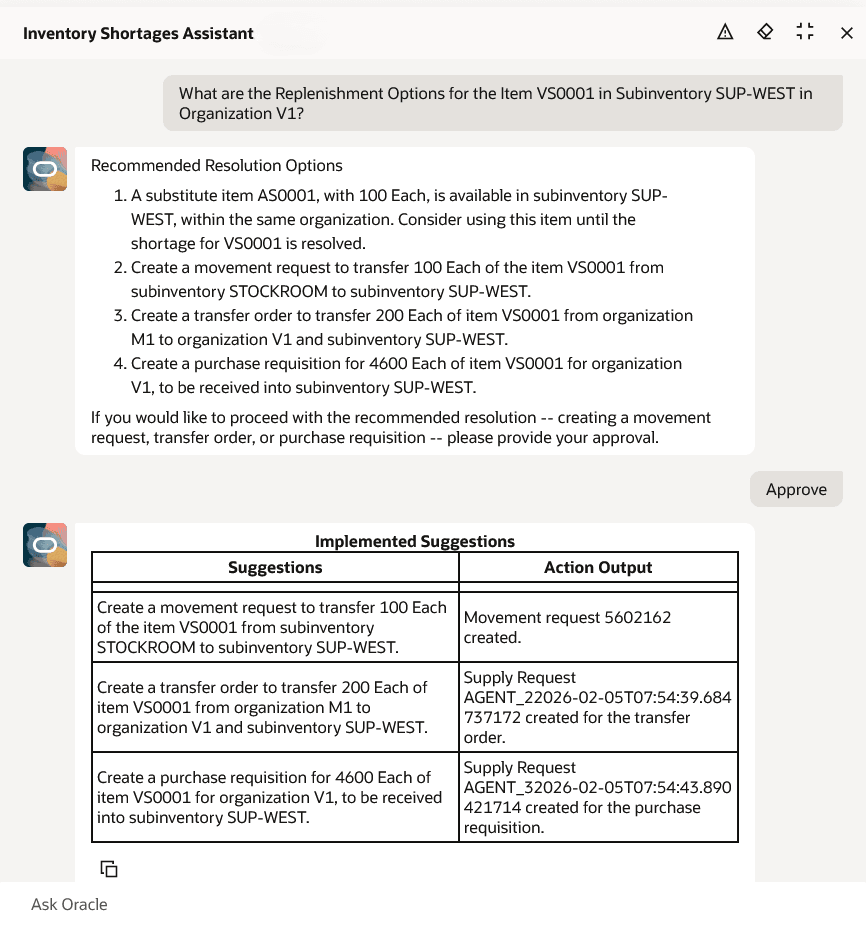
Item Shortages Assistant
Here are some sample prompts:
- What items are stocked out in organization V1?
- What items are in stockout in organization Seattle Manufacturing?
- What items are in stockout in PAR locations of organization M1?
- What items are in shortage in PAR locations of organization Seattle Manufacturing?
- What items are in stockout in Kanban locations of organization M1?
- What items are in shortage in Kanban locations of organization M1?
- What is the item availability for item VS0001 in organization V1?
- What is the substitute item availability for item VS0001 in organization V1?
- What are the replenishment options for item VS0001 in subinventory SUP-WEST in organization V1?
This feature streamlines the process of identifying and resolving supply issues by immediately providing you insights and recommendations for any shortages or stockouts present in your warehouse.
Steps to enable and configure
To enable permission groups for roles, take these steps:
- In the Setup and Maintenance work area, search for the Manage Administrator Profile Values task using the search link in the Tasks panel tab.
- Search for the Enable Security Console External Application Integration (ORA_ASE_SAS_INTEGRATION_ENABLED) profile option and set the Site profile level to Yes.
You can use AI Agent Studio to use or copy a preconfigured agent template to create agents for your business processes. To automatically add a suffix to all artifacts in your agent team, you can the Copy Template instead of Use Template button. When you copy a template, you're directly taken to the agent team canvas where you can edit the agent team settings, agents, tools, and topics. The Use Template option takes you through a step-by-step process for configuring each artifact in the agent team.
Agent Template: Inventory Shortages Assistant
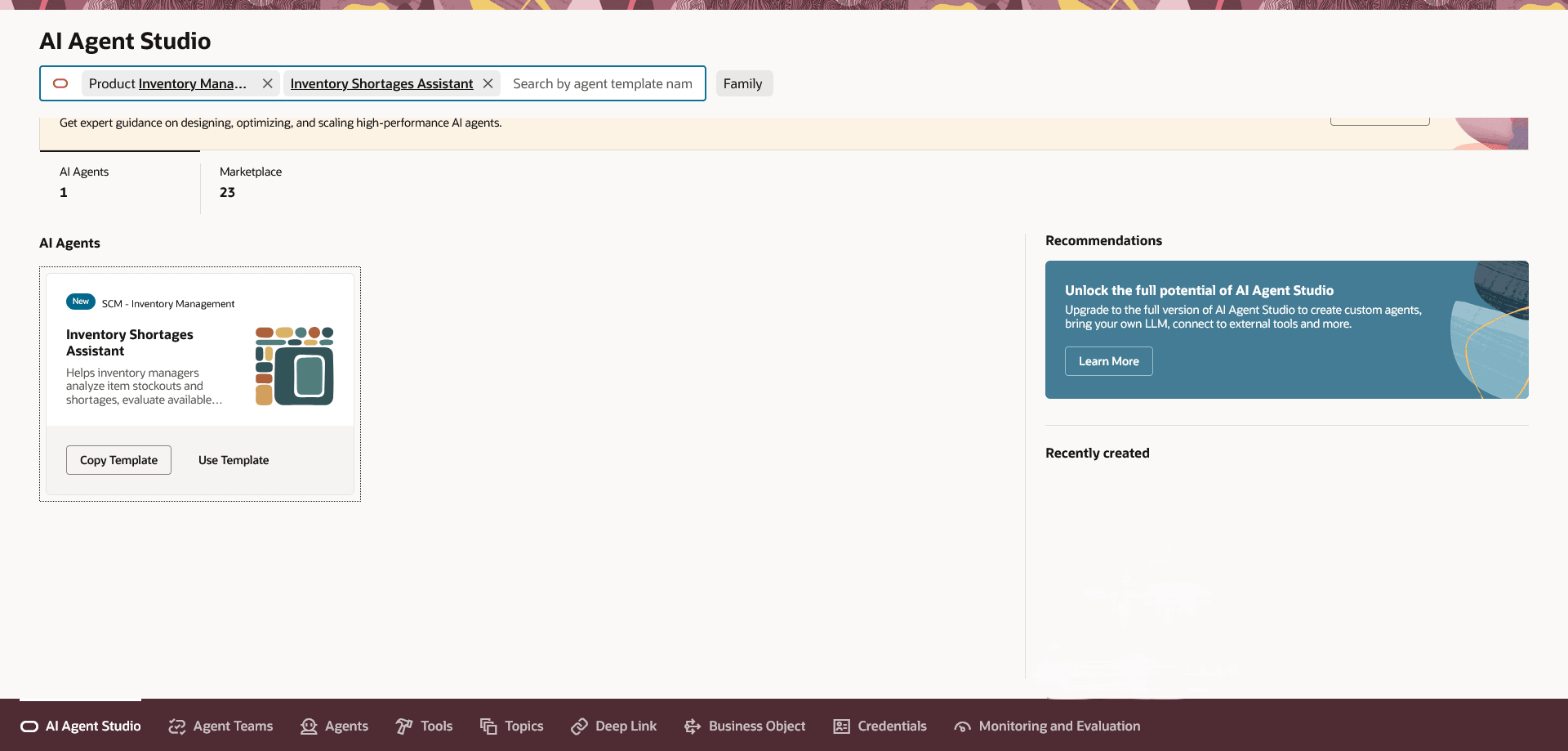
Inventory Shortages Assistant Template
For information on using AI Agent Studio, see How do I use AI Agent Studio?
Key resources
- Oracle Fusion Cloud SCM: Using Inventory Management guide, available on the Oracle Help Center.
- Access Requirements for AI Agent Studio
- How can I give users access to AI agents?
- Create AI Agents
Access requirements
To access the Oracle AI Agent Studio for Fusion Applications and manage SCM AI agents, users must be assigned a configured job role that contains these duty roles:
- SCM Intelligent Agent Management Duty (ORA_RCS_SCM_AI_AGENT_MANAGEMENT_DUTY)
- SCM Intelligent Agent Management Duty (ORA_RCS_SCM_AI_AGENT_MANAGEMENT_DUTY_HCM)
- Fai Genai Agent SCM Administrator Duty (ORA_DR_FAI_GENERATIVE_AI_AGENT_SCM_ADMINISTRATOR_DUTY)
To interact with AI agents in product pages, users must be assigned a configured job role that contains this duty role:
- Fai Genai Agent Runtime Duty (ORA_DR_FAI_GENERATIVE_AI_AGENT_RUNTIME_DUTY)
To allow users to interact with agents, you must also enable permission groups in the Security Console on those users' configured job roles that contain the Fai Genai Agent Runtime Duty role. You can enable permission groups when you manage the basic information of your configured job roles.
See Access Requirements for AI Agent Studio (for administrators) and How can I give users access to AI agents (for end-users) for more information.
To interact with the Inventory Shortages Assistant agent, users must be assigned a configured job role that contains this privilege:
- Review Item Shortage Using Responsive Inventory (INV_REVIEW_ITEM_SHORTAGE_USING_RESPONSIVE_INVENTORY_PWA_PRIV)
Users’ configured job roles must also contain privileges that allow access to the pages where AI agents are enabled.