AI Agent: Lot Management Advisor
For businesses that manage perishable or regulated inventory with lot control, efficient lot management is essential for operational success. Tasks such as monitoring expiring lots, updating lot-specific unit of measure (UOM) conversions based on transactions, or executing timely lot splits and merges can be complex and time-consuming, often requiring navigation across multiple system pages, running reports, and gathering supplementary data. This not only consumes valuable time but also increases the risk of costly errors. With the Lot Management Advisor AI agent, you can streamline all these lot-specific activities using proactive recommendations and intuitive, conversational interactions.
The Lot Management Advisor is a team of AI agents that combines the existing Material Expiration Advisor (25D) with new agents for Lot UOM Conversion, Lot Transactions, and Lot Attribute updates.
- Material Expiration Advisor
- Helps inventory managers identify lots nearing expiration and recommends next steps, such as transferring inventory to a location with the demand.
- Flags the expired lots and suggests moving the material to a designated quarantine location.
- Lot UOM Conversion Agent
- Helps inventory managers set up and maintain lot-specific UOM conversion rates and keep on-hand inventory aligned with the latest rates.
- Recommends lot-specific UOM conversion rates based on historical trends.
- Lot Transaction Agent
- Helps inventory managers initiate lot transactions such as splitting, merging, or relocating lots based on operational needs.
- Suggests optimal lot split timing and quantities based on historical lot splits and merges for similar lots with matching attributes.
- Lot Attribute Agent
- Helps inventory managers review and update lot attributes, such as location, quality grade, and other custom parameters.
You can ask the agent to list the tasks it can help you with.
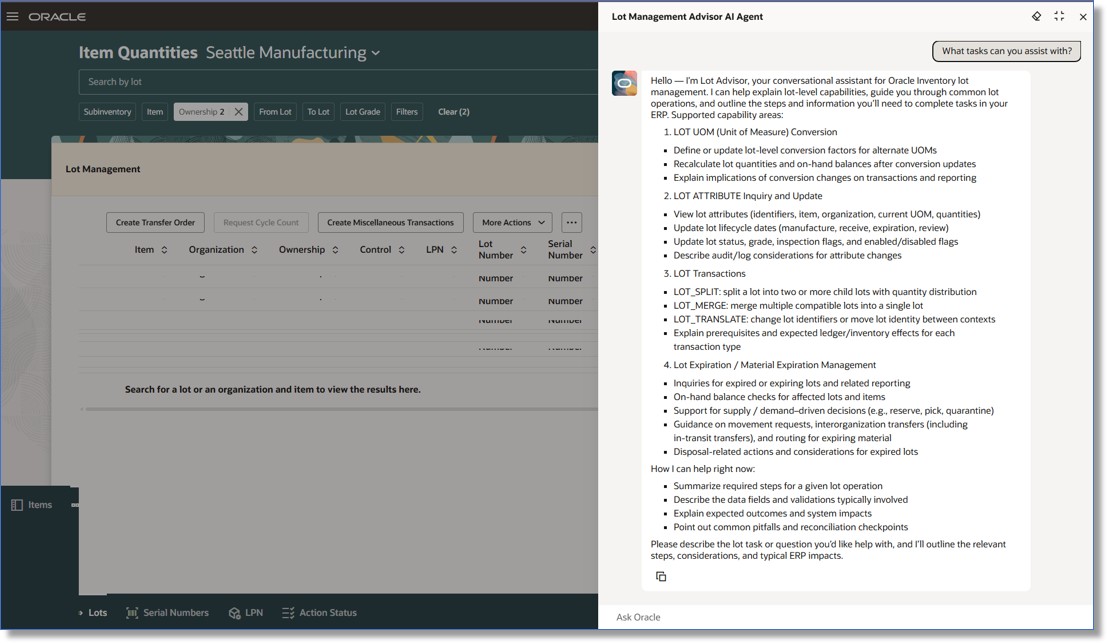
Lot Management Advisor
You can ask the agent to display lots that are nearing expiration and to update attributes such as the expiration date.
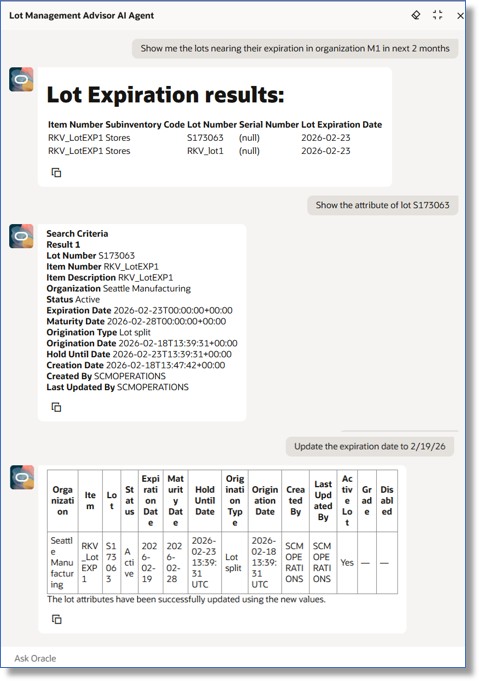
Lot Expiration and Attribute Update Agents
You can ask the agent to show recommendations for lots that are nearing expiration.
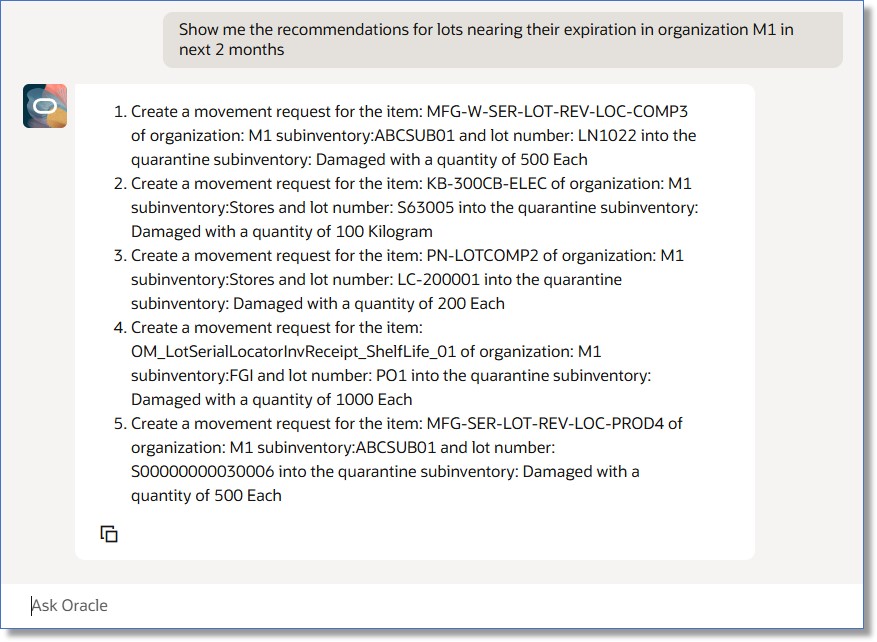
Lot Expiration Agent Recommendations
You can now use this AI agent to split lots.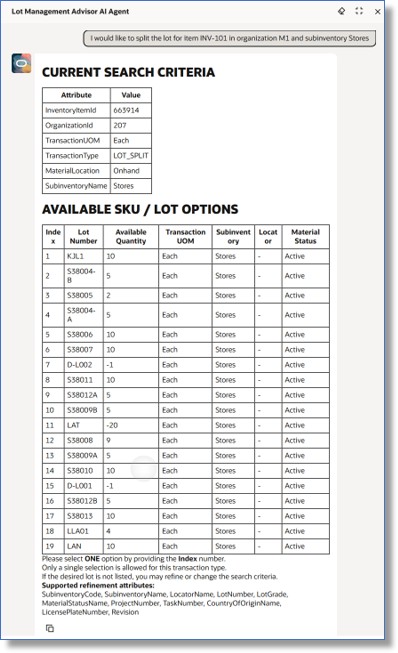
Lot Split Transaction
Select the lot to split, specify the target lot numbers, and enter the quantity for each new lot.
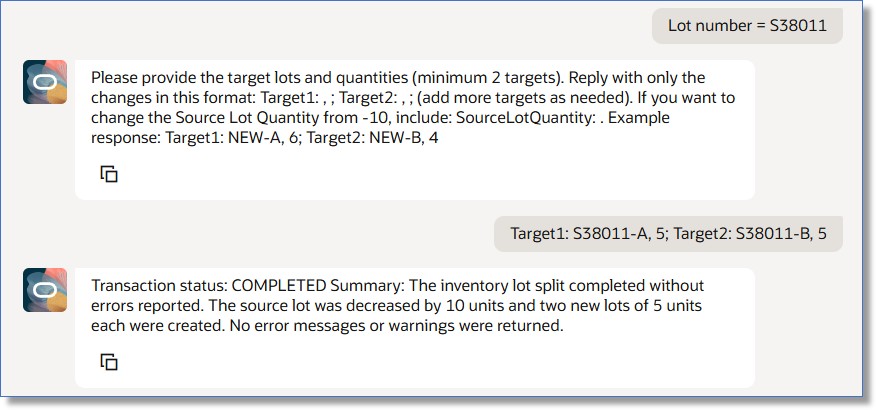
Lot Split Transaction
You can now use this agent to update the lot-specific UOM conversion rate and recalculate on-hand quantities using the new conversion rate.
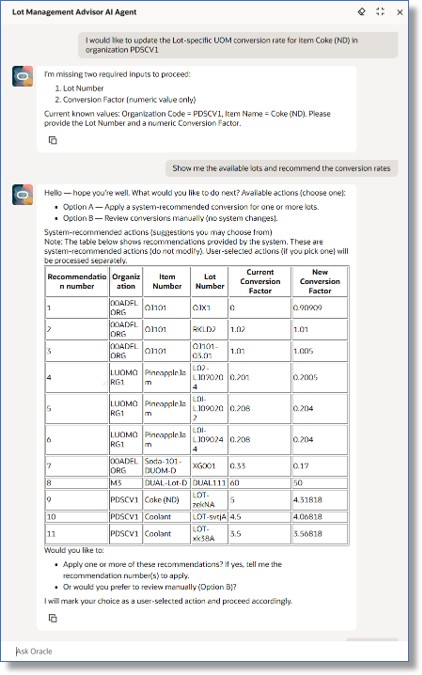
Lot-Specific UOM Conversion
The agent recommends a conversion rate based on historical trends.
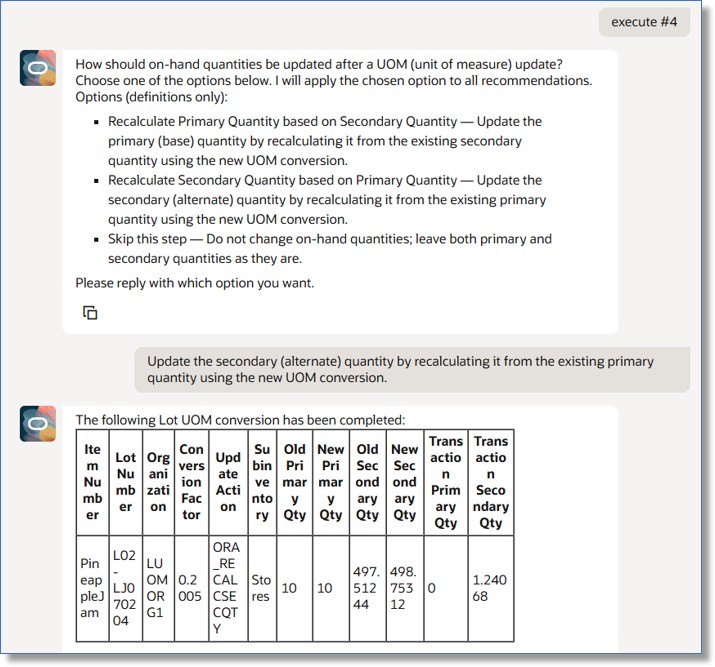
Recommendations and On-Hand Update
This feature increases operational efficiency and reduces the chance of costly mistakes by making the management of lot-controlled inventory faster, simpler, and more accurate.
Steps to enable and configure
To enable permission groups for roles, take these steps:
- In the Setup and Maintenance work area, search for the Manage Administrator Profile Values task using the search link in the Tasks panel tab.
- Search for the Enable Security Console External Application Integration (ORA_ASE_SAS_INTEGRATION_ENABLED) profile option and set the Site profile level to Yes.
You can use AI Agent Studio to use or copy a preconfigured agent template to create agents for your business processes. To automatically add a suffix to all artifacts in your agent team, you can use the Copy Template instead of Use Template button. When you copy a template, you're taken directly to the agent team canvas where you can edit the agent team settings, agents, tools, and topics. The Use Template option takes you through a step-by-step process for configuring each artifact in the agent team.
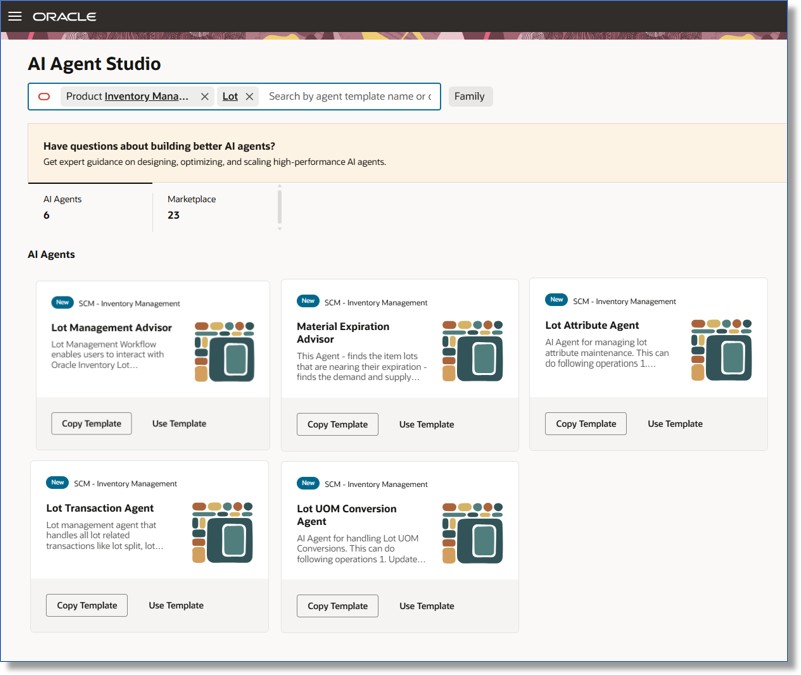
Lot Management Advisor Agent Team Templates
The Lot Management Advisor agent team includes placeholders for each individual agent. Use the Copy Template option to create copies of the agents, then replace the placeholders with the corresponding agent codes for each agent after publishing them.
Tips and considerations
You can use this additional prompt alongside the prompts supported by the 25D Material Expiration Agent:
- Show me recommendations for lots that will expire within the next month in organization ABC.
Here are some other sample prompts:
- I would like to split a lot for item XYZ in organization ABC. (Optional: Specify subinventory DEF, or provide it in a follow-up prompt to refine the results further.)
- I would like to merge lots for item XYZ in organization ABC. (Optional: Specify subinventory DEF.)
- Select the lots you want to merge from the displayed list, then follow up with: Merge lots ABC and DEF and generate the target lot.
- Recommend lot-specific UOM conversion rates for organization M1 and subinventory Stores.
- Follow the agent’s guidance in subsequent prompts to update on-hand quantities using the latest conversion rate.
Key resources
- Oracle Fusion Cloud SCM: Using Inventory Management guide, available on the Oracle Help Center.
- Oracle Fusion Cloud SCM: Using Receiving guide, available on the Oracle Help Center.
- Oracle Fusion Cloud SCM: Implementing Manufacturing and Supply Chain Materials Management guide, available on the Oracle Help Center.
- Oracle Fusion Cloud SCM: Security Reference for Manufacturing and Supply Chain Materials Management on the Oracle Help Center.
- Access Requirements for AI Agent Studio
- How can I give users access to AI agents?
- Create AI Agents
Access requirements
To access the Oracle AI Agent Studio for Fusion Applications and manage SCM AI agents, users must be assigned a configured job role that contains these duty roles:
- SCM Intelligent Agent Management Duty (ORA_RCS_SCM_AI_AGENT_MANAGEMENT_DUTY)
- SCM Intelligent Agent Management Duty (ORA_RCS_SCM_AI_AGENT_MANAGEMENT_DUTY_HCM)
- Fai Genai Agent SCM Administrator Duty (ORA_DR_FAI_GENERATIVE_AI_AGENT_SCM_ADMINISTRATOR_DUTY)
To interact with AI agents in product pages, users must be assigned a configured job role that contains this duty role:
- Fai Genai Agent Runtime Duty (ORA_DR_FAI_GENERATIVE_AI_AGENT_RUNTIME_DUTY)
To allow users to interact with agents, you must also enable permission groups in the Security Console on those users' configured job roles that contain the Fai Genai Agent Runtime Duty role. You can enable permission groups when you manage the basic information of your configured job roles.
Users' configured job roles must also contain privileges that allow access to the pages where AI agents are enabled.
- Lot Management Duty(ORA_DR_INV_LOT_MANAGEMENT_ADVISOR_AGENT_DUTY)
See Access Requirements for AI Agent Studio (for administrators) and How can I give users access to AI agents (for end-users) for more information.