 Redwood: Notify a Requester about ASN or Receipt Creation
When you order goods from suppliers, you as a requestor often need to know the status of items to plan your work, coordinate resources, or update stakeholders. Without any automated updates, its challenging or time consuming to track shipments or received status at the warehouse. Now, you can promptly receive notifications when the ordered goods are received into the warehouse or shipped out by the supplier after the Advance Shipment Notice (ASN) is created.

ASN Notification
These notifications are delivered using the Nudge framework and can be sent through email, push, or SMS, based on your configuration.
Notifications include contextual information, such as ASN number, receipt number, item details, quantity, and expected receipt date, along with direct links to the relevant Redwood Receiving pages.
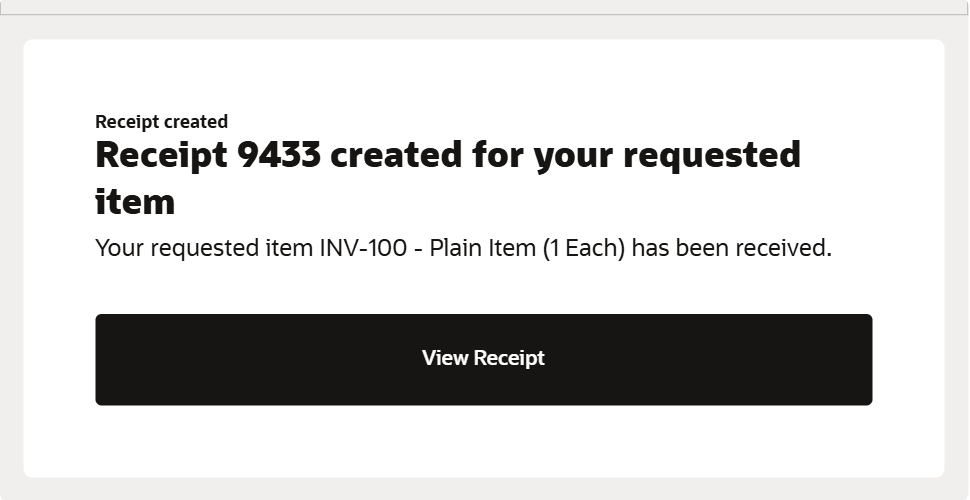
Receipt Notification
This feature increases visibility into the current status of requested goods and saves time by automatically notifying requesters when the goods they ordered are shipped by the supplier or received into the warehouse.
Steps to enable and configure
Manage Receiving Profile Options
- In the Setup and Maintenance work area, search for and select the Manage Receiving Profile Options task.
- On the Manage Receiving Profile Options page, search for and select the ORA_RCV_ENABLE_NOTIFICATION_TO_REQUESTER_USING_NUDGE profile option code.
- In the Profile Values section, set the Site level to one of the following values:
- ASN – Enables notifications for ASN creation only.
- Receipt – Enables notifications for receipt creation only.
- ASN and Receipt – Enables notifications for both ASN and receipt creation.
- None – Disables notifications.
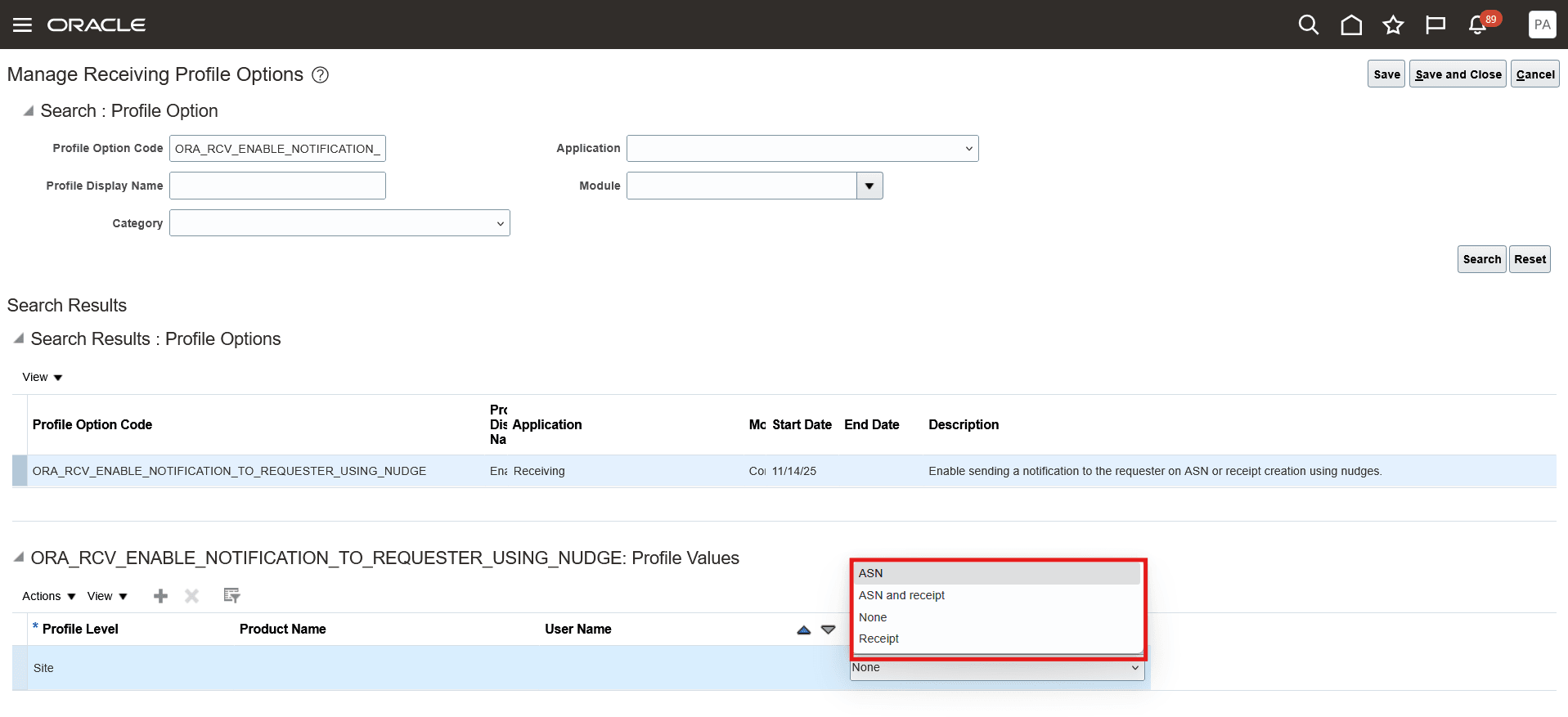
Receiving Profile Options
Nudge Configuration
Create a Nudge Plan
- Navigate to the Nudge Plans page by selecting the Nudge Configuration from the Quick Actions menu.
- On the Nudge Plans page, click Create to add a new plan.
- In the New Nudge Plan drawer:
- Enter the Nudge Plan Name.
- Enter the Nudge Plan Description.
- Select the Start Date and End Date.
- Select the Subscriber Inventory.
- Select the Type:
- ASN Creation for ASN notifications.
- Receipt Creation for receipt notifications.
- Click Create Draft.
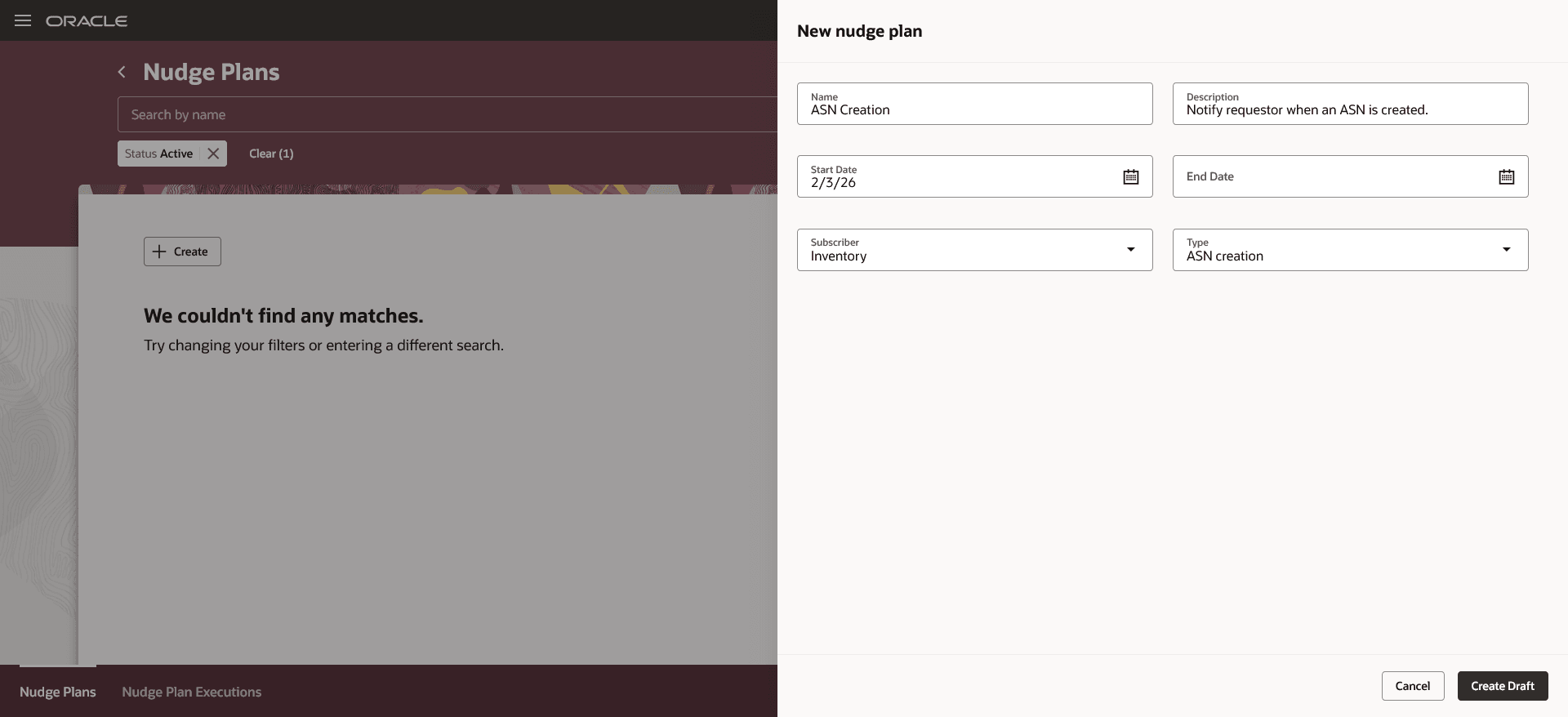
Create Nudge Plan
Create Nudge
- When the nudge plan is in Draft status, select the plan and click Add to create a new nudge.
- Configure the nudge:
- For ASN notifications, select Module as ASN Creation and Reason as Nudge when an ASN is created.
- For receipt notifications, select Module as Receipt Creation and Reason as Nudge when a receipt is created.
- Optionally, specify the relevant organization, catalog, category, or item to scope the nudge.
- Click Save.

Create Nudge
Add Channel
- On the Nudge Plan page, click the nudge name to open its details.
- In the Channels section, click Add to create a new channel.
- On the New Channel page, choose the notification channel:
- SMS
- Push Notification
- Customize the subject and message content as needed.
- Click Save.

Add Channel
The following attributes can be used in the subject and message content for notifications.
For ASN Creation Notification
- ASN_NUMBER – Supplier advance shipment notice number.
- ITEM_NUMBER – Item number on the ASN.
- ITEM_DESCRIPTION – Item number and description.
- EXPECTED_RECEIPT_DATE – Expected warehouse arrival date.
- QUANTITY – Quantity shipped.
- UNIT_OF_MEASURE – Unit of measure for the shipped quantity.
- PO_NUMBER – Purchase order number.
- REQUISITION_NUMBER – Requisition number; displays Multiple if applicable.
- REQUESTER_NAME – Name of the requester.
For Receipt Creation Notification
- RECEIPT_NUMBER – Receipt number created during receiving.
- ITEM_NUMBER – Item number on the receipt.
- ITEM_DESCRIPTION – Item number and description.
- EXPECTED_RECEIPT_DATE – Expected warehouse arrival date.
- QUANTITY – Quantity received.
- UNIT_OF_MEASURE – Unit of measure for the received quantity.
- REQUISITION_NUMBER – Requisition number; displays Multiple if applicable.
- PO_NUMBER – Purchase order number.
- TO_NUMBER – Transfer order number, if applicable.
- REQUESTER_NAME – Name of the requester.
Tips and considerations
- Notifications are sent only when a single requestor is identified for the purchase order schedule. If a schedule has multiple requestors, no notification is sent.
- Notifications are generated per ASN or receipt line, not per document.
- Receipt notifications are not sent when receipt deliveries are created for the line. In such cases, customers should use receipt delivery notifications instead.
- Notifications are not sent for drop ship purchase orders.
- If the requestor creates the receipt and receives the goods, the notification is suppressed.
Key resources
- Oracle Fusion Cloud SCM: Implementing Manufacturing and Supply Chain Materials Management guide, available on the Oracle Help Center.
- Oracle Fusion Cloud SCM: Using Receiving guide, available on the Oracle Help Center.
- Oracle Fusion Cloud SCM: Using Inventory Management guide, available on the Oracle Help Center.
Access requirements
Users who are assigned a configured job role that contains this duty role can access the Nudge Configuration:
- Nudge Configuration Duty (ORA_PER_NUDGE_CONFIGURATION_DUTY)
This duty role was available prior to this update.