Redwood: View Additional Information for Distributions in the Redwood Self-Service Receiving Application
When you combine multiple orders for similar goods across different departments, you generally allocate multiple distributions to a single purchase order line. In these situations, you may first need to accurately identify each distribution to manually enter correct quantities or amounts for specific distribution. To do this, the following attributes are now available when you override amounts or quantities at the distribution level in the Redwood Self-Service Receiving application:
- Order Quantity/Amount
- Received Quantity/Amount
- Invoiced Quantity/Amount
- Task
- Project Number
After you select the Override distribution quantities checkbox, you can edit each distribution line and enter the appropriate quantity when you perform a receipt.
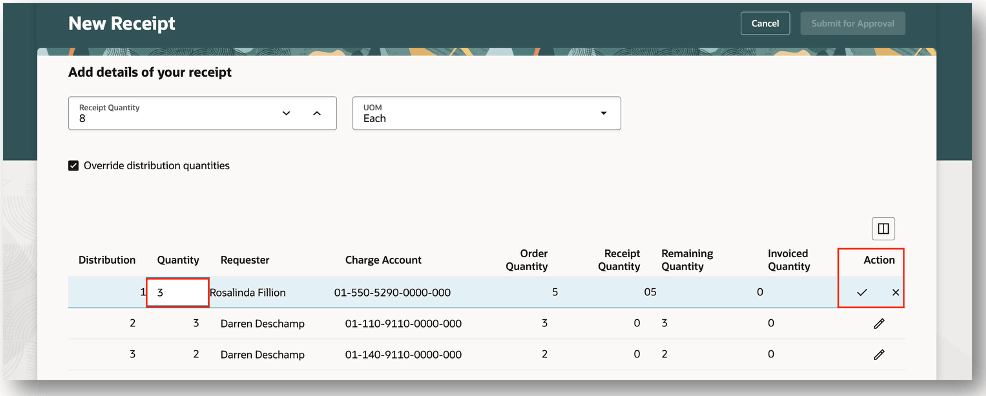
Override Distribution Quantities
After you select the Override distribution amounts checkbox , you can edit each distribution line and enter the appropriate amount when you perform a receipt.
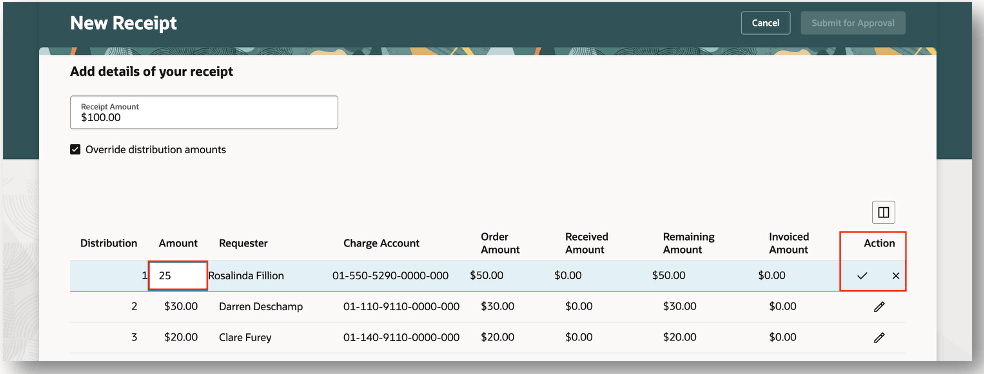
Override Distribution Amounts
This feature reduces errors by ensuring your requesters can properly identify the correct distribution when they need to manually record quantities or amounts for individual distributions.
Steps to enable and configure
These columns are hidden in the default view and can be added using the Customize Columns icon.
- Order Quantity/Amount
- Received Quantity/Amount
- Remaining Quantity/Amount
- Invoiced Quantity/Amount
- Project Number
- Task Number
Tips and considerations
When the Blind Receiving for Self-Service Procurement Enforced profile option is enabled, the Receipt Quantity/Amount won't be the default attribute for both receipt and distribution levels.
Key resources
- Oracle Fusion Cloud SCM: Using Receiving guide, available on the Oracle Help Center.
- Oracle Fusion Cloud SCM: Implementing Manufacturing and Supply Chain Materials Management guide, available on the Oracle Help Center.
- Oracle Fusion Cloud SCM: Security Reference for Manufacturing and Supply Chain Materials Management guide, available on the Oracle Help Center.
Access requirements
Users who are assigned a configured job role that contains these privileges can access this feature:
- Create Receipt with the Responsive Self Service Receiving Application (RCV_CREATE_RECEIPT_WITH_PWA_PRIV)
- Get Trading Partner Item Relationship Rest (EGI_GET_TPI_REL_REST_PRIV)
- View Units Of Measure List of Values by Web Service (RCS_VIEW_UNITS_OF_MEASURE_LOV_WEB_SERVICE_PRIV)
- View Receipt with the Responsive Self Service Receiving Application (RCV_VIEW_RECEIPT_WITH_PWA_PRIV)
- Return Receipt with the Responsive Self Service Receiving Application (RCV_RETURN_RECEIPT_WITH_PWA_PRIV)
- Update Receipt with the Responsive Self Service Receiving Application (RCV_UPDATE_RECEIPT_WITH_PWA_PRIV)
- Create Receipt for Procurement Preparer with the Responsive Self Service Receiving Application (RCV_CREATE_RECEIPT_PROCUREMENT_PREPARER_PWA_PRIV)
- Manage Receipt for Advanced Receiver with the Responsive Self Service Receiving Application (RCV_MANAGE_RECEIPT_ADVANCED_RECEIVER_PWA_PRIV)
These privileges were available prior to this update.