Redwood: Copy Lot and Serial Numbers from an ASN or Transfer Order When Using a Mobile Device to Receive or Put Away Goods
When you use a mobile device to receive or put away goods from trusted suppliers, it may not be necessary to verify each lot or serial number provided in the Advance Shipment Notices (ASNs) or from internal transfers. Instead, you may want to copy the lot or serial numbers directly from the ASN or transfer order to do the receipt or put away transaction. Now, as warehouse operators, you can automatically copy the lot or serial numbers provided on an ASN or transfer order during receipts or put away transaction.
Based on the item type, when the Allow defaulting of lots and serial numbers from ASN receiving parameter is enabled for the inventory organization, the Use lots from the ASN, Use serial numbers from the ASN, or Use lots and serial numbers from the ASN checkbox will be displayed. When the receipt routing is set to Direct Delivery, the checkbox will be displayed when you perform a receipt in the Receive Goods mobile page. When the receipt routing is set to Standard Receipt, the checkbox will be displayed when you perform a put away in the Put Away Goods mobile page.
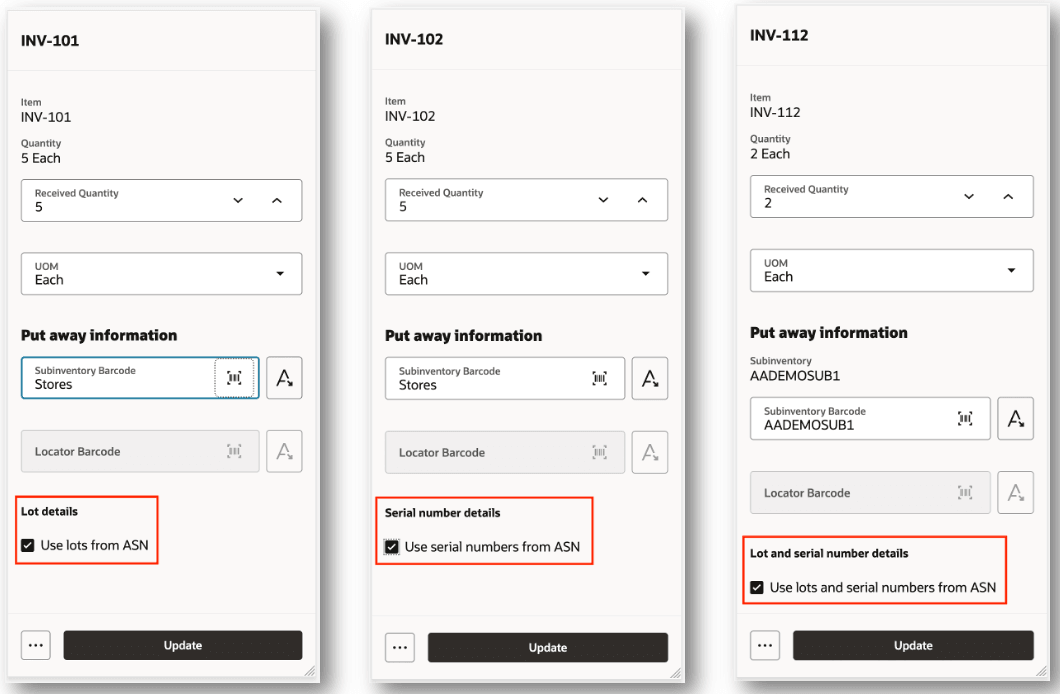
Use Lots and Serial Numbers from ASN
Based on the item type, when the Allow defaulting of lots and serial numbers from transfer order receiving parameter is enabled for the inventory organization, the Use lots from the transfer order, Use serial numbers from the transfer order, or Use lots and serial numbers from the transfer order checkbox will be displayed. When the receipt routing is set to Direct Delivery, the checkbox will be displayed when you perform a receipt in the Receive Goods mobile page. When the receipt routing is set to Standard Receipt, the checkbox will be displayed when you perform a put away in the Put Away Goods mobile page.

Use Lots and Serial Numbers from Transfer Order
This feature improves your operational efficiency by streamlining your receiving and put away process.
Steps to enable and configure
Use the Receiving Parameters task to enable Allow defaulting of lots and serial numbers from ASN and Allow defaulting of lots and serial numbers from transfer order for the Receive Goods and Put Away Goods mobile pages.
- In Setup and Maintenance, search for and select the Receiving Parameters task.
- Search for and select the inventory organization.
- Select the Allow defaulting of lots and serial numbers from ASN checkbox to enable Use lots from the ASN, Use serial numbers from the ASN, or Use lots and serial numbers from the ASN.
- Select the Allow defaulting of lots and serial numbers from transfer order checkbox to enable Use lots from the transfer order, Use serial numbers from the transfer order, or Use lots and serial numbers from the transfer order.
- Click Update.
Tips and considerations
The following conditions apply when using the Redwood: Copy Lot and Serial Numbers from an ASN or Transfer Order When Using a Mobile Device to Receive or Put Away Goods feature:
- Enable Allow defaulting of lots and serial number from ASN and Allow defaulting of lots and serial numbers from transfer order receiving parameters.
- Item must be lot control, serial number control, or both.
- Receipt quantity must be equal to the shipped quantity.
- Lot and serial information must be available on the ASN and transfer order.
Key resources
- Oracle Fusion Cloud SCM: Using Receiving guide, available on the Oracle Help Center.
- Oracle Fusion Cloud SCM: Implementing Manufacturing and Supply Chain Materials Management guide, available on the Oracle Help Center.
- Oracle Fusion Cloud SCM: Security Reference for Manufacturing and Supply Chain Materials Management guide, available on the Oracle Help Center.
Access requirements
Users who are assigned a configured job role that contains these duty roles can access this feature:
- Receive Goods Using Responsive Receiving (ORA_RCV_RECEIVE_GOODS_PWA_DUTY)
- Put Away Goods Using Responsive Receiving (ORA_RCV_PUT_AWAY_GOODS_PWA_DUTY)
These duty roles were available prior to this update.
To set up this feature, you'll need a configured job role that contains these existing privileges:
- Manage Receiving Parameter (RCV_MANAGE_RECEIVING_PARAMETER_PRIV)
- Manage Receiving Option Data (RCV_MANAGE_RECEIVING_OPTION_DATA)