AI Agent: Returns Disposition Advisor
Leverage an AI-Agent to disposition and process returns to maximize the utilization of returned assets. Parts returned from customers must be triaged for the follow-up actions to disposition them properly. This critical decision factors in key details such as warranty status, component hierarchy, and the item's disposition code setup. The Returns Parts Advisor agent assists you by recommending the appropriate disposition code, using key data points from each service part.
You can now filter for defective stocking locations holding customer-returned parts and complete the disposition process directly from the Reverse Logistics Dispositions page. The Returns Parts AI Advisor feature can provide recommended disposition codes in your search results, which you can view and accept for each line item.
Search by the Recommended Disposition filter chip to easily review and take the disposition action for each line item in the Disposition Details column.
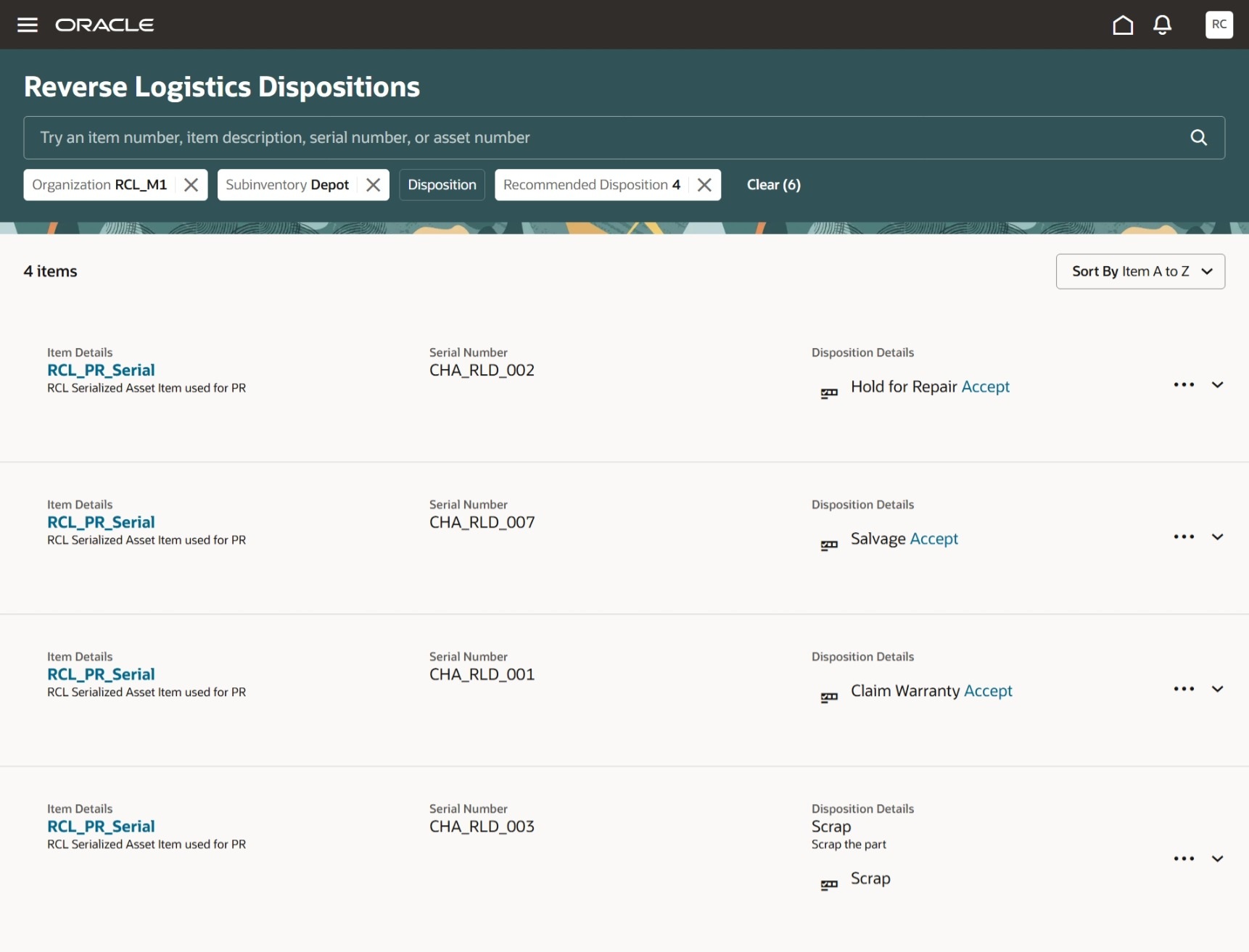
Reverse Logistics Dispositions - Return Parts Advisor Recommendations
This AI agent provides decision support for the Return Part Disposition flow by automatically recommending disposition codes—such as repair, hold for repair, or scrap—for each returned part, streamlining the review process and enhancing both repair part handling and overall productivity.
Steps to enable and configure
You can use AI Agent Studio to use or copy a preconfigured agent template to create Agents for your business processes. To automatically add a suffix to all artifacts in your agent team, you can Copy Template instead of Use Template. When you copy a template, you're directly taken to the agent team canvas where you can edit the agent team settings, agents, tools, and topics. The Use Template option takes you through a step-by-step process for configuring each artifact in the agent team.
For information on using AI Agent Studio, see How do I use AI Agent Studio?
Tips and considerations
You can schedule the Returns Parts Advisor agent to run at specified intervals in the background, automatically generating recommended disposition codes. These recommendations are then pre-populated on the Reverse Logistics Dispositions page, eliminating the need for users to request recommendations for each part individually.
Key resources
For information on using AI Agent Studio, see How do I use AI Agent Studio?
Access requirements
To access the Oracle AI Agent Studio for Fusion Applications and manage SCM AI agents, users must be assigned a configured job role that contains these duty roles:
- SSCM Intelligent Agent Management Duty (ORA_RCS_SCM_AI_AGENT_MANAGEMENT_DUTY and ORA_RCS_SCM_AI_AGENT_MANAGEMENT_DUTY_HCM – both duty role codes are required)
- Fai Genai Agent SCM Administrator Duty (ORA_DR_FAI_GENERATIVE_AI_AGENT_SCM_ADMINISTRATOR_DUTY)
In the Security Console, filter by Roles and Privileges to find the SCM Intelligent Agent Management Duty role. Filter by Roles and Permission Groups to find the Fai Genai Agent SCM Administrator Duty role.