Redwood: Execute Work Order Operations with Enhanced Options
Execute work order operations using the Redwood UI with additional options and workflows, such as inspecting rejected quantities, viewing Transactional Item Attributes for work orders, and accessing sales order attachments within the UI.
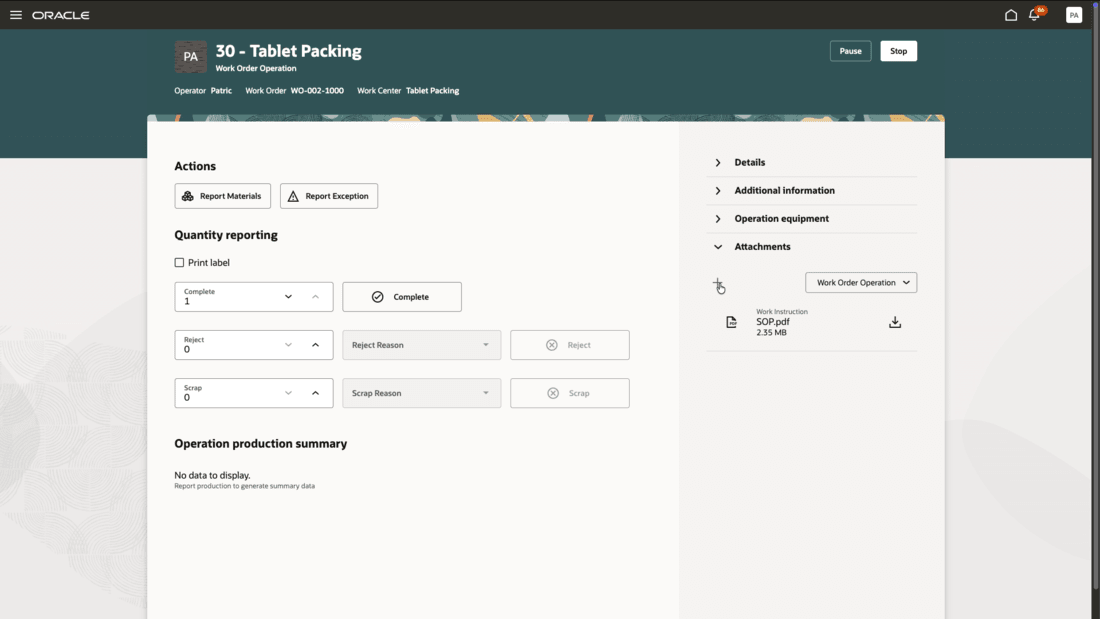
Add Work Order Operation Attachment During Work Order Operation Execution
Improves operator efficiency and execution accuracy in Fusion Cloud Manufacturing by surfacing Transactional Item Attributes(TIA) for work orders and flow schedules, enabling in-context attachment upload during execution, and supporting inspection of rejected quantities.
Steps to enable and configure
Use the Opt In UI to enable this feature. For instructions, refer to the Optional Uptake of New Features section of this document.
Offering: Manufacturing and Supply Chain Materials Management No Longer Optional From: Update 26C
This feature is a child of the opt-in required 26A feature "Redwood: Report Manufacturing Execution Operations Using a New User Experience".
Tips and considerations
- Inspection of rejects can be done by filtering the list of work order operations to view operations with reject quantities.
Key resources
- Watch the feature demo for Redwood: Execute Work Order Operations with Enhanced Options.
- Oracle Fusion Cloud SCM: Refer to the Using Manufacturing guide, available on the Oracle Help Center.
- Oracle Fusion Cloud SCM: Refer to the Implementing Manufacturing and Supply Chain Materials Management guide, available on the Oracle Help Center.
Access requirements
Redwood Production Execution Privileges:
- Execute Production at a Workstation (WIP_EXECUTE_WORKSTATION)
- View Workstations (WIS_VIEW_WORKSTATIONS_PRIV)
- Report Operation Transactions (WIP_REPORT_OPERATION_TRANSACTIONS_PRIV)
Guided Journeys: Role Codes
- Use REST Service - Guided Journeys Read Only (Role Code ORA_PER_REST_SERVICE_ACCESS_GUIDED_JOURNEYS_RO)
- Use REST Service - Guided Journey Responses (Role Code ORA_PER_REST_SERVICE_ACCESS_GUIDED_JOURNEY_RESPONSES)