Redwood: Group Work Orders for Material Availability, Reservation, and Picking
Efficient management of work orders and production material is essential for streamlined manufacturing operations, especially when coordinating across multiple work orders sharing common resources. With this update, you can now group work orders and perform key actions such as searching, reserving, releasing, and picking materials for a group of work orders in the Redwood-based Material Availability and Work Orders UI. Key changes introduced in this feature are as follows:
- Create and assign work order groups based on shared materials: You can use shared or common materials as the criteria for including work orders in a work order group. Use the Assign Work Orders to Group by Criteria action from the Work Orders page to group work orders based on the specified material. This helps you logically group dependent work orders, reduce manual grouping effort, and manage material execution effectively.
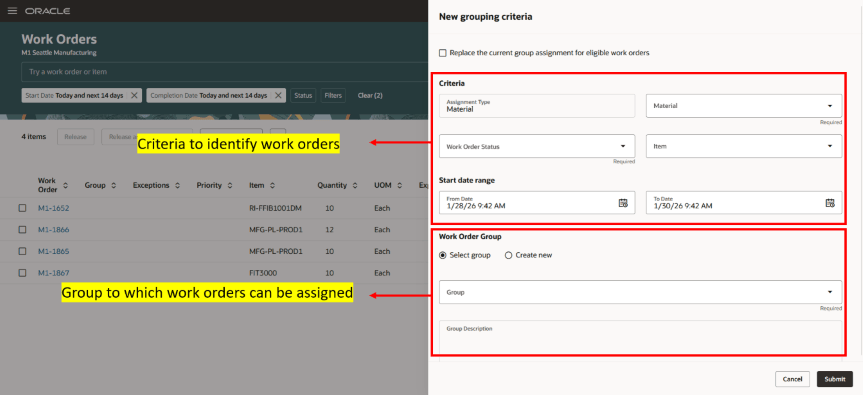
Specify Material Criteria and Group Name in Assign Work Orders to Group by Criteria Action
- Prioritize work orders in a group for material availably assignments: Work order group has been introduced as a new assignment attribute in the material availability configuration. You can prioritize work orders in a particular group over other work orders during material availability assignments by using Work Order Group as an assignment attribute. This ensures that material availability is evaluated for work orders in the group first.
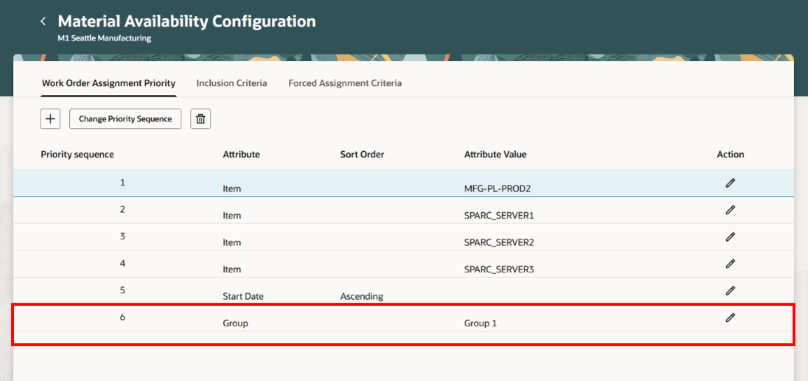
Use Group Name as the Assignment Priority Attribute
- Check material availability by group at both the work order and material levels: The Work Order Group is available both as a column and a filter in material available assignments and affected work orders page, enabling you to analyze shortages and availability at both the work order and the material level without navigating away from current workflows.
- Perform key actions such as reserving, releasing, and picking materials for work orders in a group: You can filter for a group, and perform key material actions such as reserving, releasing, and picking materials for all work orders within the group. This lets you manage material execution collectively, reducing repetitive actions and improving operational efficiency.
- Pick materials for multiple work orders within a group: You can pick materials for multiple work orders within a group by passing the Work Order Group as a parameter to the Pick Materials for Work Orders scheduled process.
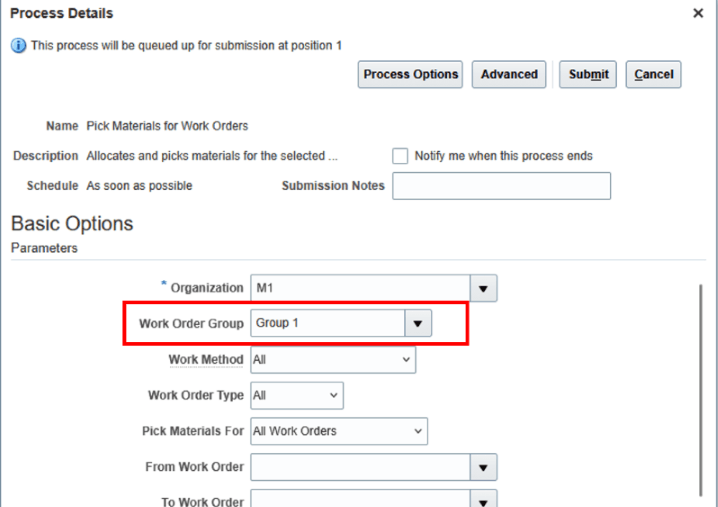
Work Order Group Parameter in the Pick Materials for Work Orders Scheduled Process
This feature provides the following benefits:
- Streamlines production planning and execution by enabling group-based management of related work orders and materials.
- Reduces manual effort and delays by minimizing repetitive actions across interconnected work orders.
- Improves accuracy and control in material management by evaluating availability and execution at a group level.
- Enhances material utilization on the shop floor through more efficient and consistent handling of materials.
Here's the demo of these capabilities:
Steps to enable and configure
You don't need to do anything to enable this feature.
Tips and considerations
- Use group-based search and filtering in both the Material Availability and the Work Orders UI to efficiently manage and analyze large volumes of work orders.
- Use the new scheduled processes to automate work order group assignment based on common input components. You can also use the override option to replace an existing group with a new group when needed. Work orders in Completed or Closed status are excluded from group assignment when using the scheduled process.
- Material Availability search using group filters and actions such as reserve, release, and pick using group filters work at the plant level.
- Changes to the Pick Materials for Work Orders scheduled process, Material Availability Configurations, and Material Availability Assignments are applicable across discrete, process, and maintenance work methods.
- You can review the details of the work orders assigned to the group by referring to the output file generated by the scheduled process.
- This update enhances the "26A Redwood Assess Material Availability for Work Order Prioritization" feature. Work Order Group is a newly added assignment criteria attribute, and all existing assignment criteria and default prioritization logic continue to work as is unless this attribute is explicitly configured.
Key resources
- Refer to the Release 25D feature Redwood: Group Work Orders to Perform Mass Actions.
- Refer to the Release 26A feature Redwood: Assess Material Availability for Work Order Prioritization
- Oracle Fusion Cloud SCM: Using Supply Chain Cost Management, available on the Oracle Help Center.
- Oracle Fusion Cloud SCM: Implementing Manufacturing and Supply Chain Materials Management guide, available on the Oracle Help Center.
Access requirements
Users who are assigned a configured job role that contains these privileges can access this feature:
- Manage Work Order Groups (WIP_MANAGE_WORK_ORDER_GROUPS)
- View Work Order Groups (WIP_VIEW_WORK_ORDER_GROUPS)
- Manage Material Availability Rules and Assignments (WIP_MANAGE_MATERIAL_AVAIL_RULES_AND_ASSIGN_PRIV)