 Redwood: Split a Work Order into Execution Runs
Manufacturers face operational challenges when producing goods that must be executed in multiple production cycles due to equipment capacity constraints. Current approaches such as creating and linking multiple work orders to properly track material usage, process parameters, and quality attributes at the production run level are considered cumbersome for efficiency and scale. There is a need for streamlined production management that aligns with the physical processes, enhances traceability, and maintains planning and order fulfillment accuracy without excessive administrative overhead.
You can now split a process or discrete manufacturing work order into multiple, consecutive execution runs, so that production, materials, resources, quality, and genealogy can be tracked at an execution run level. Each execution run requires the same set of operations, resources, and materials that are proportionally scaled to the execution run quantity. For example, a work order with a quantity of 1000 can be split into 5 execution runs of 200 quantity each. Execution runs occur one after another, with only a single run active at a given operation until the work order is complete.
With this new capability, you can:
- Split the work order quantity into execution runs by count or run size before the work order is released.
- Add or delete an execution run and edit the quantity of an individual execution run.
- Track the current operation status of each execution run along with the planned and actual quantities.
- Report production, materials, resources, outputs, and operational parameters against an execution run.
- Record work in process inspection results and generate corresponding problem reports for a specific execution run.
- View the history of production transactions in context of an execution run.
- View the genealogy of lots and serials with traceability to the execution run for production transactions.
During real-time production execution, mobile production reporting, and postproduction reporting, you can select the execution run before reporting material usage and product completion, capturing operational parameters, such as speed and temperature, and recording quality inspection results. You can proportionally backflush materials with a supply type of operation pull and charge resources with a variable charge type for each execution run of an operation. Resources and materials with a fixed charge type are charged in the first execution run for an operation.
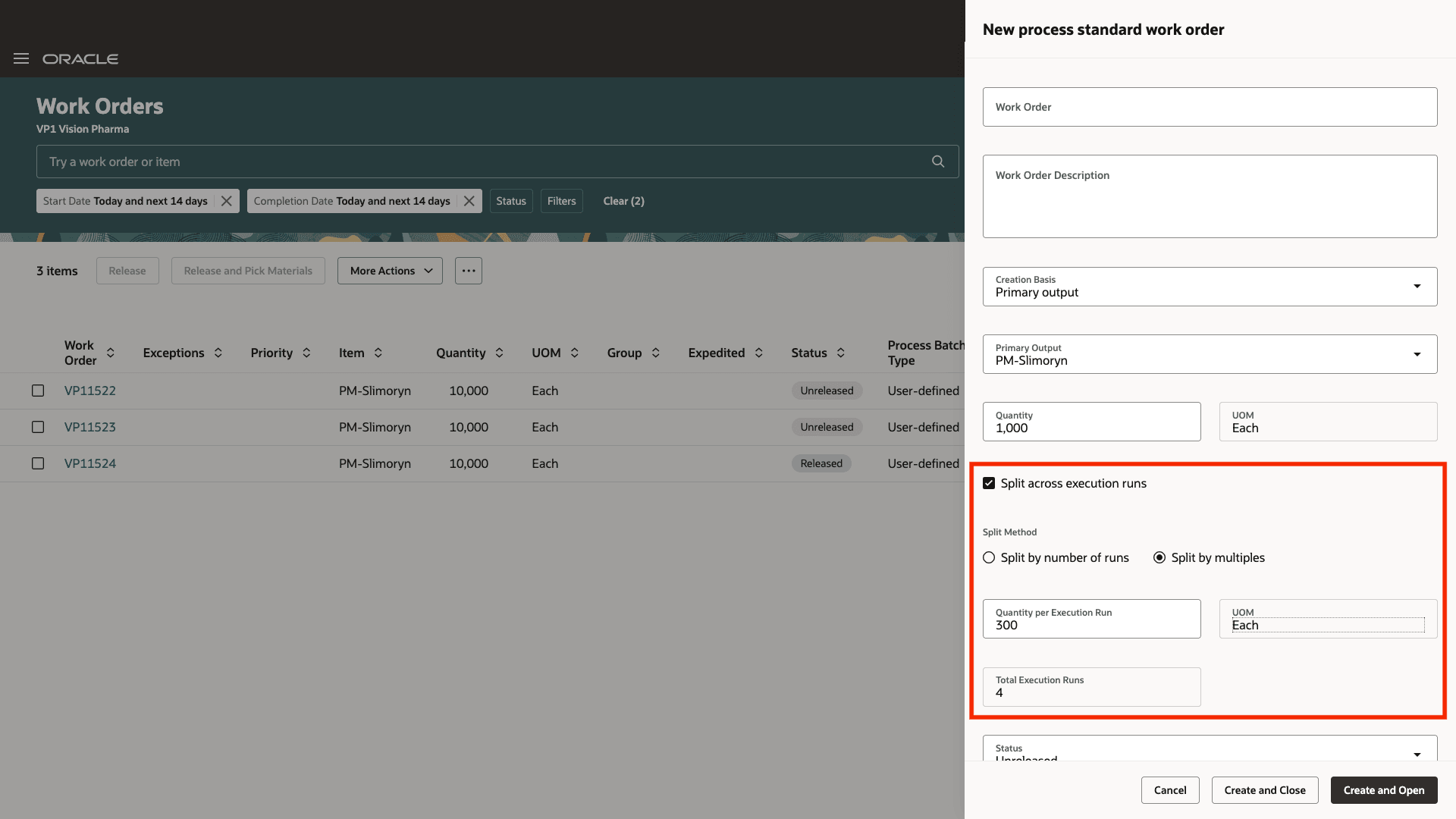
Split Work Order Quantity into Execution Runs
A new tab appears in the Work Orders page that lists the execution runs. You can add, edit, or delete the execution run numbers and quantities before the work order is released.
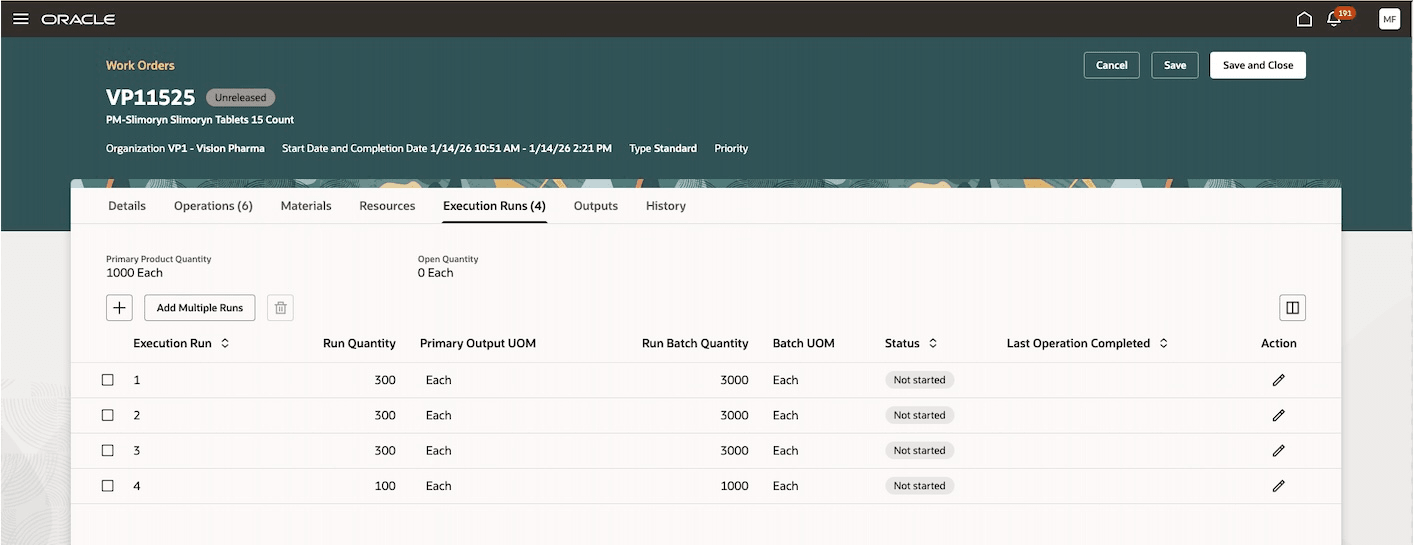
Work Orders Page: Execution Runs Tab
The execution run is stamped on all operation completion, material, and resource transactions. Before you report a transaction, you need to select the execution run to continue. For example, if you want to report a transaction using the Production Execution page, you need to pick the execution run number before you can start.
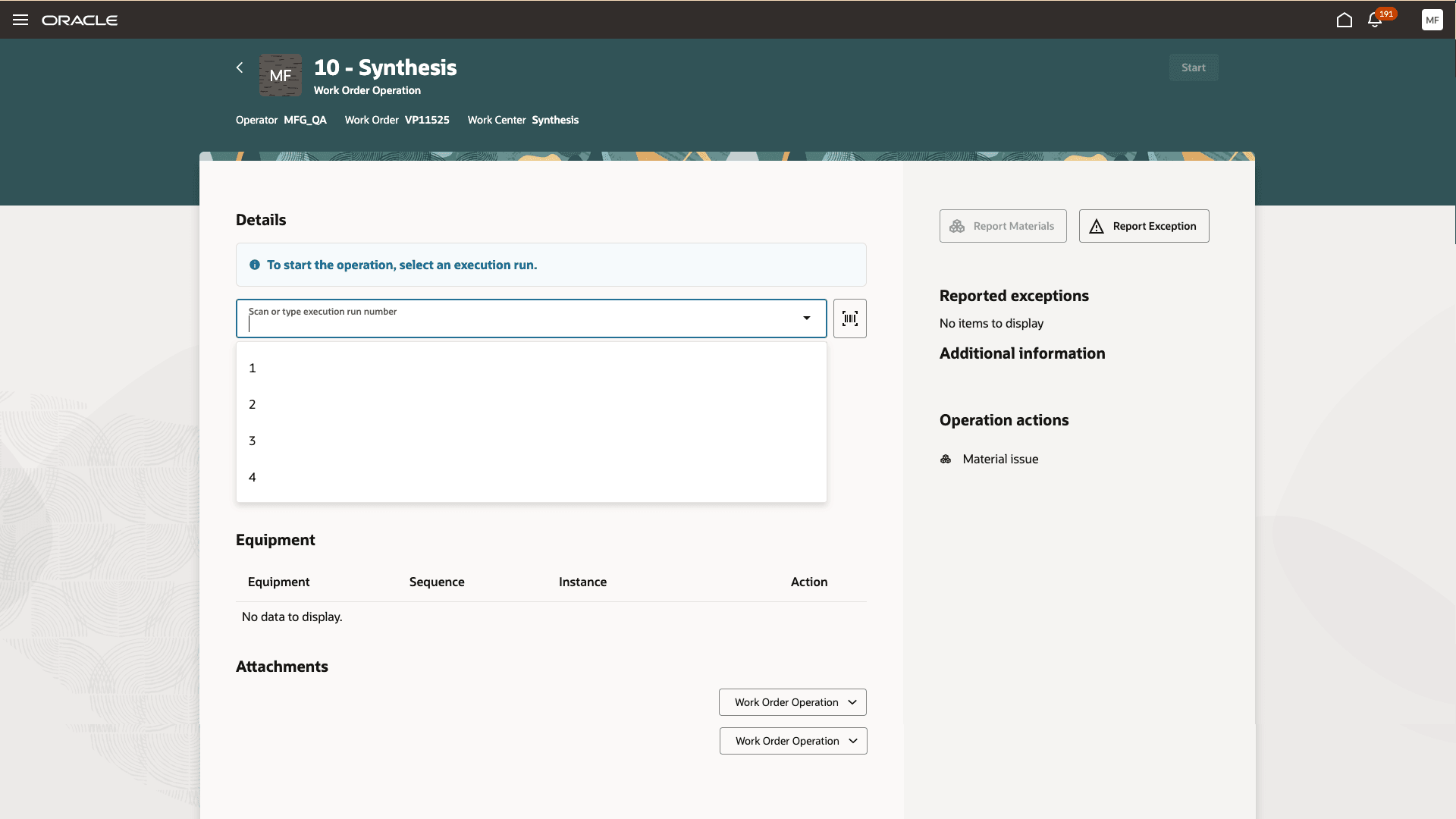
Choose the Execution Run Number to Report Transactions
Once all the operations are completed, the status of the execution run changes to Completed. Once an execution run has been completed, you can progress to any of the other execution runs that are in Not Started status. You can report material and resource transactions for any of the execution runs irrespective of the status of the execution runs, as long as the work order status allows you to do so.
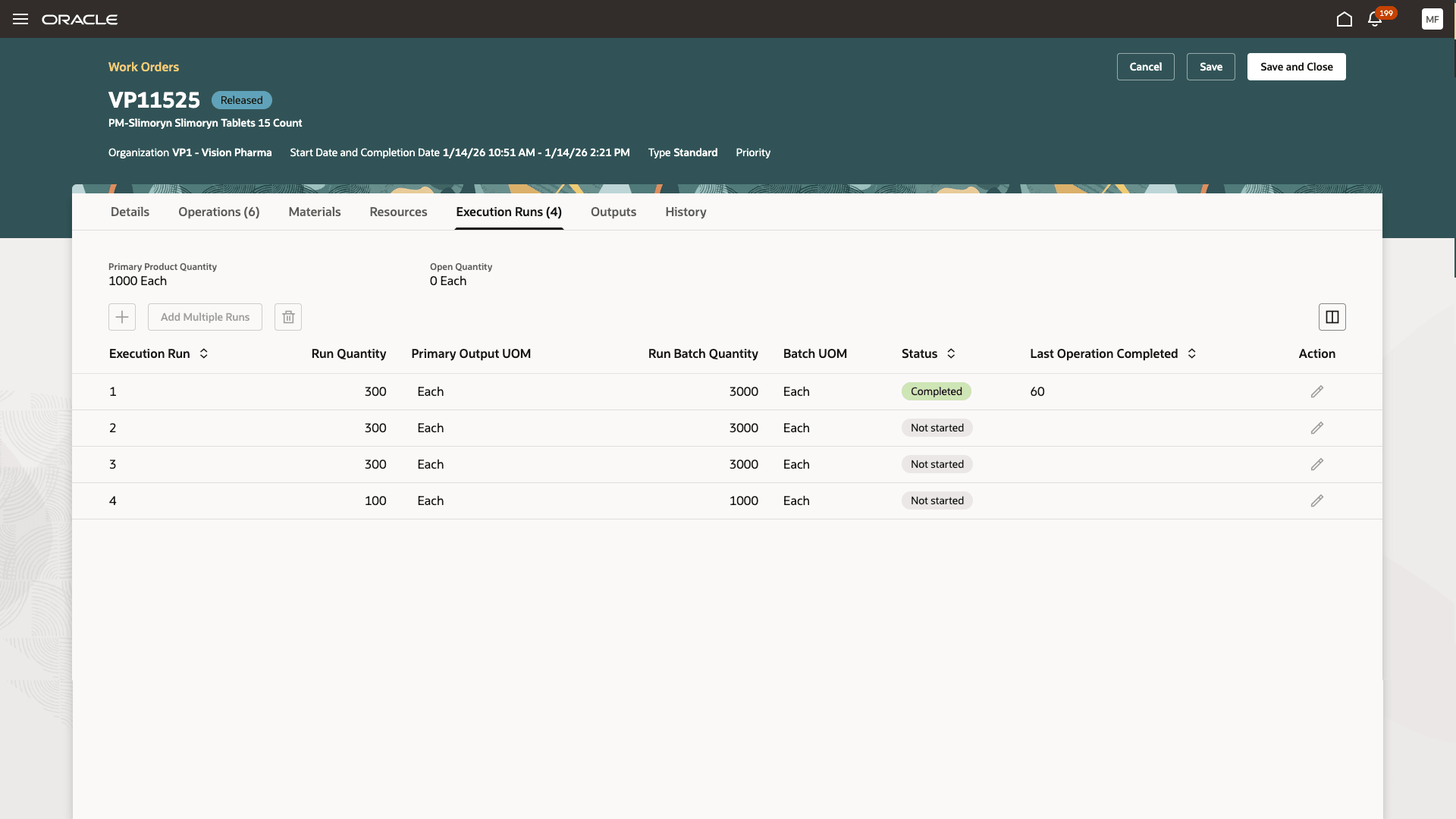
Execution Run Status
The Production Transaction History page shows the transactions reported against each execution run if the work order is split by execution runs.
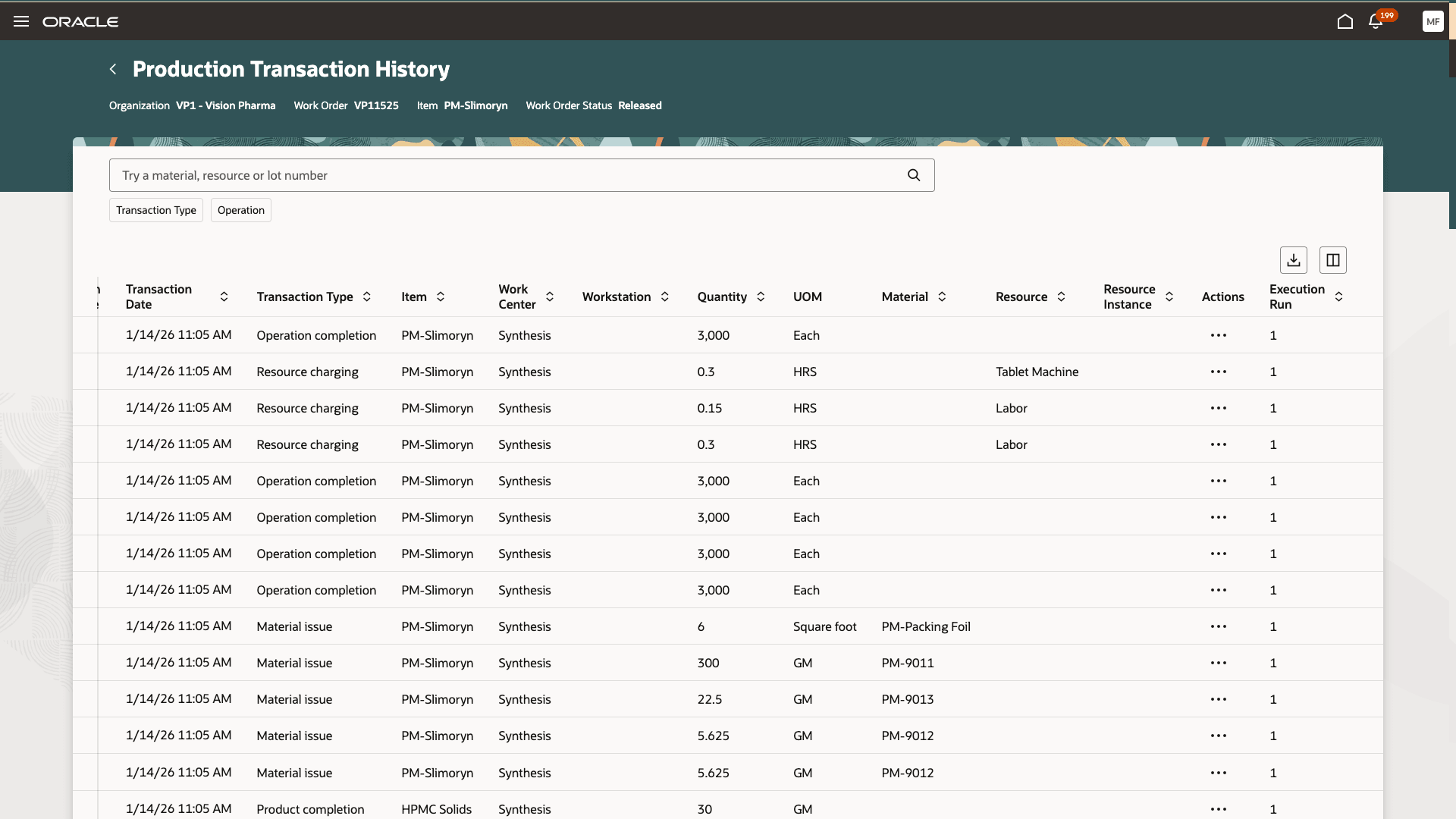
Production Transaction History
REST API changes:
The following REST APIs have been enhanced to include execution runs.
- Create discrete work orders
- Create process work orders
- Work order material transactions
- Work order resource transactions
- Work order operation transactions
FBDI changes:
Execution runs have been added to the following FBDI templates:
- Process Work Order Import
- Process Work Order Material Transaction Import
- Process Work Order Operation Transaction Import
- Work Order Import
- Work Order Material Transaction Import
- Work Order Operation Transaction Import
Tracking production in multiple execution runs increases operational efficiency and alignment with real-world production processes. As a result, execution runs support detailed traceability requirements in case of quality or compliance events.
Here's the demo of these capabilities:
Steps to enable and configure
Set up the plant parameters to enable this feature:
- In the Setup and Maintenance work area, search for, and select the Manage Plant Parameters task.
- On the Manage Plant Parameters page, select the required inventory organization.
- In the Work Execution tab, under Manage Production, enable the Allow splitting of work orders for multiple execution runs checkbox.
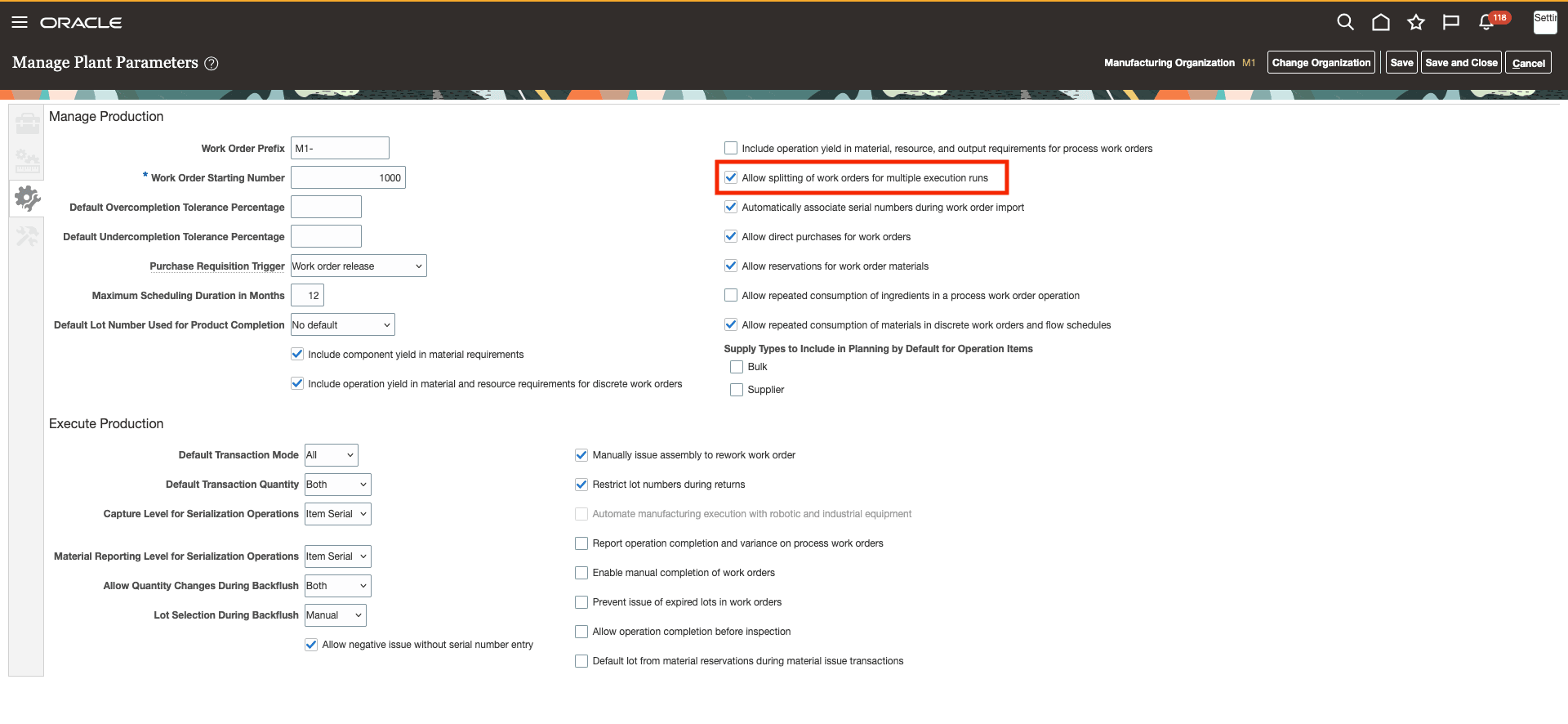
Manage Plant Parameters Page
Tips and considerations
- This feature is available only with the Redwood experience. For a consistent user experience, you can enable the Redwood pages for work orders, production execution, mobile production reporting using industrial handheld devices, postproduction reporting, quality inspection, production transaction history, and product genealogy.
- As a best practice, you can preassign product lot numbers that correspond to the execution runs for better traceability throughout the manufacturing process.
- You can't enable execution runs with parallel operations at this time.
- Serial tracked work orders can't be split into execution runs. Only standard discrete manufacturing and process manufacturing work orders can be split into execution runs.
- Material reservations and picking, lead time calculations, costing, supply planning, production exceptions, and production scheduling remain at the work order level and not at the execution run level.
- If you want to stop reporting operation completion transactions for an execution run that is in progress, you can put that execution run on hold and start any of the other execution runs that have not started.
- You cannot put an execution run on hold in case there are quantities to be moved between operations.
Key resources
- Watch the Split a Work Order into Execution Runs demo.
- Refer to the Oracle Fusion Cloud SCM: Using Manufacturing guide, available on the Oracle Help Center.
- Refer to the Oracle Fusion Cloud SCM: Implementing Manufacturing and Supply Chain Materials Management guide, available on the Oracle Help Center.
Access requirements
Users who are assigned a configured job role that contains the following privileges can access this feature:
Manage Plant Parameters (RCS_PLANT_PARAMETERS_PRIV)
Manufacturing privileges
- Manage Work Execution Work Area (WIP_MANAGE_WORK_EXECUTION_WORK_AREA_PRIV)
- Manage Work Order Headers (WIP_MANAGE_WORK_ORDER_HEADERS_PRIV)
- View Work Orders (WIP_VIEW_WORK_ORDERS_PRIV)
- Report Material Transactions (WIP_REPORT_MATERIAL_TRANSACTIONS_PRIV)
- Report Operation Transactions (WIP_REPORT_OPERATION_TRANSACTIONS_PRIV)
- Report Resource Transactions (WIP_REPORT_RESOURCE_TRANSACTIONS_PRIV)
- View Production Transaction History (WIE_VIEW_MANUFACTURING_TRANSACTION_HISTORY_PRIV)
- Report Postproduction Transactions (WIE_REPORT_POSTPRODUCTION_TRANSACTIONS)