 Redwood: Plan, Schedule, and Execute Parallel Operations in a Manufacturing Work Order
Modern manufacturing increasingly relies on using parallel operations to boost throughput, reduce lead times, and optimally utilize resources. With this new feature, manufacturing organizations can now plan, schedule, and execute parallel operations within a work order. By defining operation dependencies and leveraging parallel execution, both discrete manufacturers and process manufacturers can streamline workflows, improve scheduling precision, and enhance resource utilization while maintaining traceability and control.
Key Capabilities:
- Define, visualize, and manage operation dependencies as part of the work definition.
- Plan and execute multiple operations in parallel, reducing overall manufacturing lead times.
- Automatically schedule, release, and supervise parallel operations in work orders with accurate material, resource, and output calculations.
- Activate parallel operations using the new "Enable Parallel Operations" attribute in the work definition header.
-
Discrete Manufacturing:
- Supports single first and last operations with multiple parallel count point operations in between, all of which are subject to sequence and validation rules.
- The operation yield specified at the work definition operation level is used to calculate the work order operation material and resource requirements for parallel operations.
- Operation dependencies are defined using a new UI tab and a dependency diagram for visualization.
- Serialization start operations cannot be part of a parallel set.
- All parallel operations must be count point and in-house operations.
-
Process Manufacturing:
- Supports multiple first operations and a single last operation with sophisticated operational and scheduling dependencies.
- Define the “Finish-to-Start” dependency type, as well as transfer percentages for production quantity movement between operations.
- Handles calculation of yields and lead times at the work definition level, factoring in the dependency structure and batch configuration.
Work Definitions with Parallel Operations:
The following table helps you determine if parallel operations are allowed for a work definition type:
| Work Method | Work Definition Type | Parallel Operations Allowed |
|---|---|---|
| Discrete Manufacturing | Standard | Yes |
| Discrete Manufacturing | Standard : ATO Model | No |
| Discrete Manufacturing | Standard : Contract Manufacturing | No |
| Discrete Manufacturing | Rework | Yes |
| Discrete Manufacturing | Transform | Yes |
| Process Manufacturing | Standard | Yes |
| Process Manufacturing | Standard : Contract Manufacturing | No |
| Flow Manufacturing | Standard | No |
To create parallel operations for a work definition, select the Enable Parallel Operations attribute at the time of work definition creation. Note that the Enable Parallel Operations attribute cannot be changed after the work definition is created. There is a new page to define operation dependencies for work definitions that are enabled for parallel operations. See the Operation Dependencies section for details on how to set up operation dependencies.
You can use the Parallel Operations Enabled filter to search for existing work definitions that have parallel operations. The search results include the Parallel Operations Enabled column, which indicates whether a work definition is enabled for parallel operations.
Once operation dependencies have been created, any subsequent changes made to the work definition or its operations will render the operation dependencies invalid. After making updates, you must navigate to the Operation Dependencies page to revalidate the dependencies and resolve any issues identified during validation.
The cumulative and reverse cumulative yields displayed at the operation level use the operation dependencies to determine the correct yield at each operation. Note that this information is only displayed after the operation dependencies setup has been completed and the dependencies have been validated.
You can create multiple versions of a work definition. When a new version of a work definition is created, the operation dependencies from the previous version are copied to the new version. You can update the operation dependencies for the new version without impacting the operation dependencies of the previous version.
Using the Copy button, you can copy an existing work definition to create a new work definition. The copy action will also copy operation dependencies to the new work definition.
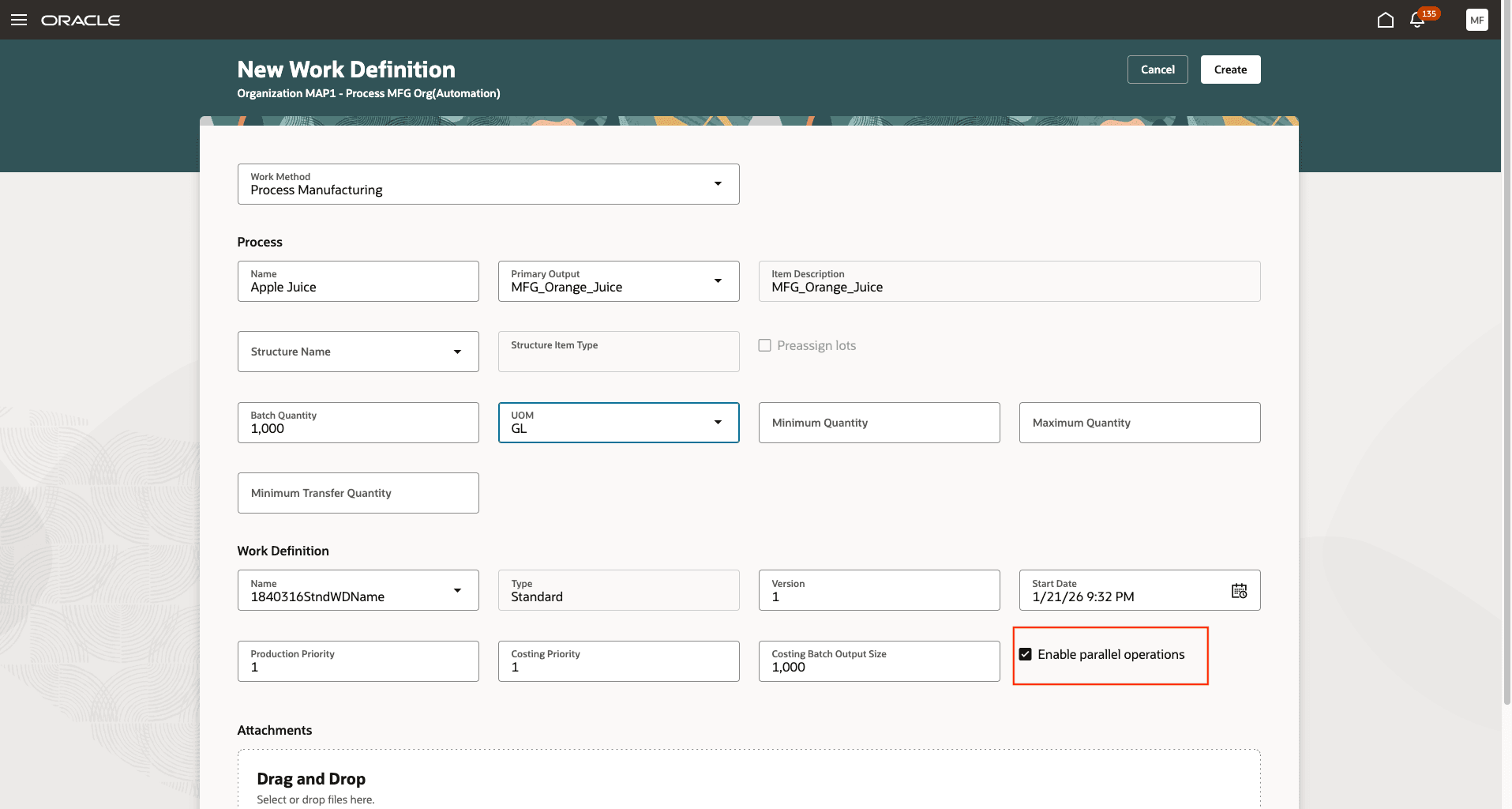
Creating a Work Definition with Parallel Operations Enabled
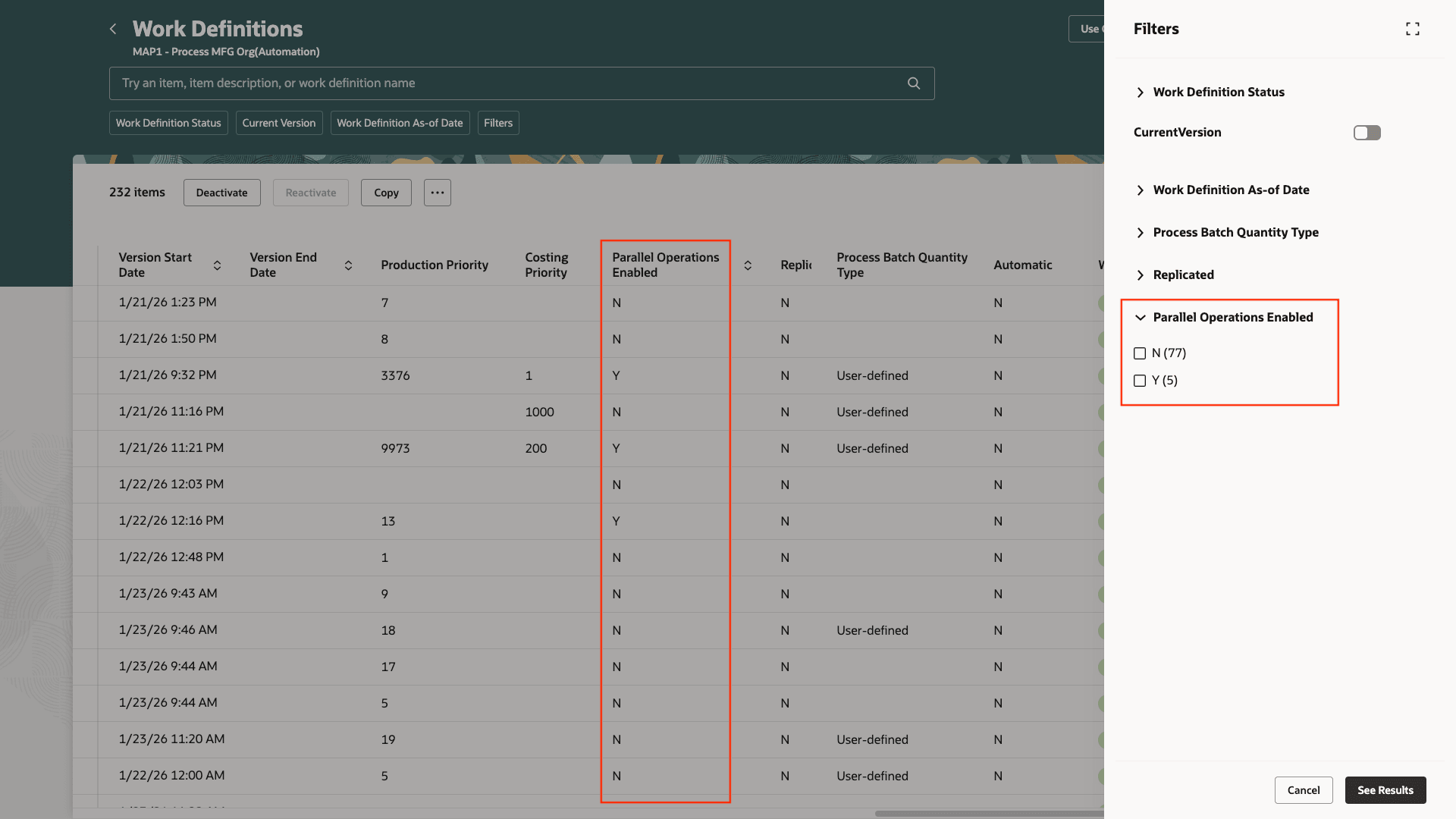
Work Definition Search and Filters Include the Parallel Operations Enabled Attribute
After creating work definitions with the Enable Parallel Operations attribute selected, define the operation dependencies. Operation dependencies can be defined using the new Operation Dependencies page. Please note that if operation dependencies are not defined for work definitions with Enable Parallel Operations enabled, or if the operation dependencies are incomplete or invalid, you cannot use those work definitions to create a work order.
Operation Dependencies:
Here are the steps to set up operation dependencies:
-
Initialize Dependencies
You can use the Initialize Dependencies button to create operation dependencies in sequential order. Once operation dependencies are initialized, you can manually modify them, as needed, to indicate the correct sequence and parallel nature of the operations. Note that after operations are initialized, you cannot initialize the dependencies again, as this may override any manual changes. -
Enter Dependencies
-
Operation dependencies are defined between two operations, referred to as the previous and next operations. During work order execution, the previous operation in a dependency is executed first and the next operation is executed after the previous operation.
-
The first operation is indicated by dependencies that have no previous operation. Note that you must have at least one first operation. Discrete manufacturing supports only one first operation whereas process manufacturing supports multiple first operations.
-
The last operation is indicated by dependencies that have no next operation. Note that you must have only one last operation, and you cannot define multiple last operations.
-
For the Process Manufacturing work method, the following additional information is captured:
-
Dependency Types: The following two dependency types are supported:
-
Finish-to-Start: Indicates that the previous operation must complete before the next operation can start. The completed quantity from the previous operation moves to the next operation. Transfer Percent is used to decide the amount of completed quantity to move. If an operation is a previous operation in multiple dependencies, then the total transfer percent for these dependencies must be 100%. Also note that every operation in the work definition must have a Finish-to-Start dependency.
-
Start-to-Start: Indicates that the previous operation must start before the next operation can start. This is a scheduling dependency and does not involve completed quantity movement between operations. As a result, there is no transfer percent associated with this type of dependency.
-
-
Transfer Percent: Indicates the percentage of completed operation quantity from the previous operation that is moved to the next operation. The following rules apply to Transfer Percent:
-
Transfer percent is only used in process manufacturing work definitions.
-
Transfer percent is not needed for Start-to-Start dependencies, as they are for scheduling only.
-
Transfer percent is not needed for the last operation, as there is no movement of completed quantity out of the last operation.
-
Transfer percent is not needed for first operations when the work definition is defined for a calculated batch quantity.
-
For first operations, the total transfer percent into the first operation must be 100%.
-
The total transfer percent out of an operation must be 100%.
-
-
-
-
Validate Dependencies
Selecting Validate Dependencies, Save, or Save and Close validates the completed dependencies and shows errors in case there are validation failures. The dependencies must conform to the following validations:-
Ensure that all count point operations and automatically transacted operations are included when setting up the operation dependencies.
-
Set up at least one operation as the first operation.
-
Set up only one operation as the last operation.
-
Ensure that the sequence number of the previous operation is lower than that of the next operation.
-
For process manufacturing, the total transfer percent out of an operation must add up to 100%.
-
For process manufacturing, the transfer percent isn't needed for:
-
The first operation dependency when the batch quantity for the work definition is calculated.
-
Start-to-Start dependencies.
-
-
Ensure that optional and automatic operations are not at the start, middle, or end of parallel operations.
-
-
Use Dependency Diagram
Using the Dependency Diagram, you can examine a visual representation of the operation dependencies in a separate window. If there are any validation errors, the dependency diagram also shows the error information.
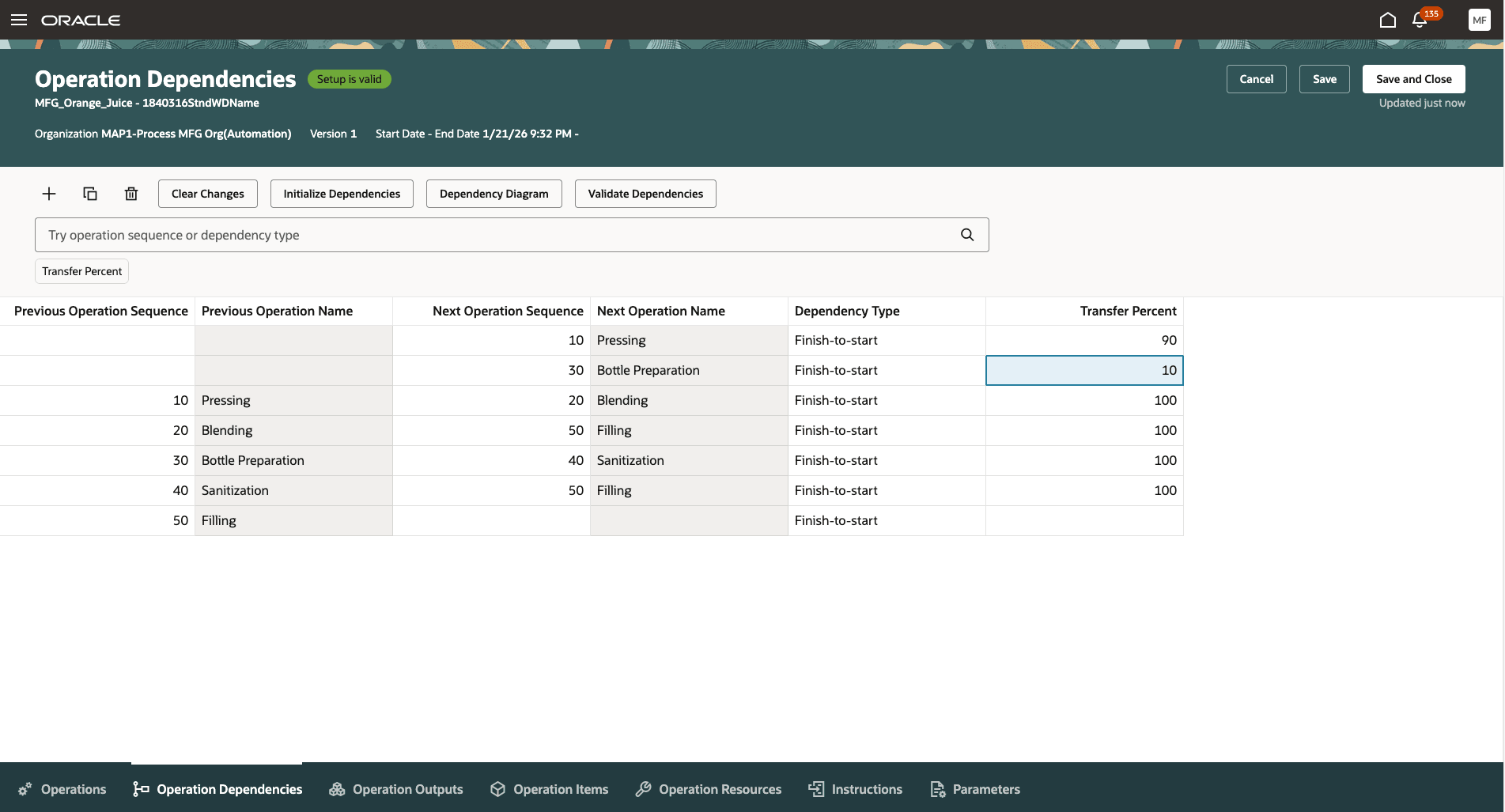
Operation Dependencies for Process Manufacturing Work Definitions
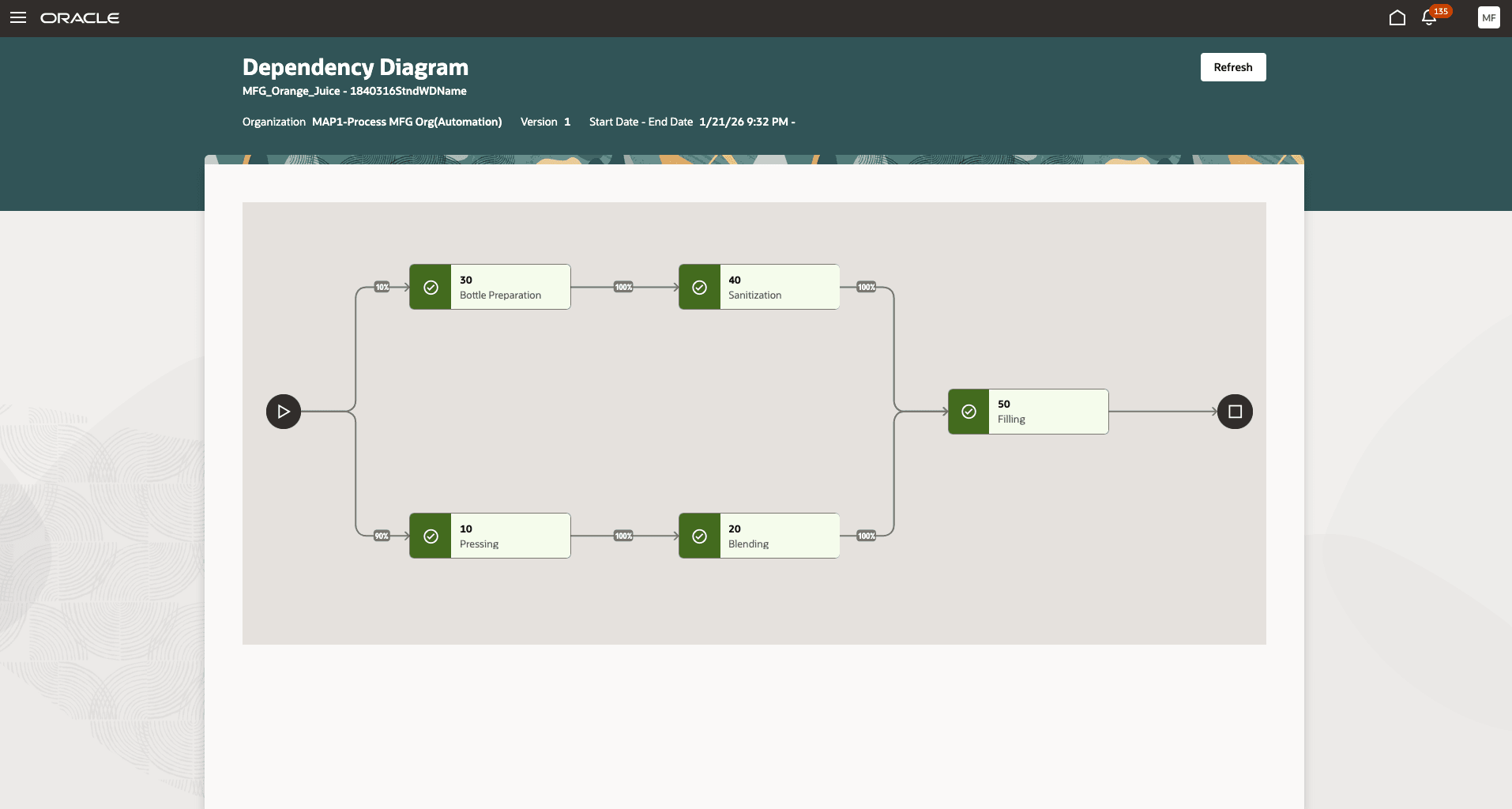
Operation Dependencies Diagram for Process Manufacturing Work Definitions
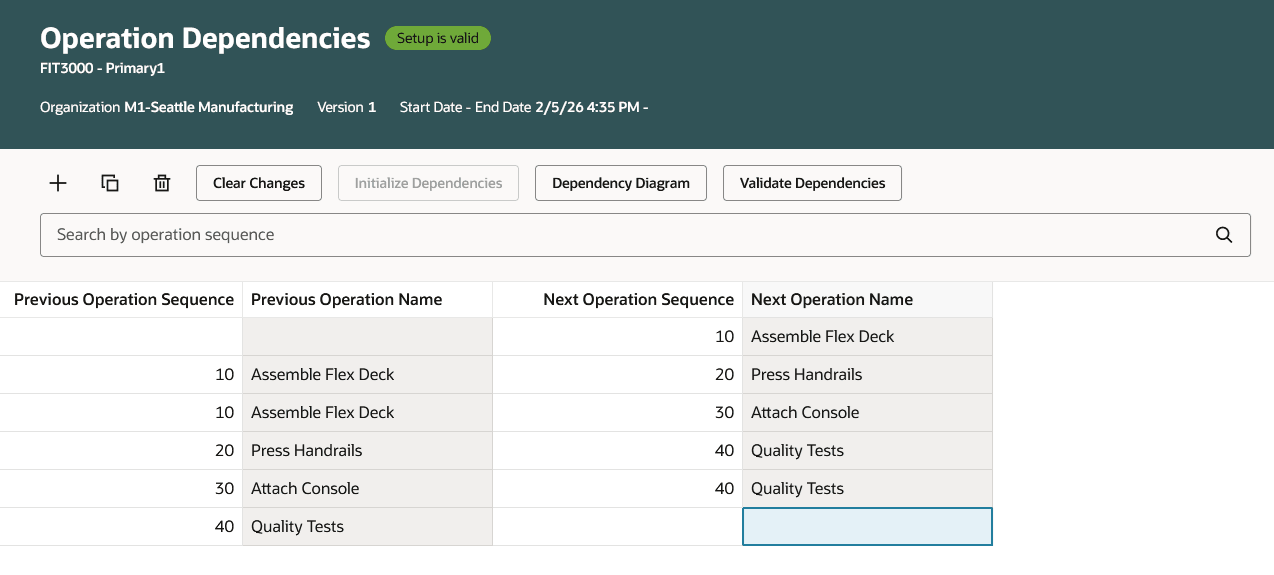
Operation Dependencies for Discrete Manufacturing Work Definitions
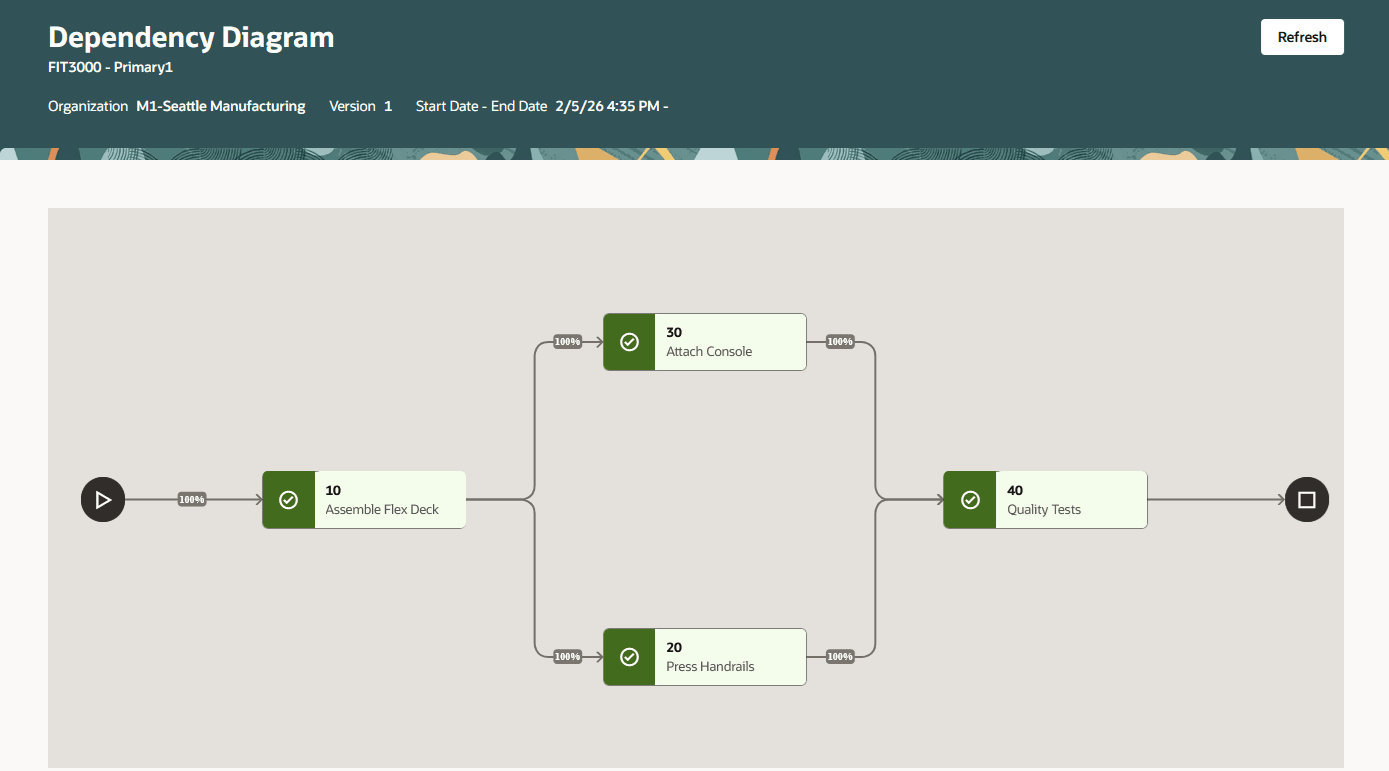
Operation Dependencies Diagram for Discrete Manufacturing Work Definitions
Calculate Lead Times and Roll Up Cumulative Lead Times
Lead time represents the duration, in days, required to manufacture or purchase an item used in producing a product. Lead times for make items are calculated using the work definition. For work definitions with parallel operations enabled, the calculation of lead time for make items uses the operation dependencies to determine the correct lead time. For parallel operations, the calculation logic uses the path that takes the most time to calculate the lead time.
Work Orders
You can create work orders for work definitions with parallel operations enabled. If a work definition with parallel operations enabled has invalid operation dependencies, an error is displayed during work order creation. The following actions are not allowed for work orders with parallel operations:
- You cannot split a work order into multiple execution runs when the work order has parallel operations.
- You cannot delete an operation from a work order with parallel operations.
- You cannot add an operation to a work order with parallel operations.
- You cannot resequence operations for a work order with parallel operations. Resequencing setup is also disallowed during work definition creation for parallel operations.
- You cannot perform midpoint rescheduling for a work order with parallel operations.
- You cannot change the count point or automatically transact attributes for operations.
The following considerations apply when creating work orders with parallel operations enabled:
-
Completion Date and Time: The start and completion dates and times are calculated based on the operation dependencies setup. Parallel operations can start at the same time. If an operation has multiple and parallel previous operations, it can only start after all previous operations have been completed.
-
Work Order Scaling and Operation Yield: During work order creation, the work order is scaled based on the output or batch quantity. Additionally, for user-defined process batch quantities, the operation yield also impacts the scaling. Scaling based on operation yield factors in parallel operations to correctly scale the work order. Note that the calculated process batch quantity does not use operation yield for work order scaling continues to function as before. Refer to the cumulative yield section for more information on how ingredients, resources, and products are scaled based on the operation yield.
-
Work Order Release: Releasing a work order sets the work order status to "Released" and calculates the ready quantity for the first operation. For work orders with parallel operations, the release process uses the operation dependencies to determine one or more first operations and calculates the ready quantity based on these dependencies.
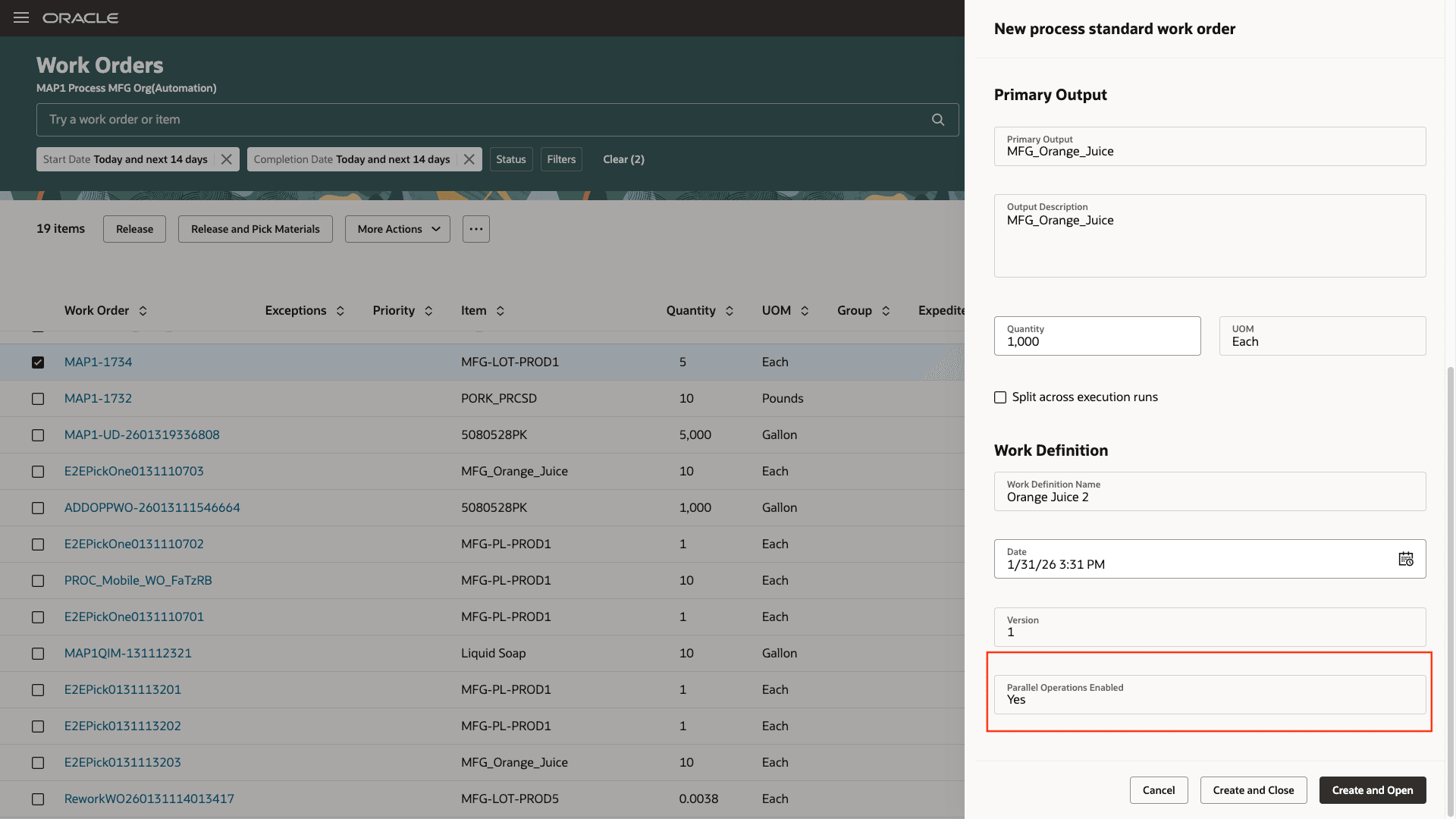
Work Order Creation
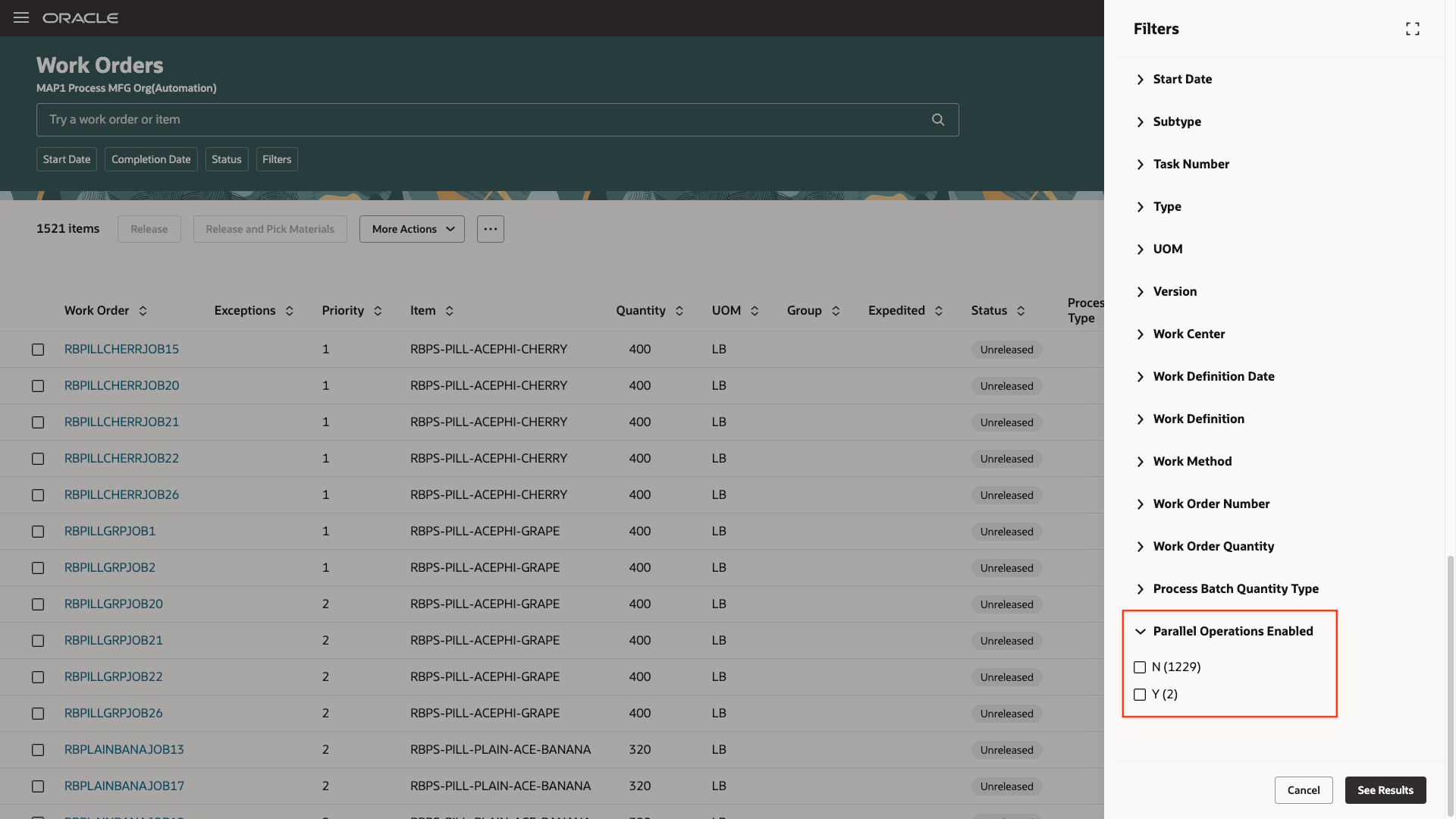
Work Order Search
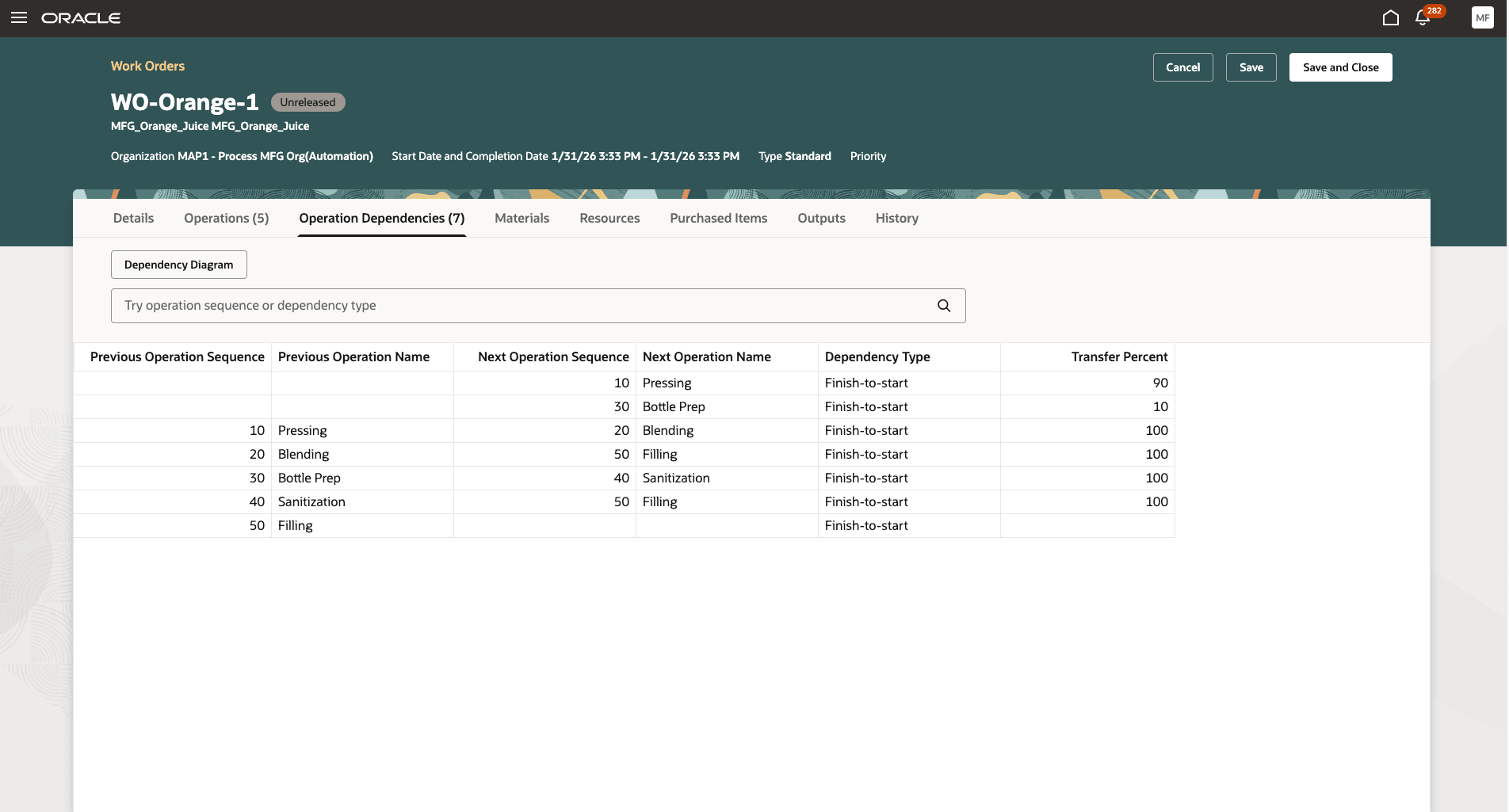
Operation Dependencies for Process Manufacturing Work Orders
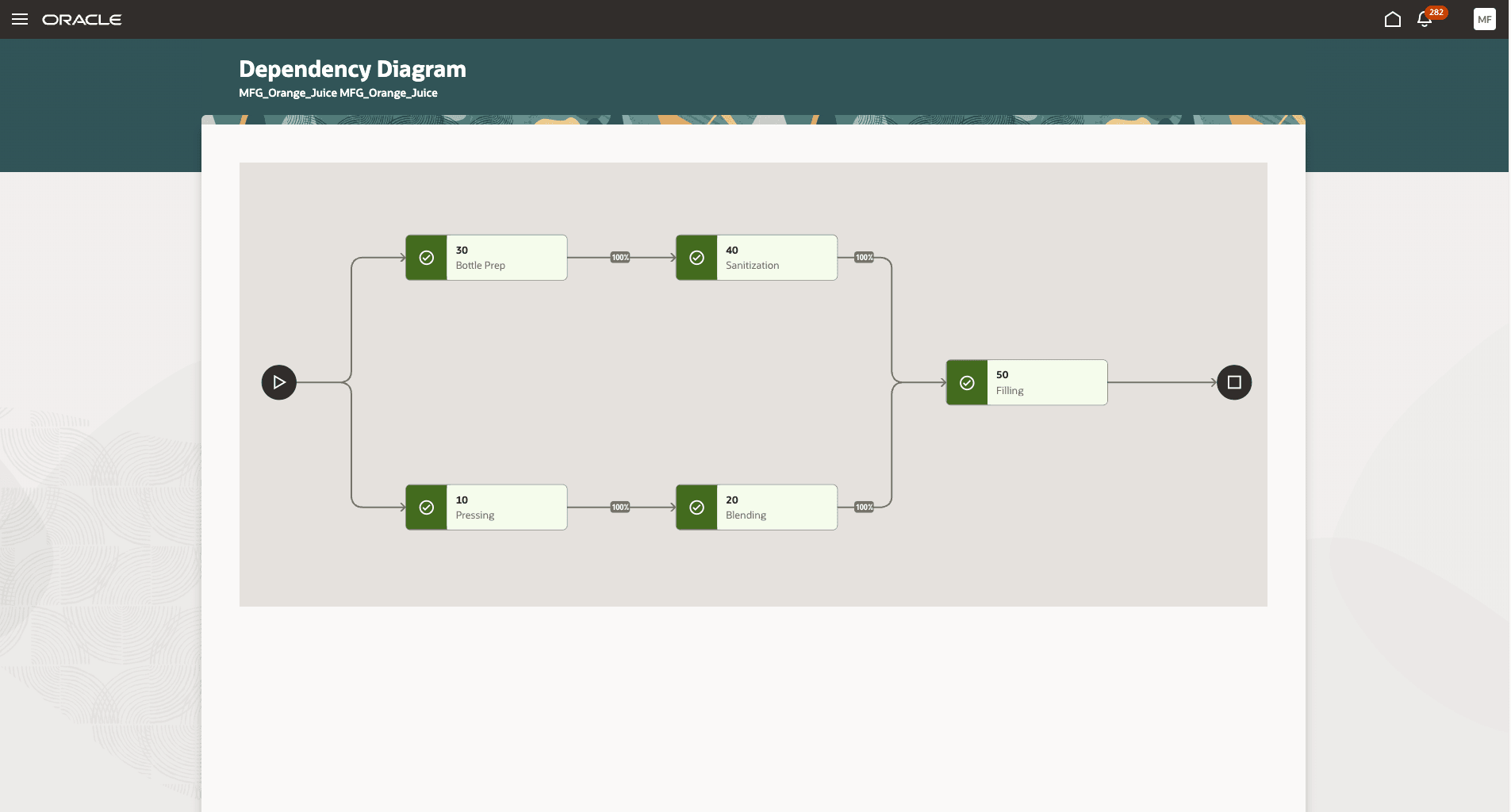
Operation Dependencies Diagram for Process Manufacturing Work Orders
Production Execution
You can continue to report operation transactions for work orders with parallel operations as you currently do. However, there are changes in how the output of an operation transaction impacts the quantities for subsequent operations. The following section describes these changes:
- Complete: Completing a quantity determines the ready quantity for the next operation. For parallel operations, the operation dependencies setup is used to determine one or more next operations and the corresponding transfer percent. The ready quantity for the next one or more operations is determined by transferring the completed quantities as follows:
-
Process manufacturing: The completed quantity, after applying the transfer percent, is transferred to the next operation. For multiple previous operations, the ready quantity for the next operation is the total transferred quantity from all previous operations.
-
Discrete manufacturing: The entire completed quantity is transferred to all the next operations. For multiple previous operations, the minimum completed quantity from the previous operations is transferred to the next operation.
-
-
Reversal: When reversing a completion, the available-to-reverse quantity is determined using the operation dependencies setup. The available quantity displayed is the maximum quantity that can be reversed, so that the ready quantities for the next operations do not become less than zero.
Please note that if ‘Transfer work-in-process manually’ is enabled for the work centers, this setup is ignored during production execution for work definitions with parallel operations. For work definitions with parallel operations, work-in-process transfer is always done automatically.
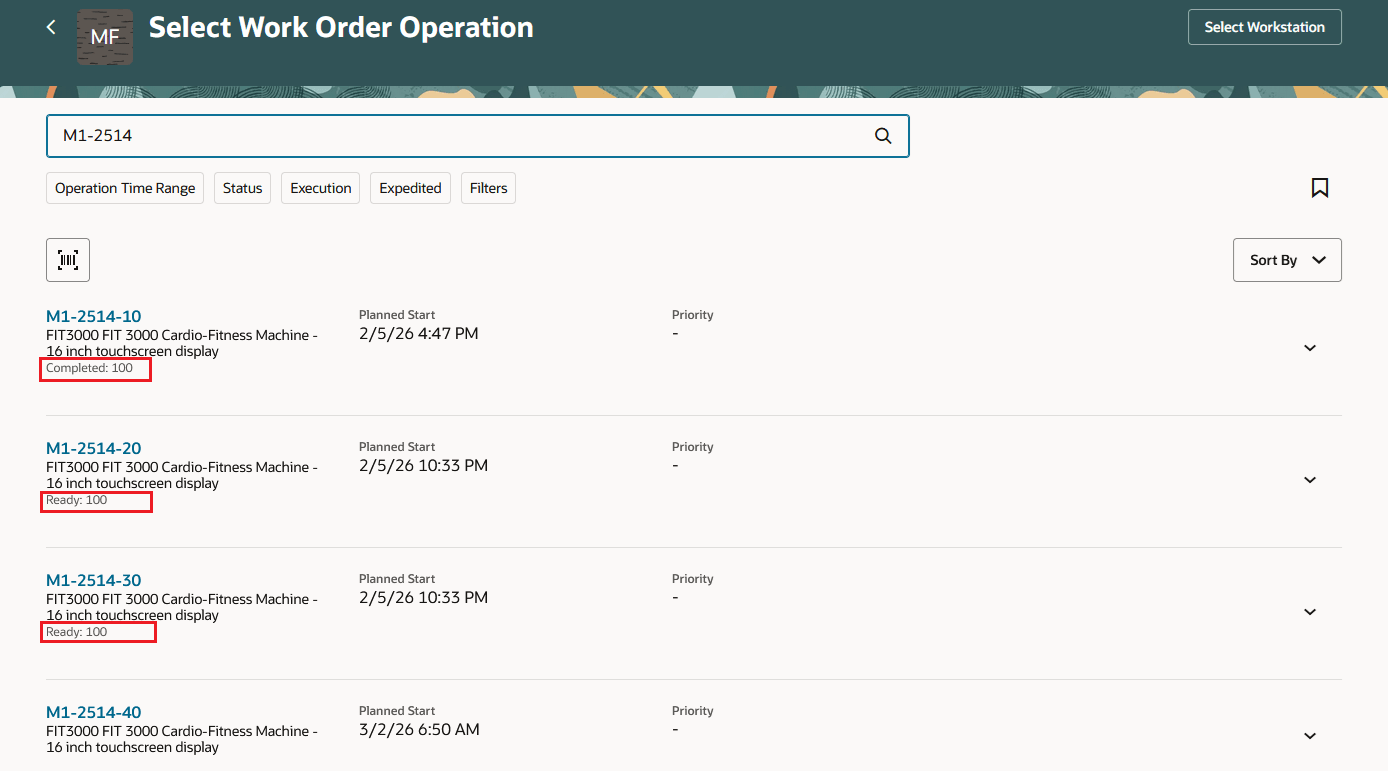
Work Order Operations
Sync Work Definition Changes with Existing Work Orders
Using this scheduled process, you can synchronize changes to work definitions. For work orders with parallel operations, work definition changes are synchronized to the work order only if the work order has not been released. Once a work order with parallel operations has been released, you cannot synchronize any work definition changes to it using this scheduled process.
Import
The following import processes have been modified to allow the import of operation dependencies:
- FBDI – Process Work Definition Import
The import process includes the following changes:
-
Work Definition Headers: An additional attribute, Enable Parallel Operations, has been introduced to optionally enable parallel operations for a work definition.
-
Operation Dependencies: For work definitions with parallel operations enabled, you can now specify the operation dependencies.
Reports
The following reports have been modified to display operation dependency information:
- Work Order Traveler Report - Displays operation dependencies for process and discrete manufacturing work orders.
- Print Work Definition Report - Displays operation dependencies for process work definitions.
- Electronic Record for Work Definition - Displays operation dependencies for process work definitions.
- Electronic Production Record - Displays operation dependencies for process and discrete manufacturing work orders.
These reports now display the operation dependencies for a work definition or work order. The following example illustrates how this information is displayed in one of these reports:
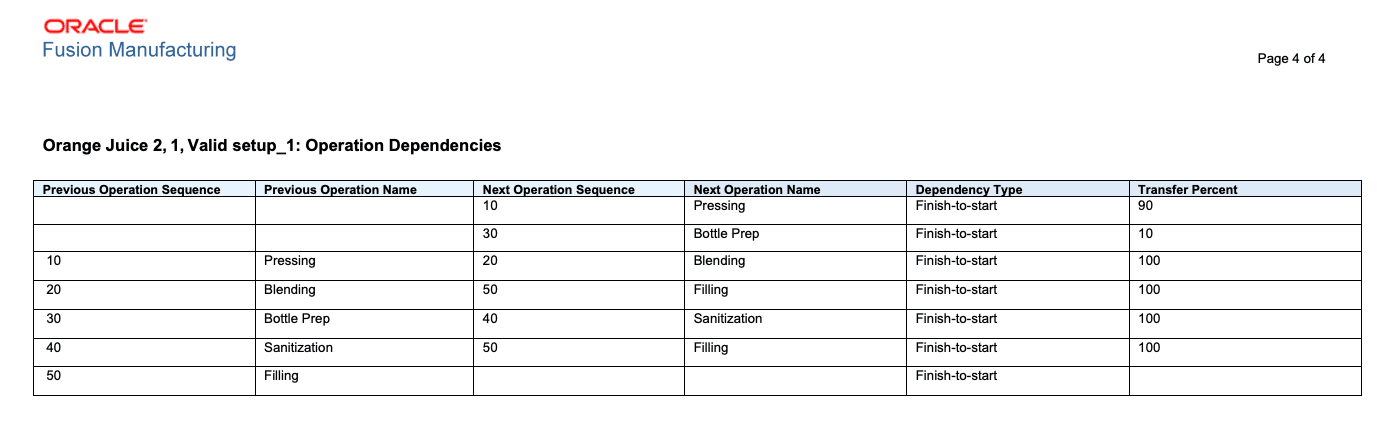
Operation Dependencies in Reports
This feature increases the flexibility and efficiency of your manufacturing processes. By enabling true parallel execution and robust dependency management, organizations can accelerate production, optimize resource usage, and deliver on tighter schedules—all while accurately tracking execution progress and maintaining quality and compliance.
Here's the demo of these capabilities in discrete manufacturing:
Here's the demo of these capabilities in process manufacturing:
Steps to enable and configure
Use the Opt In UI to enable this feature. For instructions, refer to the Optional Uptake of New Features section of this document.
Offering: Manufacturing and Supply Chain Materials Management No Longer Optional From: Update 26D
Set the Enable Parallel Operations attribute when creating a new work definition to allow parallel operations for that work definition.
Tips and considerations
- Standard, Nonstandard, Rework, and Transform work definitions can be enabled for parallel operations.
- Flow Manufacturing, Contract Manufacturing, and ATO Model work definitions cannot be enabled for parallel operations.
- The Enable Parallel Operations attribute for a work definition cannot be changed once the work definition is saved.
- Work definitions with incomplete or invalid operation dependencies cannot be used for creating a work order.
- Operation dependencies and parallel execution cannot be resequenced or edited after release; create new versions instead.
- All updates are reflected across work order creation, execution, auditing, and analytics (including REST, FBDI, OTBI, and reports).
- Only “Finish-to-Start” and “Start-to-Start” dependencies are supported, and total transfer percentages from a previous step to its next must add up to 100% (Process Manufacturing only).
- Optional, automatic, or supplier operations cannot be included in parallel branches. For Process Manufacturing, supplier operations are not supported.
- You have the flexibility to set up and execute parallel operations. For discrete work orders, you need to additionally ensure the following:
- Execute Ready Quantity: Execute the ready quantity available and report the completed quantity for all the parallel operations.
- Report Scrap Quantity: Report the scrap at only one of the parallel operations (system allows scrap for any of the parallel operations). This avoids over reporting or under reporting of scrap quantities across parallel operations.
- Manually Scheduling: When the work orders with parallel operations are manually scheduled, ensure that the parallel operations dates are updated manually.
- The following features are not supported for parallel operations:
- Execution Runs: Multiple execution runs are not supported for work orders with parallel operations.
- Transfer work-in-process manually: This setup is not used for production execution of work orders with parallel operations.
Key resources
- Oracle Fusion Cloud SCM: Refer to the Using Manufacturing guide, available on the Oracle Help Center.
- Oracle Fusion Cloud SCM: Refer to the Implementing Manufacturing and Supply Chain Materials Management guide, available on the Oracle Help Center.
Access requirements
Users who are assigned a configured job role that contains these privileges can access this feature:
- Manage Work Definitions (WIS_MANAGE_WORK_DEFINITIONS_PRIV)
- Manage Work Definitions by Service (WIS_MANAGE_WORK_DEFINITIONS_SERVICE_PRIV)
- Manage Work Order Headers (WIP_MANAGE_WORK_ORDER_HEADERS_PRIV)
- Manage Work Orders by Service (WIP_UPDATE_WORK_ORDERS_SERVICE_PRIV)
- Manage Work Order Operations (WIP_MANAGE_WORK_ORDER_OPERATIONS_PRIV)
- Manage Work Execution Work Area (WIP_MANAGE_WORK_EXECUTION_WORK_AREA_PRIV)
- Execute Production at a Workstation (WIP_EXECUTE_WORKSTATION_PRIV)
- Report Operation Transactions (WIP_REPORT_OPERATION_TRANSACTIONS_PRIV)
- Import Work Definitions (WIS_IMPORT_WORK_DEFINITIONS_PRIV)
- Import Work Orders (WIP_IMPORT_WORK_ORDERS_PRIV)
- Print Work Definition Report (WIS_PRINT_WORK_DEFINITION_REPORT_PRIV)
- Generate Work Definition Report (WIS_GENERATE_WORK_DEFINITION_REPORT_PRIV)
- Print Work Order Traveler (WIP_PRINT_WORK_ORDER_TRAVELER_PRIV)
- Print Electronic Production Records (WIP_PRINT_ELECTRONIC_PRODUCTION_RECORDS_PRIV)
- Sync Work Definition Changes with Existing Work Orders (WIS_SYNC_WORK_DEFINITION_CHANGES_TO_WORK_ORDER_PRIV)
These privileges were available prior to this update.