Redwood: Enforce Integer Quantities for Materials when Checking Material Availability for Work Orders
In a prior release, enforcing integer requirements for materials applied to flow, discrete and process manufacturing work definitions, flow schedules, and orderless transactions. Now, you can also view the availability of work order operation materials that need to be issued in integer quantities in Material Availability. The following screenshot shows the details of a sample item structure in Product Information Management. The Enforce Integer Requirement is set to Round up for the item, Bluetooth Pulse Strap.
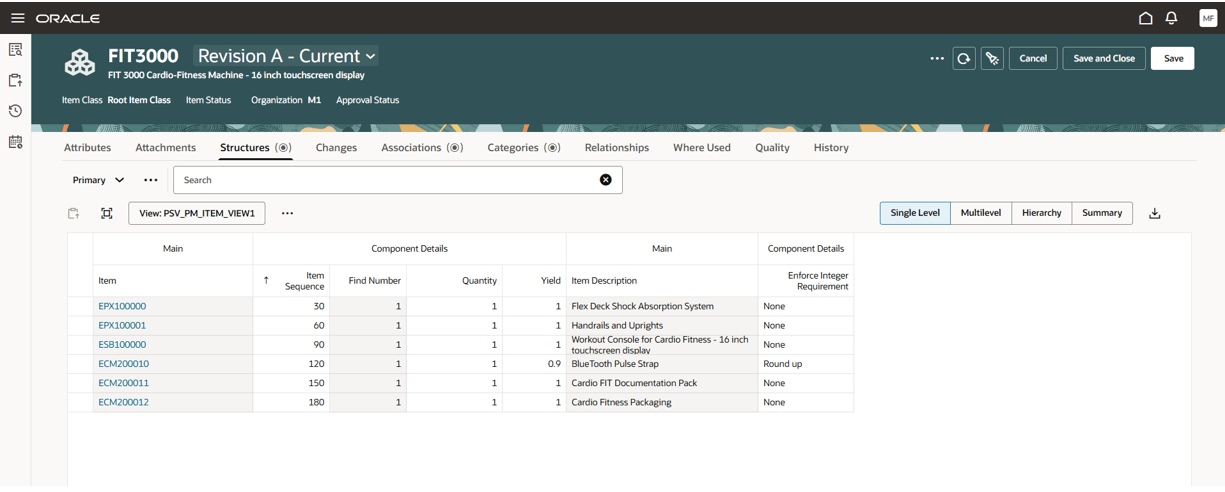
Enforce Integer Requirement Setup for an Item Structure Component in Product Information Management
The Enforce Integer and Adjusted Quantity fields are added to the material availability details for the work order. The Adjusted Quantity for the material is the round up or round down quantity per the Enforce Integer Requirement setting. The Material Availability Assignments page calculates the material availability requirements using the adjusted quantity of material as per the round up or round down value of the Enforce Integer Requirement. The following screenshot shows the Work Orders tab for the Material Availability Assignments page:
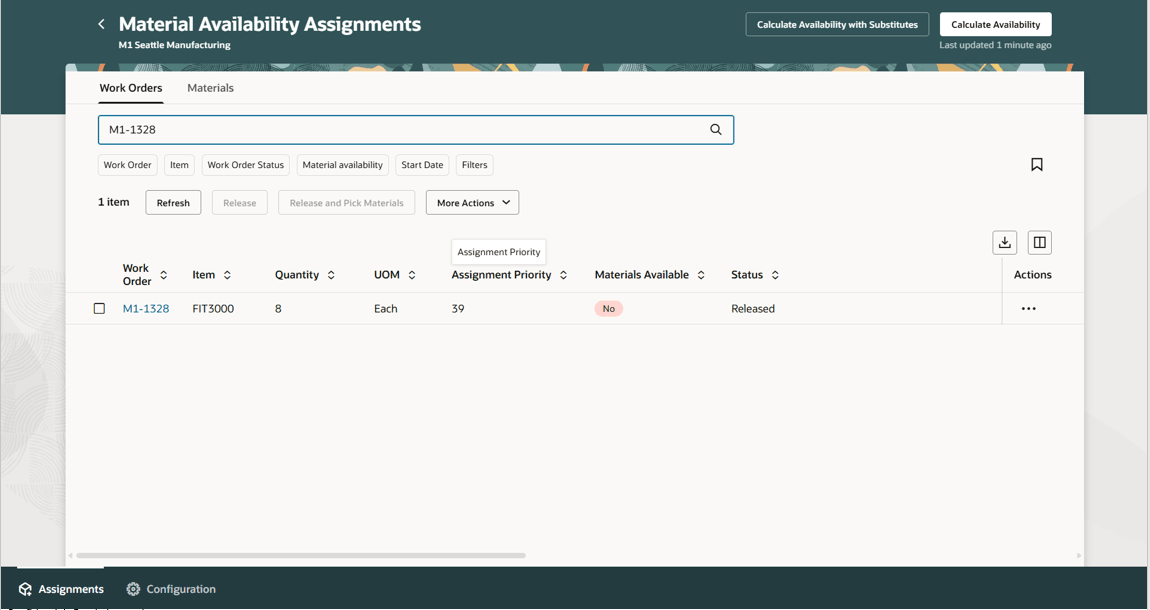
Work Orders Tab in Material Availability Assignments
The work order assignment details show all material requirements for the work order. For a material with the Enforce Integer Requirement set, the open, reserved, allocated and picked quantities are calculated using the adjusted quantity of the material. The following screenshot shows an example:
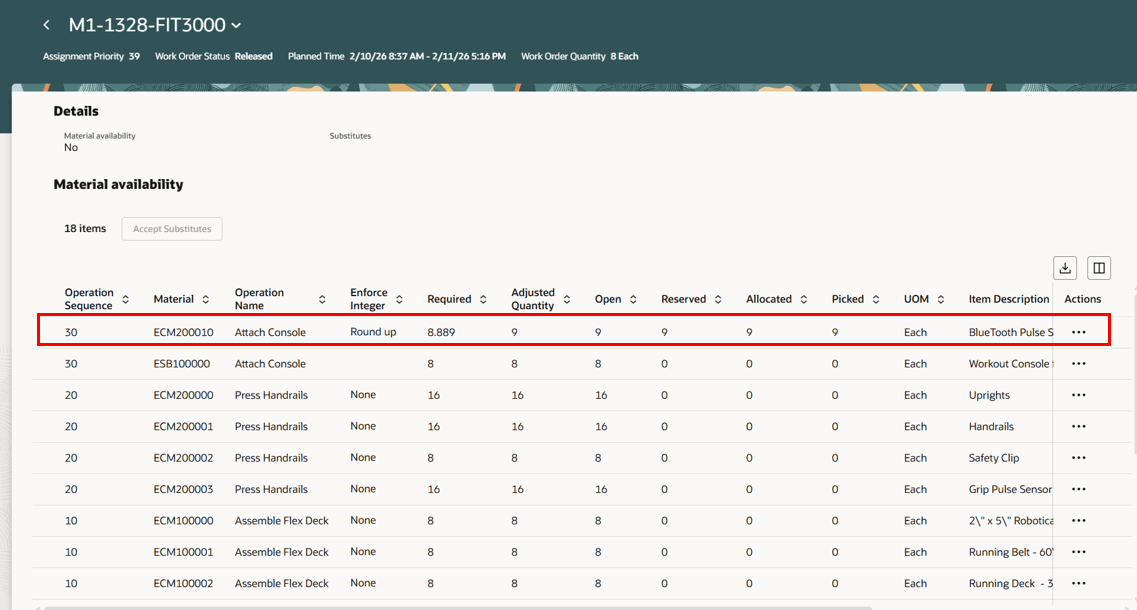
View Assignment Details for a Work Order in Material Availability Assignments
The Materials tab under Material Availability Assignments also shows the open, reserved, allocated and picked quantities using the adjusted quantity of the material.
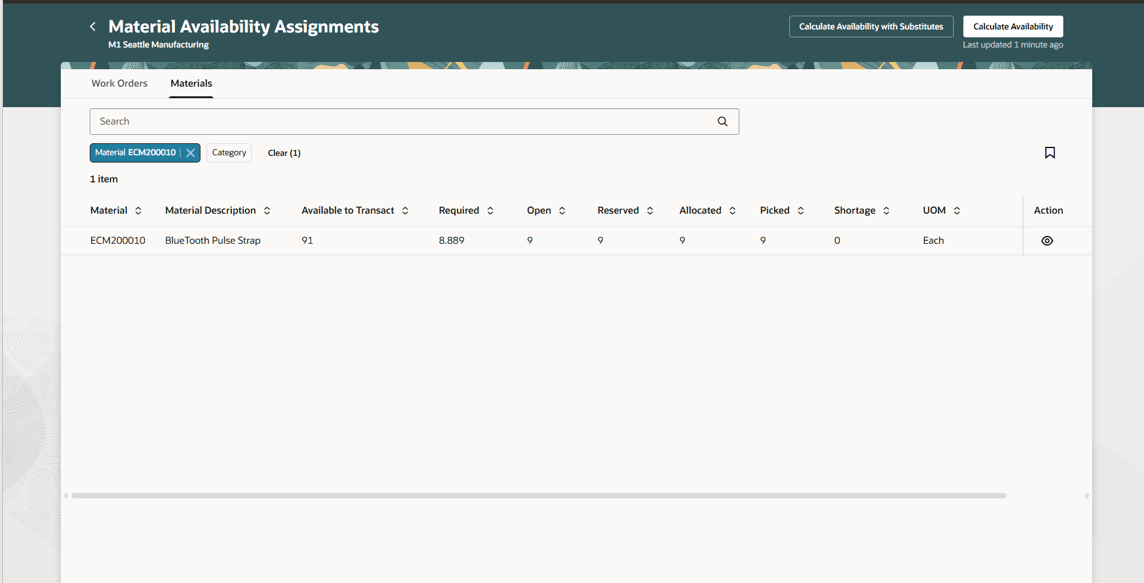
Materials Tab in Material Availability Assignments
Enforcing integer quantities alleviates discrepancies in decimal on-hand inventory balances for items that are only tracked in whole units.
Here's the demo of these capabilities:
Steps to enable and configure
You don't need to do anything to enable this feature.
Tips and considerations
- Refer to the 25D feature Enforce Integer Quantities for Materials in Work Orders and Production Transactions for more tips and considerations.
- Refer to the 26A feature Enforce Integer Quantities for Materials in Orderless Transactions and Flow Schedule Execution for more tips and considerations.
- The feature is only available with the Redwood pages for Material Availability Assignments.
- Considerations for Material Availability Assignments:
- Material availability assignments show all quantities using the primary unit of measure.
- For manufacturing work order components, the current logic for open quantity remains the same, and is calculated as:
- Open quantity = Required quantity – Issued quantity.
- In addition, the open quantity is set to zero if it becomes negative.
- For material availability assignments, open quantity is calculated as
- Open quantity = Adjusted quantity – Issued quantity.
- In addition, the open quantity is set to zero if it becomes negative.
- When the work order unit of measure is different from the primary unit of measure, the adjusted quantity and open quantity can use decimal numbers in the primary unit of measure, post UOM conversion. The primary unit measure is not rounded off again.
- If Enforce Integer Requirement is None, then the adjusted quantity is the same as the required quantity.
- Considerations for Picks and Reservations:
- Inventory picking and reservations will honor the adjusted quantity of the work order component and UOM to honor the Enforce Integer Requirement setting.
- The Material Availability Assignments page represents allocated, picked, and reserved quantities in the primary unit of measure. Therefore, no rounding is applied even if they are in decimals.
- Considerations for the Material Availability Scheduled Process:
- Calculate Material Availability uses the adjusted quantity instead of required quantity if enforce integer policy is set to either round up or round down for materials.
- Calculate Material Availability with substitutes uses the adjusted quantity instead of required quantity if enforce integer policy is set to either round up or round down for substitutes.
Key resources
- Watch the Enforce Integer Quantities for Materials in Work Orders and Production Transactions demo.
- Watch the Enforce Integer Quantities for Materials in Orderless Transactions and Flow Schedule Execution demo.
- Watch the Enforce Integer Quantities for Materials When Checking Material Availability for Work Orders demo.
- Watch Redwood: Assess Material Availability for Work Order Prioritization demo.
- Oracle Fusion Cloud SCM: Refer to the Using Manufacturing guide, available on the Oracle Help Center.
- Oracle Fusion Cloud SCM: Refer to the Implementing Manufacturing and Supply Chain Materials Management guide, available on the Oracle Help Center.
Access requirements
Users who are assigned a configured job role that contains these privileges and codes can access this feature:
Item Structure Privileges and Duty Roles:
- Create Item Structure (EGP_CREATE_ITEM_STRUCTURE_PRIV)
- View Item (EGP_VIEW_ITEM_PRIV)
- Manage Item (EGP_MANAGE_ITEM_PRIV)
- Access Item Structure Data Using a REST Service (EGP_GET_ITEM_STRUCTURE_REST_PRIV)
- Access Product Management Landing Page (EGP_ACCESS_LANDING_PAGE_PRIV)
- Item Management (ORA_EGP_ITEM_MANAGEMENT_DUTY)
Work Order Privileges:
- Manage Work Order Headers (WIP_MANAGE_WORK_ORDER_HEADERS_PRIV)
- Manage Work Order Operations (WIP_MANAGE_WORK_ORDER_OPERATIONS_PRIV)
- Manage Work Execution Work Area (WIP_MANAGE_WORK_EXECUTION_WORK_AREA_PRIV)
- View Work Orders (WIP_VIEW_WORK_ORDERS_PRIV)
Manage Material Availability Rules and Assignments:
- Manage Material Availability Rules and Assignments (WIP_MANAGE_MATERIAL_AVAIL_RULES_AND_ASSIGN_PRIV)