Redwood: Issue an Item Multiple Times in an Operation for Discrete Manufacturing Work Orders and Flow Schedules
In a prior release, you could use a unique Find Number to distinguish multiple instances of the same material within an item structure to maintain material traceability through to a manufacturing work definition operation. However, if the material appears multiple times within an operation, its quantities are combined in a discrete manufacturing work order and material transactions, and the distinct identity of each material instance is lost.
You can now configure whether the same material is combined or retained as separate instances in an operation for a discrete manufacturing work order or flow schedule. With separate material instances, you can also report material for a specific instance during orderless completion, scrap, return, and return from scrap.
For a distinct instance of a material using Find Number in a work definition operation, you can specify different attributes such as quantity, basis type, supply type, and supply subinventory and locator. A new plant parameter Allow repeated consumption of materials in discrete work orders and flow schedules controls how a recurring material in an operation is handled in work orders and production execution.
- The default setting for the plant parameter is disabled, where the material quantities are combined in an operation and not distinguished by Find Number.
- When the plant parameter is enabled, each instance of the material in an operation has a Find Number and a unique Material Sequence that can also guide the progression of materials issued from inventory to the work order.
The phantom explosion process during the creation of a discrete manufacturing work order or flow schedule applies the plant parameter setting to phantom materials and their substitutes. If the same item in a work definition operation also exists under a phantom item structure, then enabling the plant parameter maintains distinct instances instead of combining its quantities during phantom explosion.
With the plant parameter enabled, the Material Sequence and Find Number for each repeated material instance is included in the following:
- Work order operation items.
- Operation Transactions - Backflush Materials.
- Flow Schedules - Material Details.
- Orderless Transactions.
- Material transactions reporting, mobile production reporting, and postproduction reporting.
- Material transaction e-record.
- Reports including work order traveler, components list, and electronic production record.
With the plant parameter enabled, the Material Sequence for each repeated material instance is included in the following:
- Pick requests and material picking.
- Material reservations.
- Production transaction history.
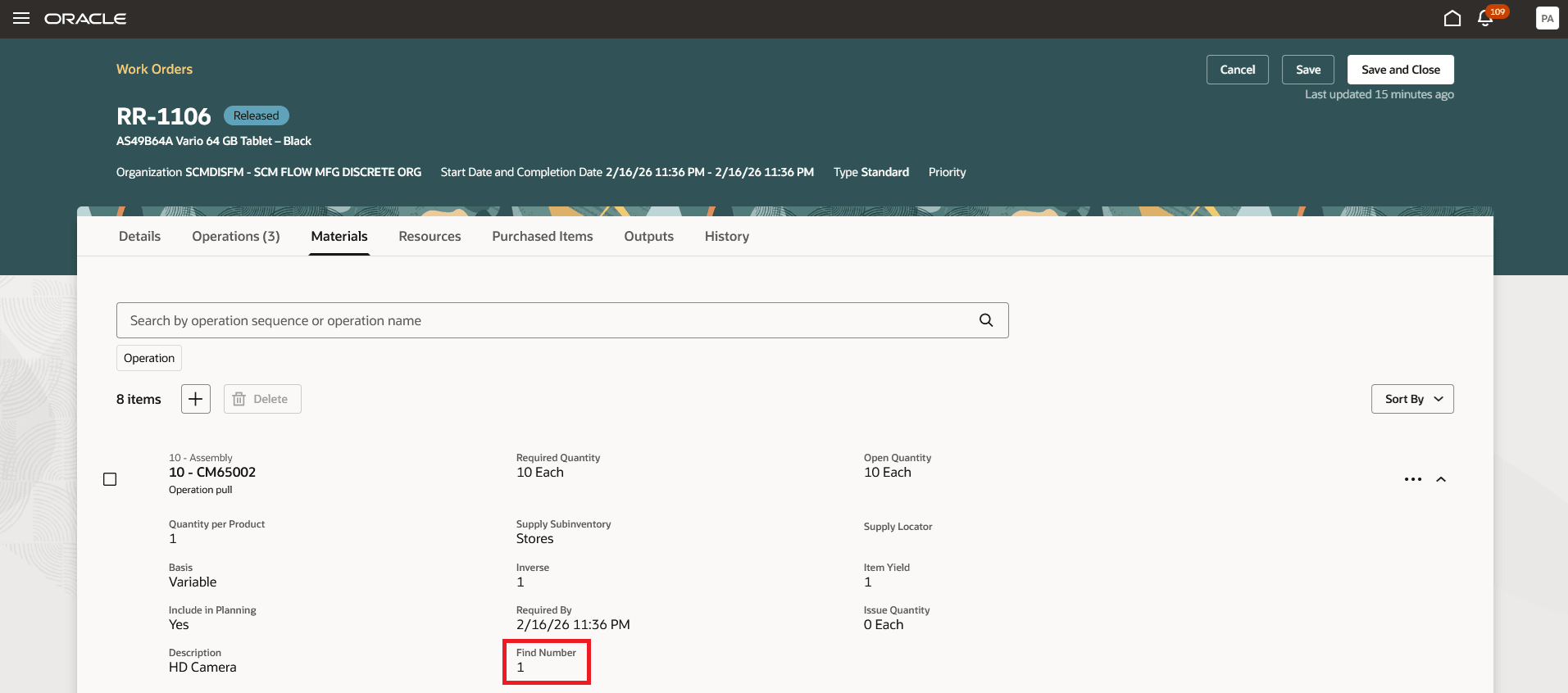
Review Material Sequence and Find Number for Work Order Material
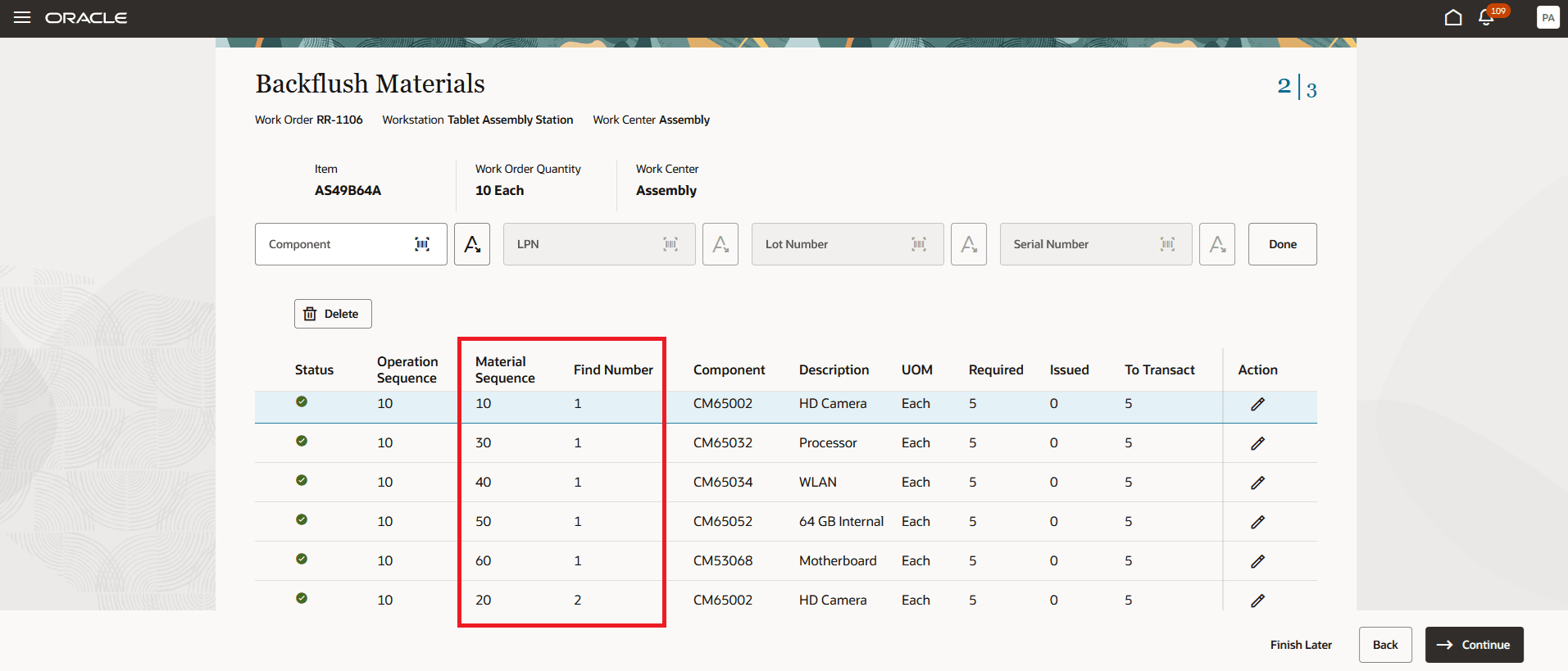
Review Material Sequence and Find Number in the Backflush Materials Page
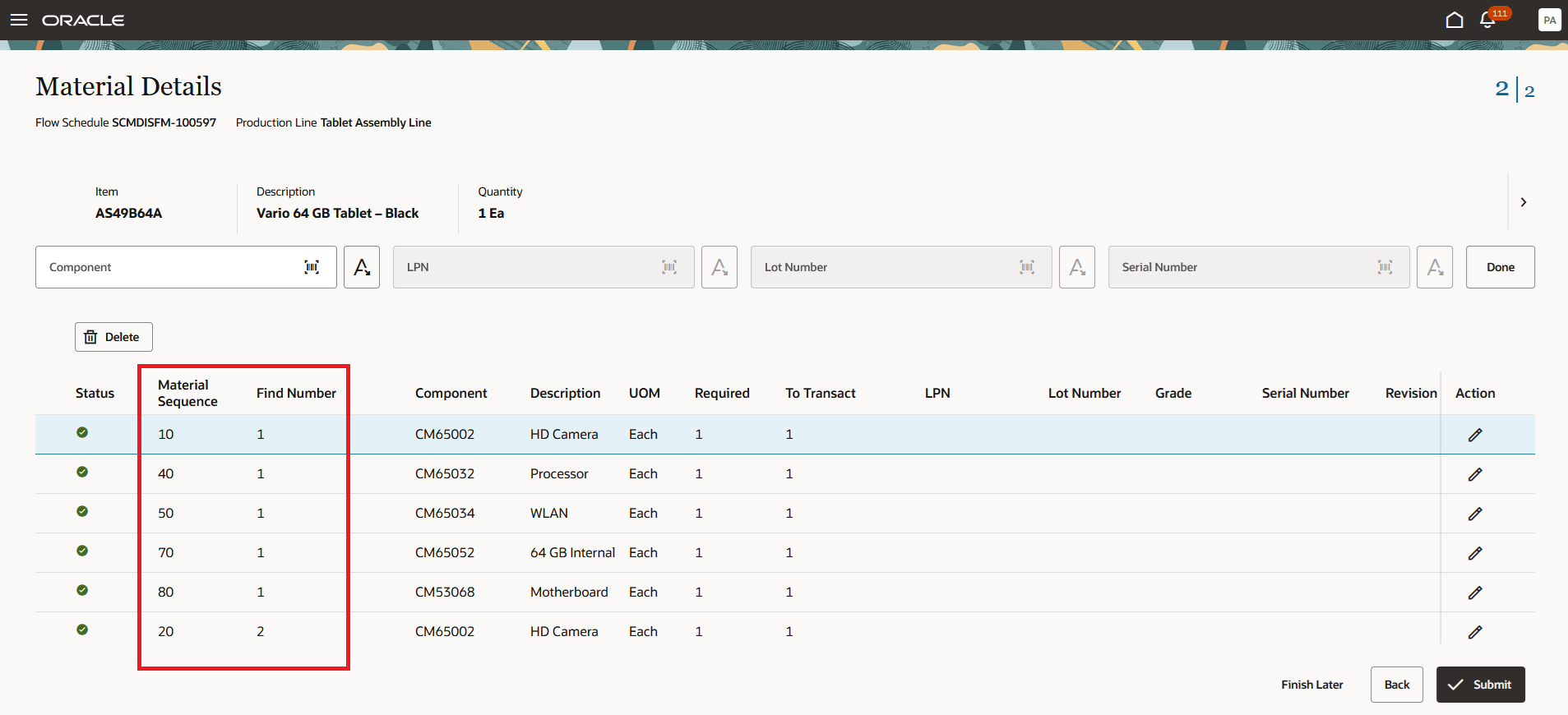
Review Material Sequence and Find Number in the Material Details Page for a Flow Schedule
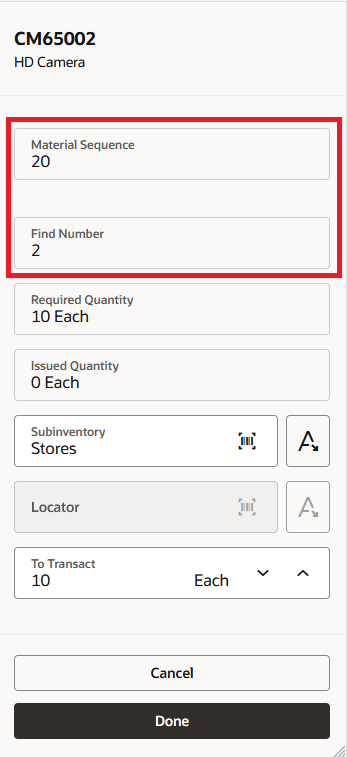
Review Material Sequence and Find Number when Reporting Material Transactions Using an Industrial Handheld Device
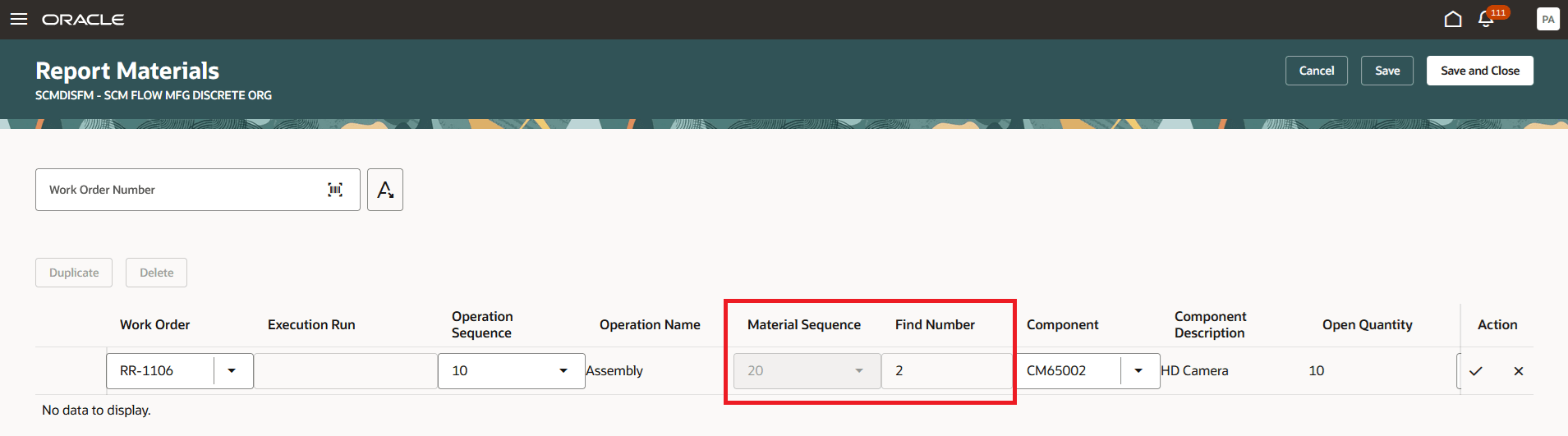
Review Material Sequence and Find Number During Postproduction Reporting
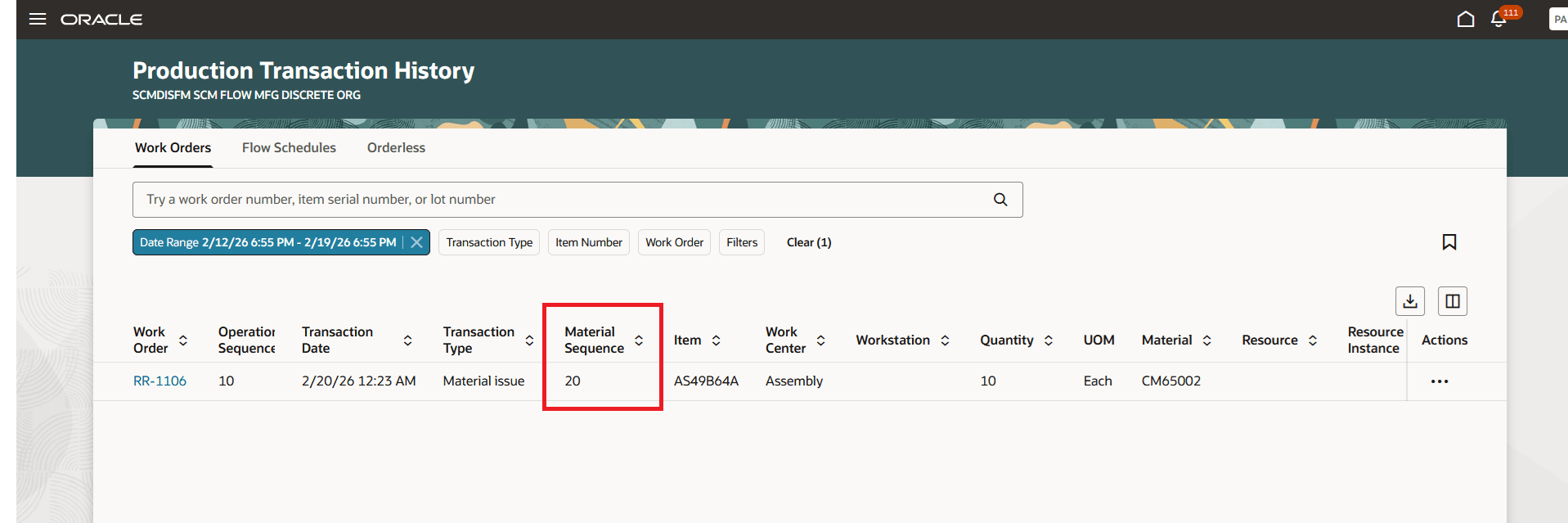
Review Material Sequence in the Production Transaction History
Using different find numbers and material sequences, you can streamline the coordination between product development and manufacturing engineering, model the materials for production more accurately, and maintain the traceability of repeated materials in a manufactured product.
Here's the demo of these capabilities:
Steps to enable and configure
Set up the plant parameters to enable this feature:
- In the Setup and Maintenance work area, search for, and select the Manage Plant Parameters task.
- On the Manage Plant Parameters page, select the required inventory organization.
- In the Work Execution tab, under Manage Production, select the Allow repeated consumption of materials in discrete work orders and flow schedules checkbox.
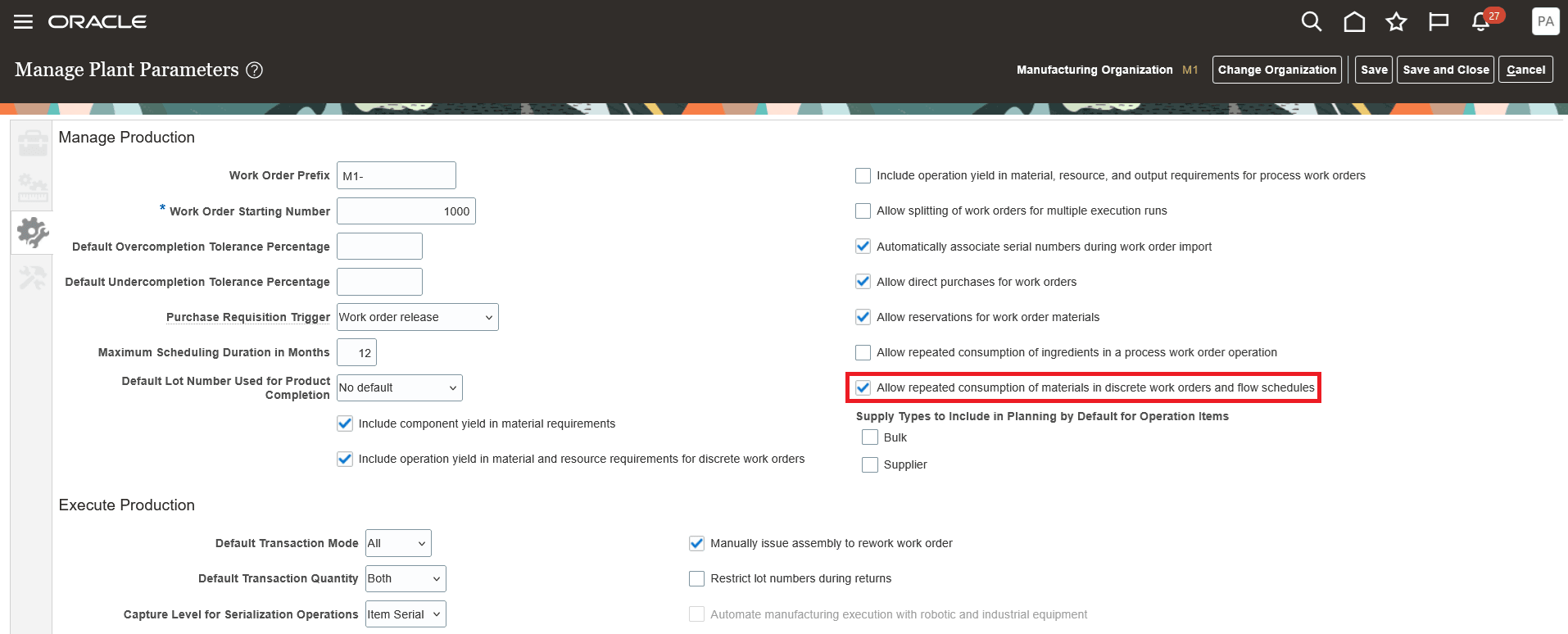
Enabling the Plant Parameter
Tips and considerations
- The following describes alternate approaches in repeating materials in an operation:
- You can repeat a material in an item structure using a unique Find Number and specify the same suggested operation sequence to automatically assign it to an operation when a discrete or flow manufacturing work definition is created. The Process Item Structure Changes to Work Definitions scheduled process automatically synchronizes item structure changes to work definitions, as the item structure component attributes are referenced.
- You can alternatively assign an item structure component quantity to a discrete or flow work definition operation and split the quantity to repeat it multiple times in the operation. The Process Item Structure Changes to Work Definitions scheduled process sends a notification if the item structure changes, the suggested operation sequence is not specified in the item structure, or the operation items have been overridden in the work definition.
- For the best user experience, use the Redwood pages as the material sequence attribute is visible only in Redwood pages for material transactions in Fusion Manufacturing.
- You can't repeat an ad hoc material in an operation or use a repeating material in a supplier operation.
- In Fusion Inventory, operation sequence and material sequence attributes have been added only to the Redwood pages. These attributes are hidden by default on the Redwood Inventory pages and can be exposed using business rules.
- If you use Fusion Supply Chain Planning, then you can't consider a repeating material in an operation during planning collections at this time.
- If you use Fusion Production Scheduling, then you can't consider a repeating material in an operation at this time.
- Also refer to the related 26A feature Issue an Item Multiple Times in an Operation for a Process Manufacturing Work Order for more information.
Key resources
- Watch the Issue an Item Multiple Times in an Operation for Discrete Manufacturing Work Orders and Flow Schedules demo.
- Refer to the Oracle Fusion Cloud SCM: Using Manufacturing guide, available on the Oracle Help Center.
- Refer to the Oracle Fusion Cloud SCM: Implementing Manufacturing and Supply Chain Materials Management guide, available on the Oracle Help Center.
Access requirements
Users who are assigned a configured job role that contains the following privileges can access this feature:
Manage Plant Parameters (RCS_PLANT_PARAMETERS_PRIV)
Manufacturing privileges
- Manage Work Definitions (WIS_MANAGE_WORK_DEFINITIONS_PRIV)
- View Work Definitions (WIS_VIEW_WORK_DEFINITIONS_PRIV)
- Get Work Definitions by Service (WIS_GET_WORK_DEFINITIONS_SERVICE_PRIV)
- Manage Work Definitions by Service (WIS_MANAGE_WORK_DEFINITIONS_SERVICE_PRIV)
- Manage Work Execution Work Area (WIP_MANAGE_WORK_EXECUTION_WORK_AREA_PRIV)
- Manage Work Order Headers (WIP_MANAGE_WORK_ORDER_HEADERS_PRIV)
- View Work Orders (WIP_VIEW_WORK_ORDERS_PRIV)
- Report Material Transactions (WIP_REPORT_MATERIAL_TRANSACTIONS_PRIV)
- View Production Transaction History (WIE_VIEW_MANUFACTURING_TRANSACTION_HISTORY_PRIV)
- Report Postproduction Transactions (WIE_REPORT_POSTPRODUCTION_TRANSACTIONS)
Inventory privileges
- Manage Inventory Movement Request (INV_MANAGE_INVENTORY_MOVEMENT_REQUEST_PRIV)
- Confirm Pick Using Responsive Inventory (ORA_INV_CONFIRM_PICK_PWA_DUTY)
- Confirm Pick Using Responsive Inventory (INV_CONFIRM_PICK_PWA_PRIV)
- View Inventory Pick Using Responsive Inventory (ORA_INV_VIEW_INVENTORY_PICK_PWA_DUTY)
- View Inventory Reservation Using Responsive Inventory (ORA_INV_VIEW_INVENTORY_RESERVATION_PWA_DUTY)
- Review Completed Inventory Transactions Using Responsive Inventory (INV_REVIEW_COMPLETED_INVENTORY_TRANSACTION_PWA_PRIV)
These privileges were available prior to this update.