Track Equipment and Operator Related Activities During Production Execution
In modern manufacturing, accurate tracking of resource usage during work order operations is key to understanding true costs and optimizing performance. This update introduces the ability for operators to record the time spent on each distinct activity—such as setup, run, teardown, and cleanup—performed at a resource during production execution. Operators can start, pause, and stop activities in real time, automatically capturing the precise durations and associating them with the relevant resource. These enhancements bring a new level of detail to production reporting, capacity planning, and costing.
Key capabilities include:
- Operators can start, pause, and stop resource activities, such as setup, run, and breakdown, during operation execution.
- Automatic recording and charging of resources based on the actual time spent, leading to precise and granular costing.
- Supervisors and engineers can view, monitor, and analyze activity durations and resource utilization for operational decisions and improvement initiatives.
- Smart Operations Configuration enhancements now link activity tracking with workstation status change reasons for streamlined shop floor visibility.
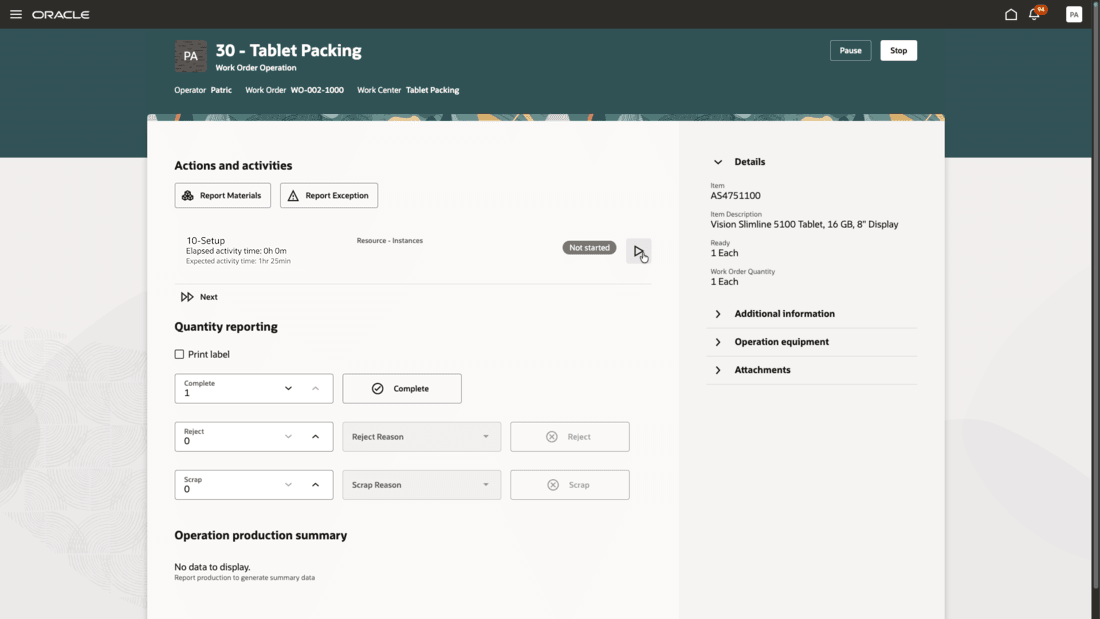
Start Resource Activity
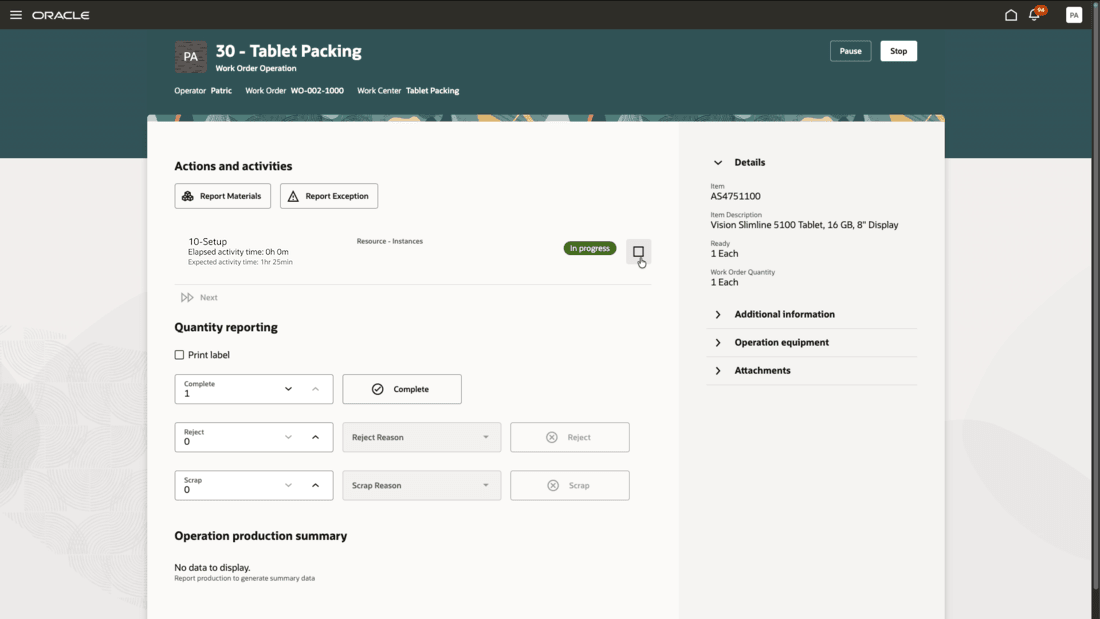
Stop Activity
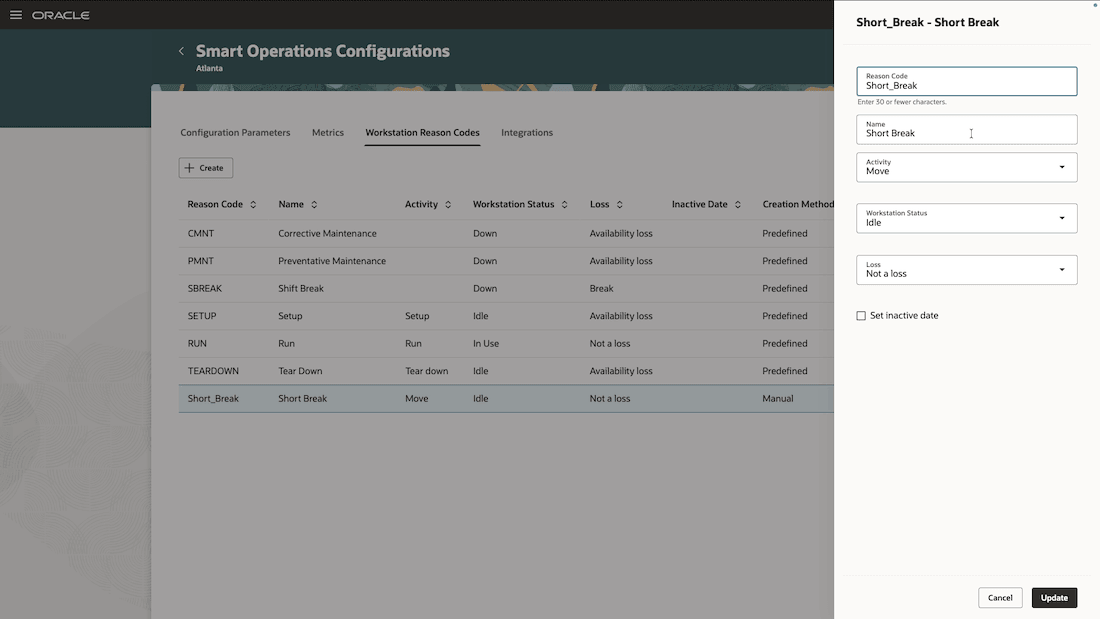
Map a Resource Activity to a Workstation Status Change Reason
This feature enables businesses to achieve accurate cost accounting, improve capacity and efficiency planning, and gain powerful insights into the sources of delays and losses. With granular tracking, manufacturers can reduce waste, drive lean and continuous improvement initiatives, and ensure that resources are optimally utilized.
Here's the demo of these capabilities:
Steps to enable and configure
- In the Work Execution work area, select the Smart Operations Configurations action. On the Configuration Parameters tab of Smart Operations Configurations, set Track Activities to Enable.
- Map work order operation resources or work definition operation resources to resource activities to allow an operator to report start and stop for the resource activities.
Tips and considerations
- Activities can only be started for one resource sequence at a time; activities can be started and stopped multiple times. Activities can also be skipped.
- Automated charging for resource usage is now supported at the activity level.
- Equipment resources that have a resource activity defined are charged for the duration of the activity.
- Equipment resources that do not have a resource activity defined are charged for the whole duration of execution.
- Labor resources that have a resource activity defined are charged for the duration of the activity.
- If the operators checked in and executing the operation at a workstation are labor resource instances of a resource that has an activity defined, then the operators are charged against the activity for the duration of the activity. If they work before the activity started or after the activity ended, then they are additionally charged for the duration that they were executing the work order operation without an active resource activity.
- Activity tracking is supported for both workstation-based execution and execution without the context of workstations.
- Resource activities can be mapped to a workstation status change reason code, so that the workstation's status automatically changes to the mapped status when the operator starts an activity. If an operator pauses or changes the workstation status when an activity is in progress, the activity is stopped after a warning message.
- Activities can be configured in the lookup type - ORA_WIS_RESOURCE_ACTIVITY.
- Activities "Setup", "Run", and "Tear Down" are mapped to workstation status change reasons "Setup", "Run", and "Tear Down" by default. You can configure these further using the Smart Operations Configuration action in the Work Execution work area.
Key resources
- Watch the feature demo for Track Equipment and Operator Related Activities During Production Execution.
- Oracle Fusion Cloud SCM: Refer to the Using Manufacturing guide, available on the Oracle Help Center.
- Oracle Fusion Cloud SCM: Refer to the Implementing Manufacturing and Supply Chain Materials Management guide, available on the Oracle Help Center.
Access requirements
Redwood Production Execution Privileges:
- Execute Production at a Workstation (WIP_EXECUTE_WORKSTATION)
- View Workstations (WIS_VIEW_WORKSTATIONS_PRIV)
- Report Operation Transactions (WIP_REPORT_OPERATION_TRANSACTIONS_PRIV)
Guided Journeys: Role Codes
- Use REST Service - Guided Journeys Read Only (Role Code ORA_PER_REST_SERVICE_ACCESS_GUIDED_JOURNEYS_RO)
- Use REST Service - Guided Journey Responses (Role Code ORA_PER_REST_SERVICE_ACCESS_GUIDED_JOURNEY_RESPONSES)