Stop an Operation and Correct Resource Usage During Production Supervision
Operational disruptions such as operator absences, abandoned sessions, or system interruptions can create gaps in execution and resource tracking on the factory floor. With this update, production supervisors can use the Monitoring tab in the Production Supervision UI to force check out operators and properly stop work order operations. This ensures that resource usage time and operation status are accurately recorded, even if an operator does not manually check out at the end of their shift.
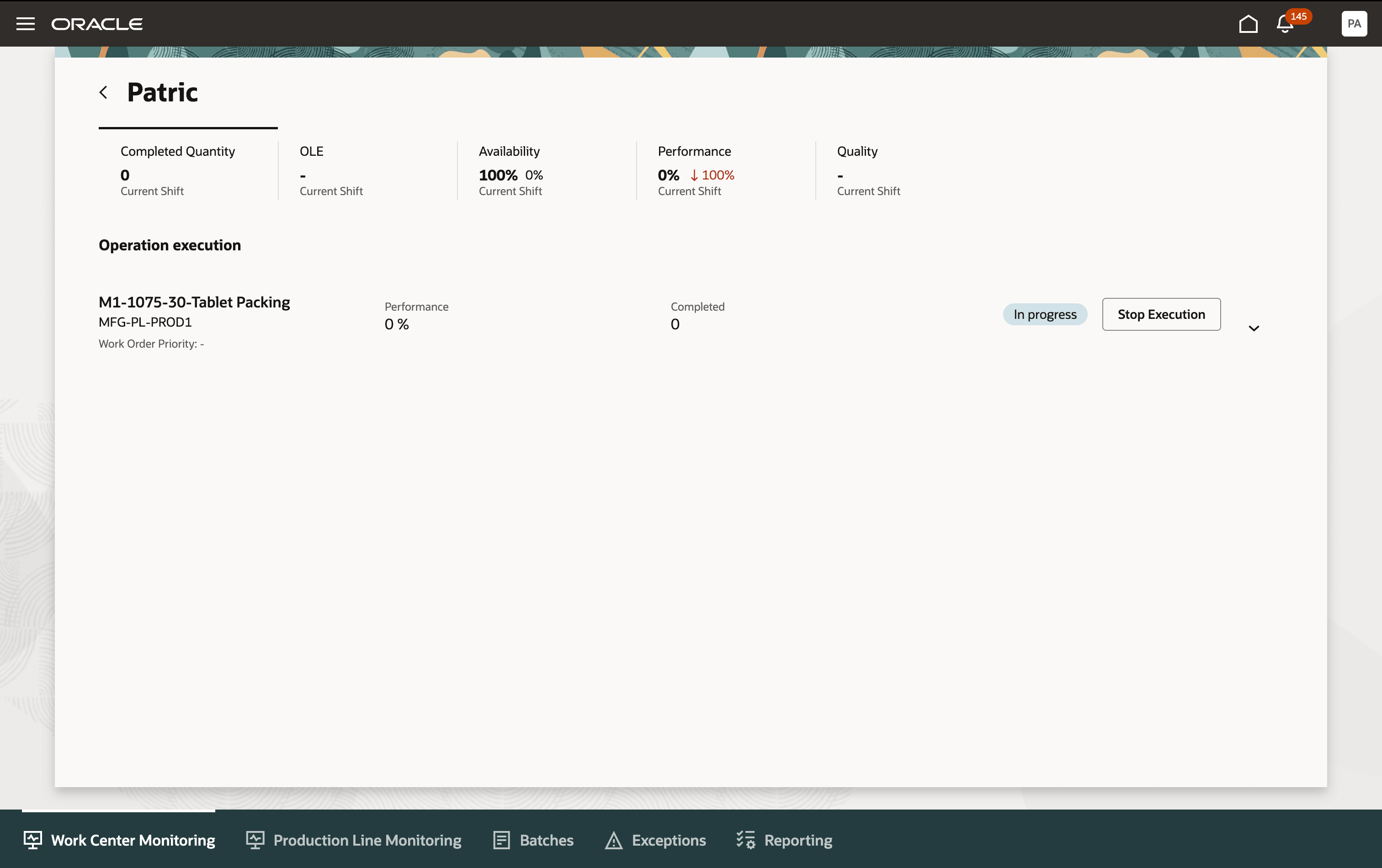
Stop Execution of Work Order Operation
Key capabilities include:
- Supervisors can force check out individual operators from active operations irrespective of whether multiple or single operators are present.
- When checking out the last operator, the execution session ends, and the supervisor can adjust resource usage time before confirming.
- Three modes of resource charging are supported: No resource charge (Don't Submit), automated background charge (Automatic), and supervisor review and edit of resource time (After Review).
This feature provides operational resilience and greater supervision control, allowing supervisors to maintain accurate labor and equipment usage records, ensure timely session closure, and improve overall production data quality for performance.
Here's the demo of these capabilities:
Steps to enable and configure
Use the Opt In UI to enable this feature. For instructions, refer to the Optional Uptake of New Features section of this document.
Offering: Manufacturing and Supply Chain Materials Management No Longer Optional From: Update 26D
To enable this feature, you must specify how the system should process resource transactions when operators stop execution:
- Navigate to the Supply Chain Execution > Work Execution > Smart Operations Configurations page.
- Select the appropriate value in the Resource Transaction Submission After Execution field. The following options are available: Automatic, After Review, and Don't Submit.
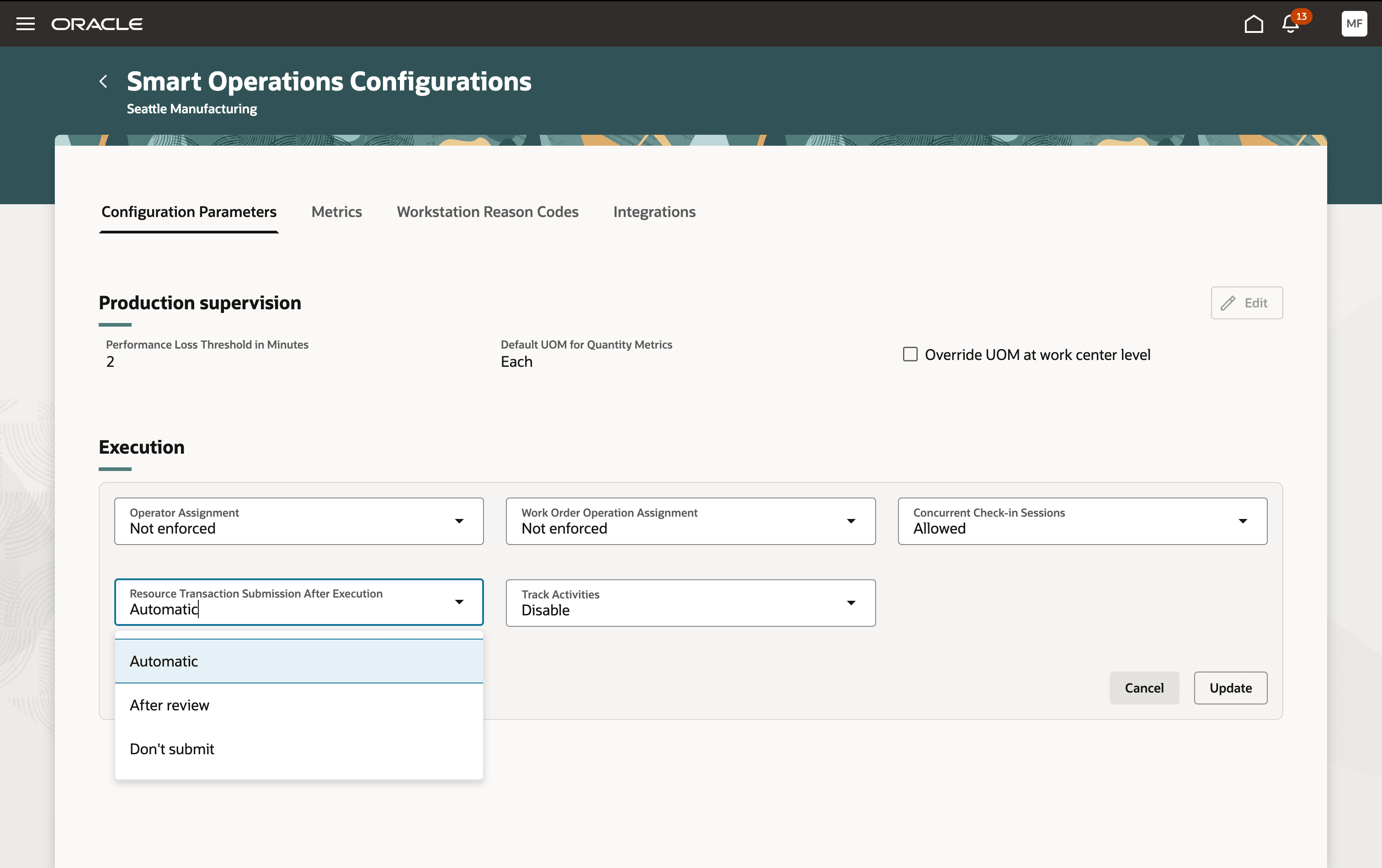
Resource Transaction Submission Types
Tips and considerations
- If multiple operators are checked in, only the chosen operator is checked out. The session remains active until the last operator is checked out.
- On force checkout of the last operator, supervisors can review and adjust the resource usage and then confirm closure; all changes are reflected immediately.
- The supervisor must use the current time or an earlier timestamp (never future) when adjusting the check-out timestamp.
Key resources
- Refer to the Oracle Fusion Cloud SCM: Using Manufacturing guide, available on the Oracle Help Center.
- Refer to the Oracle Fusion Cloud SCM: Implementing Manufacturing and Supply Chain Materials Management guide, available on the Oracle Help Center.
Access requirements
Users who are assigned a configured job role that contains the following privileges can use this feature:
- Supervise Production (WIP_SUPERVISE_PRODUCTION_PRIV): Allows access to the production supervision task.
- Check Out Operator (WIP_CHECKOUT_OVERRIDE_WORKSTATION_PRIV): Allows a supervisor to override the normal operator checkout process and forcefully check out an operator from a workstation or operation.
- Execute Production at a Workstation (WIP_EXECUTE_WORKSTATION): Allows an operator to execute and report production at a workstation.
- Configure Smart Operations Parameters (WIP_CONFIGURE_SMART_OP_PARAMETERS_PRIV): Allows users to define and configure parameters for Smart Operations.