Collect Production Parameter Data Manually Using Digital Work Instructions
Accurate data collection at each step of the manufacturing process is essential for quality, traceability, and regulatory compliance. With this update, operators are now empowered to record and store production data—including readings and measurements from external tools while executing the instruction tasks, at the precise step where the data is collected. Manufacturing engineers can embed parameter fields into instruction steps, and operators can enter relevant details as part of the guided workflow, ensuring that the right data is collected at the right time.
With this update, you have the option to add operational parameters from the operation to a work instruction step, which lets the operator capture the parameter values during work execution. The options to add work instruction text and media continue to be available.
The operator supplies the operational parameter values when executing the work instruction. The operator can also view previously collected parameters. The option to collect parameters at operation completion continues to be available.
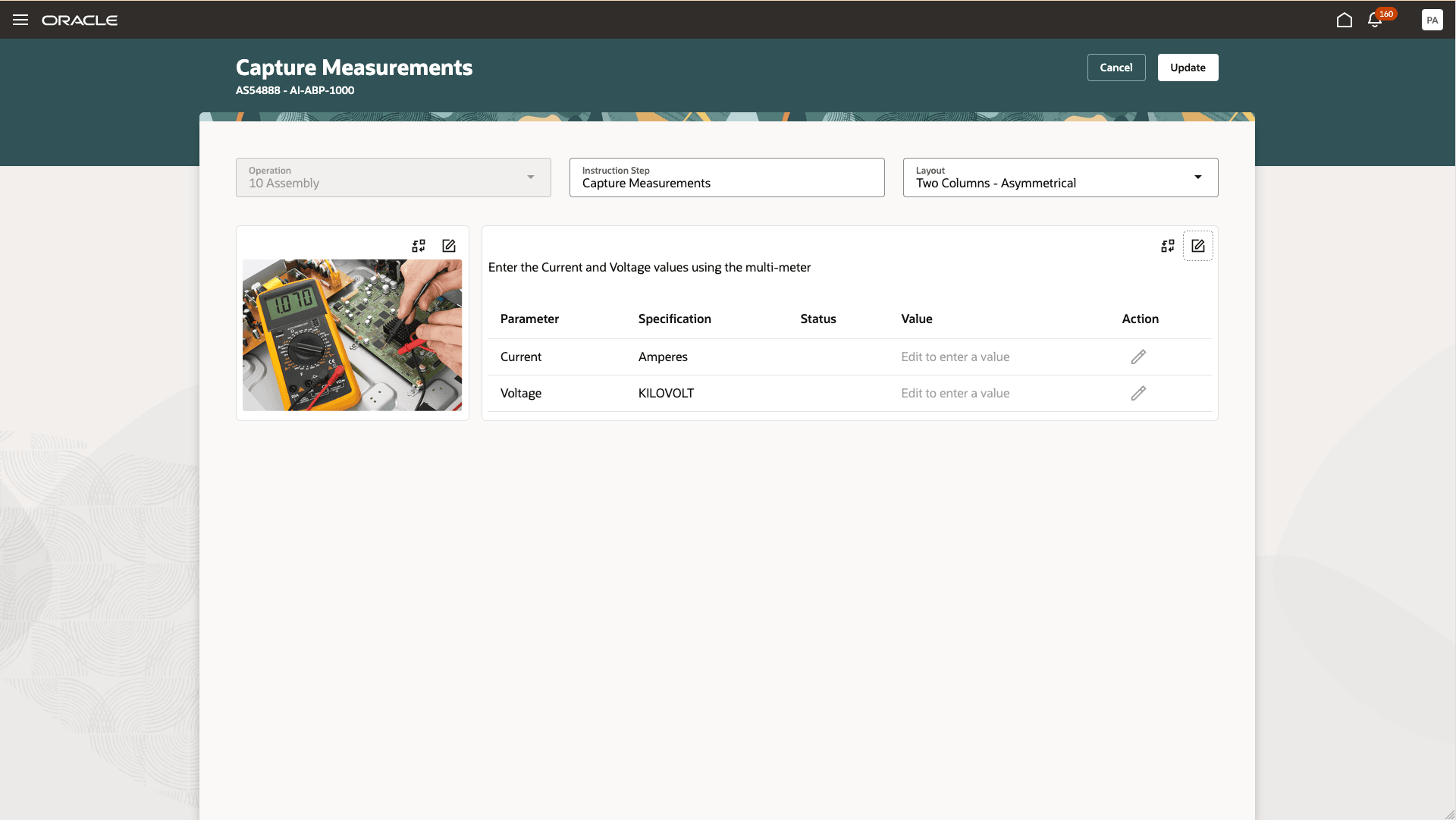
Adding Parameters to an Instruction Step
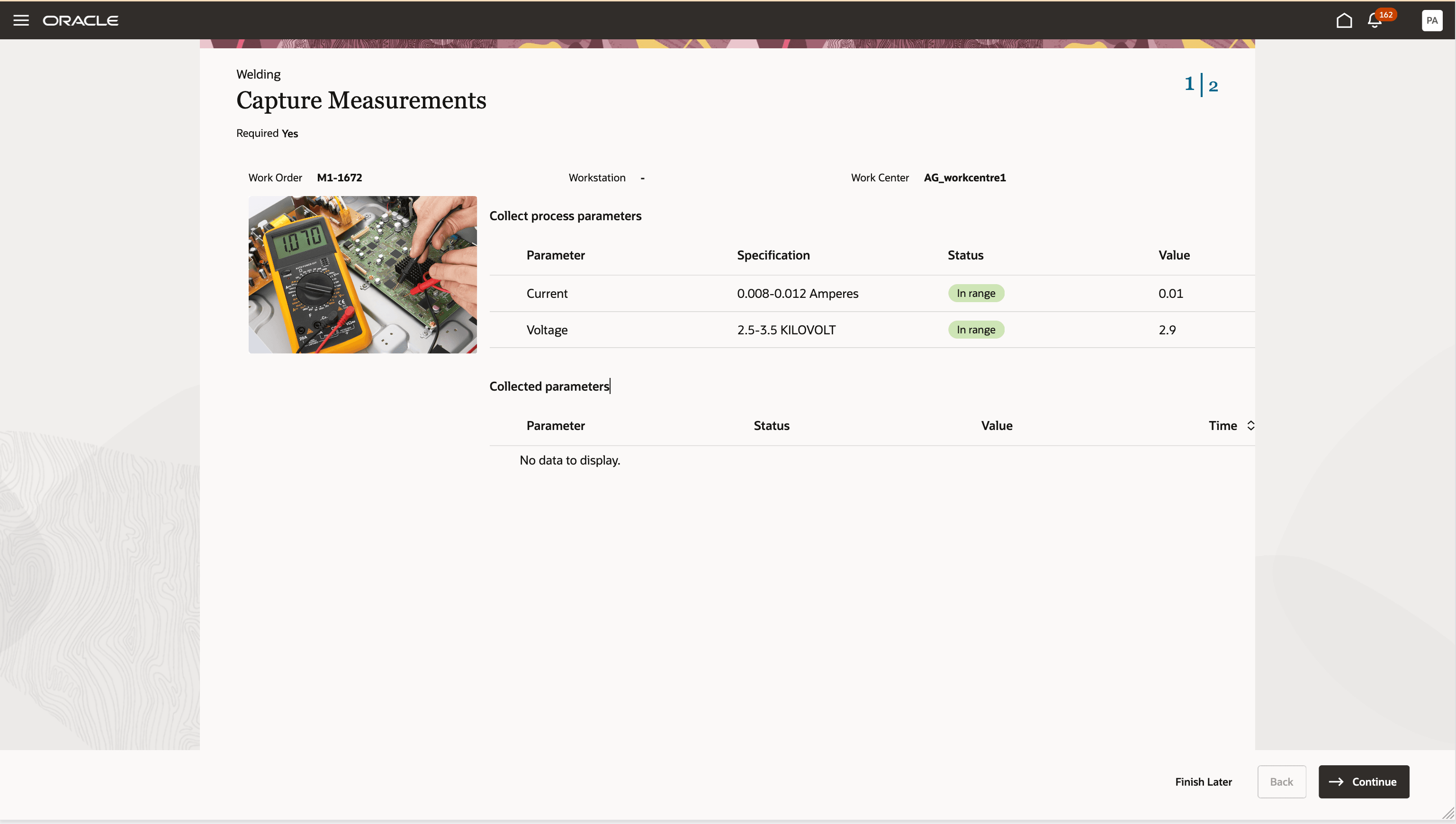
Capturing Operational Parameters at a Work Instruction Step
Businesses can improve product quality management, meet regulatory or customer reporting requirements, and reduce manual record-keeping efforts by capturing production data right where it is generated—linked to the specific step and operation.
Here's the demo of these capabilities:
Steps to enable and configure
This feature requires the 24D feature, Author Work Instruction Tasks for a Work Definition Operation, which is permanently opted in from the 25B update.
Tips and considerations
- When authoring digital work instructions, add data parameter fields directly into each step to prompt operators for the necessary information.
- Enhance step templates with a combination of text, media, and parameters to optimize data guidance and collection.
- You can choose to make the instruction tasks requiring data collection mandatory. This ensures that operators don’t skip the step during work execution.
- You can't capture ad hoc measurements that are not defined in the work definition.
- Supplying values is not mandatory to complete the step in this update.
- The option to collect operation completion parameters is still available when completing an operation.
Key resources
- Refer to the 24D update for the capability to Author Work Instruction Tasks for a Work Definition Operation
- Refer to the 24D update to learn how to Use Work Instruction Tasks to Complete a Work Order Operation at a Workstation
- Refer to the 25C update to Record Process Data for an Operation When Executing Production at a Workstation
Access requirements
Users who are assigned a configured job role that contains these privileges and duty roles can use this feature:
| Name | Code | Description |
| View Work Definitions | WIS_VIEW_WORK_DEFINITIONS_PRIV | This privilege allows users to view work definitions and the details of the work definitions. |
| Manage Work Definitions | WIS_MANAGE_WORK_DEFINITIONS_PRIV | This privilege allows users to edit work definition details. |
| Execute Production at a Workstation | WIP_EXECUTE_WORKSTATION | Allows check-ins, checkouts, and reporting of operation execution progress at a workstation. |
| Digital Work Instructions Access Duty | ORA_PER_SCM_DIGITAL_WORK_INSTRUCTIONS_ACCESS_DUTY | Allows workers to access their assigned digital work instructions (digital work instruction assigned journeys). |
| Digital Work Instructions Builder | ORA_PER_SCM_DIGITAL_WORK_INSTRUCTIONS_BUILDER_DUTY | Allows management of digital work instructions (digital work instruction journeys). |