Redwood: Use More Item Types and Charges with Your Pricing Promotions
In earlier updates, you couldn't create a promotion for a configured item or a subscription item. Now you can, and you can use these items as the promotion's eligibility condition. You can also apply the promotion for a recurring charge.
Realize this benefit:
- Provide your customers with an incentive to purchase more of the items that you sell from your catalog.
It's easy. Use the new Item Type attribute when you create your promotion:
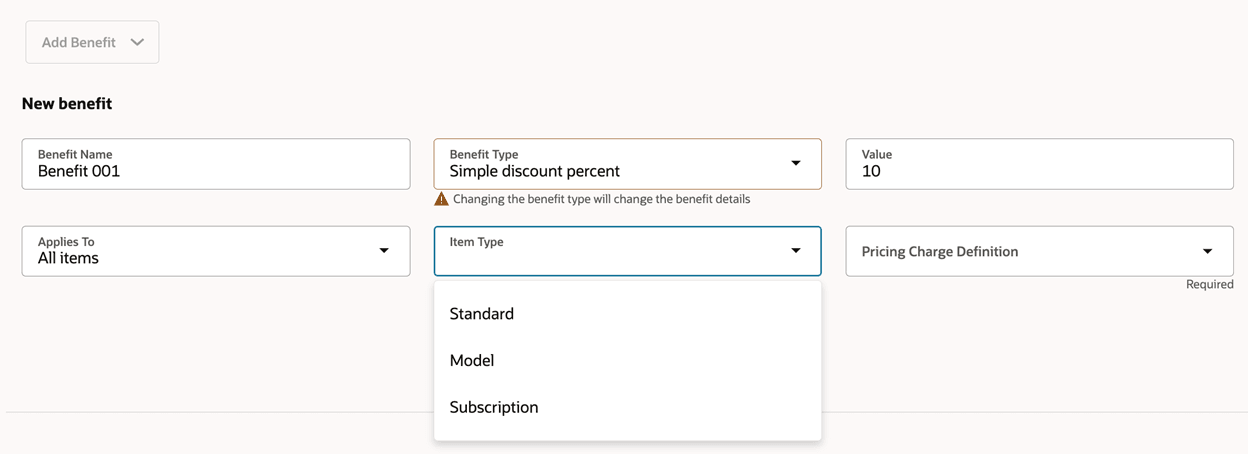
Steps to enable and configure
You must opt in to the Use More Item Types and Charges with Your Pricing Promotions feature.
Tips and considerations
You can:
- Continue to manage promotions at different levels, such as applies to All Items, Item Categories, or Item.
- Use the Pricing Charge Definition to select a recurring charge.
- Select more than one item type. For example, select Model and also select Subscription to apply the promotion to configured items and to subscriptions.
- Select more than one pricing charge definition. For example, select Freight and also select Transportation.
- Add a service duration and period to the subscription.
You must use the Item Type attribute when you set the Applies To attribute to Item. Its optional for Item Category or All Items.
Key resources
Access requirements
Users who are assigned a configured job role that contains these privileges can access this feature:
- Manage Draft Pricing Promotions (QP_MANAGE_DRAFT_PRICING_PROMOTIONS)
- Manage Pricing Promotions (QP_MANAGE_PRICING_PROMOTIONS)
- View Pricing Promotions (QP_VIEW_PRICING_PROMOTIONS)
- Activate Pricing Promotions (QP_APPROVE_PRICING_PROMOTIONS)
These privileges were available before this update.