Redwood: Do More Pricing Setups for Configured Item's Components
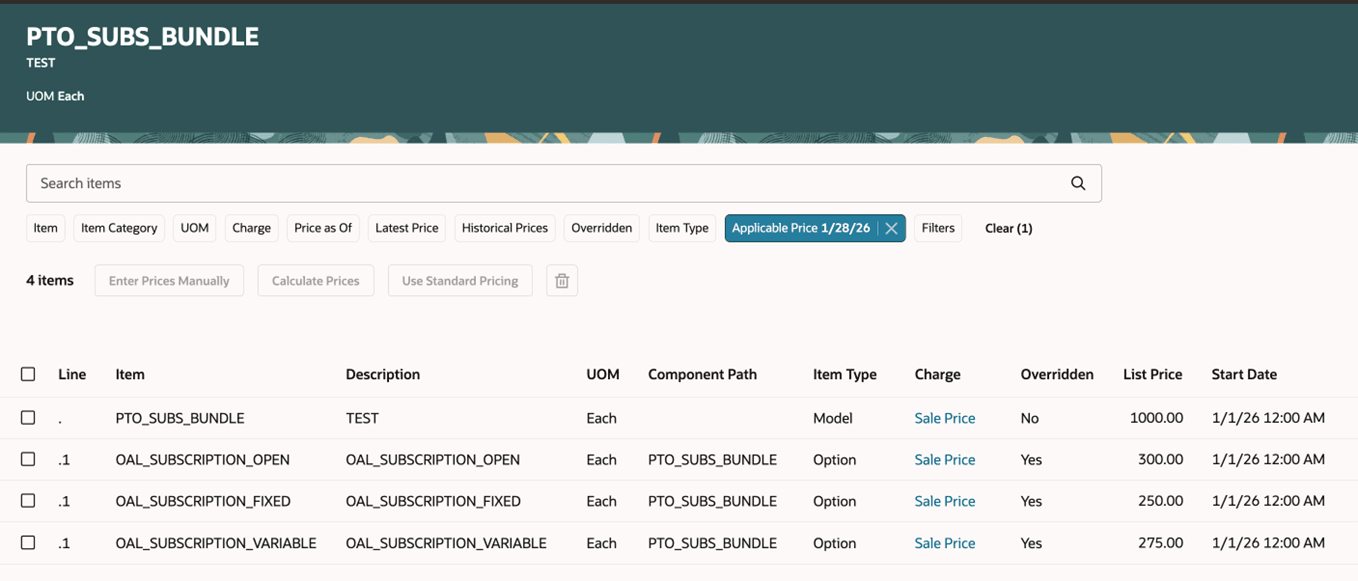
Do more pricing setups for each of your configured item's components than you could in earlier updates. You can now use a new, single page to view your item's standard and component prices, manually enter price and charges, or to apply a mass action.
Realize this benefit:
- Work more efficiently. Use a single page to manually view and manage your configured item's pricing, including all of its components and options.
Try it:
- Go to Home > Order Management > Pricing Administration > Price Lists.
- Search for your price list, click Standard Items > Model and Components, add your item, then click the icon in the Structure column.
- Use this new page to manage your item:
Steps to enable and configure
You must opt in to the Redwood: Do More Pricing Setups for Configured Item's Components feature.
Tips and considerations
Use these new attributes on the page:
- Line. Displays the sequence number of the item's structure.
- Item Type. Specifies whether the item is the root item, an option class, or an option.
- Overridden. Yes means the line contains price that's specific for this item. No means it’s the standard price.
You can now filter on:
- Applicable Price. Displays the component's price for a specific date.
- Overridden. Filter according to Yes or No.
- Item Type. Filter according to model, option class, or option.
Click Use Standard Pricing to toggle between specific pricing and standard pricing.
Key resources
Set Up Pricing for Configuration Models
Access requirements
Users who are assigned a configured job role that contains these privileges can access this feature:
- Manage Pricing Rules (QP_MANAGE_PRICING_RULES)
- Approve Discount Lists (QP_APPROVE_DISCOUNT_LISTS)
- Manage Discount Lists (QP_MANAGE_DISCOUNT_LISTS)
- Manage In-Progress Discount Lists (QP_MANAGE_IN_PROGRESS_DISCOUNT_LISTS)
- View Discount Lists (QP_VIEW_DISCOUNT_LISTS)
- View Price Lists (QP_VIEW_PRICE_LISTS_PRIV)
- Manage Price Lists (QP_MANAGE_PRICE_LISTS_PRIV)
- Approve Price Lists (QP_APPROVE_PRICE_LISTS_PRIV)
These privileges were available before this update.