Redwood: Collaborate with Catalog Administrators and Suppliers on Catalog Authoring
Collaborate on catalog authoring using a Redwood page. You can transfer a draft blanket purchase agreement to the catalog administrator or supplier to collaborate in the purchase agreement creation. A catalog administrator can also update an approved purchase agreement through a change order.
Buyer
When creating or editing a draft blanket purchase agreement, you can transfer it to a catalog administrator or supplier for collaboration. Transferring the agreement changes its status to Pending Catalog Authoring. Also, when you transfer it to a catalog administrator, the agreement is also automatically enabled for catalog administrator authoring.
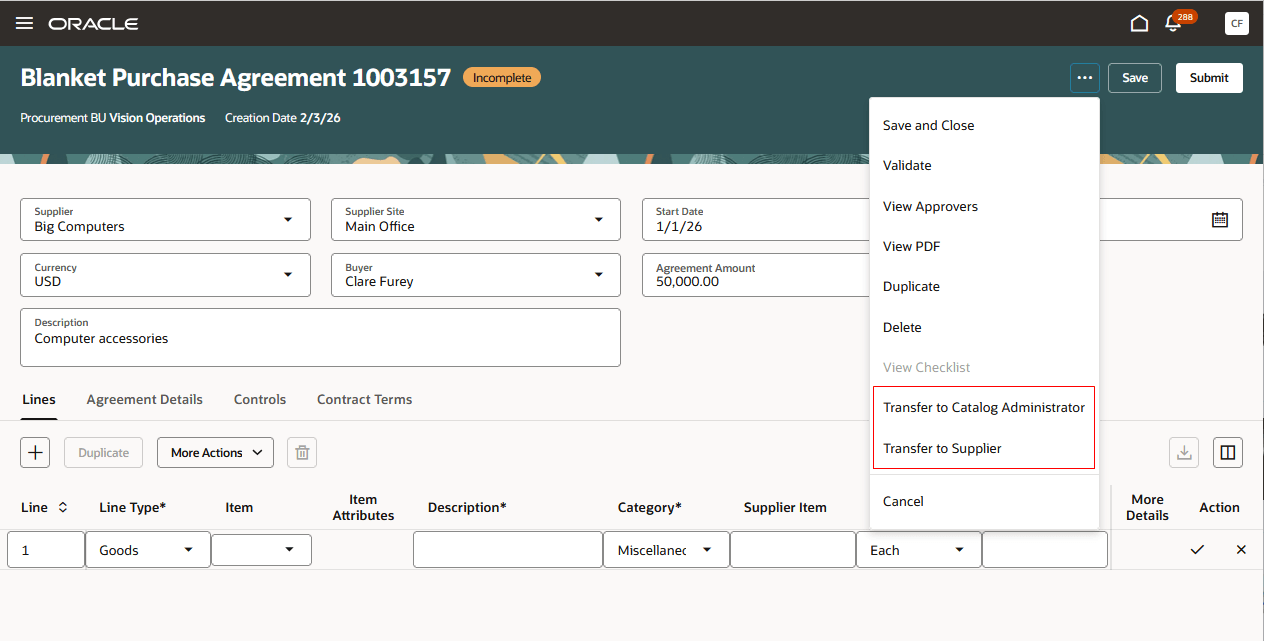
Transfer a Blanket Purchase Agreement to a Catalog Administrator or Supplier
You can grant catalog administrators access to approved blanket agreements by enabling catalog administrator authoring from the View Agreement page. To revoke access, disable catalog administrator authoring for agreements.
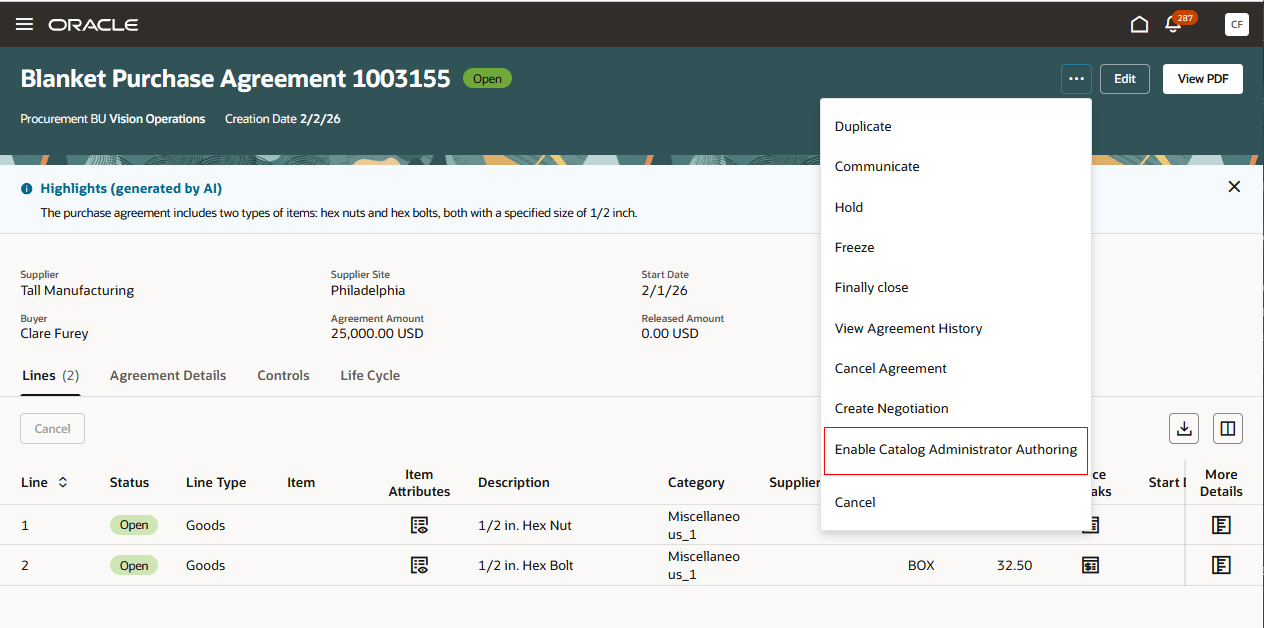
Enable Blanket Agreement for Catalog Administrator Authoring
The Purchase Agreements page shows which party, either the catalog administrator or the supplier, currently holds the pending catalog authoring agreement. It also indicates whether the agreement is enabled for catalog administrator authoring.
Updating a pending catalog authoring agreement will withdraw the agreement and sets its status to Incomplete.
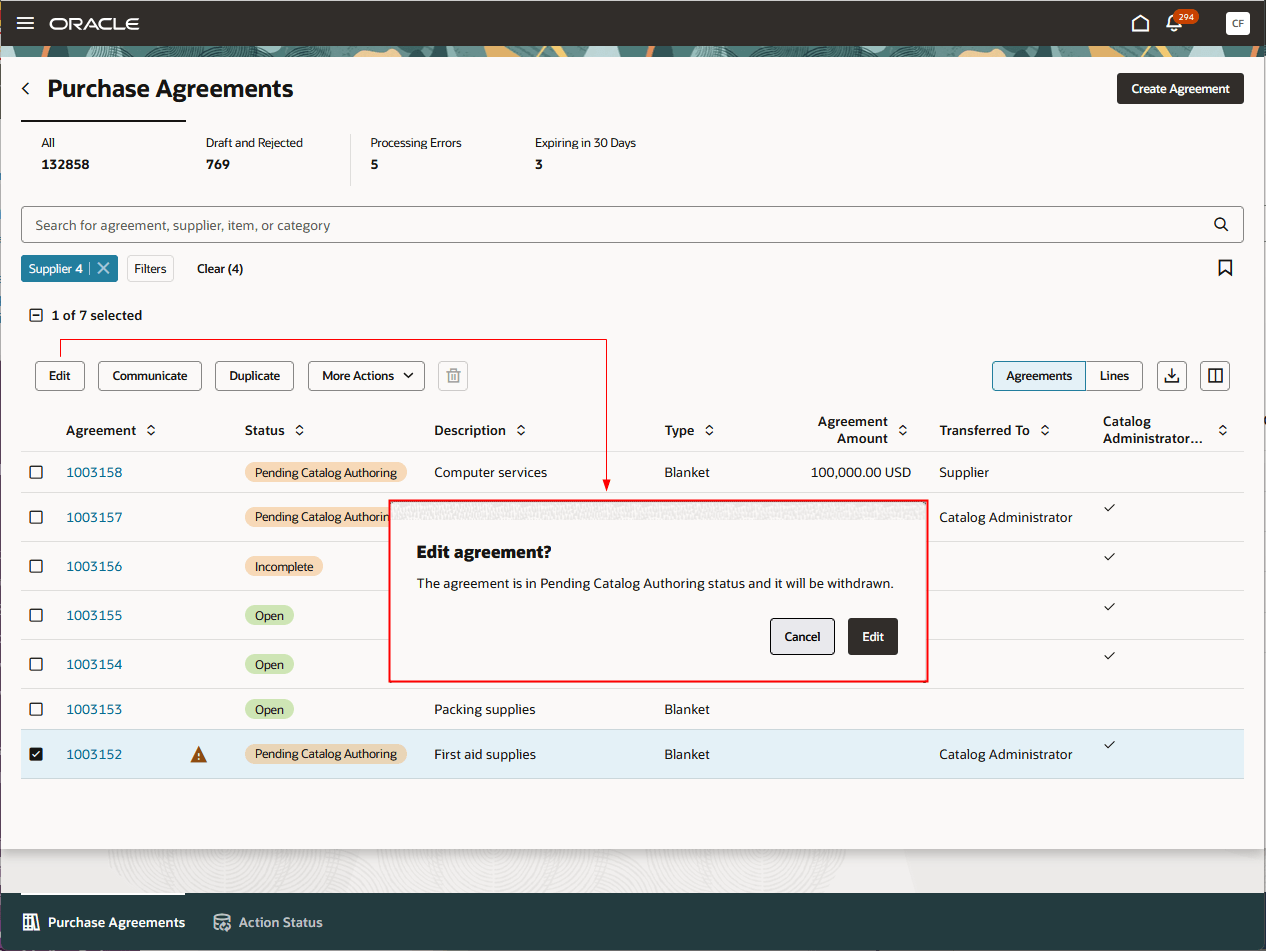
Withdraw Pending Catalog Authoring Blanket Agreement
Catalog Administrator
Catalog administrators can access blanket purchase agreements enabled for catalog administrator authoring on the Catalog Agreements page.
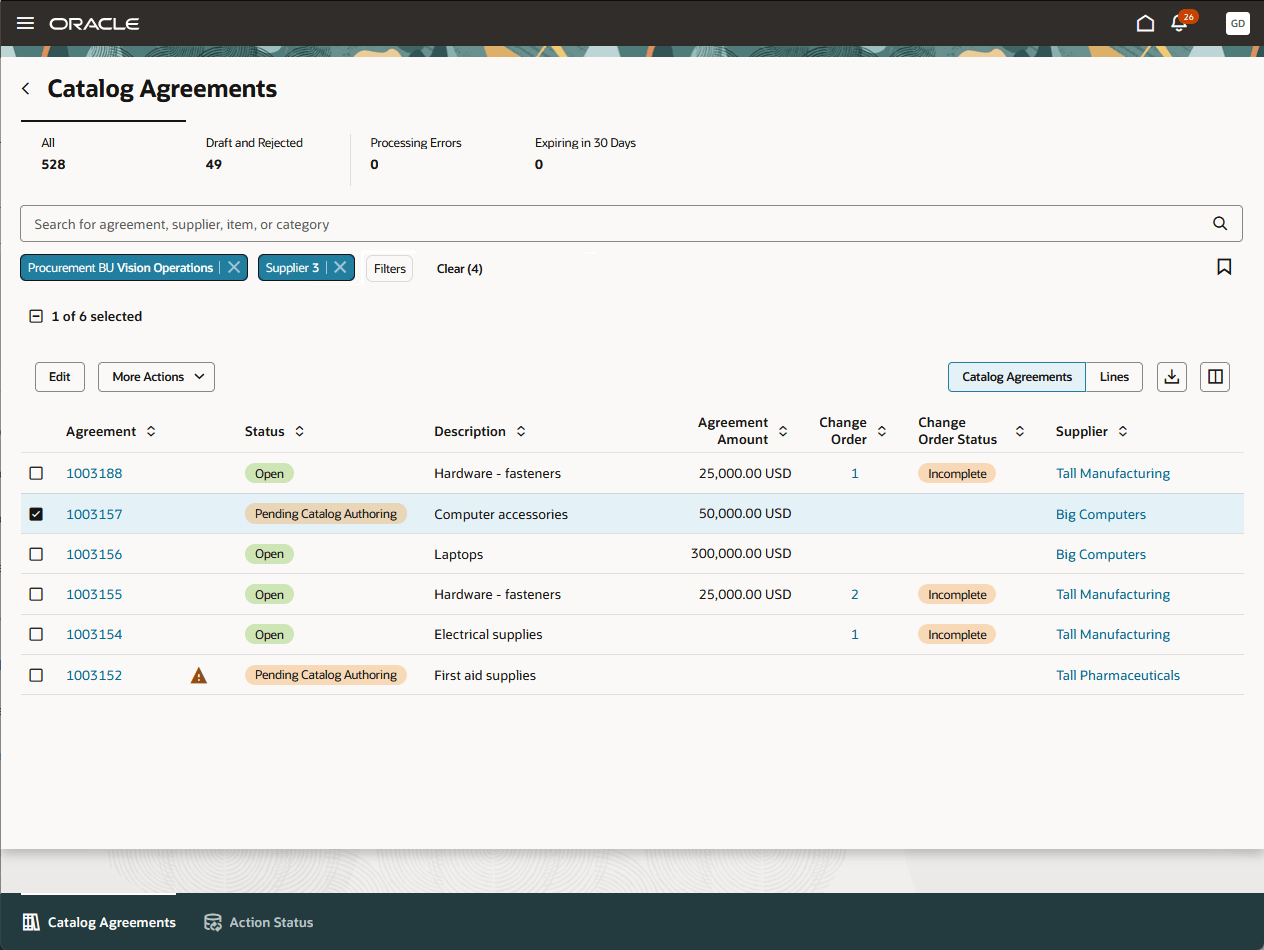
Catalog Administrator Searches for Blanket Agreements Enabled for Catalog Administrator Authoring
As a catalog administrator, you can add content to agreements in Pending Catalog Authoring status that have been transferred to you. After you complete your updates, transfer the agreement back to the buyer for review. This action resets the agreement status to Incomplete, allowing the buyer to submit the agreement for approval.
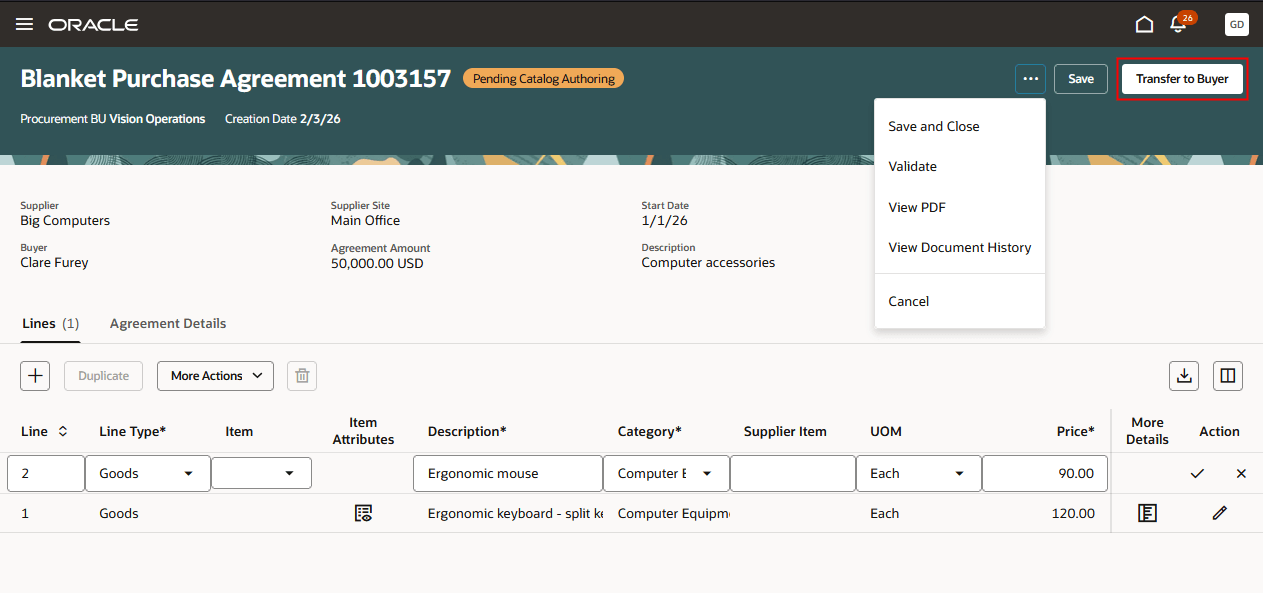
Catalog Administrator Transfers Blanket Agreement Back to Buyer
Catalog administrators can also update an approved blanket agreement to create a change order.
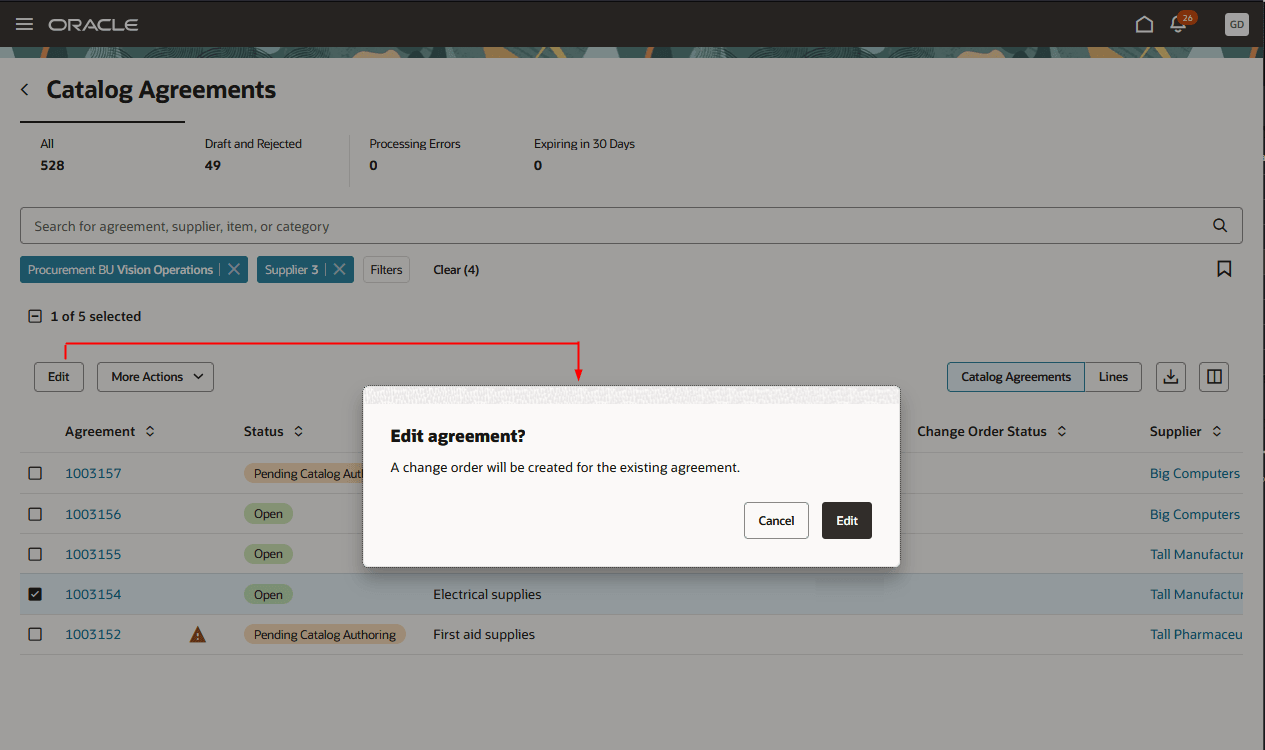
Catalog Administrator Creates Agreement Change Order
Supplier
Like catalog administrators, suppliers can add lines to agreements in Pending Catalog Authoring status that have been transferred to them. After they complete their updates, suppliers transfer the agreement to the buyer, who reviews the updates and submits it for approval.
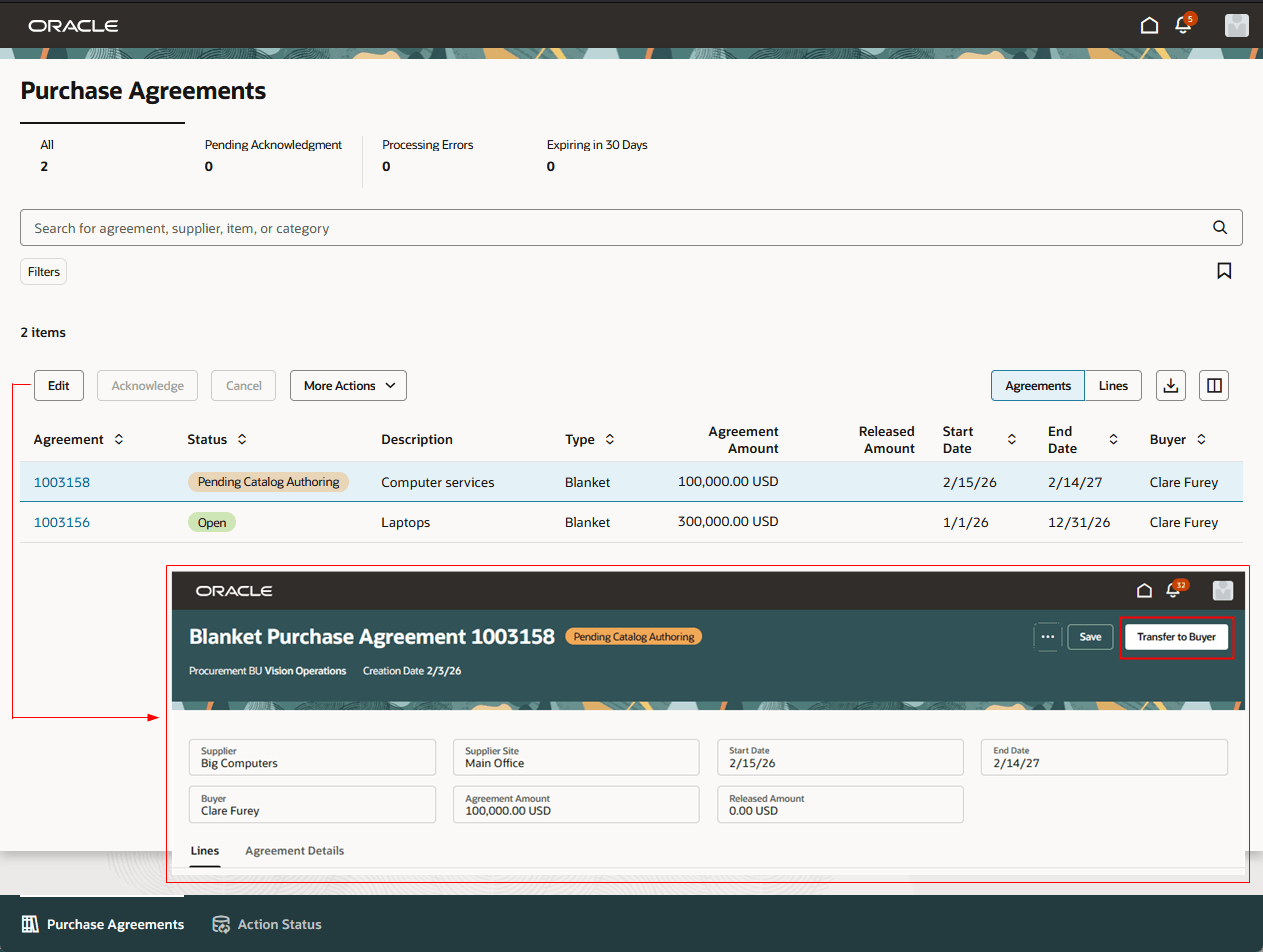
Supplier Transfers Blanket Agreement Back to Buyer
Steps to enable and configure
If you haven't enabled Redwood for Purchasing, see the Getting Started with Redwood in Purchasing topic on the SCM Resource Center in Customer Connect.
Tips and considerations
- Catalog administrators can only view and update draft blanket agreements while the agreement is in Pending Catalog Authoring status. After the agreement is transferred back to the buyer, it's no longer accessible to catalog administrators until the agreement reaches the Open status.
- Catalog administrators can't modify header-level attributes on agreements in Pending Catalog Authoring status.
- Suppliers can't modify header-level attributes on agreements in Pending Catalog Authoring status, except for the Supplier Agreement attribute.
- Suppliers can also update an approved blanket agreement to create a change order. Refer to the Redwood: Create Purchase Agreement Changes as a Supplier feature, available in Oracle Fusion Cloud Procurement What’s New, update 26A.
Key resources
To learn more about the Catalog Agreements Redwood page, refer to the Redwood: Manage Purchase Agreements as a Catalog Administrator feature, available in Oracle Fusion Cloud Procurement What's New, update 26B.
Access requirements
Users who are assigned a configured job role that contains this existing privilege can enable blanket purchase agreements for catalog administrator authoring:
- Enable Purchase Agreement Catalog Authoring (PO_ENABLE_PURCHASE_AGREEMENT_CATALOG_AUTHORING_PRIV)
Users who are assigned a configured job role that contains this existing privilege can transfer blanket purchase agreements to catalog administrators:
- Transfer Blanket Purchase Agreement to Catalog Administrator (PO_TRANSFER_BLANKET_PURCHASE_AGREEMENT_TO_CATALOG_ADMINISTRATOR_PRIV)
Users who are assigned a configured job role that contains this existing privilege can transfer blanket purchase agreements to suppliers:
- Transfer Blanket Purchase Agreement to Supplier (PO_TRANSFER_BLANKET_PURCHASE_AGREEMENT_TO_SUPPLIER_PRIV)
Users who are assigned a configured job role that contains these existing privileges can access the Catalog Agreements page:
- Manage Procurement Catalog Content (POR_MANAGE_PROCUREMENT_CATALOG_CONTENT_PRIV)
- Search Purchase Agreement (PO_SEARCH_PURCHASE_AGREEMENT_PRIV)
Users who are assigned a configured job role that contains this existing privilege can transfer blanket purchase agreements back to buyers:
- Create Blanket Purchase Agreement Line (PO_CREATE_BLANKET_PURCHASE_LINE_PRIV)
Users who are assigned a configured job role that contains this existing privilege can create change orders on blanket purchase agreements:
- Change Purchase Agreement (PO_CHANGE_PURCHASE_AGREEMENT_PRIV)