AI Agent: Planning Order Release Assistant - Batch Processing of Orders
You can now auto-release planned orders using the AI agent Planning Order Release Assistant. Use it to evaluate orders for release by comparing the exceptions thresholds for the orders that you have set.
This update has enhancements to this capability to process a large volume of orders in parallel so that this process runs in the shortest time possible. Additionally, you can use an identifier to mark all orders for release within the batch. You can also access the processed orders on the supplies and demands page using a link so that only the orders that have been processed in the batch are pre-filtered and displayed.
Process up to 4000 planned orders in one transaction using the Planning Order Release Assistant.
Processing large sets of orders takes a lot of time. So, one way to monitor the results without having to wait for the result notification on the Supplies and Demands visualization is to check the Plan Status Details panel.
This panel displays the status of the order release assistant workflow. Each time you run the Planning Order Release Assistant, a unique identifier is automatically assigned to the processed orders. This identifier is displayed as the Workflow ID hyperlink in the Plan Status Details panel. Clicking on the id value opens the Supplies and Demands visualization and returns the list of orders that were examined by the Order Release Assistant during that workflow execution. You can then check the resulting release status of the orders and manually review the remaining orders that were not marked for release by the Order Release Assistant.
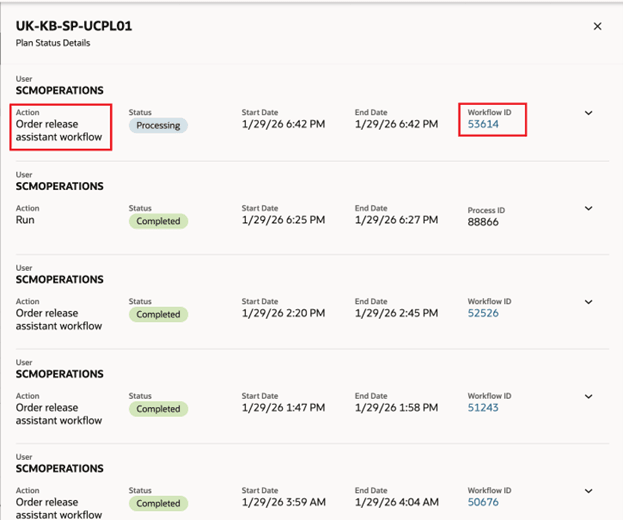
Order Release Assistant Workflow Status and Link in the Plan Status Details Panel
Steps to enable and configure
To enable permission groups for roles:
- In the Setup and Maintenance work area, search for the Manage Administrator Profile Values task using the search link in the Tasks panel tab.
- Search for the Enable Security Console External Application Integration (ORA_ASE_SAS_INTEGRATION_ENABLED) profile option and set the Site profile level to Yes.
Key resources
- How can I give users access to AI agents?
- AI Agent: Planning Order Release Assistant in Supply Planning What's New 26A
Access requirements
To interact with AI agents in product pages, users must be assigned a configured job role that contains this duty role:
- Fai Genai Agent Runtime Duty (ORA_DR_FAI_GENERATIVE_AI_AGENT_RUNTIME_DUTY)
To allow users to interact with agents, you must also enable permission groups in the Security Console on those users' configured job roles that contain the Fai Genai Agent Runtime Duty role. You can enable permission groups when you manage the basic information of your configured job roles.
Rules document upload and delete:
To upload a new or delete an existing threshold document the following privilege is required:
- Manage Planning Objects (MSC_MANAGE_PLANNING_OBJECTS_PRIV)
Using the Orders Release Assistant:
Users who are assigned a configured job role that contains these privileges can access this feature:
- Monitor Plan Inputs Work Area (MSC_MONITOR_PLAN_INPUTS_WORK_AREA_PRIV)
These privileges were available prior to this update.
A new duty role is also required:
- Supply Chain Planning Order Release Workflow Duty (ORA_DR_MSC_ORDER_RELEASE_WORKFLOW_DUTY)