Redwood: Manage Publish Order Forecast Using a New User Experience
You can now use the Redwood user experience to publish order forecasts from Oracle Supply Planning to Oracle Supply Chain Collaboration.
You can publish an order forecast by selecting Publish Order Forecast from the Actions (…) menu of a supply plan.
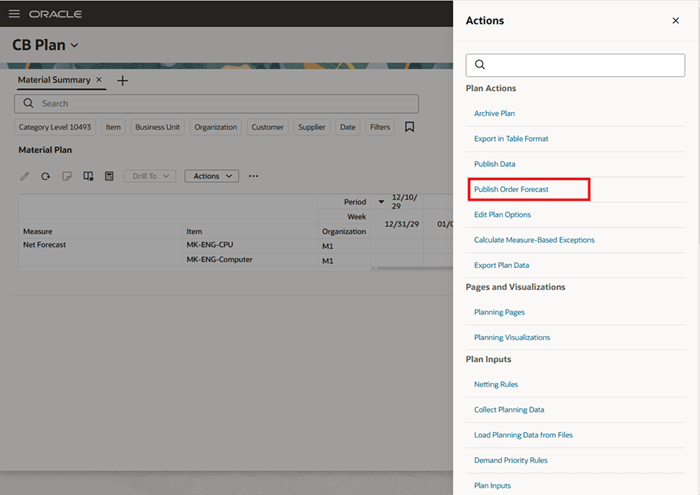
Publish Order Forecast Menu Option
Use the Publish Order Forecast panel to enter key attributes, including Plan, Organization, Item, and Supplier. You can also select publish options such as Include purchase orders in the order forecast and Run the Supply Planning Collaboration Decomposition job.
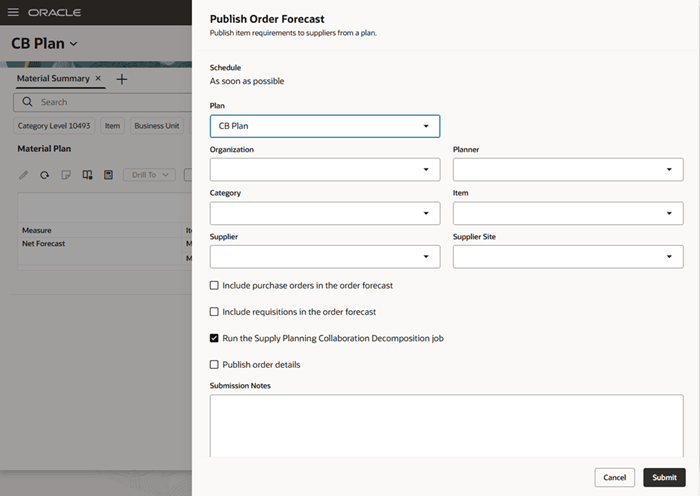
Publish Order Forecast Panel
Steps to enable and configure
You don't need to do anything to enable this feature.
Key resources
- Refer to the 24C Cloud Applications Readiness content for the Use Additional Options with Publish Order Forecast Action feature for Oracle Fusion Cloud Supply Chaing Collaboration.
- For information on the Publish Order Forecast scheduled process, refer to the chapter titled Publish Order Forecast in the Using Supply Chain Collaboration on the Oracle Help Center.
Access requirements
Users who are assigned a configured job role that contains this privilege can access this feature:
- Release Planning Recommendations (MSC_RELEASE_PLANNING_RECOMMENDATIONS_PRIV)
This privilege was available prior to this update.