Edit Billing Details Directly from the Shopping Cart
New User Experience to Edit Billing Details from the Cart:
With this release, you can update distributions and project details directly from the shopping cart using the billing icon. This is available both from the list view and the table view of the cart.

List View with the Billing icon
You can show or hide the new billing icon in the list view of the cart using extensibility. In the table view, the icons for edit, delivery, and billing are grouped in an Actions column. You can hide or show the Actions group as a whole.
Before this release, the navigation required multiple clicks to get to the distribution details in a drawer. Now clicking the Billing icon takes you directly to the Billing Details page. Using this page, you can:
- View all the distribution information in a summary table.
- Edit distribution details.
- Navigate to view or edit line or delivery details.
- Navigate to other lines on the requisition.
NOTE: You can save as you go or the details will be saved automatically when you navigate out of the current page.

New Page to Edit Billing Details
There are no changes to the functionality for creating or editing distributions. Navigation and layout have been streamlined for quicker access. With all details now available on a single page, these are some of the usability enhancements:
- The table allows you to sort distributions based on criterion including distribution number and charge account.
- Use the table column organizer to add or remove columns from view.
- Reorder sections, including the project costing and charge account sections, using Extensibility.
- You can edit a distribution in the form below the distribution table.
The enhanced user experience of editing distribution and project information on the page is also available in these flows:
- Enter Requisition Line: You can create billing details on a single page using the Billing tab.
- Edit Multiple Lines: You can create new distributions using the new layout instead of launching a drawer.
Here's an illustration on how to create new distributions directly on the Edit Multiple Lines page.
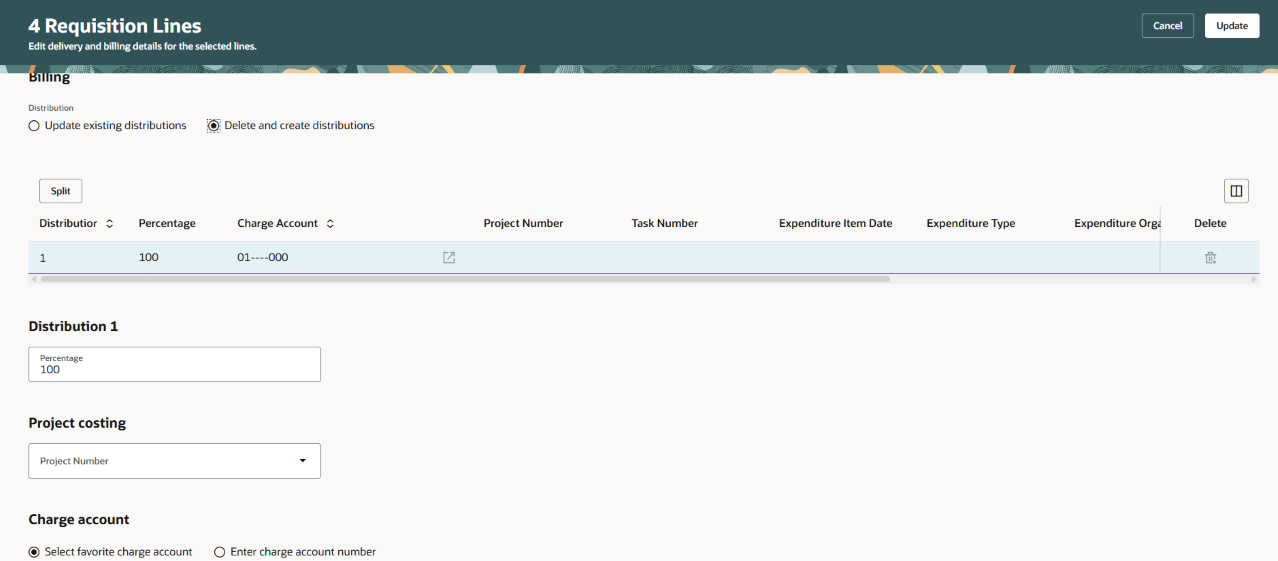
Create Distributions Using Edit Multiple Lines
You can also move the Billing regions and its sections elsewhere to the top of the page using Extensibility. Here's an illustration:

Billing Region Moved Using Extensibility
Optimized Page Display using Edge-to-Edge Layout:
In addition to the enhancements discussed earlier, the page layout now uses an edge-to-edge design. This accommodates more fields on a single row, reducing the need to scroll to view information. No opt in is required, this feature is enabled by default in this release. You will find the revised layout available on several pages, including:
- Enter Requisition Line.
- Requisition Line Details.
- Multiple Lines.
Here are some sample illustrations:
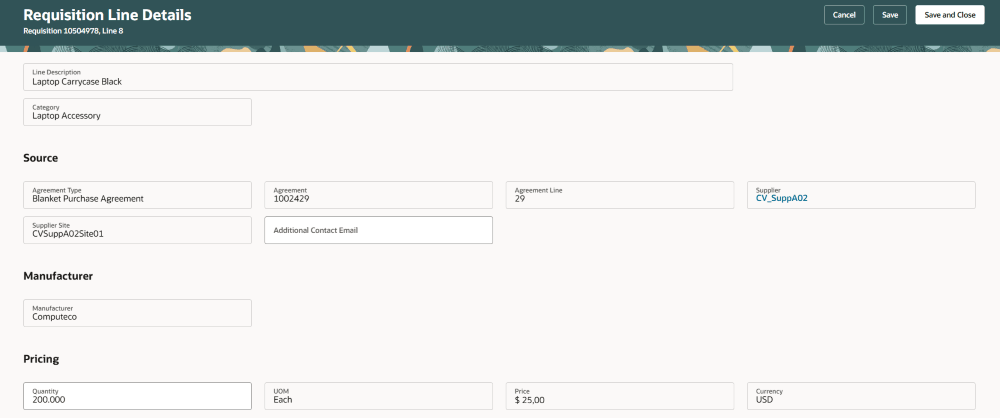
Edit Requisition Line Details

Edit Requisition Line Details - Billing
Save Details and Continue to Edit Requisition Lines
You can now save your progress while editing requisition lines and continue making changes, whereas in previous releases, you could save your updates all at once.
Steps to enable and configure
Use the Opt In UI to enable this feature. For instructions, refer to the Optional Uptake of New Features section of this document.
Offering: Procurement
Tips and considerations
- You must opt in to this feature to use the enhanced edit billing details experience.
- Specific error messages that previously referred to delivery and billing details have been modified to specify the correct page where action is needed.
- If you continue to use the existing layout for billing details, adaptations made using extensibility aren't impacted due to the changes in the billing details related changes.
- When you split an existing distribution, the new row will be added directly below it.
Key resources
- To know how to provide the required privileges to your requesters to use your own configured role instead of the Requisition Self Service User role, refer to the Privileges Required for a Predefined Role for a Requisition Self Service User topic.
- For more information on how to enable a guided journey for Redwood pages, refer to the Enable a Guided Journey for Redwood Pages topic.
- For information about using Oracle Visual Builder Studio to extend your Redwood application pages, see Oracle Fusion Cloud HCM and SCM: Extending Redwood Applications for HCM and SCM Using Visual Builder Studio.