AI Agentic App: Cost Accounting Close Workspace - Enhanced Reasoning and Insights
In Update 26C, the enhanced Cost Accounting Close Workspace helps cost accountants and finance teams complete period close with greater speed, clarity, and confidence. AI-powered insights and in-context actions make it easier to identify exceptions, understand financial movements, and take the actions needed to keep close on track. To access the workspace:
- Go to the Home page and navigate to Supply Chain Execution.
- Go to Quick Actions and select the Show More menu.
- Under the Cost Processing section, select Cost Accounting Close Workspace.
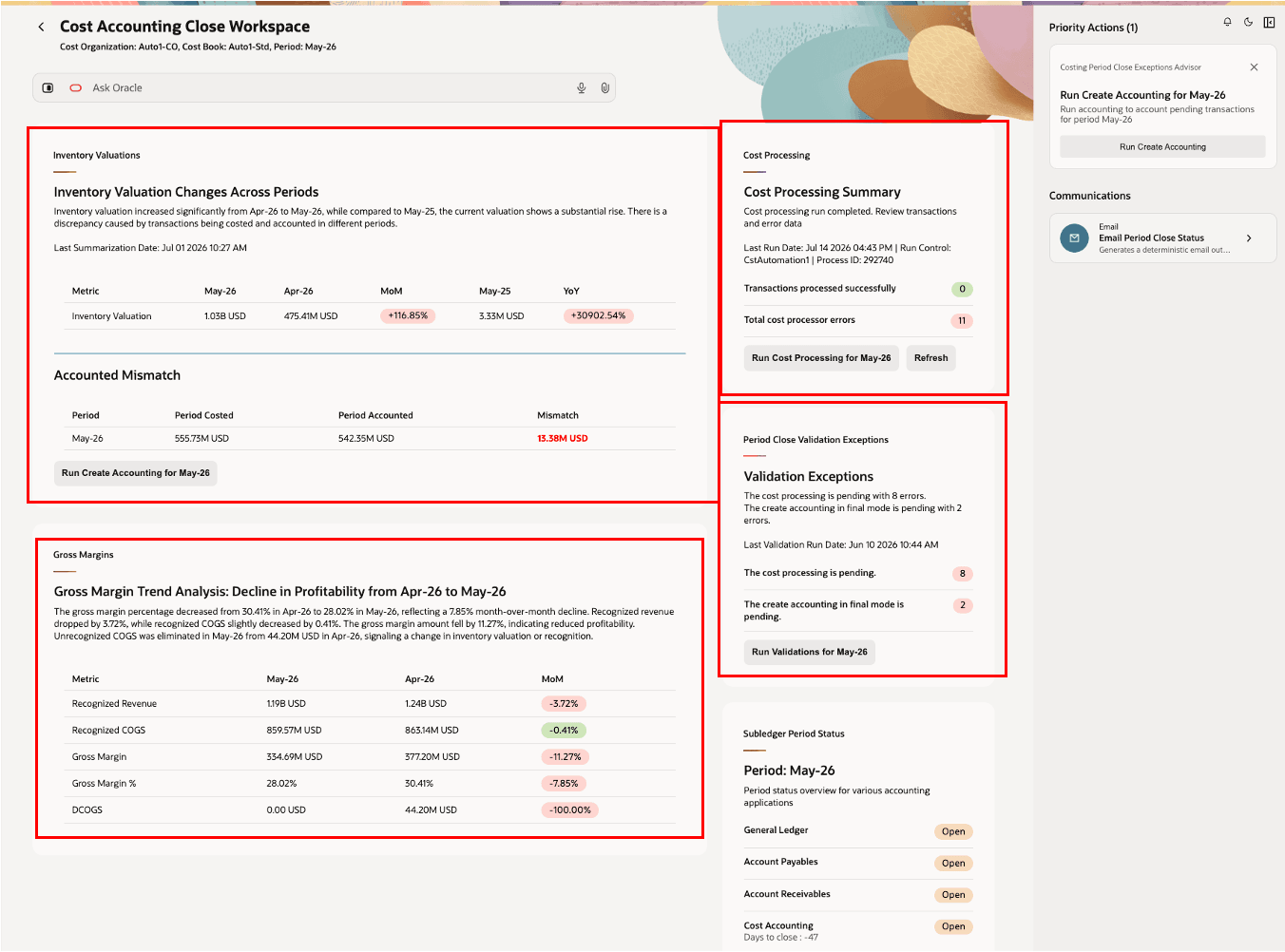
Cost Accounting Close Workspace
Ask Oracle: Context & Headline
Ask Oracle now provides a more natural, context-aware experience. Users can set the cost organization, cost book, and accounting period using natural language, and receive guidance based on the selected period’s close status. Dynamic headlines and contextual prompts help users focus on the period and activities that matter most.
Cost Processing Summary
The Cost Processing Summary card provides deeper insight into processing errors, including error hotspots, likely root causes, and recommended actions when you expand the card. This helps you quickly identify and prioritize the cost processing exceptions that need attention before period close, reducing manual investigation and helping period close activities stay on track.
You can process costs directly from the Cost Processing Summary card to manage end-to-end costing activities from a single place. The automated daily runbook helps you submit related scheduled processes from the workspace, monitor processing progress in real time, and review a summary of transactions that completed successfully or remain in error. This helps cost accountants complete routine close activities faster, reduce navigation across multiple process pages, and focus attention on exceptions that need follow-up before period close.
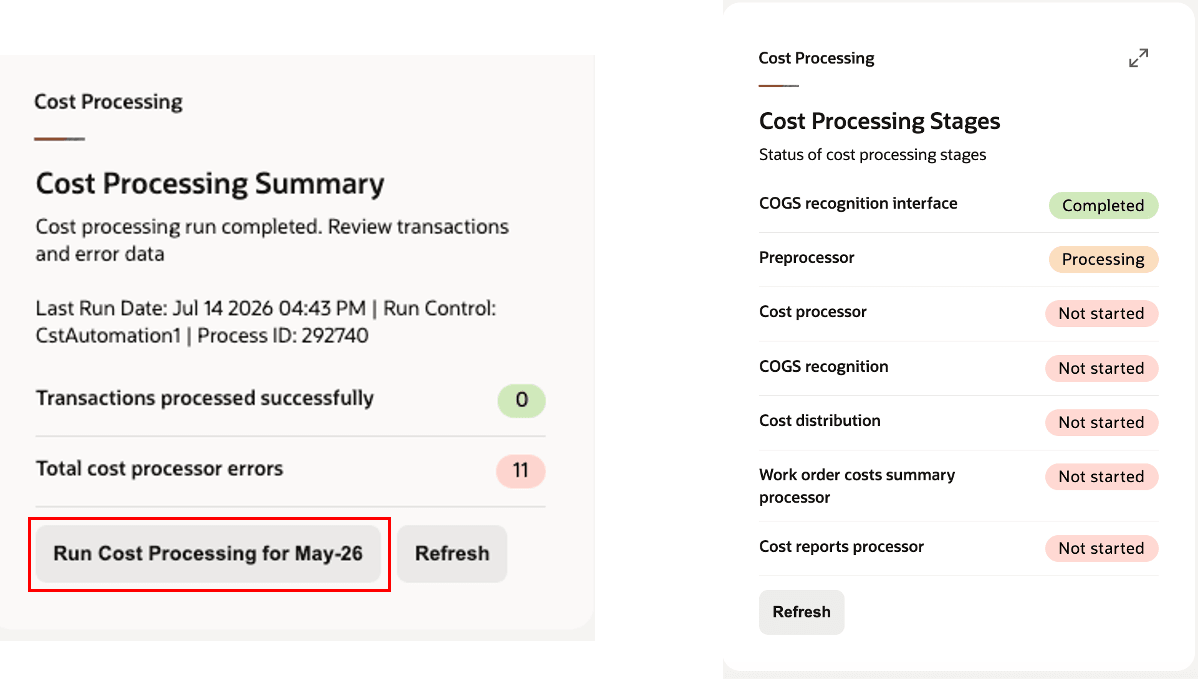
Cost Processing Summary Card
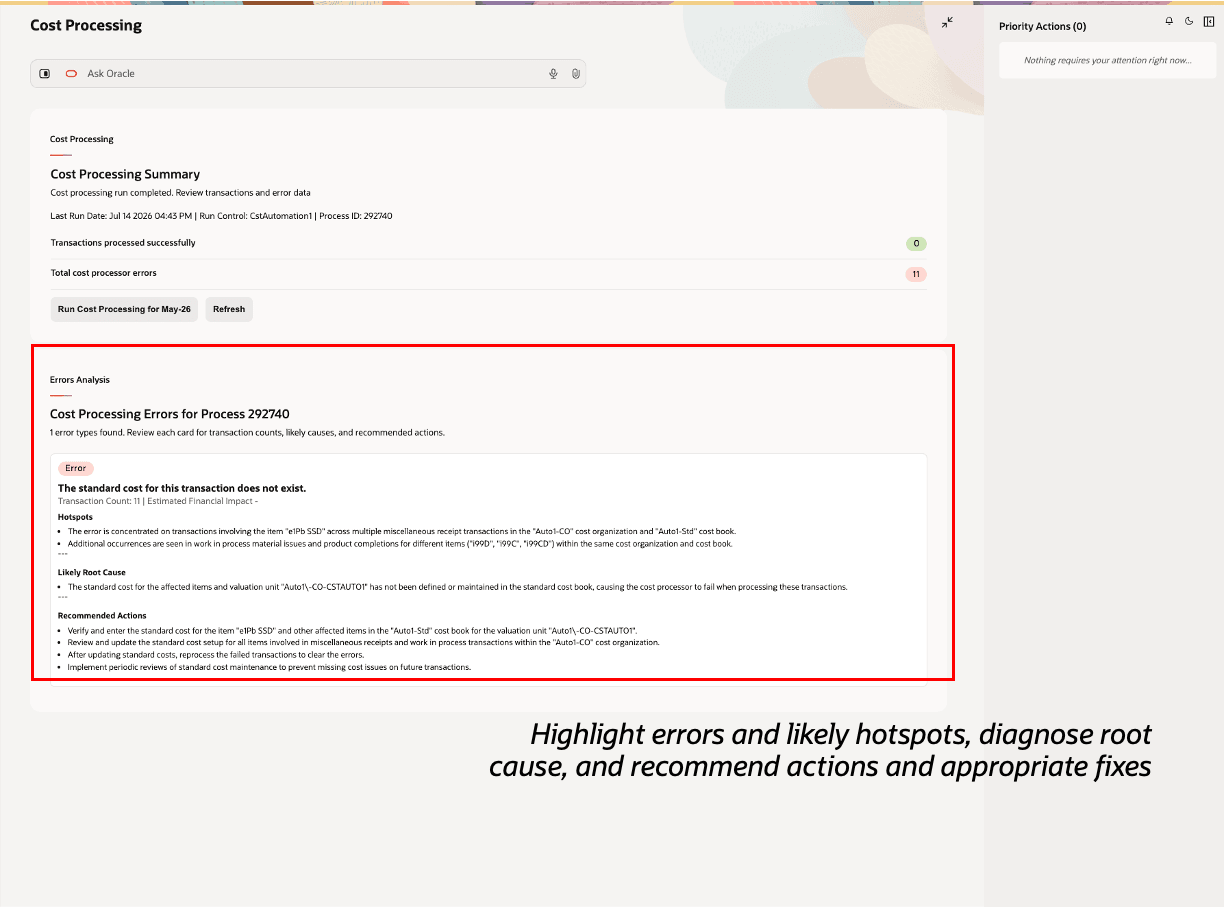
Cost Processing Summary Card Expand
When you click the Run Cost Processing action in the Cost Processing Summary Card, the following processors will run, with the interface processes running in parallel, followed by the Create Cost Accounting Distributions, and Validate and Update Cost Accounting Periods:
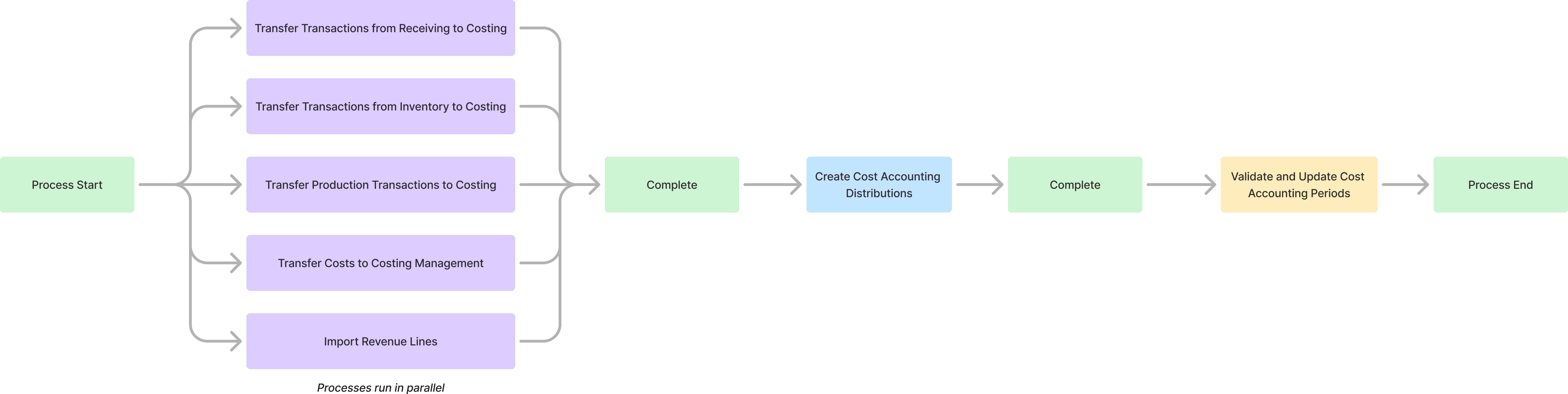
Orchestrate Costing Processes Workflow
Period Close Validation Exceptions
The Period Close Validation Exceptions card now includes a Run Validations action that refreshes stale validation results.
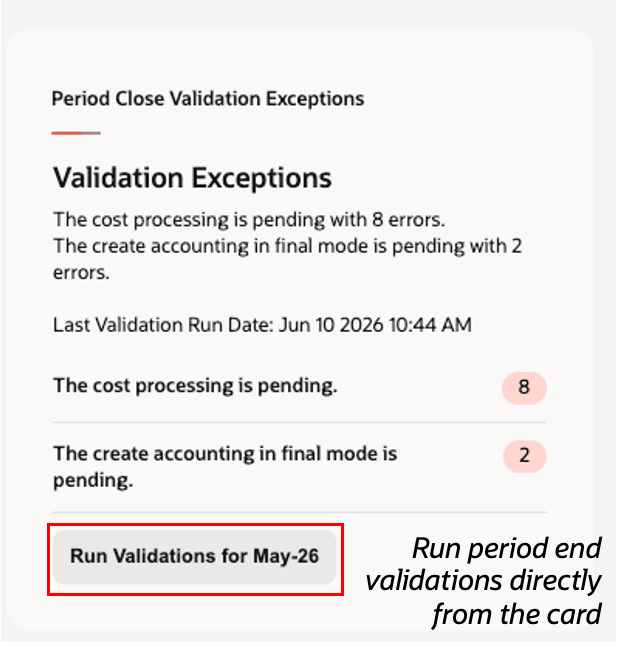
Period Close Validation Exceptions Card
Inventory Valuations
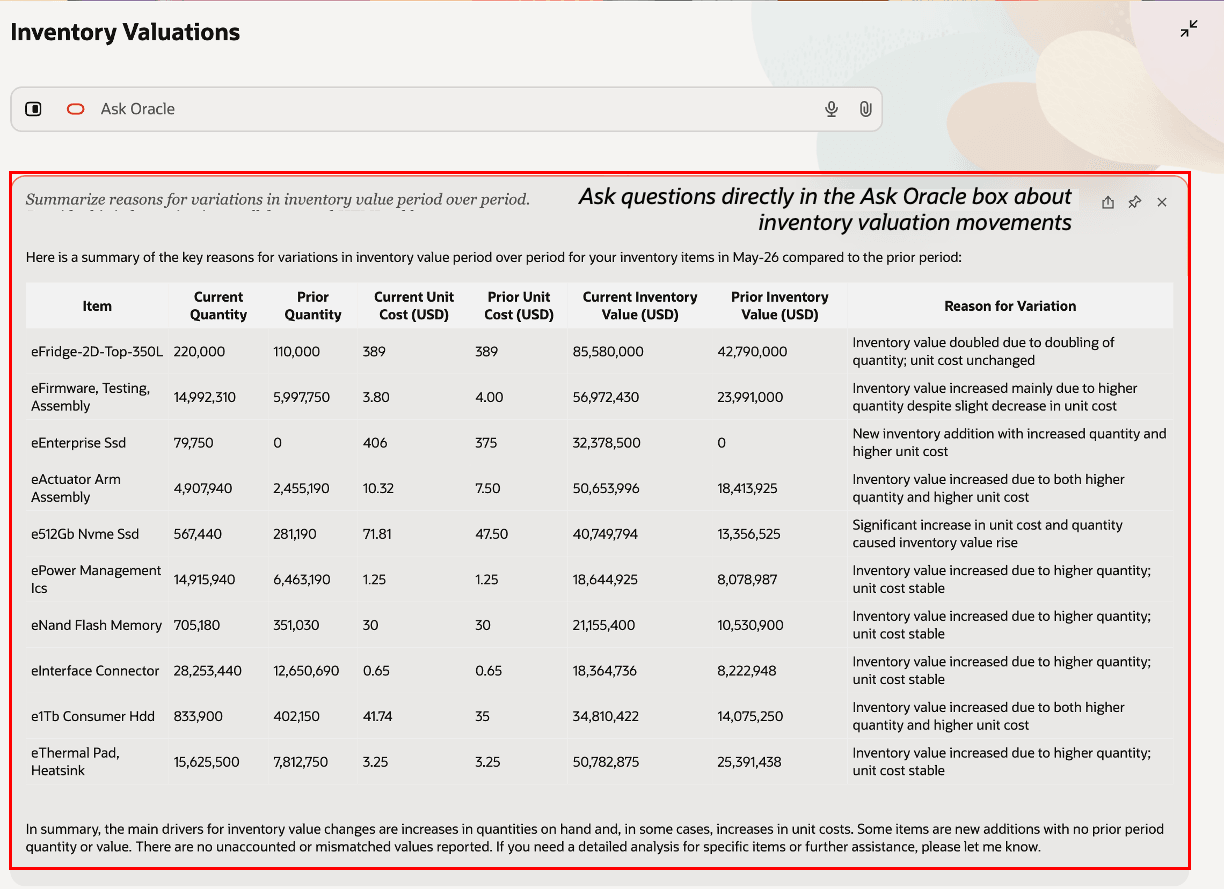
The Inventory Valuations card includes improved agentic reasoning to help explain changes in inventory value by comparing valuation activity and surfacing key drivers, exceptions, and trends that may need attention before period close.
Use the enhanced valuation insights to:
- Compare inventory valuation changes across periods and identify the items contributing most to the movement.
- Surface potential differences between costed amounts and accounted amounts earlier in the close process.
- Run Create Accounting for the selected period after resolving errors and processing transactions, so inventory value reflects the latest accounting activity.
- Use Ask Oracle to investigate inventory value changes and accelerate analysis before period close.
These enhancements help you quickly understand what’s driving inventory value changes, identify potential accounting gaps earlier, and reduce the time spent investigating valuation movements before period close.
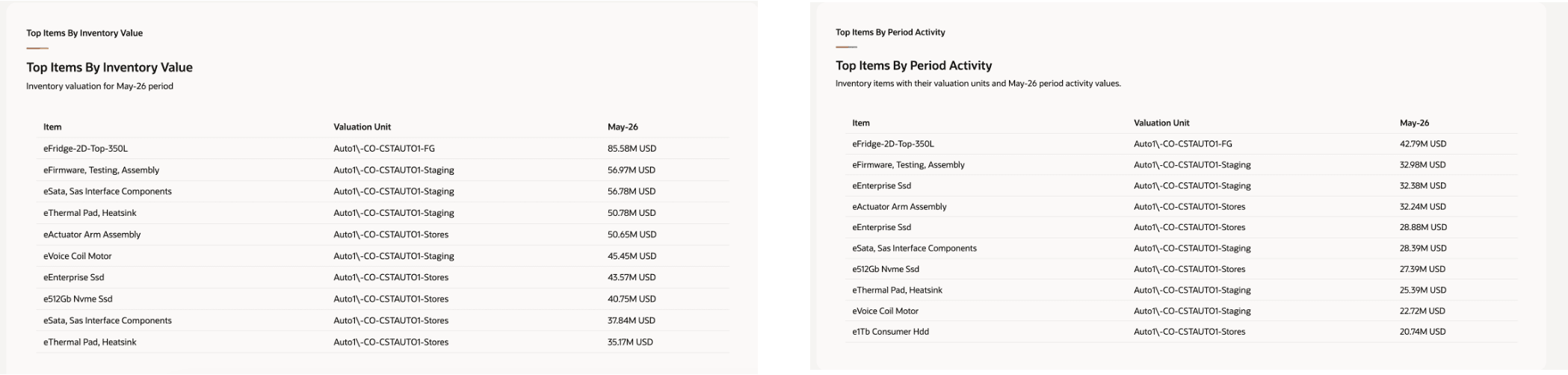
In the expanded view, you can see Top Items by Inventory Value and Top Items by Period Activity, helping you quickly identify the items driving valuation changes and focus your analysis on the areas with the greatest impact.
Ask Oracle example: Summarize reasons for variations in inventory value between current and prior period
Gross Margins
The Gross Margins card helps finance and cost accounting teams understand whether margin results are ready to support period close. It highlights changes in revenue, recognized COGS, gross margin, and deferred COGS, and uses Ask Oracle to explain the key drivers behind those movements.
Use Ask Oracle and the expanded card view to:
- Analyze gross margin changes for the selected period.
- Understand how revenue, recognized COGS, and deferred COGS are contributing to margin movement.
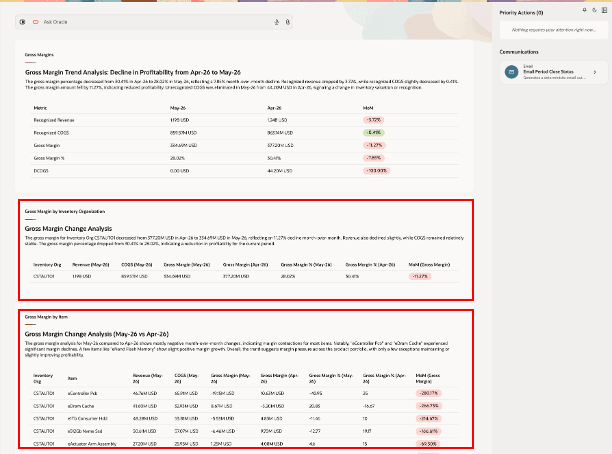
- Review inventory organization, item, and customer-level details to identify where changes are concentrated.
- Identify margin results that may need follow-up because COGS is deferred or accounting activity may be incomplete.
- Focus on the data points most likely to affect close readiness.
These enhancements help finance and operations teams move from manual margin review to faster close analysis by showing what changed, why it changed, and what may need attention before the period is closed.
What led to Change in Gross Margin: Get Trending Items
What led to Change in Gross Margin: Get Trending Customers
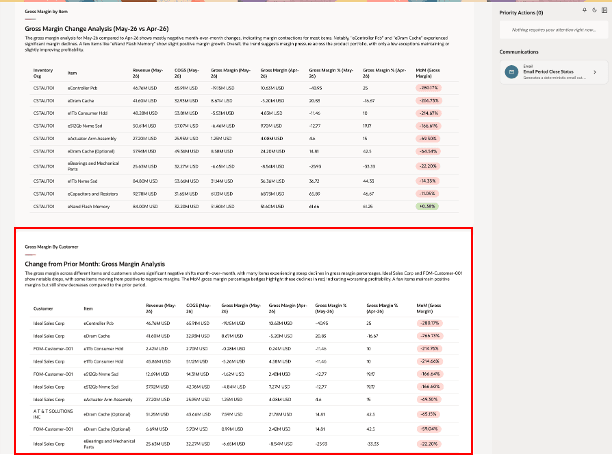
Ask Oracle example: Summarize reasons for variations in Gross Margin for an Item
Some benefits of this feature include:
- Accelerates period close through in-context cost-processing actions and automated runbook support.
- Reduces manual investigation by highlighting processing errors, likely root causes, and recommended actions.
- Improves visibility into inventory valuation changes, including top contributing items and period activity.
- Helps teams understand gross-margin movements across revenue, recognized COGS, and deferred COGS.
- Enables earlier identification and resolution of exceptions and potential accounting gaps before period close.
Steps to enable and configure
To use this feature, you must first enable this profile option:
- Navigate to the Setup and Maintenance work area.
- Search for and select the Manage Cost Accounting Profile Options task.
- On the Manage Cost Accounting Profile Options page, search for and select the ORA_CST_PERIOD_CLOSE_AGENTIC_APP_ENABLED profile option code.
- In the Profile Values section, set the Site level to Yes. The default value is No.
- Click Save and Close. The changes will take effect the next time users sign in.
Tips and considerations
- To set the context for the Cost Accounting Close Workspace:
- You can view the period close readiness information for any cost organizations that you have access to, one cost organization and cost book at a time.
- To set a default cost organization with the primary cost book as the context for the app, use the profile option:
- Profile Option Code: ORA_CST_DEFAULT_COST_ORG
- Name: Define Default Cost Organization
- Description: Specify the default cost organization context that's applied when users navigate to the Cost Accounting pages.
- You can use natural language to set the context of the app, however make sure that the cost organization name, and the cost book name are provided exactly as they are setup. Here are a few examples:
Cost Organization Cost Book Period Natural Language Prompt App Context ZCST-Vision Ops CB_1 Jul-26 "Set cost org to ZCST-Vision Ops, book to CB_1 and period to July 2026" Context set correctly ZCST-Vision Ops CB_1 Jul-26 "Set cost org to zcst vision ops, book to cb_1 and period to Jul-26" Context will not set correctly due to typos in cost organization, and case sensitivity in cost book -
Use Ask Oracle to understand period close status, investigate key movements, and identify areas that may need attention before close.
-
For Inventory Valuations and Gross Margins, Ask Oracle provides insights based on the summarized information available in the card. It can help explain changes, highlight top contributing items, organizations, customers, or cost elements, and suggest where to focus your review. It doesn’t analyze individual transaction-level records for these cards.
-
Example questions you can ask:
- What changed in inventory value compared with the prior period?
- Which items are contributing most to the inventory valuation movement?
- Are there any valuation changes that may need review before close?
- What drove the change in gross margin this period?
- Which items, customers, or inventory organizations contributed most to margin movement?
- Is deferred COGS affecting the reliability of gross margin results?
- What should I review before closing this period?
-
For transaction-level investigation, such as identifying specific errored transactions, root blockers, or transaction records to resolve, use the Cost Processing Summary card and related transaction details.
-
- Ensure the Cost Reports processor runs on a regular schedule to keep inventory valuation, COGS, and gross margin information current. The data shown in the workspace may be stale if the Cost Reports processor hasn’t run after recent cost processing or accounting activity.
- If you cannot access the workspace despite having the necessary duty roles, try enabling permission groups by doing the following steps:
- Go to the Home page and navigate to Tools.
- Go to Security Console.
- Search for the duty role Costing Period Close Workspace Duty (ORA_CST_COST_ACCOUNTING_CLOSE_WORKSPACE_DUTY).
- Edit the role and click on Enable Permission Groups under Basic Information.
- Complete the flow and save and close.
- Run the Import User and Role Application Security Data scheduled process to bring the changes into effect.
- The workspace will continue to evolve, with additional insights, actions, and automation capabilities planned for future updates.
Key resources
Access requirements
Users who are assigned a configured job role that contains the following privileges can access this feature:
- Manage Cost Processor errors by Web Service (CST_MANAGE_COST_PROCESSOR_ERRORS_WEB_SERVICE_PRIV)
- Create Cost Distributions by Web Service (CST_CREATE_COST_DISTRIBUTIONS_WEB_SERVICE_PRIV)
- Manage Cost Periods by Web Service (CST_MANAGE_COST_PERIOD_WEB_SERVICE_PRIV)
- View Cost Organization Relationship by Web Service (CST_VIEW_COST_ORG_RELATIONSHIP_WEB_SERVICE_PRIV)
- Manage Cost Organization Relationship by Web Service (CST_MANAGE_COST_ORG_RELATIONSHIP_WEB_SERVICE_PRIV)
- Run Inventory Valuation Report by Web Service (CST_RUN_INVENTORY_VALUATION_REPORT_WEB_SERVICE_PRIV)
- Analyze Cost of Goods Sold and Gross Margins Using REST Service (CST_ANALYZE_PRODUCT_GROSS_MARGINS_WEB_SERVICE_PRIV)
- Get Enterprise Structures Using REST Service (FUN_GET_ENTERPRISE_STRUCTURES_REST_SERVICE_PRIV)
Users assigned a configured job role that contains the following duty role and SAS role can access this feature:
- Costing Period Close Workspace Duty (ORA_CST_COST_ACCOUNTING_CLOSE_WORKSPACE_DUTY)
To interact with AI agents in product pages, users must be assigned a configured job role that contains this duty role:
- Fai Genai Agent Runtime Duty (ORA_DR_FAI_GENERATIVE_AI_AGENT_RUNTIME_DUTY)