AI Agent: Gross Margin Analyst for Configured Items
You can now use the Gross Margin Analyst as a workflow agent to estimate gross margin for sales orders before fulfillment. The workflow agent analyzes sales order details and uses available pricing and cost information to calculate the estimated gross margin for a complete sales order or for a specific item in a sales order.
In Oracle Fusion Cloud SCM 26B, Gross Margin Analyst was delivered as a supervisor agent for chat-based interaction with plain items. In update 26C, the capability is enhanced as a workflow agent that supports chat, email, and REST-based invocation. It also supports plain and configured item structures, including ATO, PTO, and KIT scenarios, so business users can review expected profitability earlier in the order lifecycle and reduce manual margin analysis for complex orders.
Feature Experience
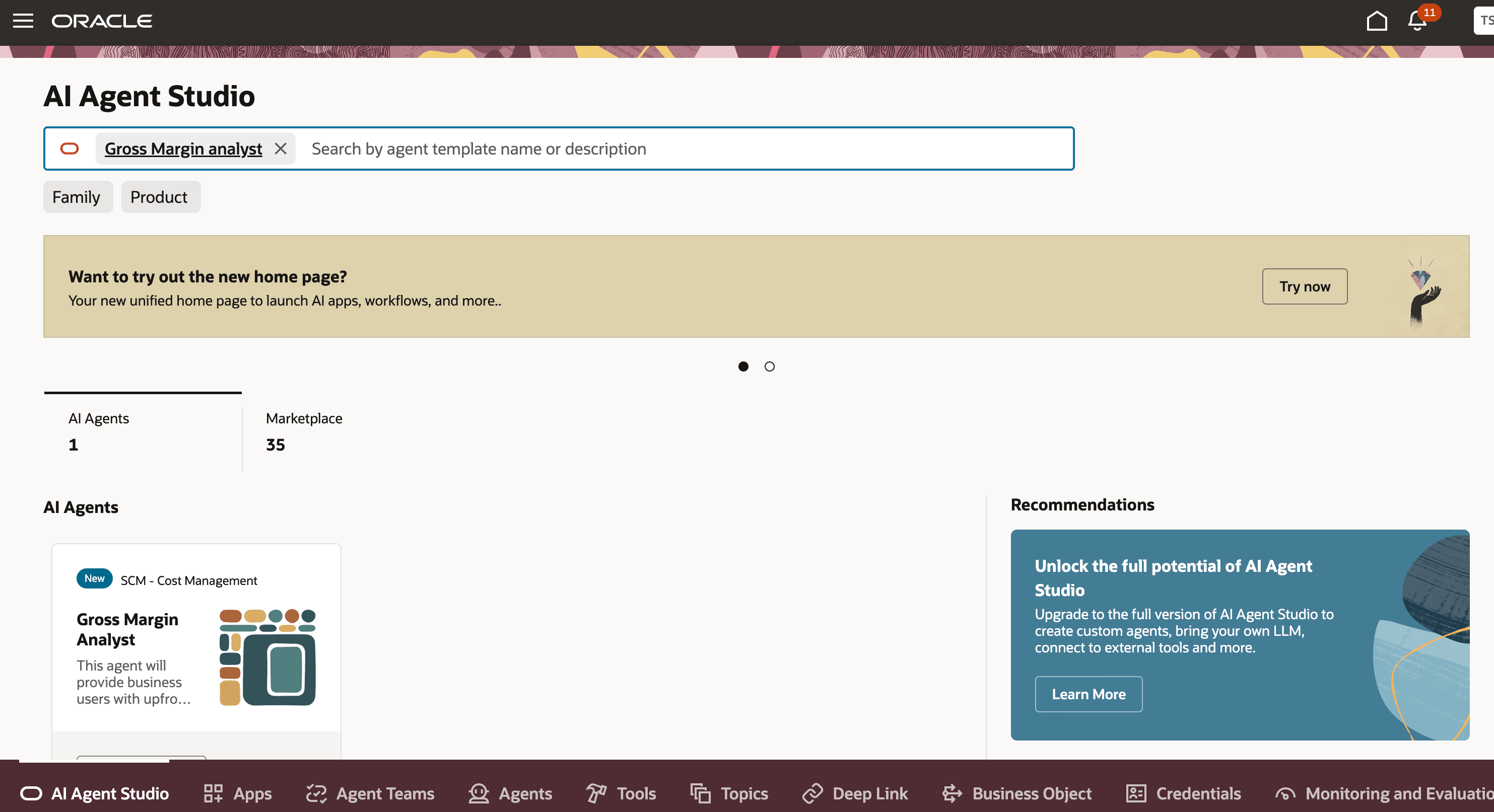
Gross Margin Analyst Agent Card in AI Agent Studio
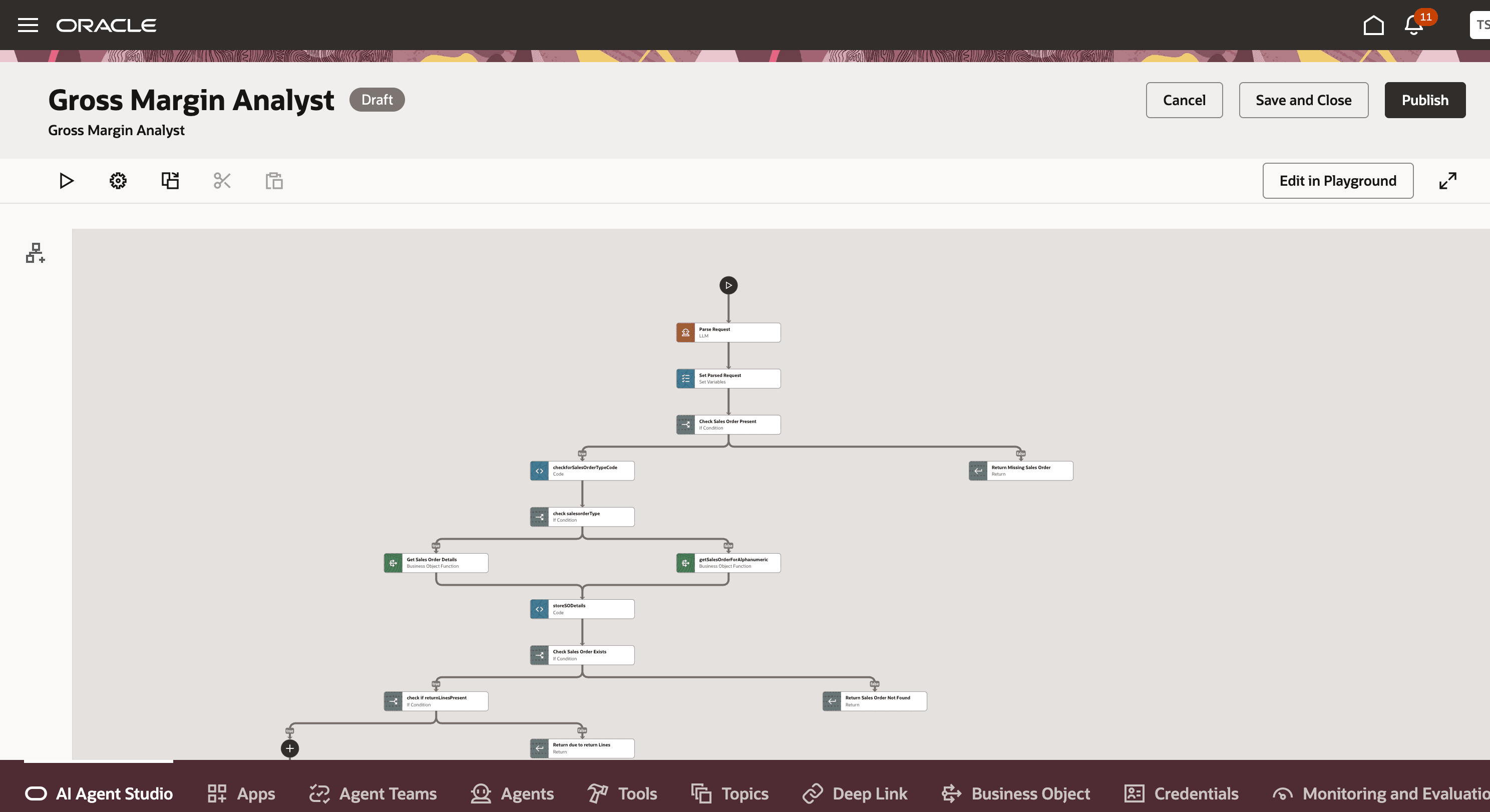
Gross Margin Analyst Workflow Canvas
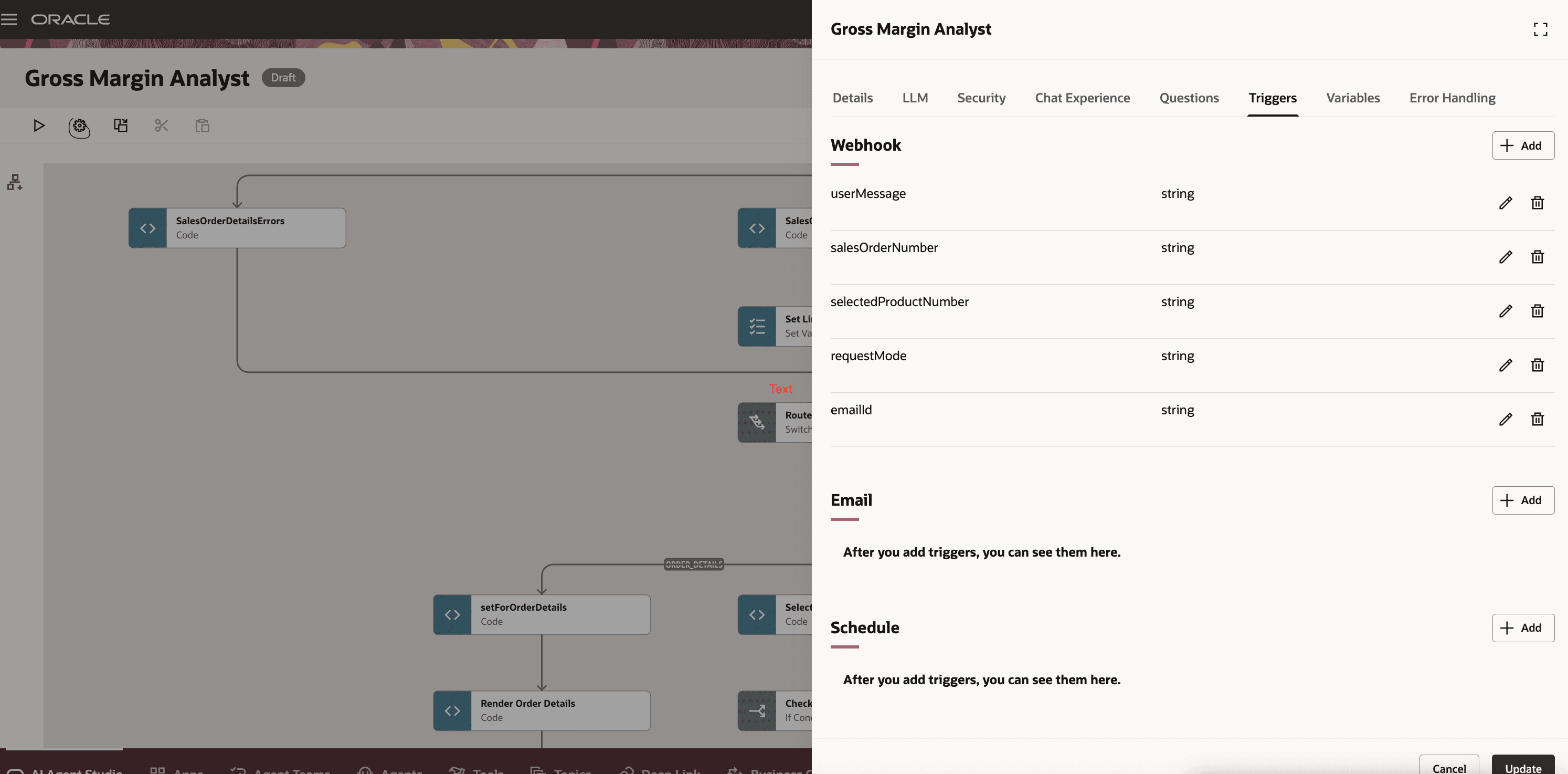
Trigger Configuration for Webhook, Email, and Schedule Invocation
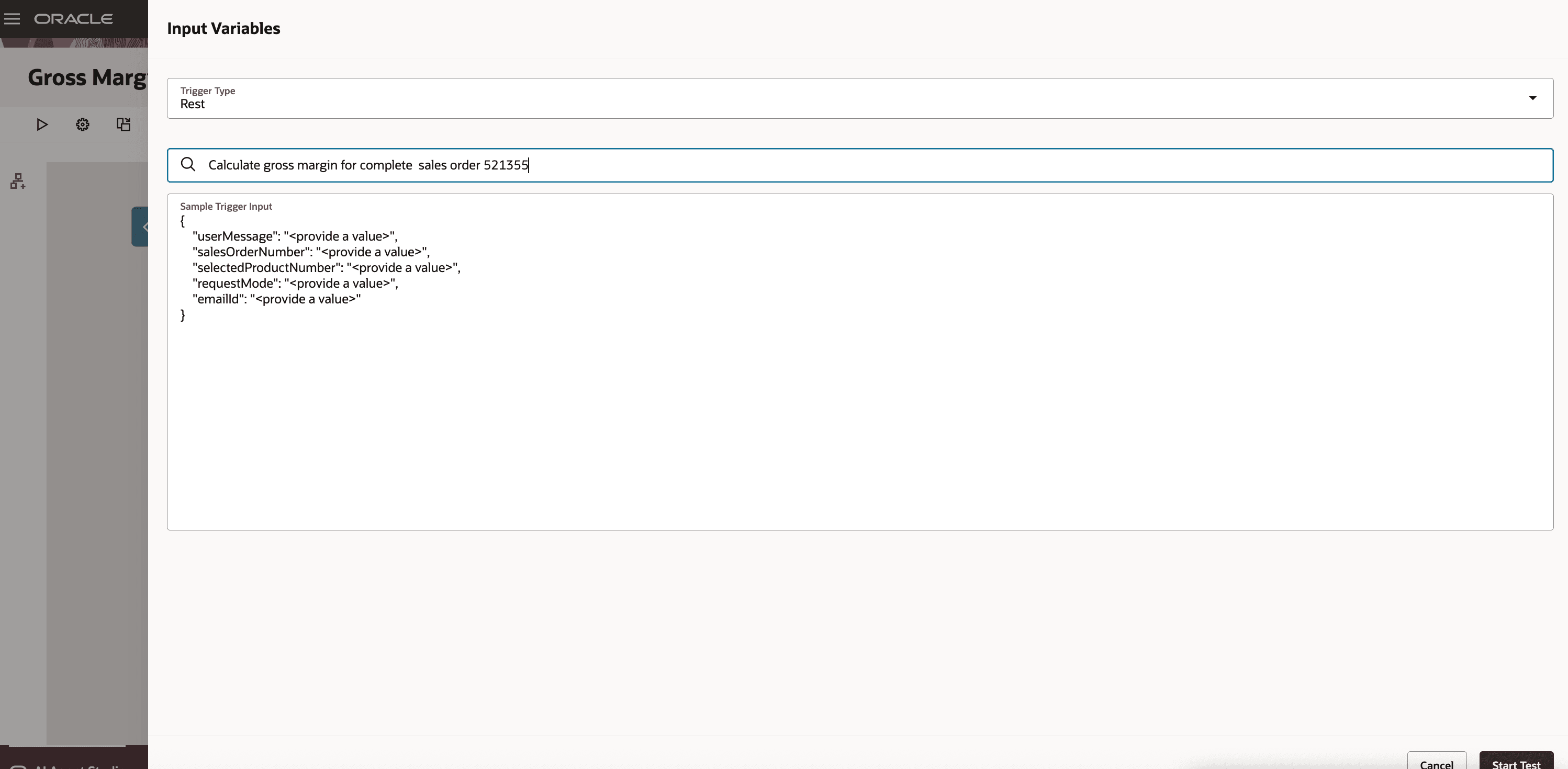
REST Test Input for a Gross Margin Request
Result Examples
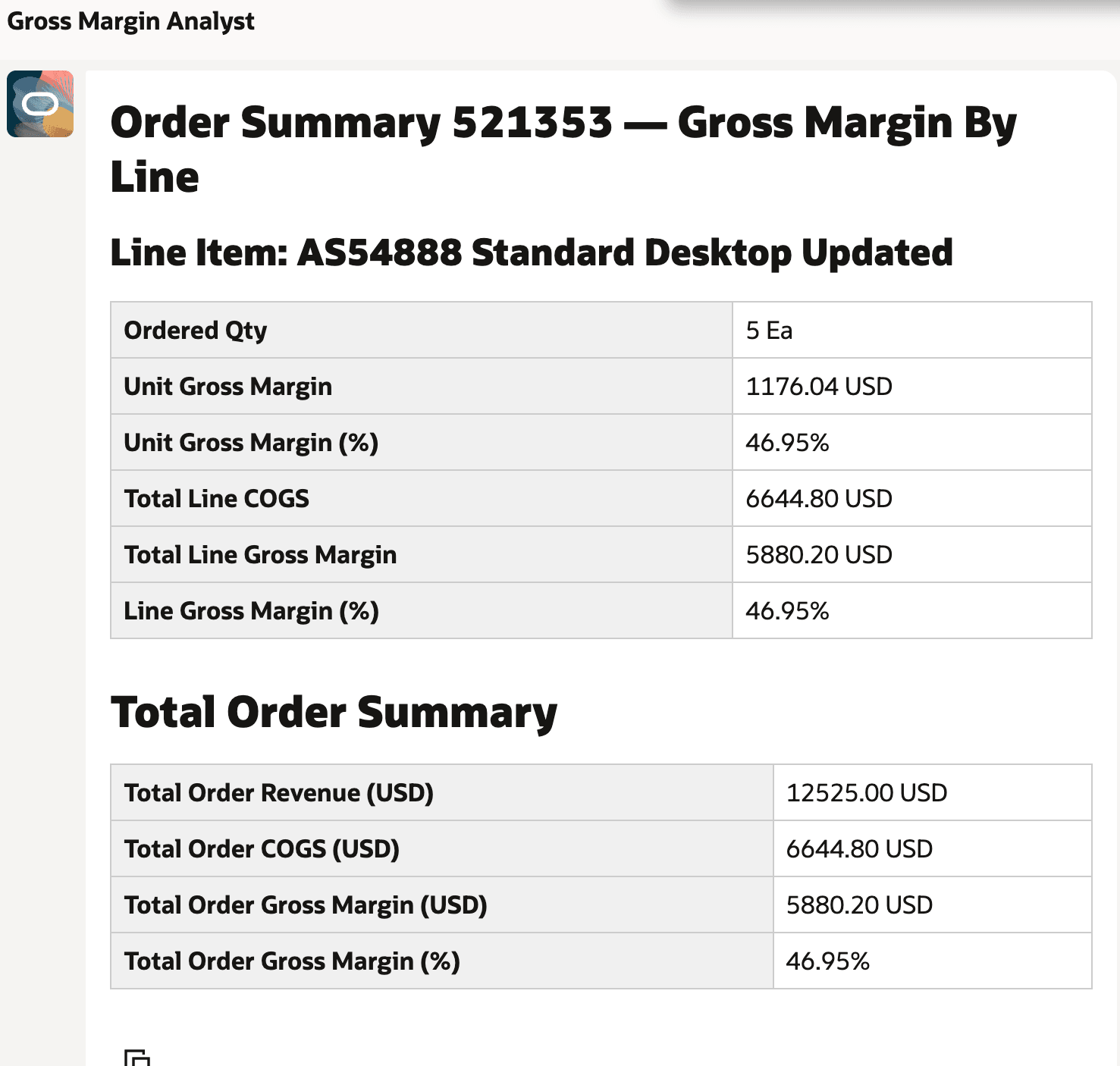
Gross Margin Output for a Plain Item
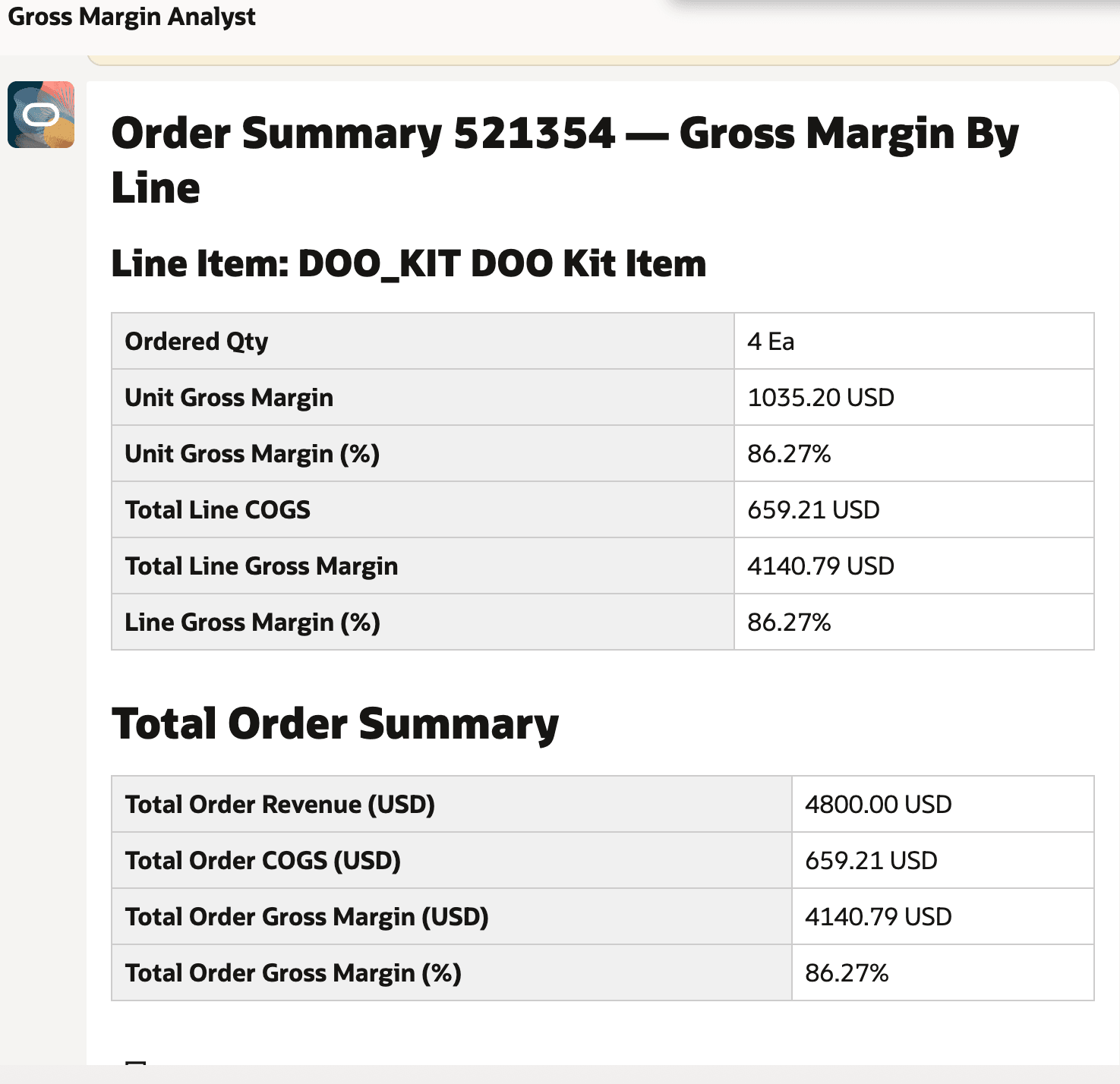
Gross Margin Output for a Configured Item
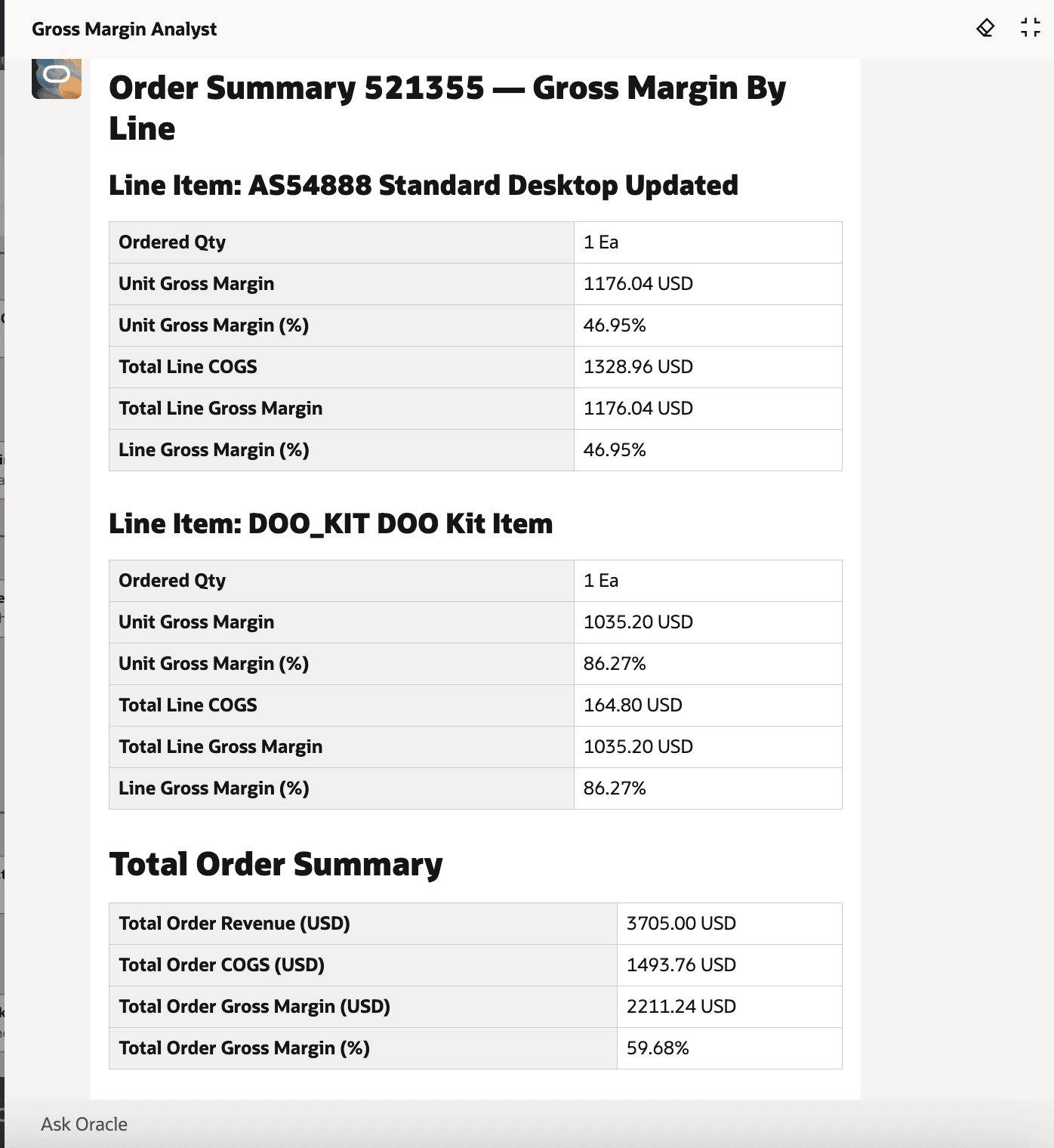
Gross Margin Output for a Multi-Item Sales Order
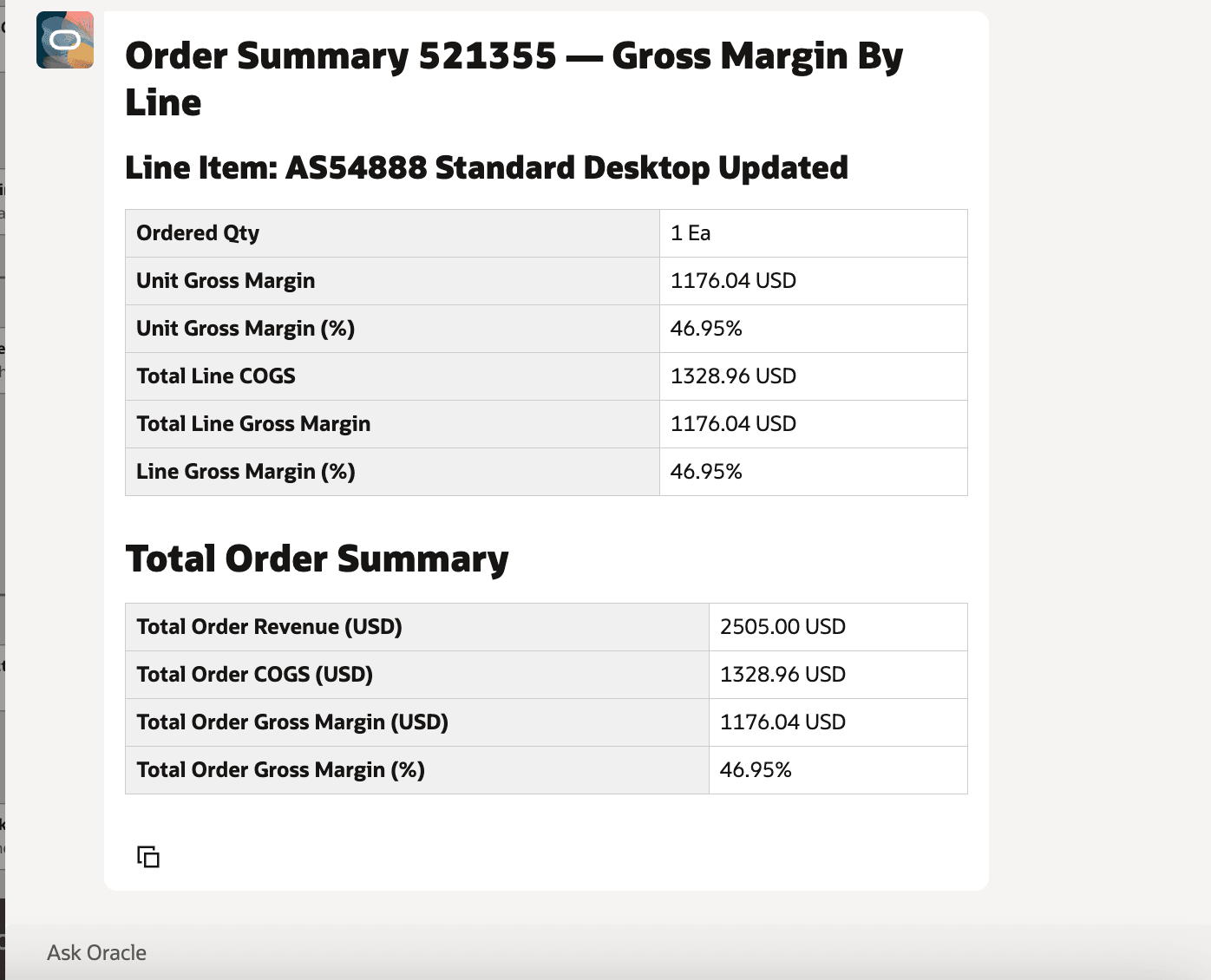
Gross Margin Output for a Specific Plain Item in a Multi-Item Order
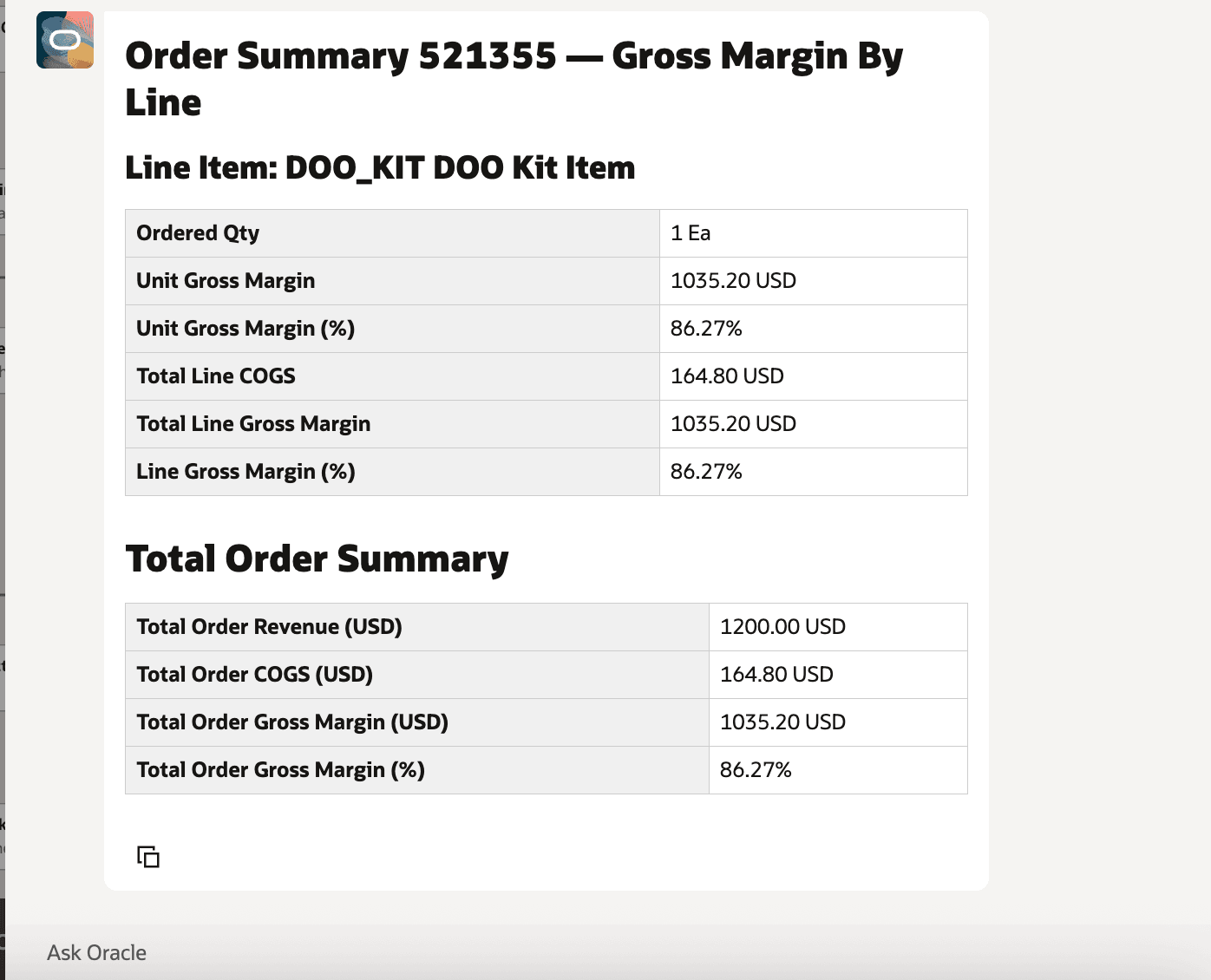
Gross Margin Output for a Specific Configured Item in a Multi-Item Order
From a business perspective, this workflow agent helps move gross margin review from a reactive finance activity to an operational control that can be used closer to the point of decision. Sales, order management, supply chain planning, and finance teams can use the same agent output to review margin exposure before fulfillment, assess item-level profitability, and identify orders that may require pricing, sourcing, or cost review.
Because the capability is delivered as a workflow agent, organizations can reuse the same gross margin intelligence across multiple interaction patterns. Users can ask for margin estimates in chat, route requests through email, invoke the workflow through REST, or expose the agent in a guided journey on pages such as order creation or gross margin analysis, based on the implementation pattern adopted by the organization.
- Sales and order management users can review estimated profitability before an order progresses further in fulfillment, helping them identify low-margin or negative-margin transactions earlier.
- Supply chain planners can factor margin into sourcing and fulfillment discussions, alongside availability and lead-time considerations, when cost or sourcing location may affect profitability.
- Finance and cost accounting teams can use consistent gross margin output to support exception review, post-fulfillment analysis, and follow-up on cost or pricing anomalies.
- Operations leaders can compare margin signals across customers, items, and sourcing locations to identify patterns that may point to pricing, cost, or fulfillment issues.
- Organizations can standardize margin-aware decision support by embedding the agent in guided journeys or operational workflows, while still using role-based access and permission groups to control who can configure and invoke the agent.
Steps to enable and configure
To enable permission groups for roles, take these steps:
- In the Setup and Maintenance work area, search for the Manage Administrator Profile Values task using the search link in the Tasks panel tab.
- Search for the Enable Security Console External Application Integration (ORA_ASE_SAS_INTEGRATION_ENABLED) profile option and set the Site profile level to Yes.
To use the agent from the AI Agent Studio, take these steps:
- In AI Agent Studio, create an inbound email account if you want to use email-based invocation. On the AI Agent Studio landing page, open the Credentials tab, select Add Account. Select the email provider, select Inbound, and enter the account name, email address, email folder, polling interval, description, tenant ID, client ID, and client secret.
- Use a dedicated email folder for gross margin requests where possible. The source draft notes that the agent looks for unread emails in the configured folder, so a dedicated folder helps keep request processing controlled.
- In AI Agent Studio, search for the Gross Margin Analyst template by agent team name, family, product, or creator, and select Copy Template.
- Enter a valid suffix, continue to the agent team, and open Agent Team Settings.
- On the Triggers tab, add the email trigger and select the inbound email account created for gross margin requests.
- To test the workflow through REST, select Debug, choose Rest as the trigger type, enter a supported gross margin prompt, and start the test.
Supported prompt patterns from the source drafts include:
- Calculate gross margin for complete sales order 521355.
- Calculate gross margin for item AS54888 in sales order 521355.
- Calculate gross margin for item DOO_KIT in sales order 521355.
Tips and considerations
- Schedule the Create Cost Accounting Distributions process with the Cost Accounting Report Processor selected at the required frequency so that the cost of goods sold values used for gross margin analysis are current.
- You can call the agent for a newly created sales order or an earlier fulfilled order, provided the required order, pricing, and cost information is available.
- Use a dedicated inbound email folder for gross margin requests when configuring email invocation. The agent processes unread emails in the configured folder.
- After publishing the agent, you can add it to a page such as the Order Creation or Gross Margin page by including it in a guided journey as an agent task of the type Workflow Agent.
- For orders that include both bill-only lines and shippable lines, gross margin estimation is supported only for shippable lines. Bill-only lines aren't considered for gross margin estimation.
- Verify the email provider support for the target 26C environment before configuring email-based invocation.
Key resources
- Oracle Fusion Cloud SCM: Using Supply Chain Cost Management guide, available on the Oracle Help Center.
- Oracle Fusion Cloud SCM: Implementing Manufacturing and Supply Chain Materials Management guide, available on the Oracle Help Center.
- Oracle Fusion Cloud SCM: Security Reference for Manufacturing and Supply Chain Materials Management guide, available on the Oracle Help Center.
- Access Requirements for AI Agent Studio
- How can I give users access to AI agents?
- Create AI Agents
Access requirements
To access Oracle AI Agent Studio for Fusion Applications and manage SCM AI agents, users must be assigned a configured job role that contains these duty roles:
- SCM Intelligent Agent Management Duty (ORA_RCS_SCM_AI_AGENT_MANAGEMENT_DUTY)
- SCM Intelligent Agent Management Duty (ORA_RCS_SCM_AI_AGENT_MANAGEMENT_DUTY_HCM)
- Fai Genai Agent SCM Administrator Duty (ORA_DR_FAI_GENERATIVE_AI_AGENT_SCM_ADMINISTRATOR_DUTY)
To interact with AI agents in product pages, users must be assigned a configured job role that contains this duty role:
- Fai Genai Agent Runtime Duty (ORA_DR_FAI_GENERATIVE_AI_AGENT_RUNTIME_DUTY)
To allow users to interact with agents, enable permission groups in the Security Console on the configured job roles that contain the Fai Genai Agent Runtime Duty role. You can enable permission groups when you manage the basic information of the configured job roles.
See Access Requirements for AI Agent Studio (for administrators) and How can I give users access to AI agents (for end-users) for more information.
To interact with the Gross Margin Analyst AI agent, users must be assigned a configured job role that contains this privilege:
Review Item Cost Element Details REST (CST_ANALYZE_PRODUCT_GROSS_MARGINS_WEB_SERVICE_PRIV)