Use Advanced Scheduling and Assignments for Maintenance Work Orders
Enable advanced scheduling and assignment by integrating Oracle Fusion Cloud Field Service with Oracle Fusion Cloud Maintenance to optimize technician allocation while maintaining execution control. This capability separates scheduling optimization from execution by allowing Fusion Field Service to generate time-slot-based assignment recommendations using technician skills, availability, and constraints, while Oracle Maintenance remains the system of record for work orders, assignments, and execution tracking. Organizations can selectively enable this functionality using a plant-level parameter, ensuring applicability only to maintenance-enabled organizations and avoiding conflicts with manufacturing scheduling. The process uses a scheduling flow where Oracle Maintenance contains work orders and resource requirements, Fusion Field Service returns recommended assignments, and Oracle Maintenance applies them through bottom-up scheduling at the operation level. Additional enhancements include time-block-based schedule visualization, technician self-assignment, operation-level clocking, and improved execution visibility through actual start and end timestamps. These capabilities improve scheduling accuracy, technician utilization, and real-time execution tracking while preserving control within Oracle Maintenance.
The following screenshot shows the Scheduling tab in the Resources view after the advanced scheduling has run for the maintenance organization.
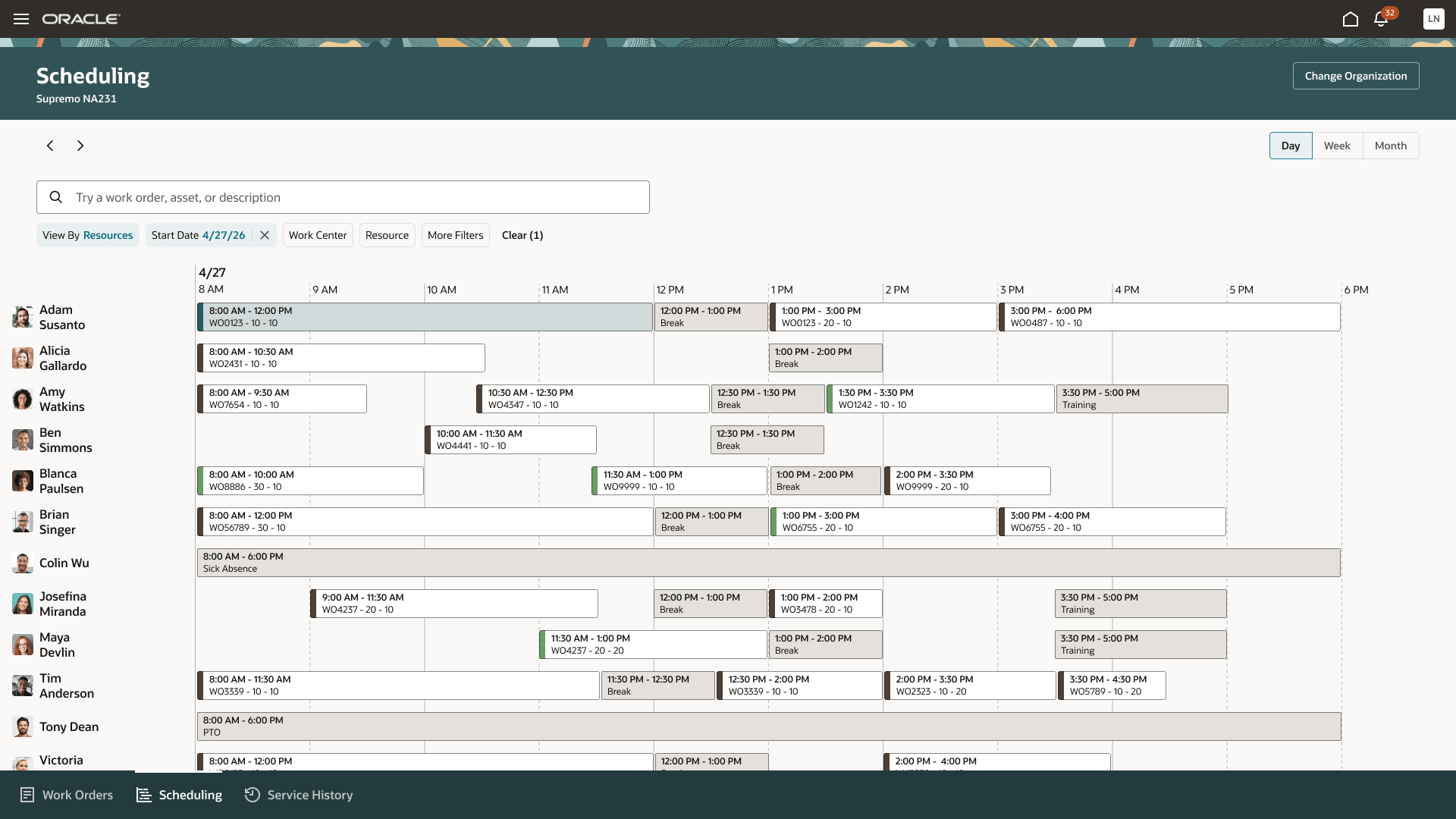
Resources view in Scheduling tab in Maintenance Supervision
Define Resources
Define resources for each organization and work center to represent the job category or skill set required to perform operation sequence work. Each resource must include one or more resource instances that represent technicians available for scheduling and assignment. Assign the Maintenance Technician role to each technician who participates in advanced scheduling.
Configure Technician Availability
In Fusion Field Service, create technician schedules, shift definitions, and lunch periods so technicians are available for scheduling and assignment to maintenance work orders. You must enable the offering for Fusion Field Service and provision at least one Administrator and Manager role to manage technician schedules, shift definitions, and lunch periods.
Release Work Orders
Maintenance work orders with resource requirements must be in Released status before they can be considered for advanced scheduling.
Run the Scheduling Process
Run the Request Maintenance Work Orders Advanced Scheduling and Assignments scheduled process for a maintenance organization using a configurable scheduling horizon of up to 30 days. The scheduling horizon considers planned work order start and end dates and any additional time into which work can be pushed. A scheduling horizon that is too narrow can prevent work orders from being scheduled, while a horizon that is too large can push work too far into the future.
We recommend running the process nightly after the final shift.
Review and Manage Assignments
Review assignment recommendations and scheduling outcomes in Maintenance Supervision. You can search for assigned, partially assigned, and unassigned work orders.
You can optionally firm a work order or assignment to prevent rescheduling.
From the Resources tab in Edit Work Order Details, you can:
- View technician assignments generated by the scheduling process or added manually.
- Unassign technicians if no time has been reported and the work order isn't completed.
- Add assignments for technicians during the resource sequence time period.
- Perform administrative actions such as clocking technicians out or completing operations.
Review the Schedule
Use the Scheduling tab in Maintenance Supervision to review work order and technician schedules.
From the Work Orders view, you can:
- Review assigned and unassigned work orders.
- Manage existing assignments.
From the Resources view, you can:
- Review technician calendars, assignments, and unavailable time.
- Add unavailable time for items such as sick leave, appointments, and meetings.
- Assign unassigned operations to technicians for a selected day and time period.
Report Work
Technicians continue to use My Maintenance Work to review and report on assigned work orders. Technicians can optionally clock in and clock out of work order operations to support real-time execution tracking and reporting.
Improve maintenance scheduling and execution by assigning work more effectively based on technician availability and qualifications. Increase visibility into assignments, scheduling outcomes, and execution progress to support more efficient maintenance operations.
Here's the demo of these capabilities:
Steps to enable and configure
Complete the following setup in Oracle Fusion Cloud Field Service and Oracle Fusion Cloud Maintenance to enable advanced scheduling and assignment.
Oracle Fusion Cloud Field Service
- Enable the Fusion Field Service offering.
- Provision at least one administrator user and one manager user.
- Enable the Support of Maintenance Resources opt-in feature.
- Configure technician schedules, shifts, lunch periods, and calendars.
- Define at least one activity type for unavailable time.
Oracle Fusion Cloud Maintenance
- Ensure technician users are defined and assigned the Maintenance Technician role.
- Ensure each technician has a default maintenance organization and access to all maintenance organizations they'll use.
- Run the Maintain Party and Location Current Record Information scheduled process to synchronize current user setup information.
- Enable the plant parameter for maintenance-only organizations that require advanced scheduling.
Tips and considerations
If you are currently using assignments, we recommend deleting future assignments before enabling advanced scheduling to avoid overlapping assignments and scheduling conflicts.
Key resources
Refer to the Using Maintenance guide for additional setup and configuration details.
View the Enable Work Orders Scheduling and Resources Assignment chapter in the Implementing Manufacturing and Supply Chain Materials Management guide for additional information.
Access requirements
Users who are assigned a configured job role that contains these privileges can access Field Service to manage technician schedules, shift definitions, and lunch periods :
- ORA_FFS_FIELD_SERVICE_MANAGER_JOB (Field Service Manager Job)
- ORA_FFS_FIELD_SERVICE_APPLICATION_ADMINISTRATOR_JOB (Field Service Administrator)
Users who are assigned a configured job role that contains these privileges can use the new My Maintenance Work capabilities:
- MNT_ALLOW_OP_SELF_UNASSIGN: Allows technicians to unassign themselves from operations. This privilege is available only for organizations enabled for advanced scheduling.
- MNT_ALLOW_OP_DETAIL_CLOCKOUT: Allows technicians to perform detailed operation clock out activities, including adjusting clock in and clock out times and completing operations during clock out. Without this privilege, technicians can perform only real-time clock out.
Users who are assigned a configured job role that contains these privileges can use the new Maintenance Supervision capabilities:
- MNT_ALLOW_OTHERS_OP_CLOCKOUT: Allows supervisors to perform operation clock out activities on behalf of technicians.
- MNT_ALLOW_OP_DETAIL_COMPLETE_FOR_OTHERS: Allows supervisors to perform detailed operation completion activities on behalf of technicians.
- MNT_SCHEDULE_WO_USING_FFS_SCHEDULER: Provides access to submit the scheduling process used to generate maintenance work order scheduling and assignment recommendations.