AI Agentic App: Batch Process Manufacturing Workspace
The Batch Process Manufacturing Workspace is an agentic application designed to proactively monitor, analyze, and optimize end-to-end batch manufacturing operations. It brings together specialized AI agents that continuously scan master data and production activity to detect issues early, explain root causes, and guide users with the resolution.
At a high level, the workspace acts as an intelligent control tower for process manufacturing, helping product definition and operations move from reactive troubleshooting to proactive decision-making.
The workspace consolidates recipe, batch, variance, and conformance insights into a single unified experience, reducing the need to navigate across multiple pages and manually compare data. It helps users quickly:
- Identify what requires attention.
- Understand the likely causes and the operational impact.
- Drill down into detailed insights.
- Take the next best action.
The workspace is organized into focused panels, so that users can start with a high-level summary and then navigate into the specific area requiring investigation.
1. Access the Workspace
To access the workspace:
- Navigate to Supply Chain Execution.
- Under Quick Actions, select Show More to view the complete list of available actions.
- Select Batch Process Manufacturing Workspace under Manage Production.
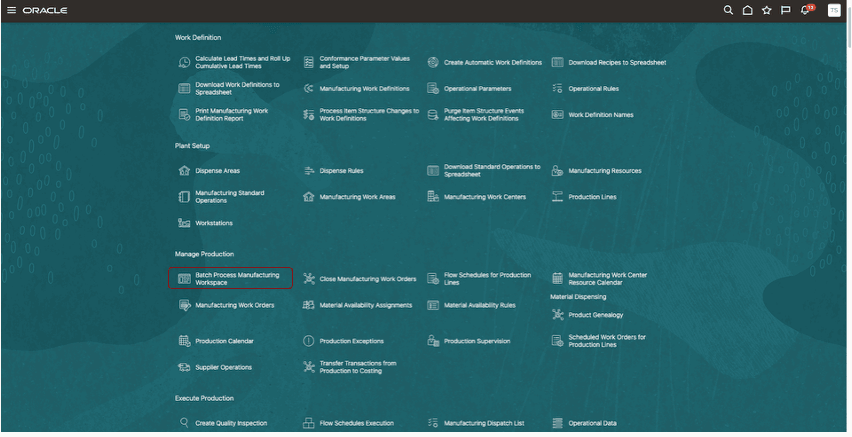
Quick Action to Access the Workspace
This functionality is controlled through a development profile option and is visible only when the profile option is enabled.
Alternatively, you can also access the workspace from AI Agent Studio:
Navigate to Tools, AI Agent Studio, Applications, and then select Batch Process Manufacturing Workspace.
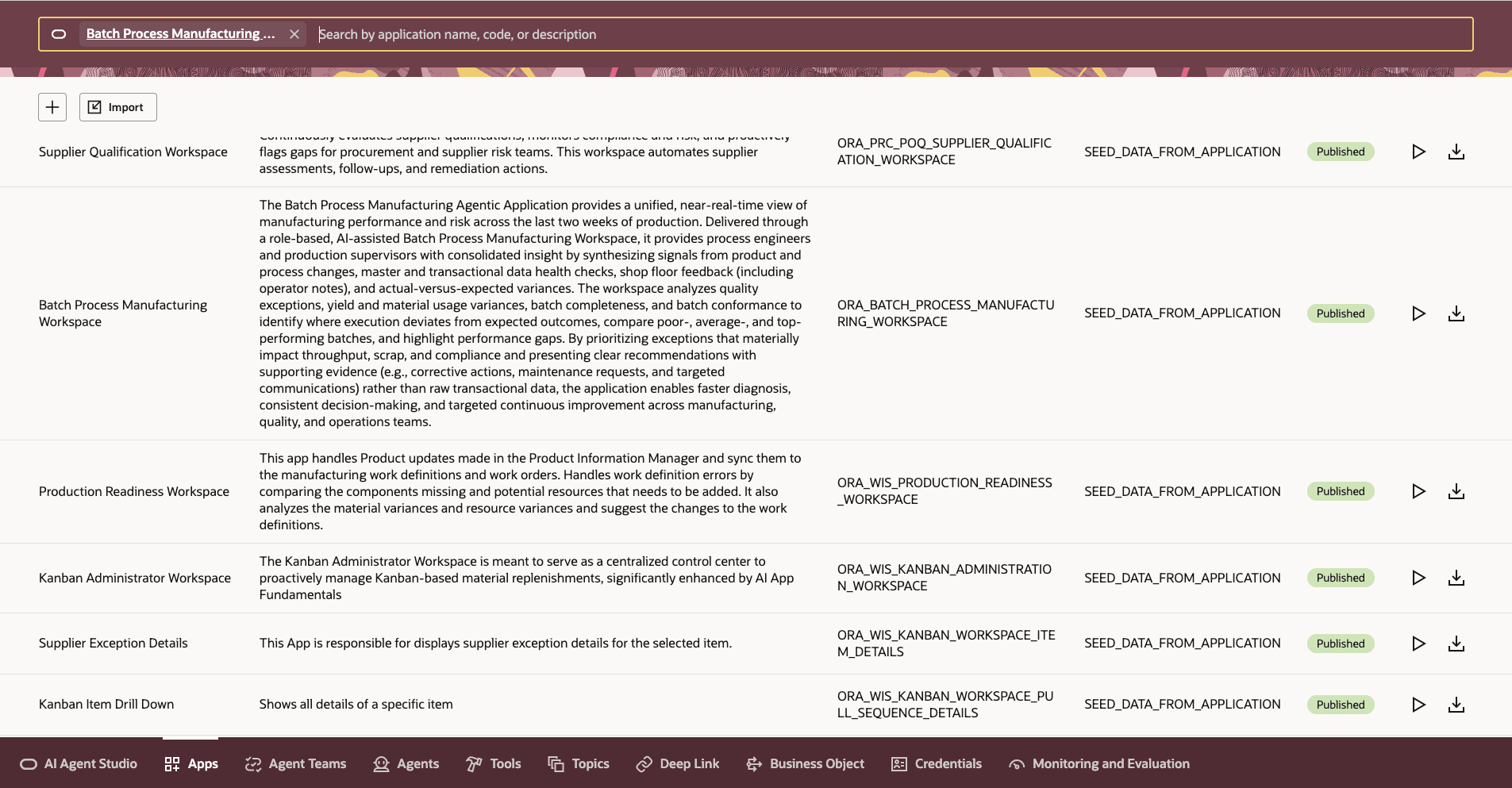
Navigation Using AI Agent Studio
2. Set the Workspace Context
Before reviewing insights, it is recommended to use Ask Oracle or the context controls to configure the workspace context.
The following context values determine the recipe, batch, and variance details displayed in the workspace:
- Plant (Organization)
- Analysis Duration
Context Validation Rules
The workspace validates the selected context before displaying insights:
- The plant must be a valid process manufacturing-enabled organization.
- You must have access to the selected plant.
- The analysis duration must be greater than zero.
Workspace Structure
The workspace is organized into the following sections:
- Workspace Header – Displays the workspace title and navigation controls.
- Context Section – Displays the selected plant and analysis duration.
- Chat Icon – Opens the conversational assistant experience.
- Ask Oracle Bar – Allows you to ask contextual questions and drill deeper into insights.
Workspace Summary – Displays a high-level overview of the recipe, batch, and conformance insights.
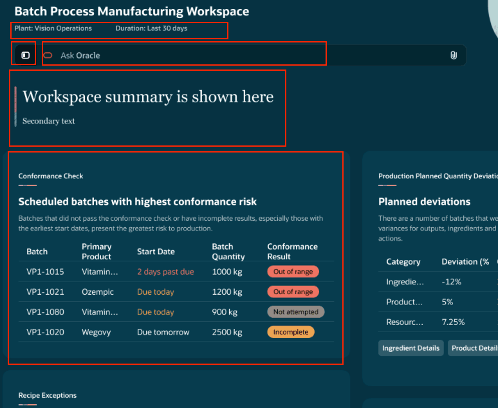
Workspace Layout
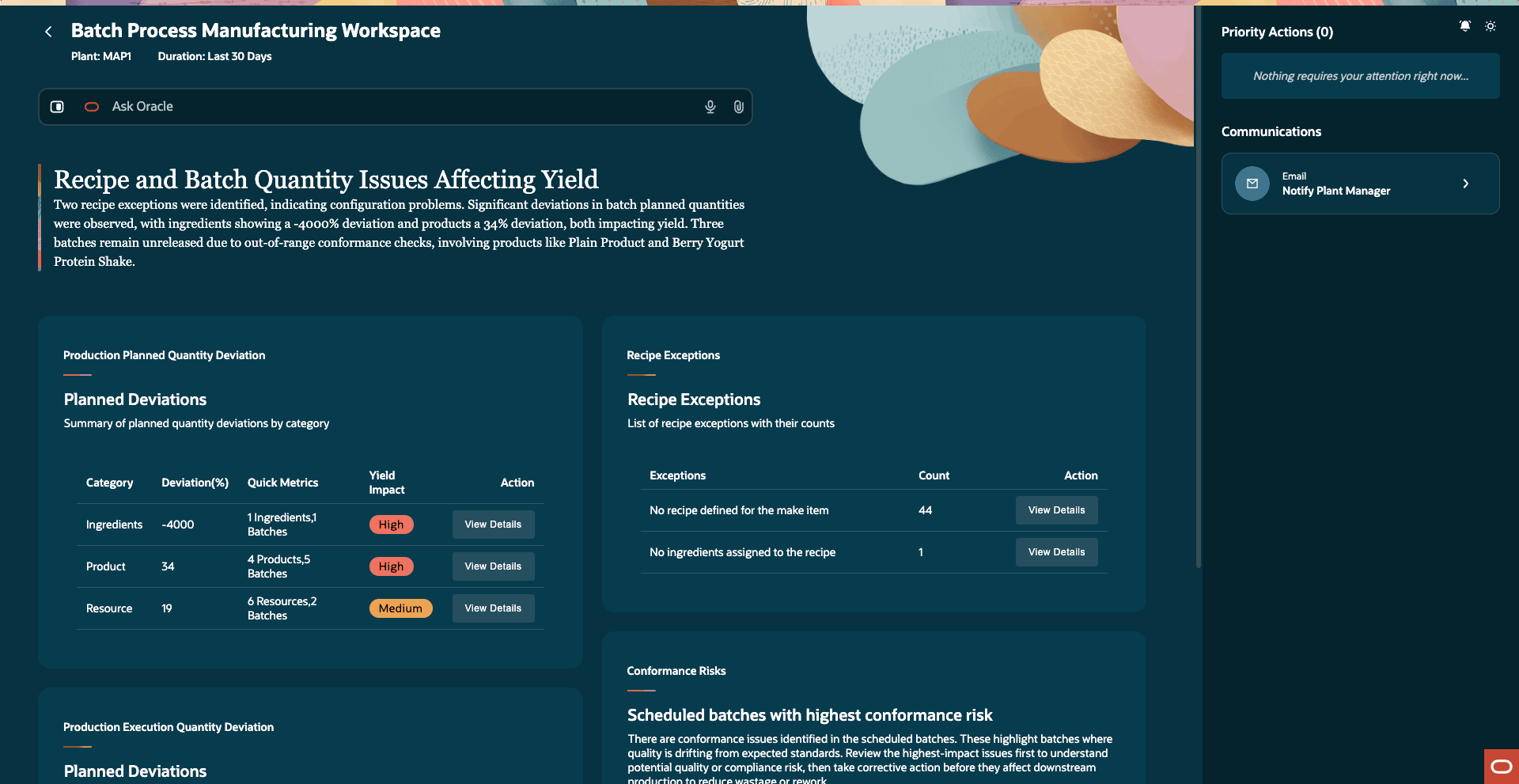
Insights Provided Based on the Organization and Analysis Duration
3. Review the Summary Panels
Each panel focuses on a different problem area. Users can start with the panel showing the highest impact issue, then drill down for more details.
The summary section provides a high-level overview of the following:
- Recipe exceptions
-
Production deviations:
- Production Planned Quantity Deviations
- Production Execution Quantity Deviations
- Conformance risks
-
Each advisor panel focuses on a specific operational problem area and allows you to review insights, investigate root causes, and take follow-up actions.
What Each Panel Does?
Recipe Exception Advisor
Use the Recipe Exceptions Advisor to ensure that recipes are production-ready before they impact planning, costing, or execution.This advisor continuously reviews the recipe, formula, item, and plant setup data to identify configuration issues and operational risks early.
It helps users identify issues such as the following:
- No recipe defined for a make item.
- Missing ingredients or products.
- Invalid operation dependencies.
- Inactive or unapproved recipes.
- Formula or structure mismatches.
- Other recipe setup gaps that may impact production readiness.
Each exception displays:
- A summary count.
- Impacted recipes or items.
- Detailed insight into the issue.
- Recommended next steps.
Users can select View Details to drill down into the impacted records, understand the root cause, and review the suggested corrective actions.
Scope and Purpose
The Recipe Exceptions Advisor helps users:
- Detect and prioritize recipe setup exceptions.
- Review summarized and detailed exception insights.
- Understand the likely root causes and resolution guidance.
- Review recommended priority actions where applicable.
- Analyze additional information related to:
- Recipes
- Items
- Formulas / Item Structures
- Plants
The Recipe Exceptions Advisor helps users:
- Improve recipe and master data readiness.
- Reduce production disruptions caused by setup issues.
- Support governance and compliance processes.
- Maintain alignment between formulas, recipes, and manufacturing execution.
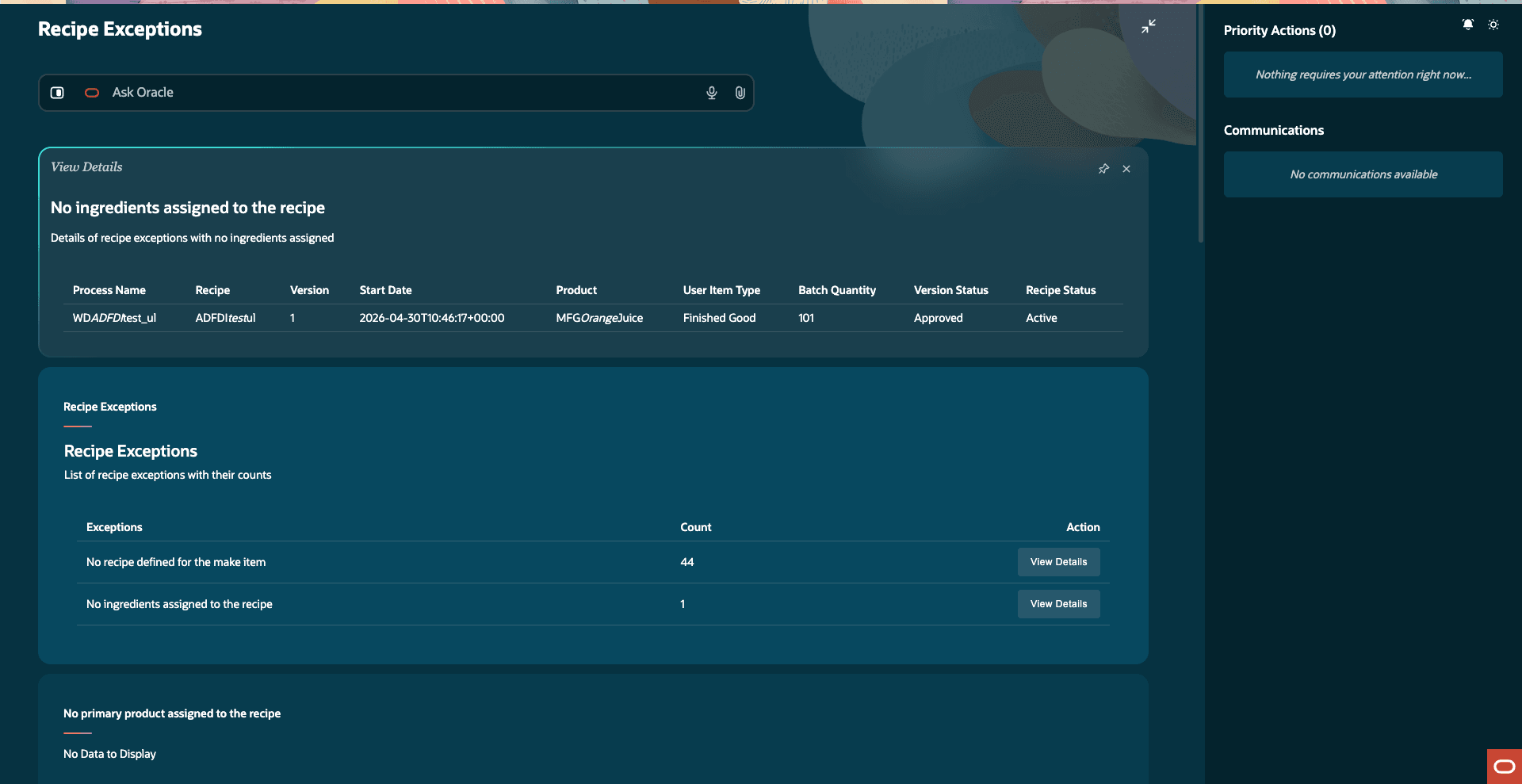
Recipe Exceptions Advisor Overview
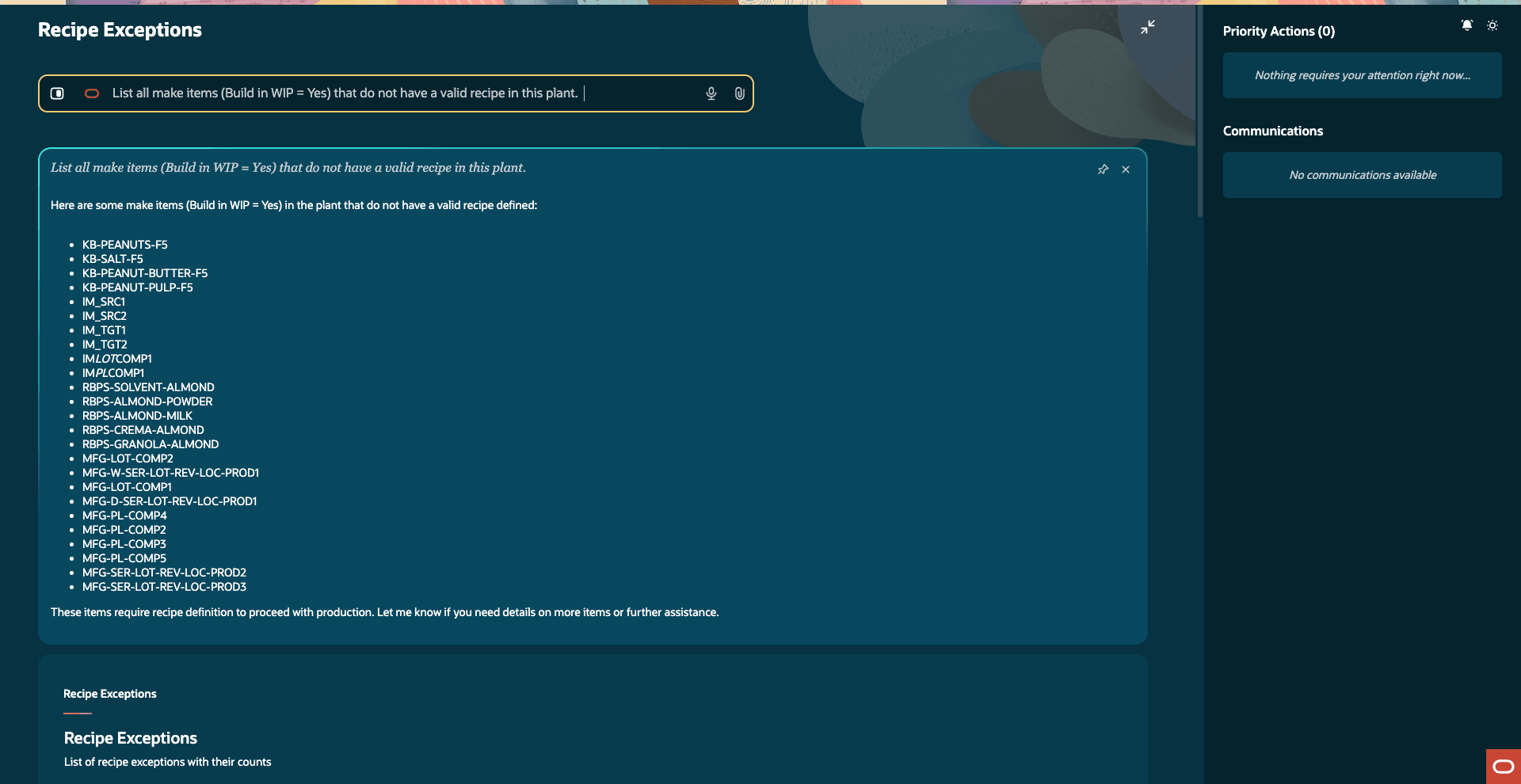
Recipe Exception Drill Down or Detail Panel
Users can also drill down into the insights and ask deeper contextual questions to better understand the issue.
Production Planned Quantity Deviation
Use the Production Planned Quantity Deviation panel to identify planning-related deviations before batch execution begins.
This advisor compares recipe expectations with planned batch quantities and highlights the differences in planned values across:
- Ingredients
- Products
- Resources
The advisor also highlights the impact level, helping users quickly identify the most significant deviations requiring attention.
Scope and Purpose
The Production Planned Quantity Deviation advisor helps users:
- Detect planned quantity deviations for products, ingredients, and resources.
- Quantify and prioritize the deviations based on operational impact.
- Understand likely root causes and planning-related changes.
- Review recommended corrective actions where applicable.
- Analyze additional information related to:
- Recipe details.
- Product batches and execution.
- Items.
- Plants.
Users can drill down into the insights to understand the following:
- Which batch or recipe is impacted?
- Was the deviation intentional or unexpected?
- Which ingredient, product, or resource contributed the most to the variance?
The advisor also provides guidance for investigating common causes such as the following:
- Planning overrides.
- Yield adjustments.
- Material substitutions.
- Resource planning changes.
The Production Planned Quantity Deviation advisor helps users:
- Improve planning accuracy and reduce variability.
- Reduce waste caused by planning inconsistencies.
- Improve manufacturing efficiency and batch readiness.
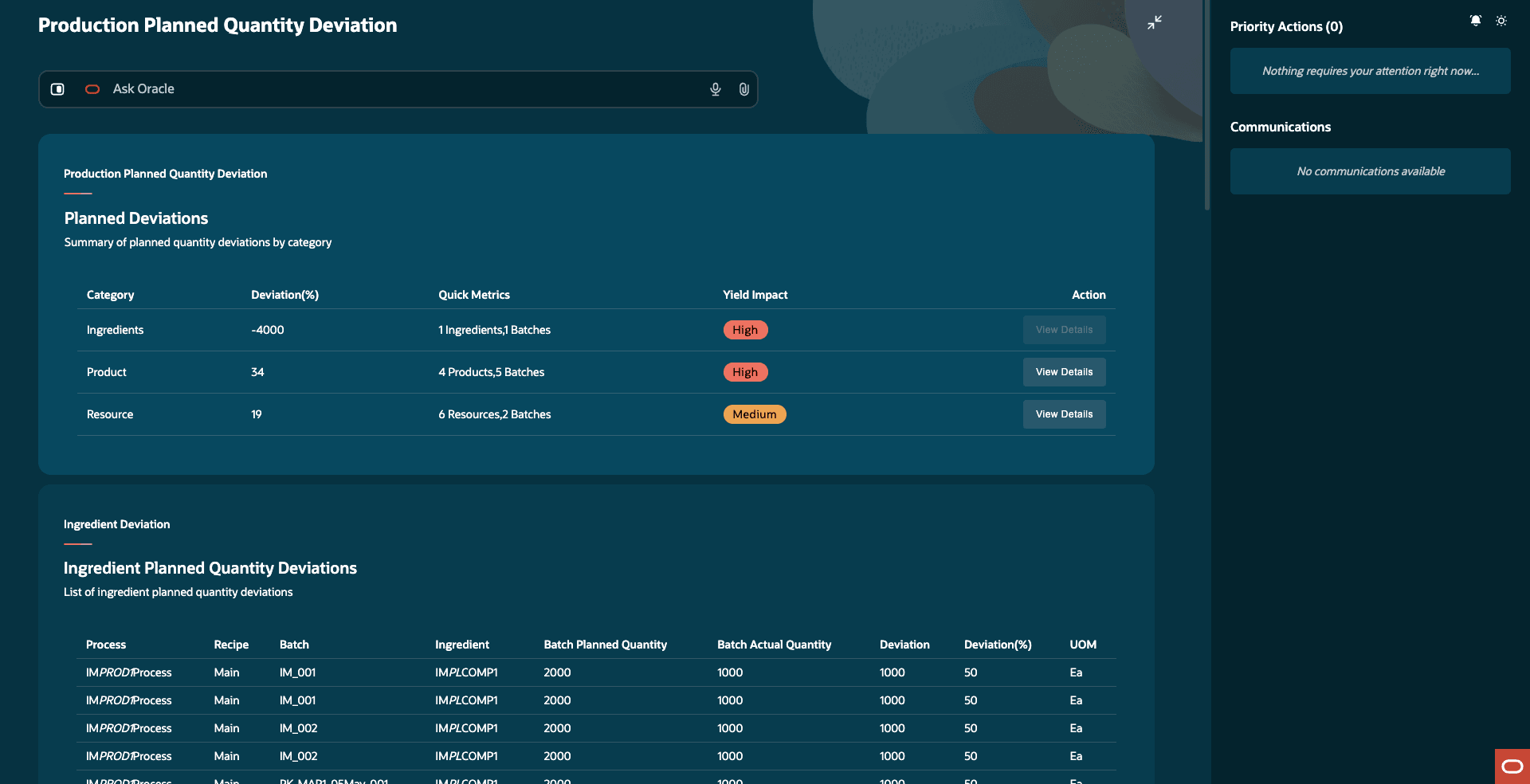
Production Planned Quantity Deviation Overview
Production Execution Quantity Deviation
This panel helps users analyze what actually happened during production execution.
It shows where actual usage differs from the planned batch quantities for:
- Ingredients
- Products
- Resources
Use this panel to investigate whether the batch performed as expected and identify where actual execution drifted from the plan.
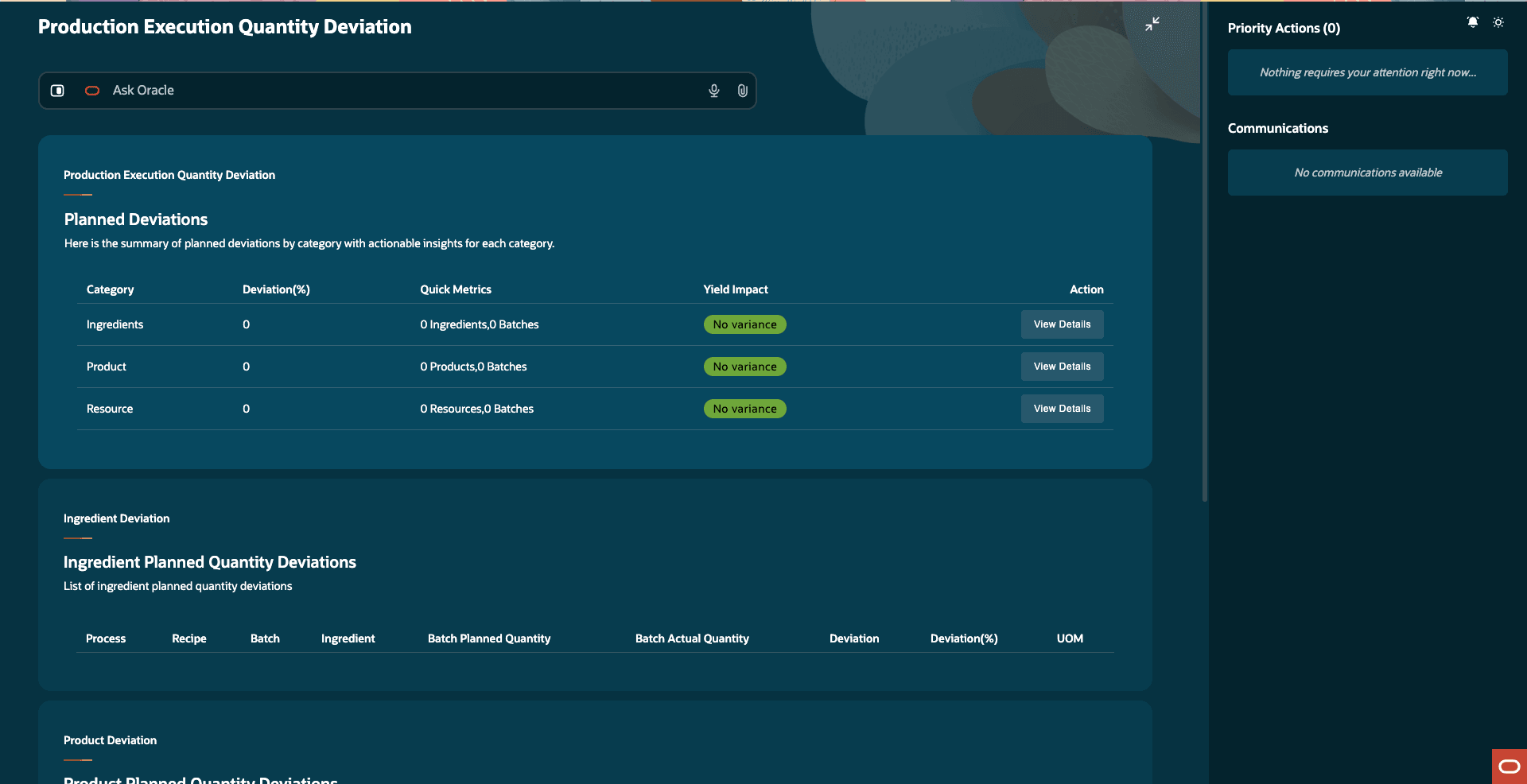
Production Execution Quantity Deviation
Batch Conformance Agent
Use the Batch Conformance Agent to identify high-risk batches and take preventive action before compliance issues occur.
This panel highlights scheduled or in-progress batches that may not meet target conformance requirements, allowing you to focus on the most critical risks first. By surfacing these issues early, you can reduce scrap, rework, and production delays.
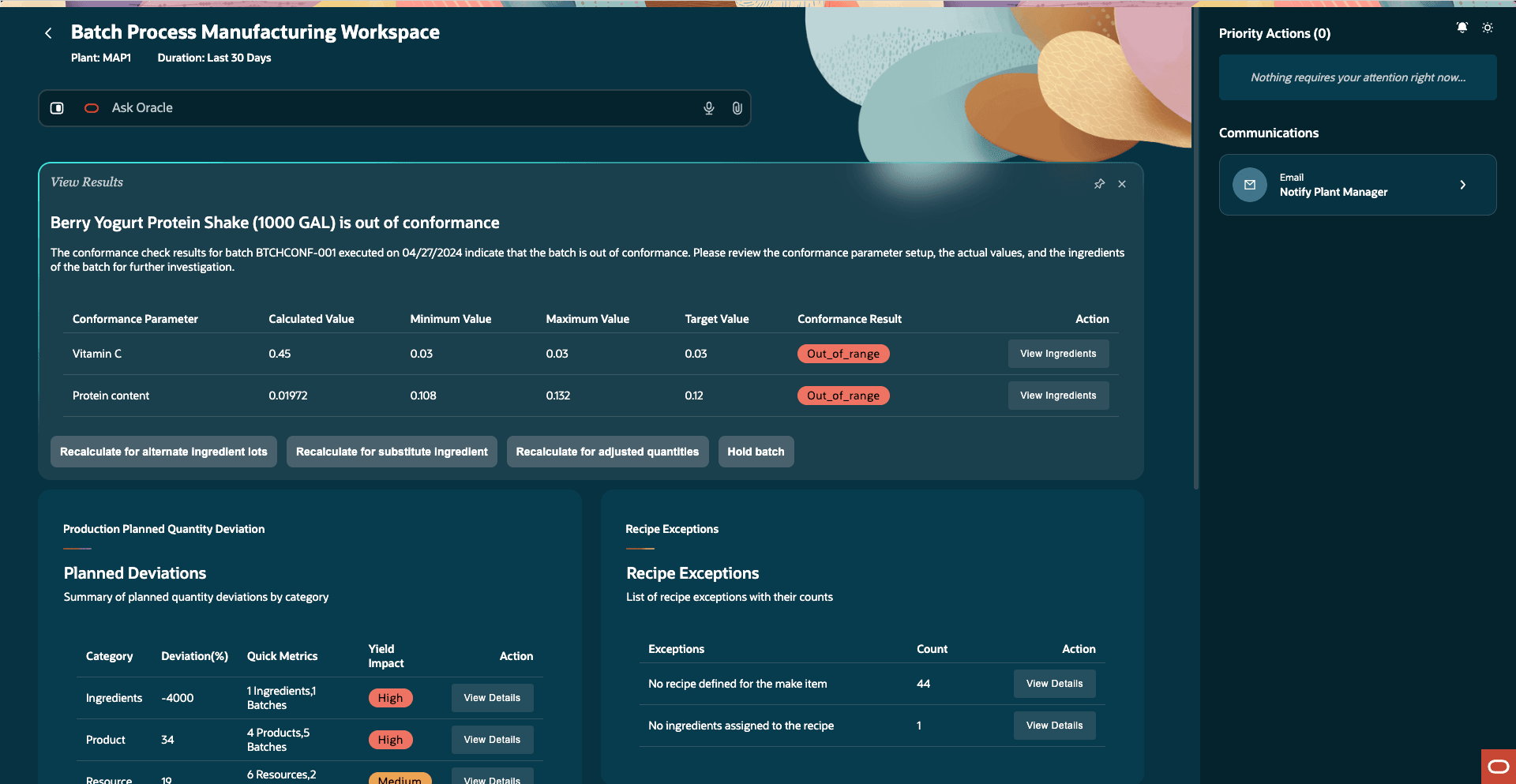
Batch Conformance Agent
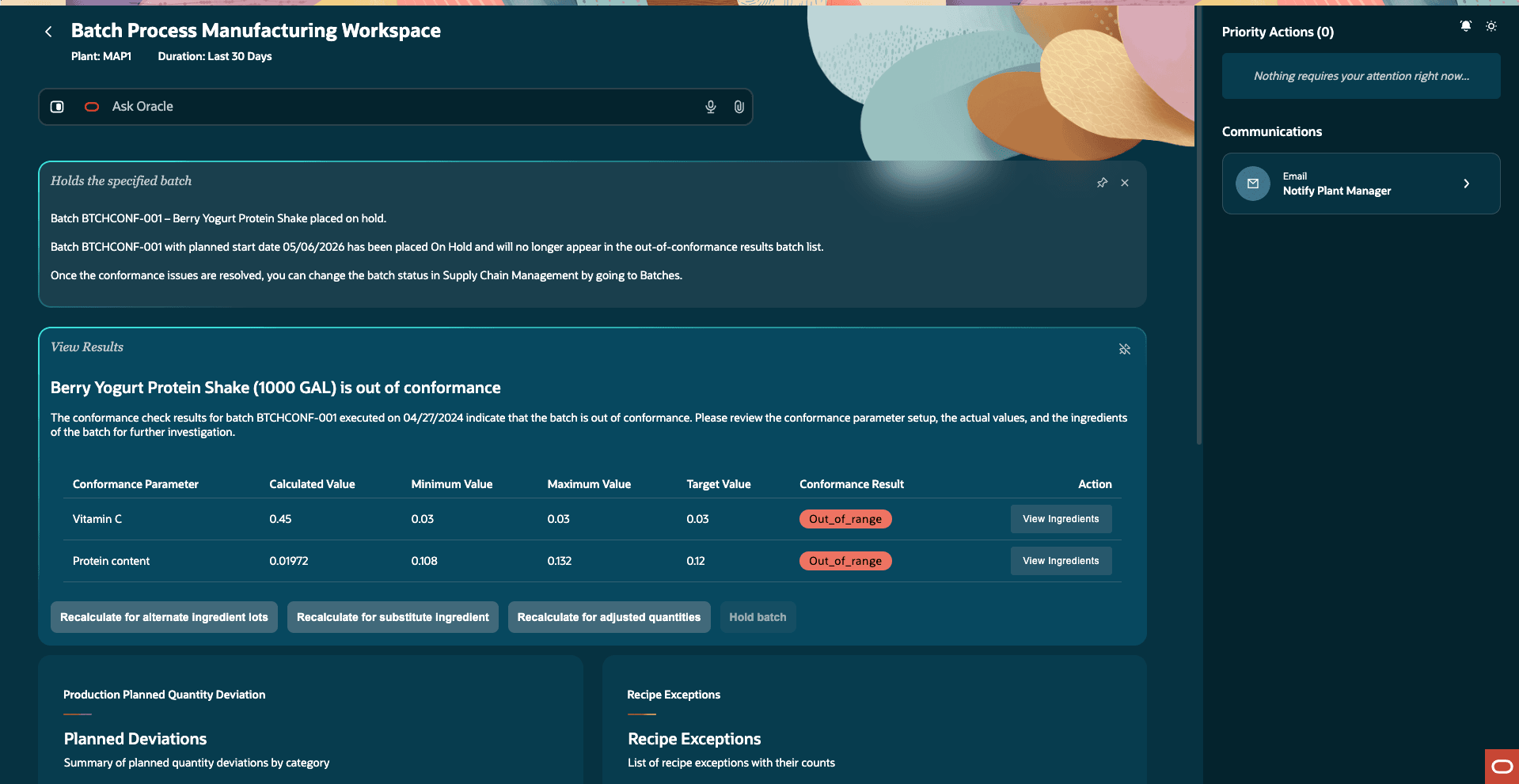
Conformance Drill Down or Simulation Panel
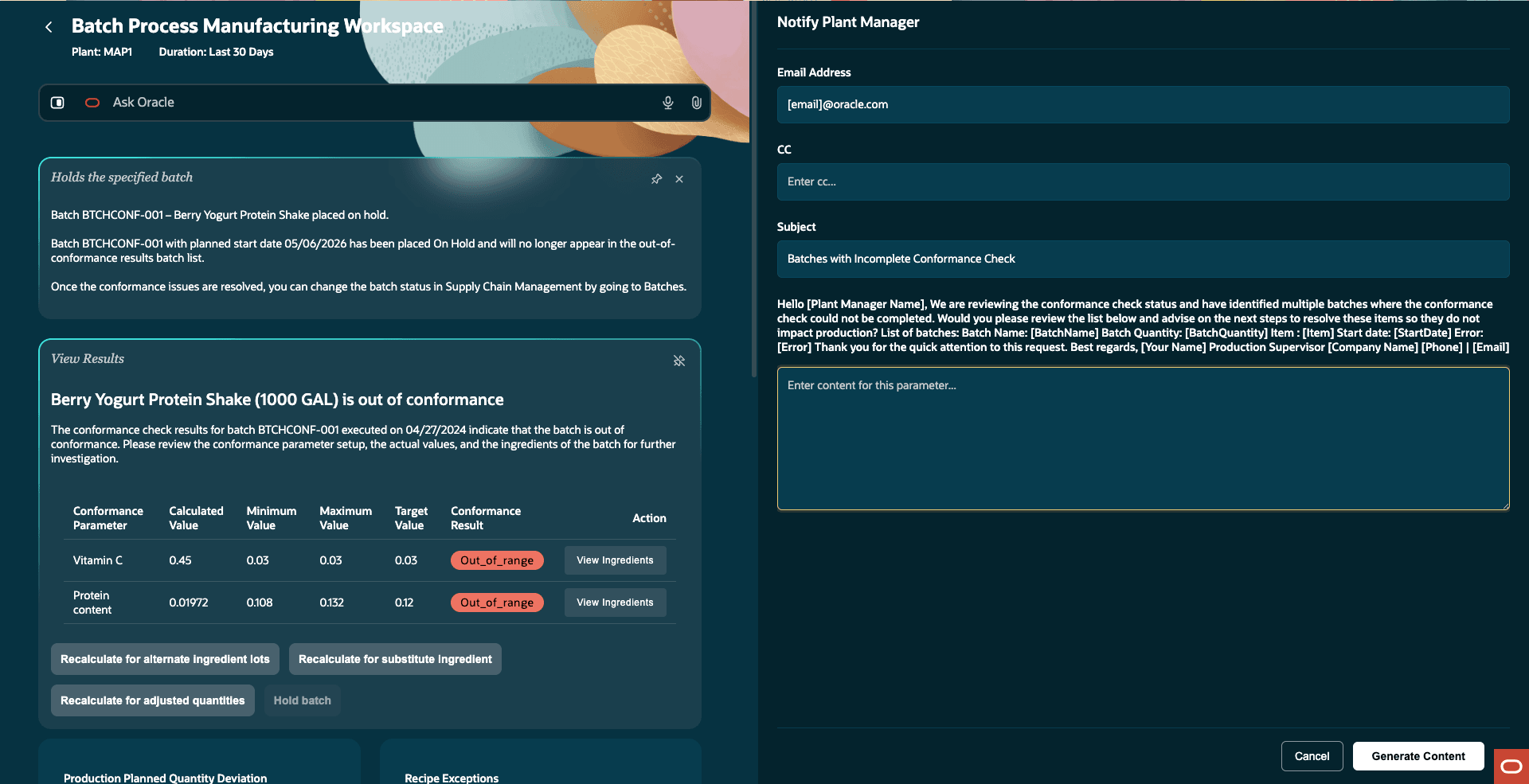
Choose to Share an Email with the Plant Manager
Scope and Purpose
The Batch Conformance Agent helps users:
- Identify batches with potential conformance risks.
- Review conformance calculations and risk indicators.
- Analyze actual versus target conformance values.
- Perform simulations to evaluate corrective changes before execution.
- Review recommended priority actions where applicable.
- Analyze additional information related to:
- Conformance parameters.
- Actual and target values.
- Conformance results and details.
- Production batches.
You can drill down into the batch details to understand the following:
- Which parameters are contributing to the risk?
- How much does the batch deviate from target values?
- What changes may improve the conformance result?
The simulation capability allows you to test changes such as ingredient adjustments or quantity changes before execution continues.
The Batch Conformance Agent helps you achieve the following:
- Reduce process variability.
- Minimize scrap and rework.
- Improve manufacturing efficiency and batch consistency.
Priority Actions and Communications
Based on the issue identified, the workspace can recommend next steps such as:
- Notifying approvers for unapproved recipes.
- Reactivating inactive recipes.
- Escalating conformance risks.
- Sharing exception summaries with plant managers and manufacturing teams.
Use this section to quickly take follow-up action directly from the workspace.
Ask Oracle
The Ask Oracle bar lets you ask deeper questions about the data shown in the workspace.
For example, you can ask:
- “Why is this batch at high conformance risk?”
- “Show recipe exceptions for inactive recipes”
- “Which ingredient caused the highest variance?”
The Batch Process Manufacturing Workspace helps users:
- Detect issues earlier.
- Reduce manual investigation effort.
- Improve recipe readiness and batch performance.
- Reduce scrap, rework, and variability.
- Make faster and informed operational decisions.
Steps to enable and configure
Enable the workspace using the following profile option:
- ORA_WIE_BATCH_PROCESS_MANUFACTURING_WORKSPACE_AGENTIC_APP_ENABLED
Tips and considerations
- The workspace is available only for process manufacturing-enabled plants.
- The default analysis duration is 30 days and can be updated.
- The workspace provides insights and recommendations, but does not directly update transactional data.
- Results depend on the completeness and accuracy of the recipe and the batch.
- Users require the appropriate roles and privileges to access the workspace and related insights.
- This workspace includes the AI Agent: Batch Conformance Guide.
Key resources
- Oracle Fusion Cloud SCM: Refer to the Using Manufacturing guide, available on the Oracle Help Center.
- Oracle Fusion Cloud SCM: Refer to the Implementing Manufacturing and Supply Chain Materials Management guide, available on the Oracle Help Center
Access requirements
Users who are assigned a configured job role that contains the following privileges can access this feature:
- Allows access to the Batch Process Manufacturing Workspace agentic app (WIP_ACCESS_BATCH_PROCESS_MANUFACTURING_WORKSPACE)
- Allows access to the production variances in the Batch Process Manufacturing Workspace agentic app (WIP_ACCESS_WORK_ORDER_VARIANCES )
- Allows querying results for conformance check and triggering conformance checks with or without simulation (WIP_MANAGE_CONFRM_CHECK_RESULTS)