AI Agent: Batch Conformance Guide
In process manufacturing, you deal with a high degree of variability in your raw materials. Ingredients, and even lots of the same ingredient, can vary in their composition or physical properties by source, lot, season, or formulation. At the same time, you must also adhere to regulatory restrictions or compliances applicable for your industry. Variability of ingredients causes significant rework or wastage, increasing your enterprise's production costs and reducing your profits.
You can now use the Batch Conformance Guide to calculate expected conformance values for unreleased process manufacturing batches, review whether those values are in range for your primary product, and simulate changes to the batch to understand the impact on the conformance parameter values before the batch is released.
Production supervisors can review a batch before execution, see the calculated conformance values for the primary product, and understand whether the batch is in range or out of range for applicable conformance parameters. An out-of-range value indicates potential quality issues and should be addressed before the batch is released to avoid expensive rework. The conformance check is calculated only for the primary product of the batch; any additional products are excluded from the check, including co-products and by-products.
The conformance parameter value for the primary product is calculated as follows:
CPVal(Primary Product) = Sum(CPVal(Ingredient) * Ingredient Quantity in conformance parameter UOM) / Primary Product Quantity in conformance parameter UOM
Where:
- CPVal(Primary Product) indicates the calculated conformance parameter value for the product.
- CPVal(Ingredient) indicates the actual conformance parameter value of the ingredient/ingredient-lot.
If the calculated value is outside the acceptable range defined for the product, then the conformance result of the batch is considered out-of-range.
Production supervisors can also explore what-if scenarios by changing ingredient quantities, substituting ingredients, or using alternate lots, then review the recalculated conformance results before deciding whether to update the batch from the Batches UI.
Conformance Parameter Setups
1. Conformance Parameters
Conformance parameters are physical properties that you want to measure and track for your ingredients and products to track quality or compliance issues.
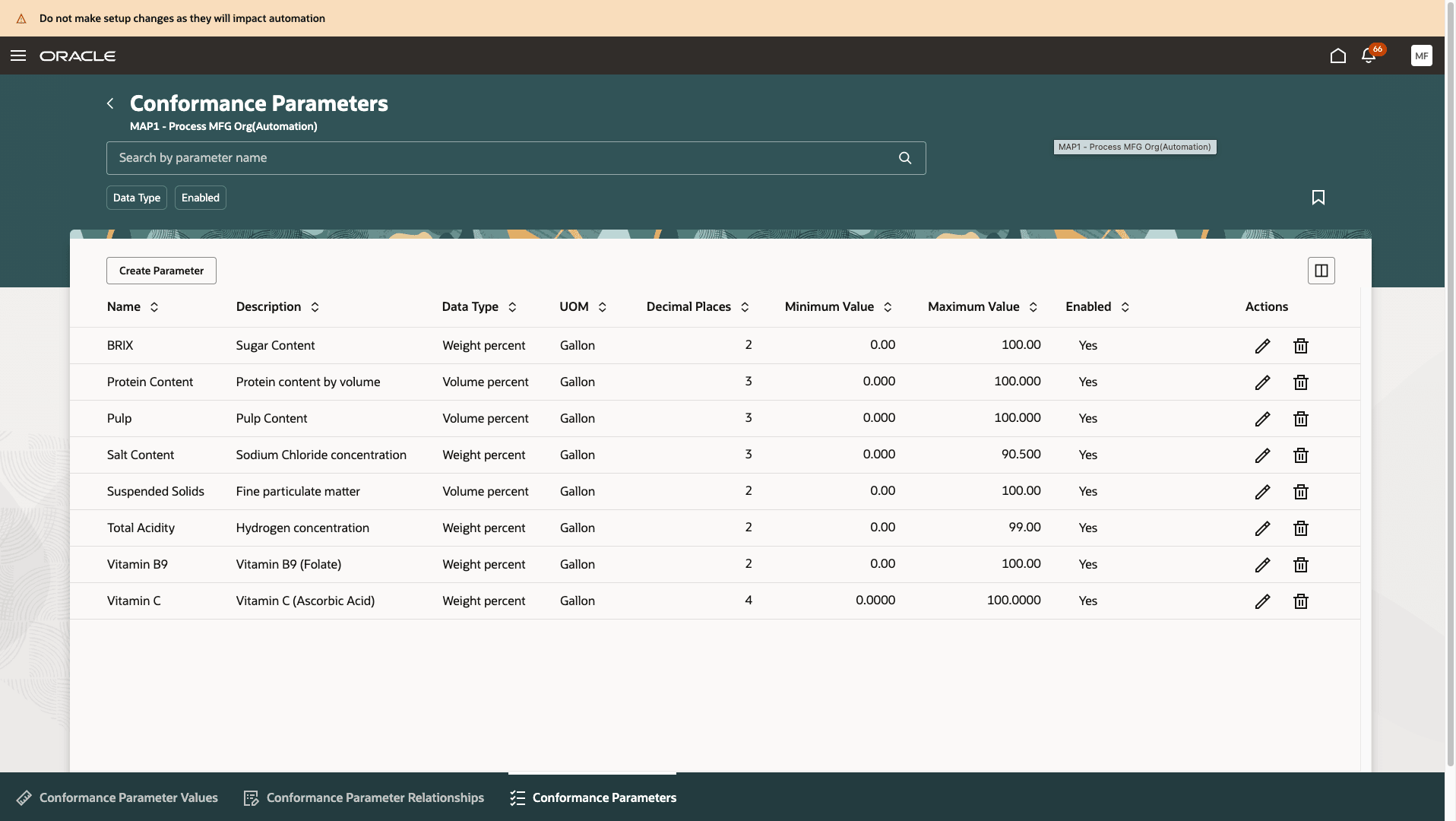
Conformance Parameters Overview Page
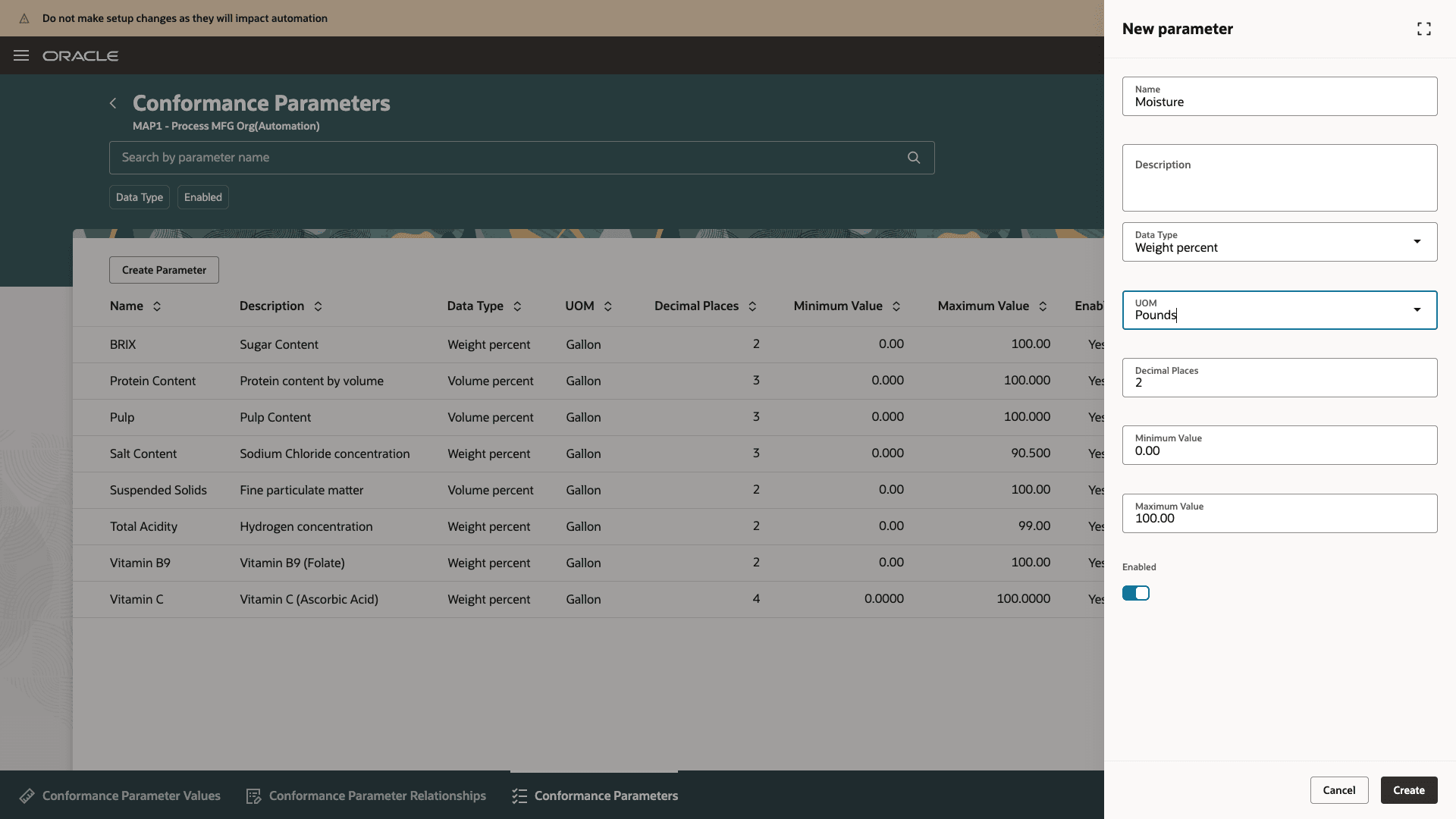
New Conformance Parameter Drawer
- Conformance parameters can be of data type 'Weight percent' or 'Volume percent'.
- Conformance parameter UOM is the common unit of measure to convert all quantities of ingredients and products to for conformance check calculations.
- The minimum and maximum values defined for the conformance parameter need to be adhered to when defining the target values for your products.
- Only enabled conformance parameters can be used to define relationships and values and will be applicable for the conformance check.
2. Conformance Parameter Relationships
After defining conformance parameters, you can assign these parameters to your ingredients and products so that you can track these values. The assignment can be done for a specific item or for an item category.
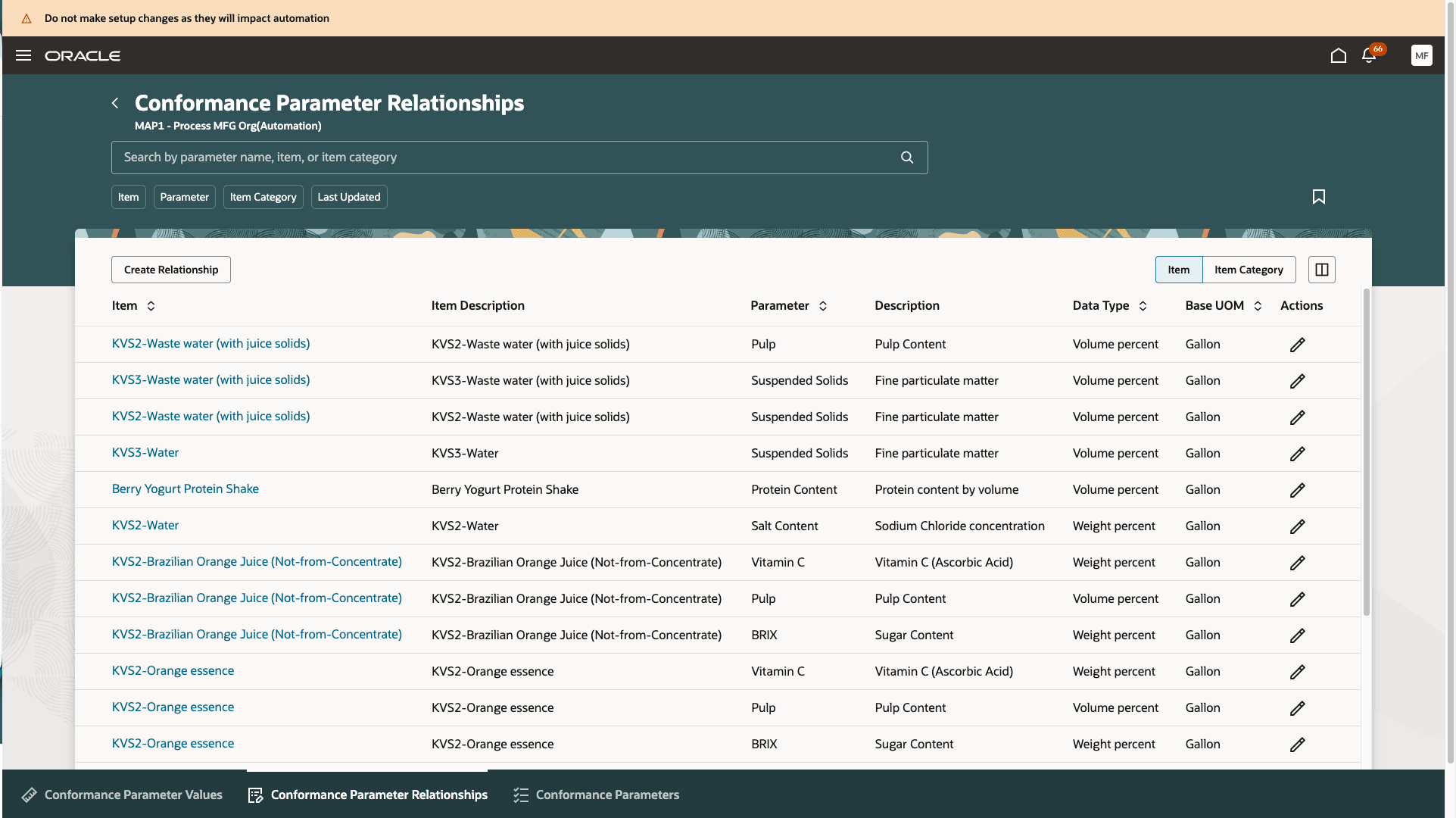
Conformance Parameter Relationships for Items
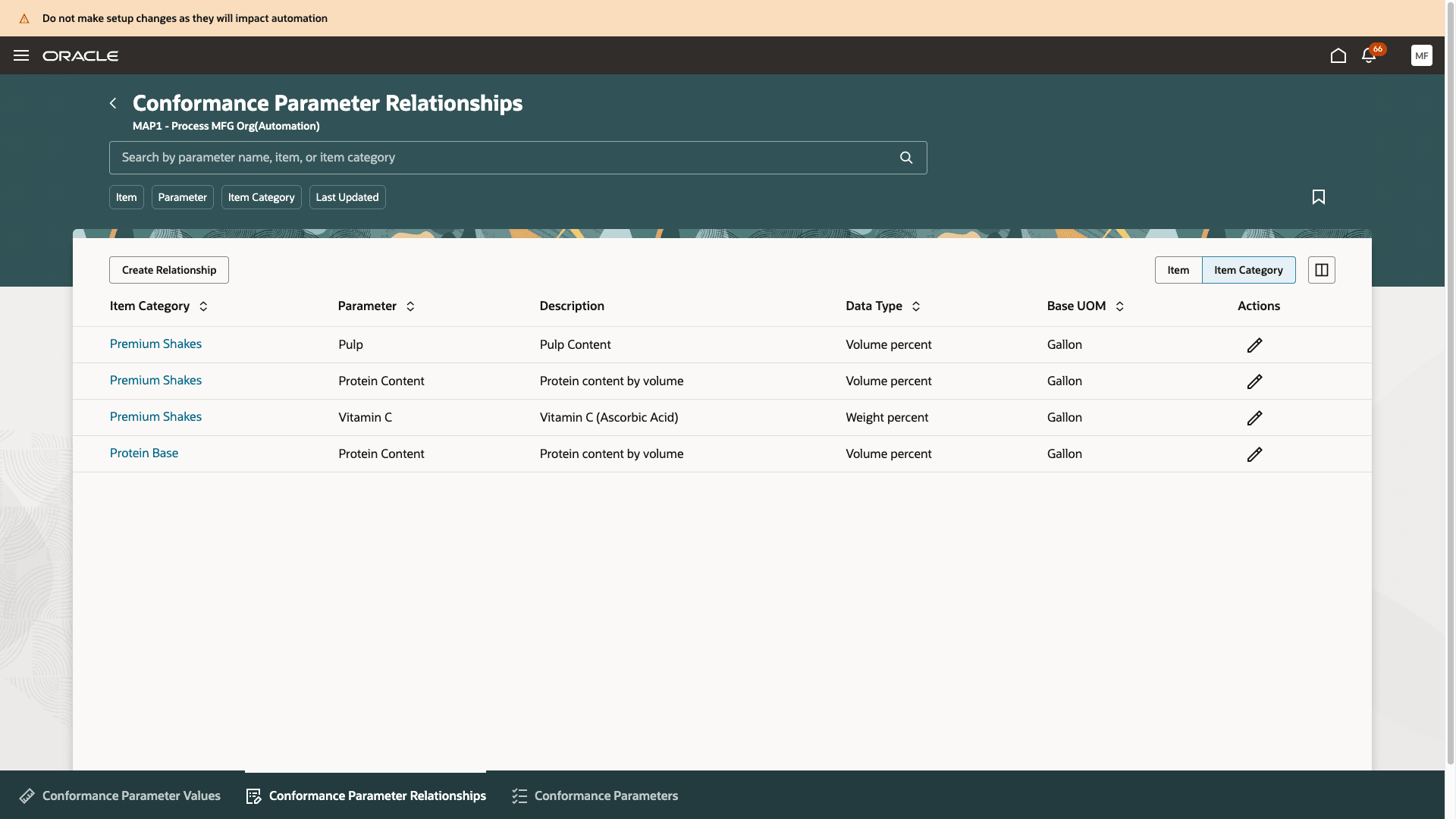
Conformance Parameter Relationships for Item Categories
If relationships are defined both for the item category and the item, the relationship set up at the item level will be applicable.
3. Conformance Parameter Values
Once you have assigned the conformance parameters to items, you can enter the values.
Actual values
You enter the actual values as you receive and inspect raw materials from your suppliers.
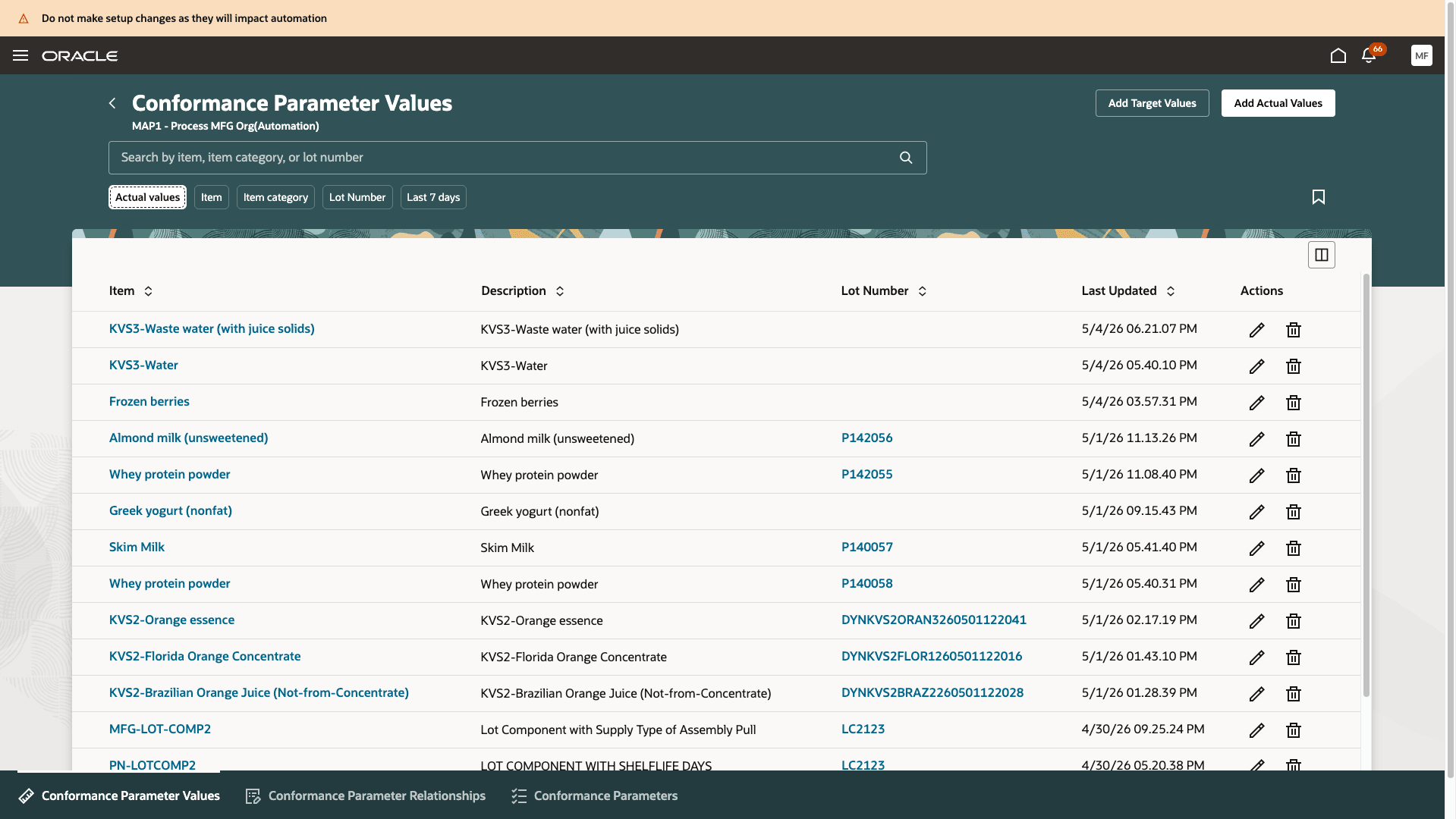
Actual Values for Conformance Parameters of Ingredients
Target values
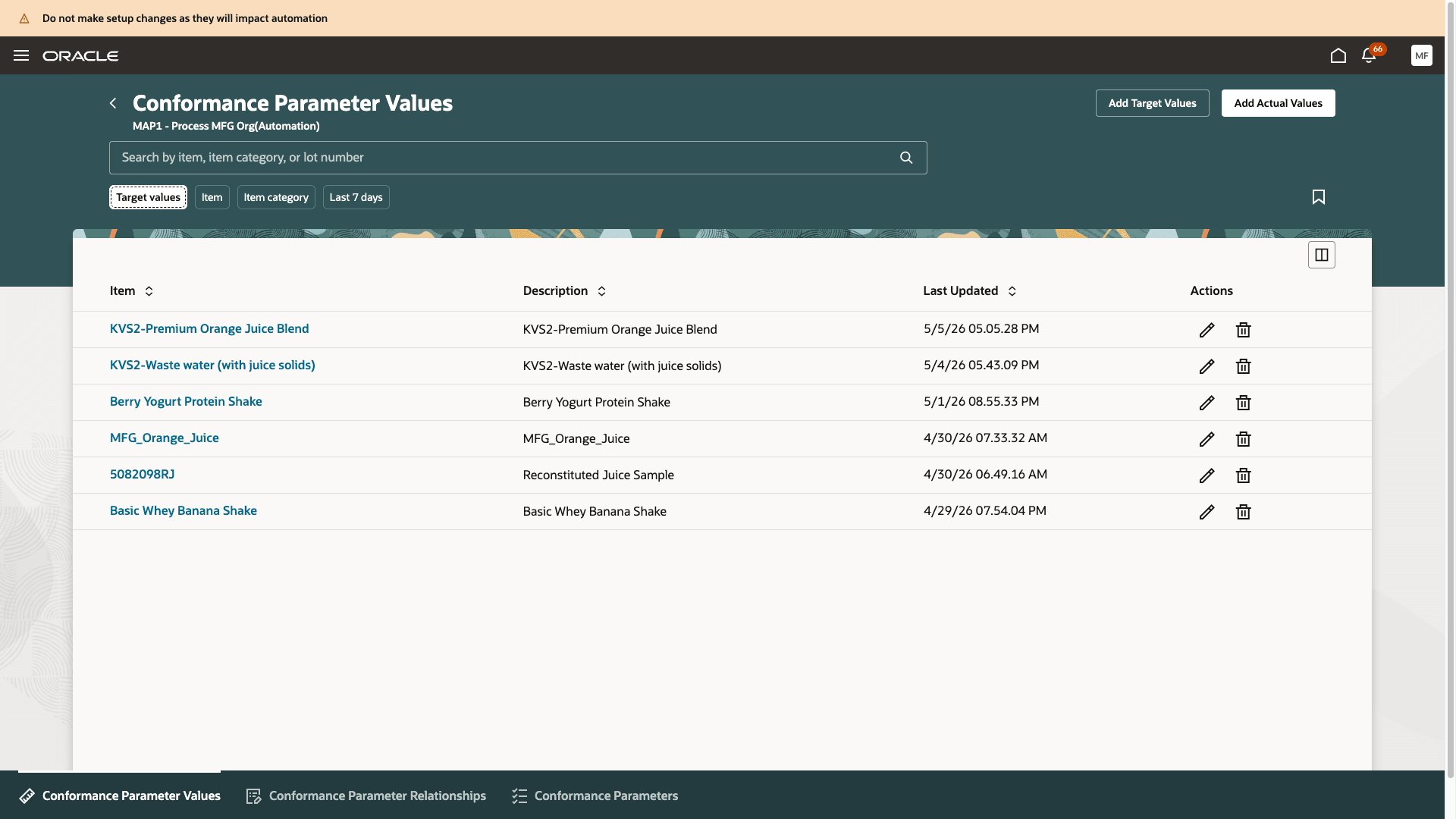
Target Values for Conformance Parameters of Products
While entering target values, you can specify the acceptable range for your products. This range is used to determine the conformance result of the batch.
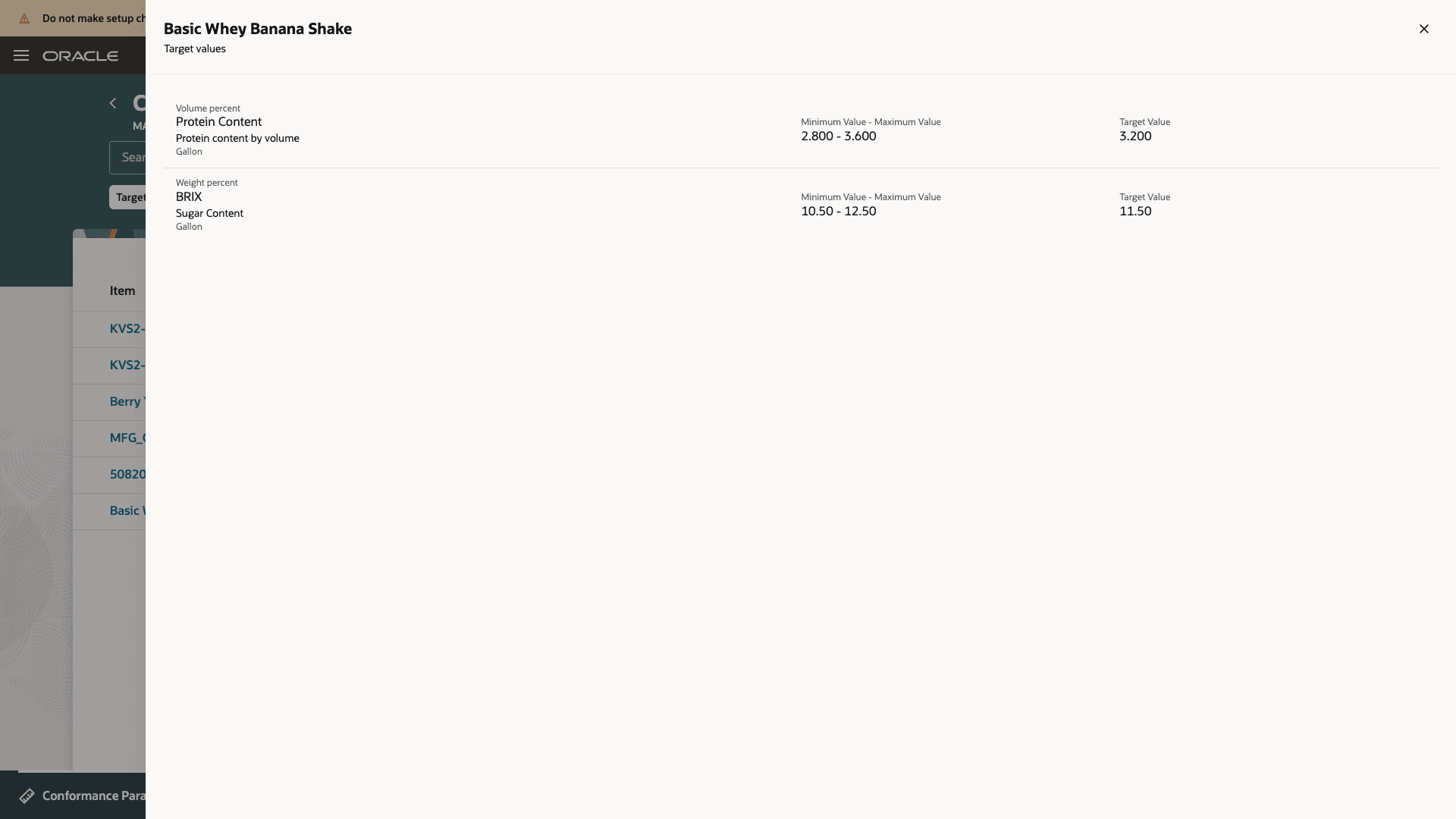
Target Values
Triggering the conformance check
You can trigger the conformance check for an unreleased batch from the Batches page.
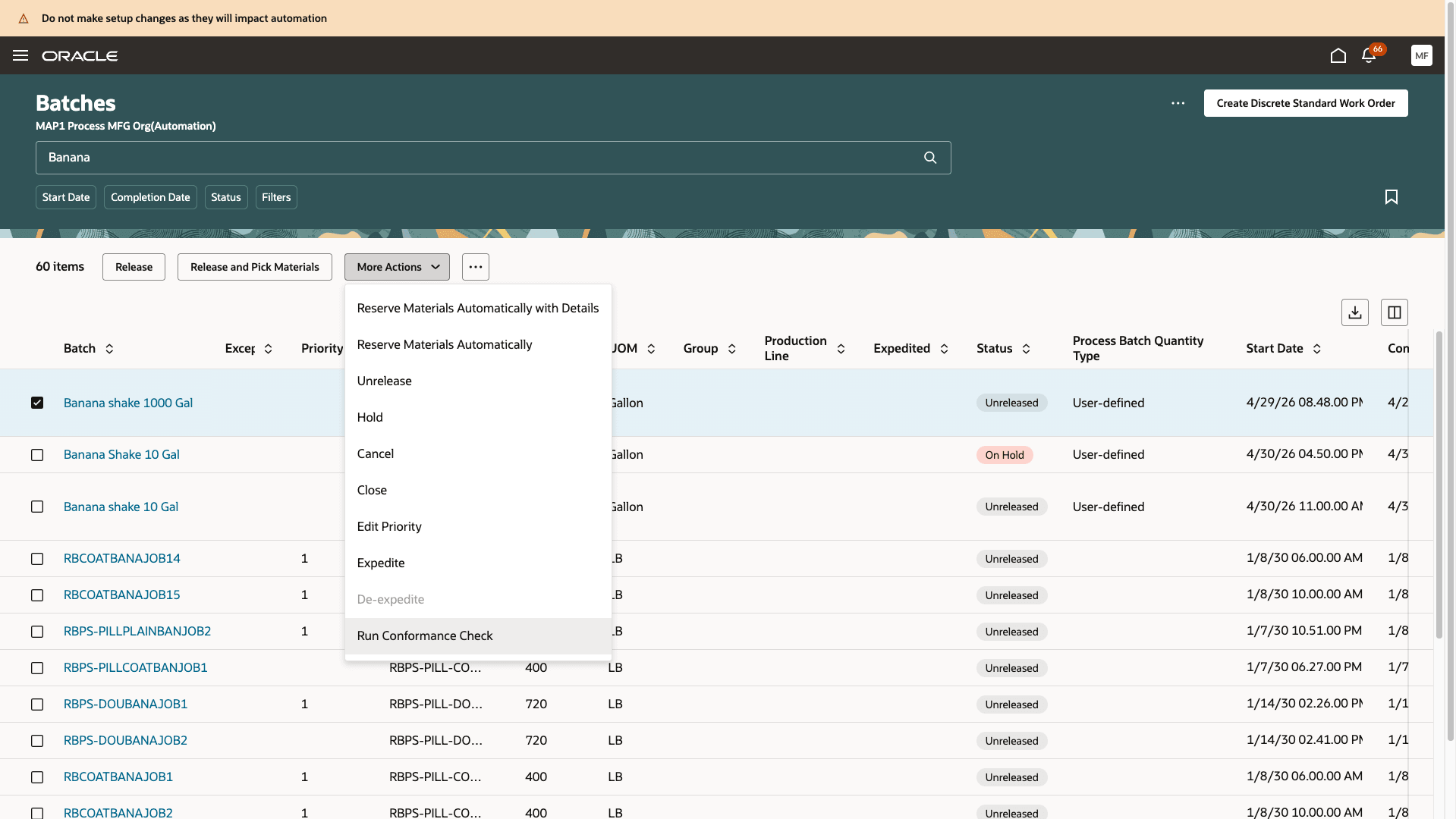
Trigger Conformance Check from the Batches Page
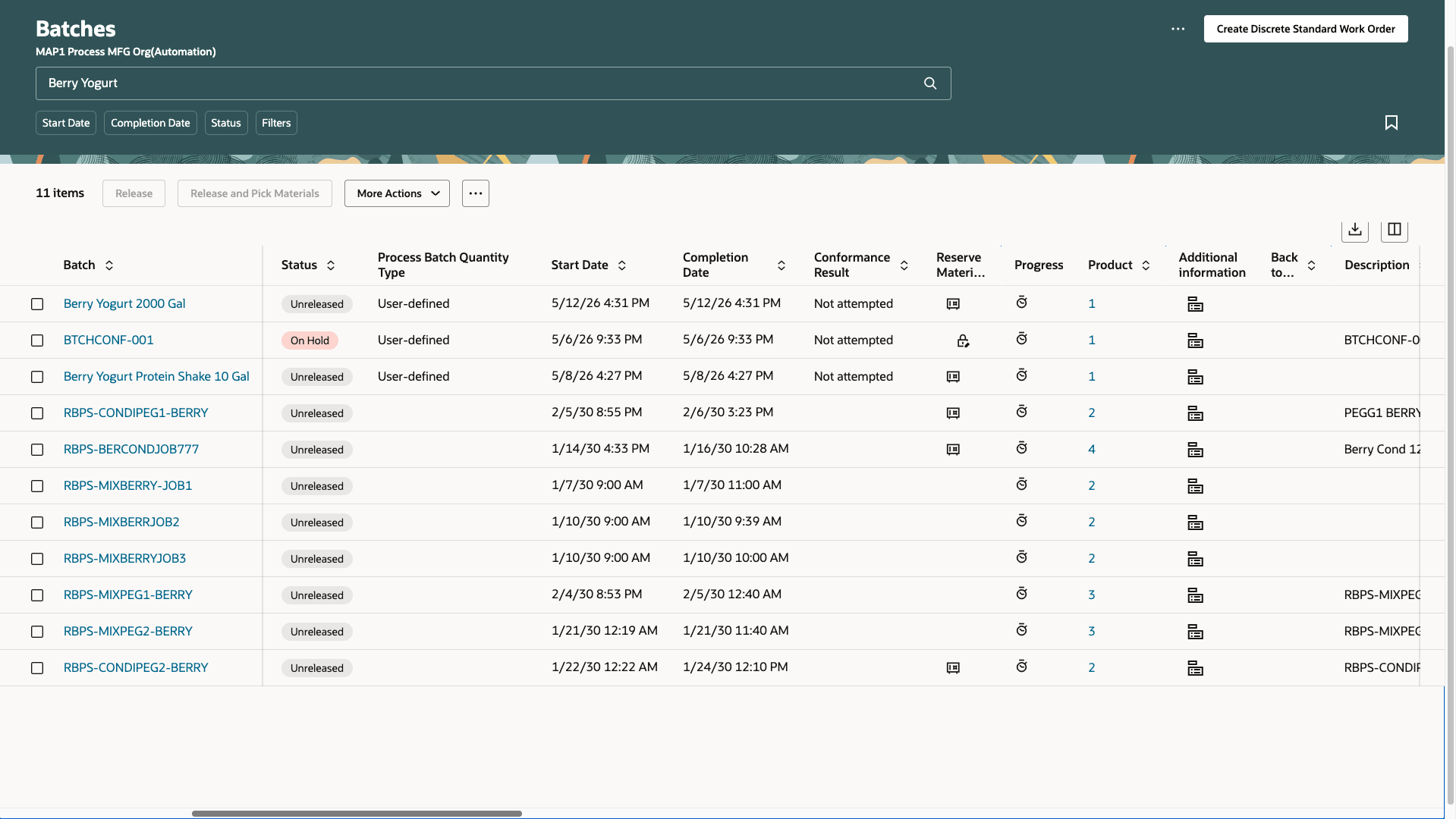
Conformance Result in the Batches Page
In the Batches page, you can also see the conformance result of the batch. The different conformance result values are:
- Not applicable - The batch is not eligible for conformance check because the feature has not been opted in.
- Not attempted - Conformance check has not been triggered for the batch.
- Incomplete - Conformance check couldn't be completed due to missing pre-requisite setups.
- Out of range - One or more conformance parameters values of the primary product are out of acceptable range.
- In range - All conformance parameter values are in range.
You can also search by conformance result to look at batches that have issues or have not gone through the conformance check yet.
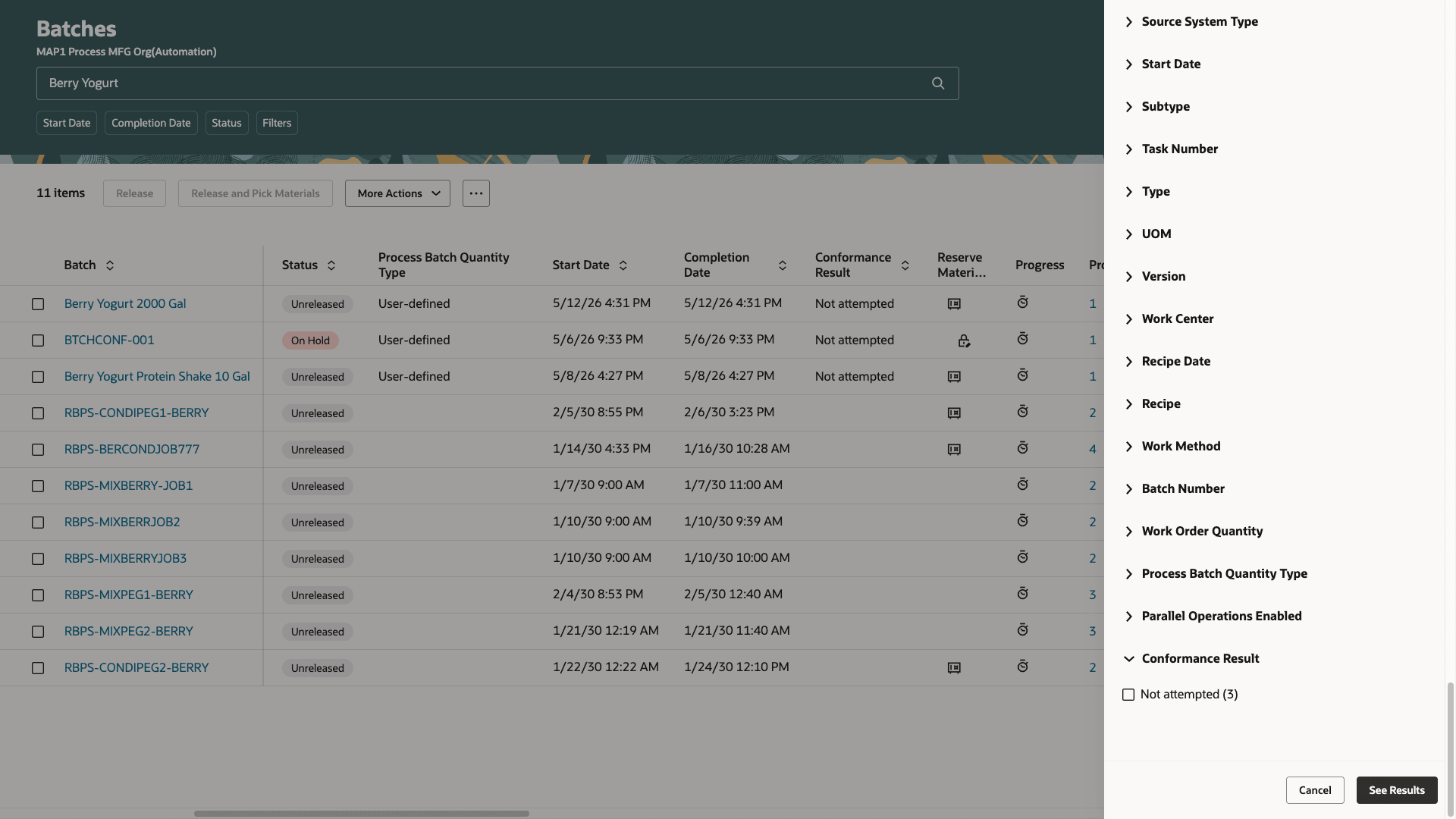
Search By Conformance Result in the Batches Page
Interactions through the Batch Process Manufacturing Workspace
Once you've triggered the conformance check for the batch, the batch should be visible in the workspace. The Conformance Risks section shows unreleased batches where the conformance result is out of range, incomplete, or not attempted, sorted by the start date and batch quantity to help you focus on batches that will go into production soon and have potential quality or compliance concerns.
You can further expand the section to see specific sections:
-
Out-of-range conformance results
In this section, you can see all batches with out-of-range conformance results, sorted by start date and batch quantity.
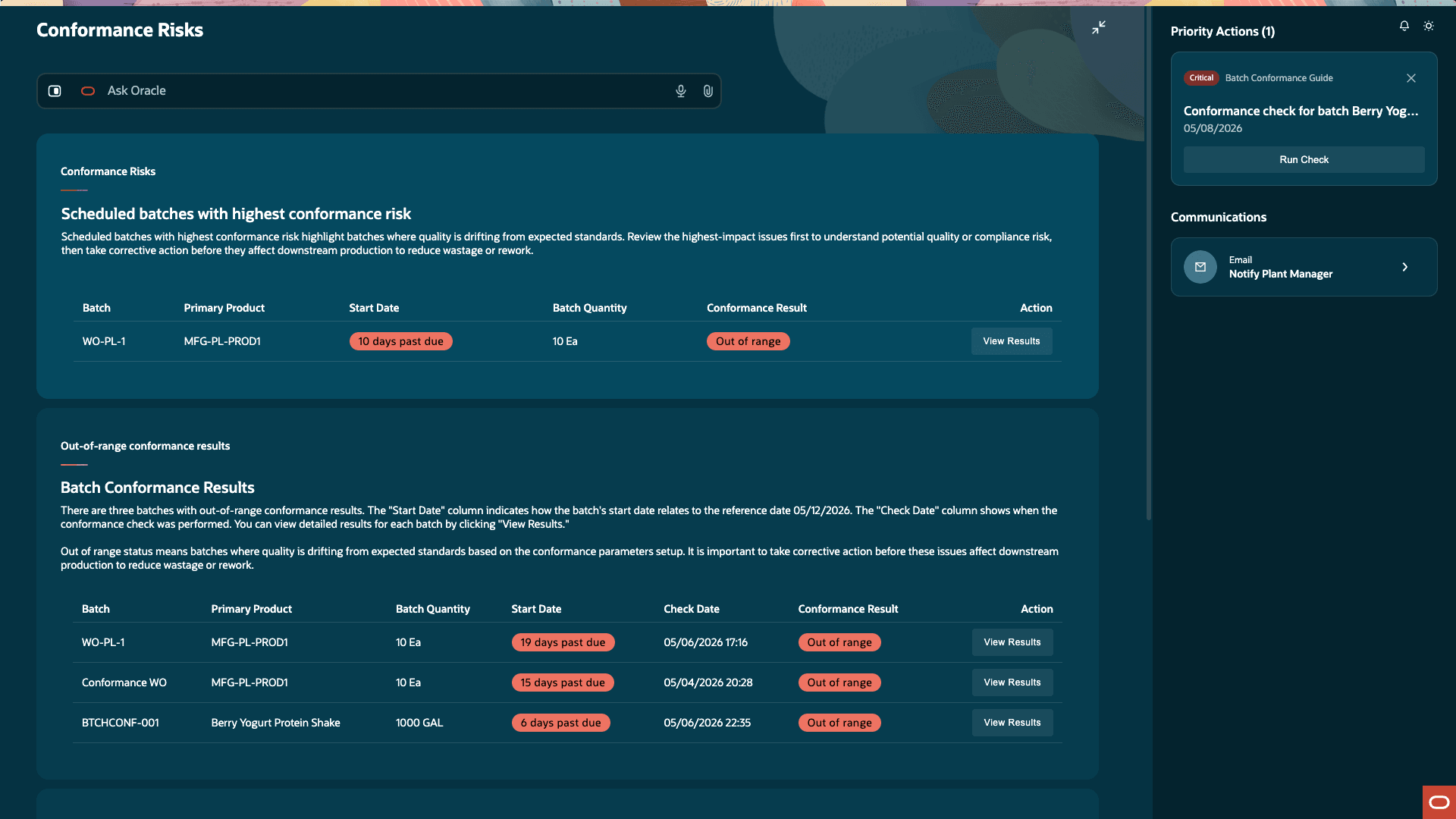
Out-of-Range Conformance Results Section
Click View Results to see the calculated conformance parameter values of the primary product.
You can perform three simulation flows to see the impact on calculated parameter values:
- Select an alternate lot for an ingredient and recalculate the conformance parameter values.
- Select a substitute ingredient and recalculate the conformance parameter values.
- Adjust the quantity of ingredient and recalculate the conformance parameter values.
When your simulation leads you to acceptable conformance parameter values, you can make corrections to the batch manually before it is released to avoid potential issues.
-
Incomplete conformance results
In this section, you can see all batches where the conformance check couldn't be completed due to missing setups.
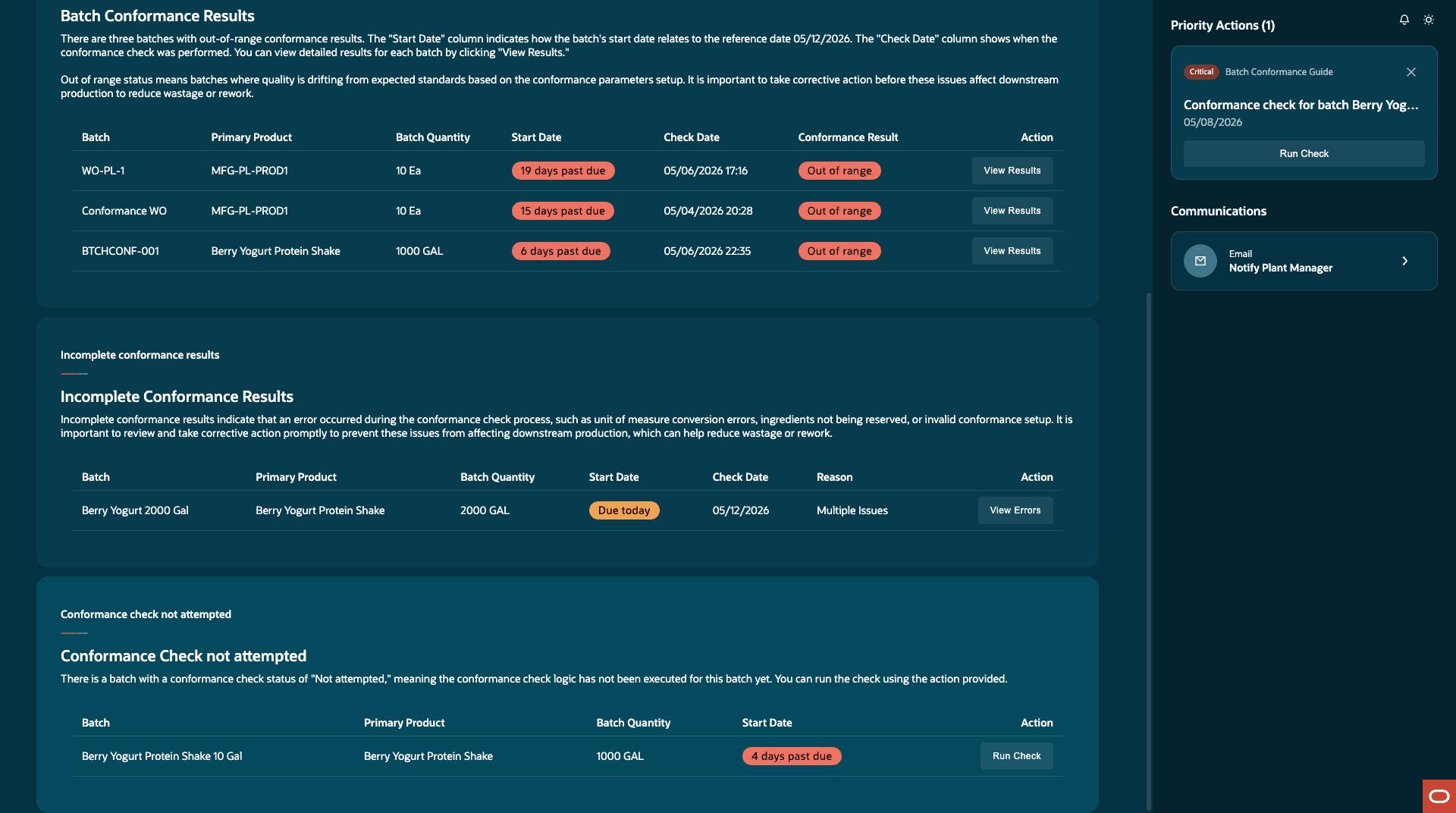
Incomplete Conformance Result Section
You can use the Communications section to send an email to the plant manager notifying them of the missing steps.
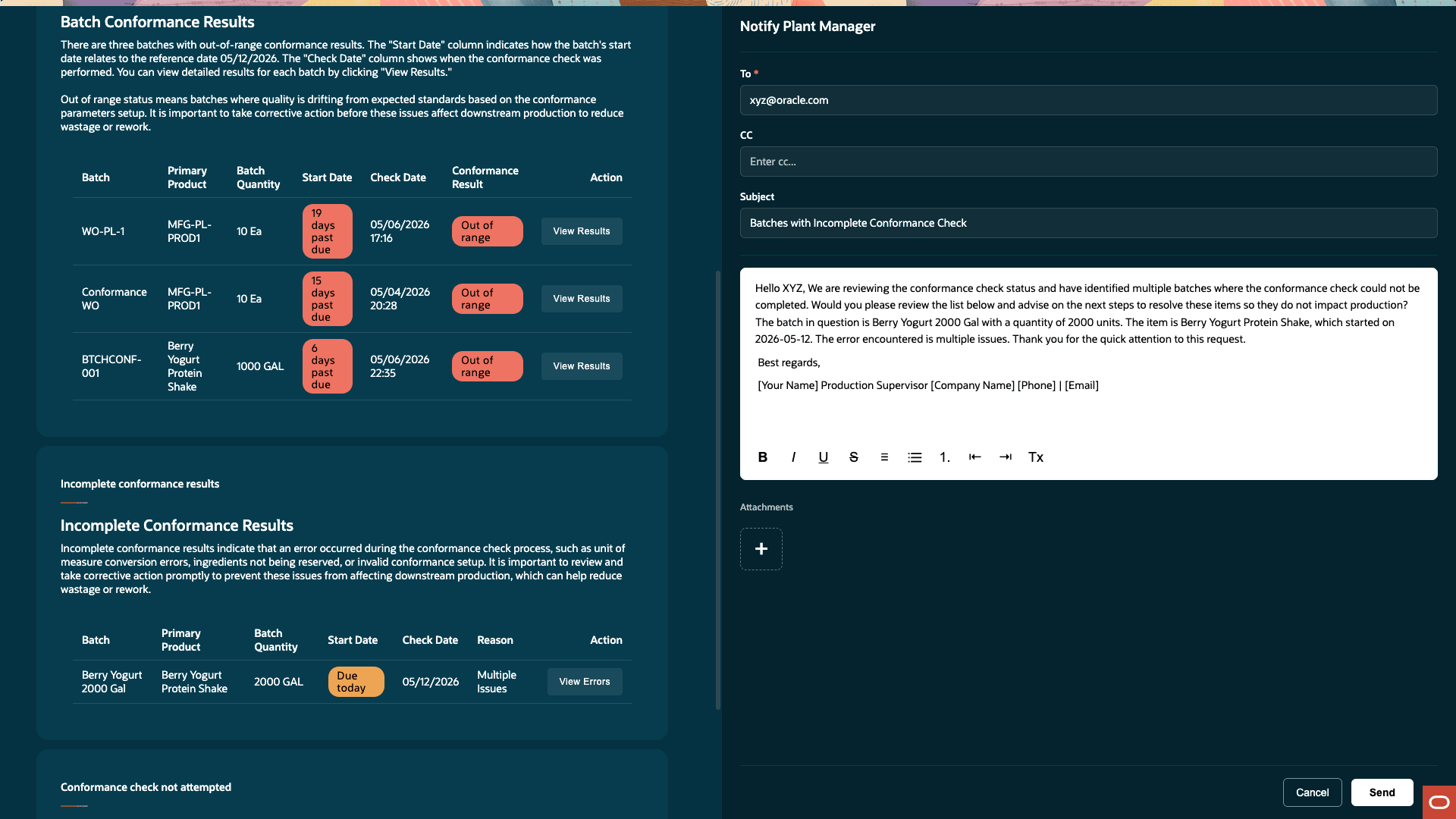
Email Plant Manager
-
Conformance check not attempted
In this section, you can see all batches where conformance check has not been attempted. You can run the check for a batch here.
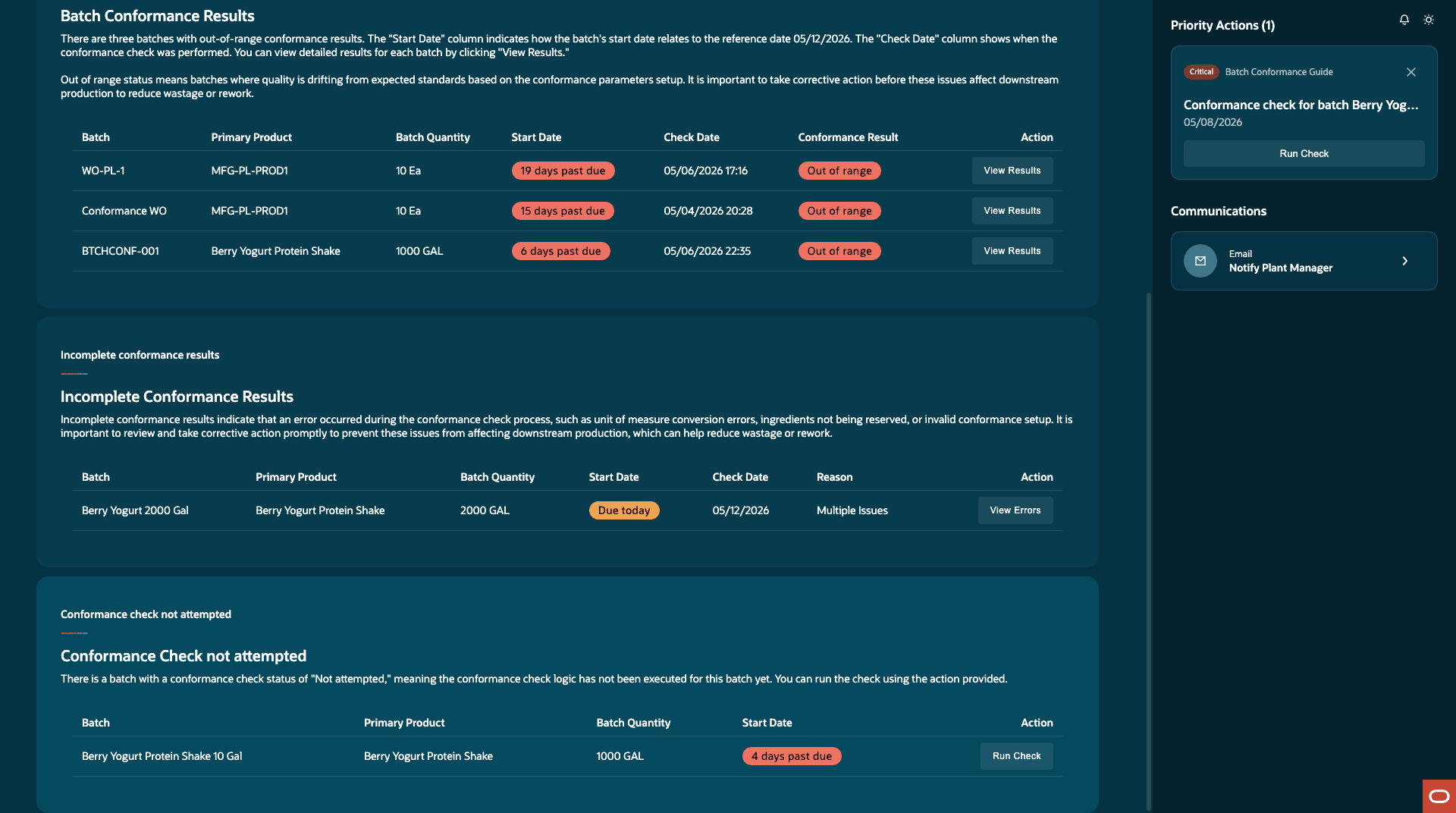
Conformance Check Not Attempted Section
In the Priority Actions section, you can run the conformance check for unreleased batches where conformance check has not been triggered, and with a start date in the past.
Ask Oracle
You can ask questions to identify which batches need your attention. Some examples of questions you can ask are:
-
Show me all unreleased batches with conformance risks.
-
Show me unreleased batches starting today that have a conformance risk.
-
Which batches with conformance issues have multiple parameters out of range?
-
Which batches with conformance issues have only one parameter out of range?
-
Which batches of {product} have conformance issues?
-
Show me the trend of conformance-issue batch count over the last 7 days.
-
Which product has the most unreleased batches at conformance risk?
-
Which parameter is most frequently out of range across unreleased batches?
-
What percentage of unreleased batches are currently at conformance risk?
- Show me the batches where I need to run the conformance check.
You can also ask specific questions about the batch to investigate the conformance issues and ingredients, and trigger simulations to resolve conformance issues.
This feature provides the following benefits:
- Helps improve first-time-right production by reducing avoidable rework, scrap, and release delays.
- Intercepts potential quality or compliance issues by tracking key specifications for products.
- Performs simulations to identify necessary adjustments to the ingredients to mitigate the issues in time.
Steps to enable and configure
Use the Opt In UI to enable this feature. For instructions, refer to the Optional Uptake of New Features section of this document.
Offering: Manufacturing and Supply Chain Materials Management No Longer Optional From: Update 27A
Tips and considerations
- This feature applies to the Process Manufacturing work method only.
- The conformance check can be run for unreleased batches only.
- Only item categories associated with the Inventory functional area can be used to set up conformance parameter relationships.
- When a batch is created after opting in to this feature, the conformance result is defaulted as 'Not attempted'.
- If the primary product doesn't have a conformance parameter relationship, the conformance result is 'Not applicable'.
- Ensure that you've defined item specific UOM conversions for your items (ingredients and products) with the conformance parameter UOM.
- If required setup, reservation, lot, or conversion data is missing, then the conformance result is incomplete and the missing setup is captured.
- If the actual value of an ingredient isn't defined for a given conformance parameter, then the value is assumed to be 0 for conformance check calculations.
- For calculated batch quantity, only ingredients which contribute to the yield set are considered.
- The agent doesn't make any changes or corrections to the batch. Any necessary changes need to be made manually.
- To see the accurate conformance result of the batch in the Batches page, please run the background process "ESS job to create index definition and perform initial ingest to OSCS" with the index as "fa-scm-mfg-work-order".
- Please review the readiness documentation for Fusion Cloud Manufacturing feature AI Agentic App: Batch Process Manufacturing Workspace to enable the workspace.
- The Batches page in the Redwood experience is enabled through the Redwood Manage Work Orders Enabled and Use Process Manufacturing Terminology with the Redwood User Experience profile options. Refer to the 25B feature Redwood: Search and Perform Mass Actions for Work Orders Using a New User Experience and 26B feature Use Process Manufacturing Terminology with the Redwood User Experience.
Key resources
- Oracle Fusion Cloud SCM: Implementing Manufacturing and Supply Chain Materials Management guide, available on the Oracle Help Center.
- Oracle Fusion Cloud SCM: Security Reference for Manufacturing and Supply Chain Materials Management guide, available on the Oracle Help Center.
Access requirements
Users who are assigned a configured job role that contains these privileges can access this feature:
- Allows querying, creating, and updating conformance parameter relationships (WIS_MANAGE_CONFRM_PARAM_RELATIONSHIPS)
- Allows querying, creating, and updating conformance parameters (WIS_MANAGE_CONFRM_PARAMETERS)
- Allows querying, defining, and updating target values for conformance parameters (WIS_MANAGE_CONFRM_PARAM_TARGET_VALUES)
- Allows querying, defining, and updating actual values for conformance parameters (WIS_MANAGE_CONFRM_PARAM_ACTUAL_VALUES)
- Allows querying results for conformance check and triggering conformance checks with or without simulation (WIP_MANAGE_CONFRM_CHECK_RESULTS)
- Allows access to the Batch Process Manufacturing Workspace agentic app (WIP_ACCESS_BATCH_PROCESS_MANUFACTURING_WORKSPACE)