Scan or Enter the Lot and Serial Number Details for Backflush Components Using Industrial Handheld Devices
Before this release, industrial handheld mobile operation transactions supported backflush of only plain components or ingredients. With this enhancement, production operators can complete operations on mobile devices for work orders that include plain, lot-controlled, serial-controlled, and lot-and-serial-controlled backflush components or ingredients.
You can now enter the lot and serial details for backflush components or ingredients during Mobile Manufacturing operation completion transactions. If lot or serial enabled components are to be backflushed, then the Backflush Materials UI appears as part of operation completion. All pull components or ingredients for the operation are displayed, and operators can add ad hoc components for issue. User can enter lot and serial details for backflush components or ingredients during Mobile Manufacturing operation completion transactions.
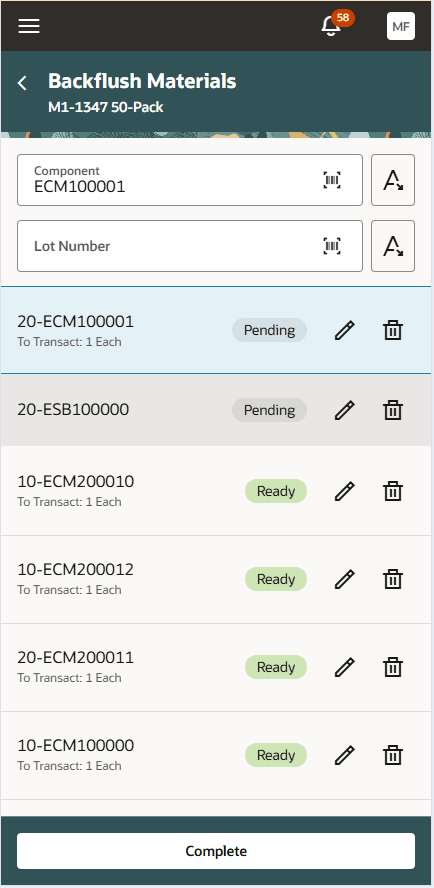
Backflush Materials - Scan Item Lot
This enhancement enables production operators to remain in the mobile operation completion flow when backflush components require lot or serial tracking. It reduces the need for separate follow-up transactions for tracked materials, improves shop floor efficiency, and supports more accurate capture of inventory-controlled material during operation reporting.
Here's the demo of these capabilities:
Steps to enable and configure
You don't need to do anything to enable this feature.
Tips and considerations
- For LPN/WMS enabled organizations, capturing the LPN/Packing unit detail during backflush is supported.
Key resources
- Watch the 26C feature 'Scan or Enter the Lot and Serial Number Details for Backflush Components Using Industrial Handheld Devices' demo.
- Refer to the 25D feature 'Report Operation Completions, Rejections, and Scrap Efficiently Using Industrial Handheld Devices' details here.
- Oracle Fusion Cloud SCM: Refer to the Using Manufacturing guide, available on the Oracle Help Center.
- Oracle Fusion Cloud SCM: Refer to the Implementing Manufacturing and Supply Chain Materials Management guide, available on the Oracle Help Center
Access requirements
Users who are assigned a configured job role that contains these privileges and codes can access this feature:
- Manage Production Reporting Work Area (WIP_MANAGE_PRODUCTION_REPORTING_ WORK_AREA)
This privilege allows access to the Production Reporting work area to report production transactions using handheld devices and is a new privilege in this update. - Report Operation Transactions (WIP_REPORT_OPERATION_TRANSACTIONS_PRIV)
This privilege was available prior to this update.