Create Automatic Work Definitions for ATO Models
Automatic work definitions remove the need to manually maintain work definitions for item structure changes making them ideal for light manufacturing scenarios that are completed in a single step.
Before this update, you could create an automatic work definition only for a standard item. With this update, you can now create an automatic work definition for an Assemble to Order (ATO) model. An automatic work definition has only one operation, which is a standard operation marked as the default for the automatic work definition. All the first-level components of the ATO model item structure are assigned to the single operation.
You can create an automatic work definition for an ATO model from the Redwood Item Structure user interface. You can also mass create automatic work definitions for ATO models using the Create Automatic Work Definitions scheduled process. An automatic work definition is created with the internal name ORA_MAIN and a production priority of 1. You can't view or update the details of an automatic work definition except for the production priority and costing priority. You can create configured item work orders by referencing an ATO model automatic work definition.
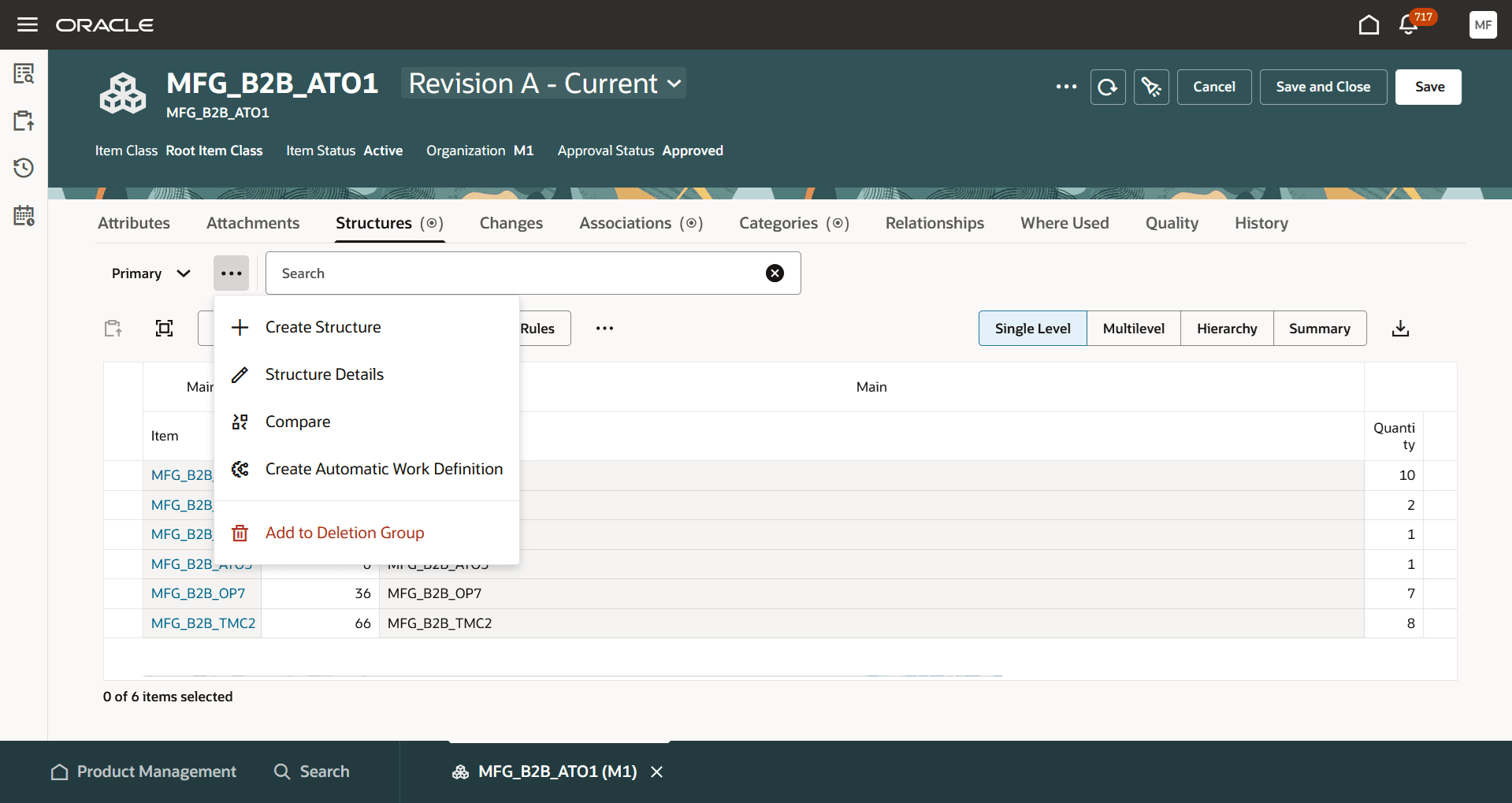
Create Automatic Work Definition Action in the Redwood Item Structures UI
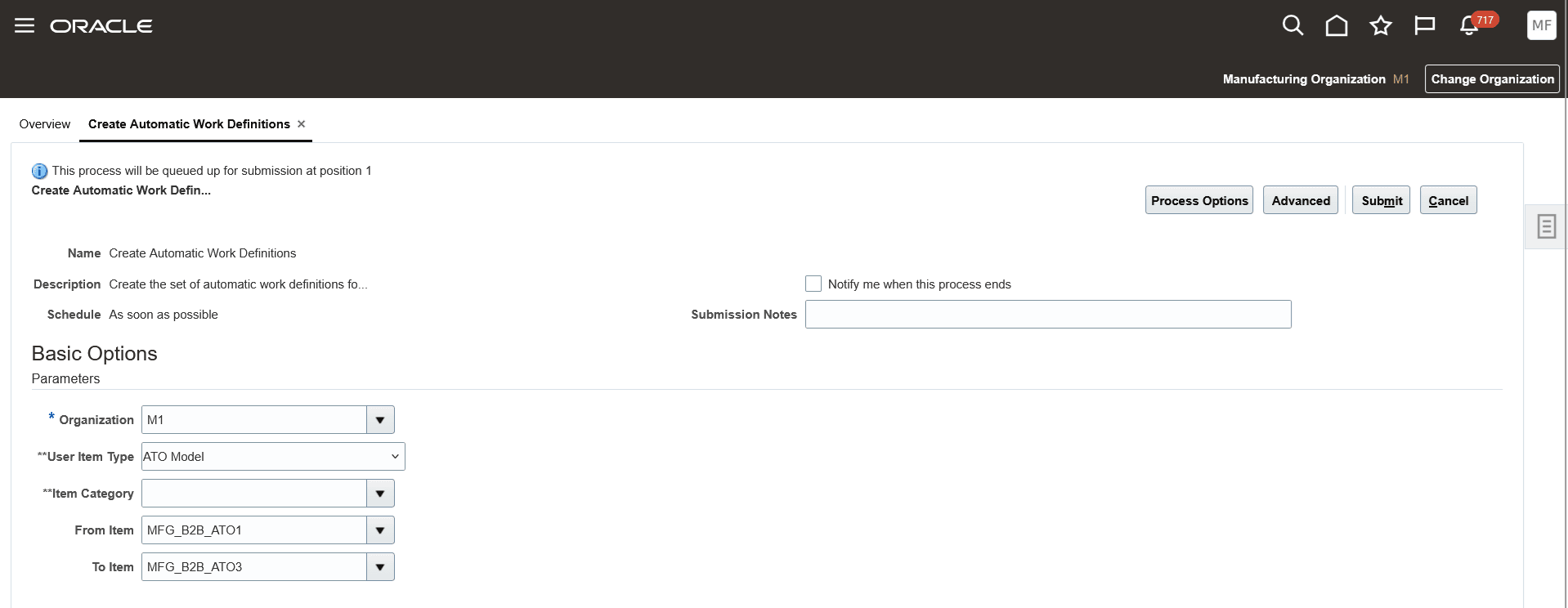
Create Automatic Work Definitions Scheduled Process
The benefit of creating a configured item work order from an automatic work definition is that you don't have to manually maintain the work definition in case the ATO model item structure changes. There's no need to run the Process Item Structure Changes to Work Definitions scheduled process to synchronize item structure changes to automatic work definitions. Changes to the ATO model item structure are automatically reflected in new item work orders created using the ATO model automatic work definition.
Here's the demo of these capabilities:
Steps to enable and configure
Use the Opt In UI to enable this feature. For instructions, refer to the Optional Uptake of New Features section of this document.
Offering: Manufacturing and Supply Chain Materials Management No Longer Optional From: Update 27A
The following are the required steps:
- Ensure that the predefined work definition name ORA_MAIN is active. This predefined work definition name is used to create an automatic work definition.
- Select a standard operation that's to be used in automatic work definitions by enabling the attribute Default for automatic work definitions.
- An automatic work definition can have only one operation.
- When a standard operation is selected as the default, the standard operation is enforced as count point enabled. You can update the default standard operation, but there can only be one default at a time.
- You can update the resources associated with the default standard operation, and the update will be reflected in new work orders created using the automatic work definition.
- Ensure that you don't create manual work definitions before creating an automatic work definition. When the application creates an automatic work definition, it's assigned a production priority of 1. If an active manual work definition already exists with production priority 1, the automatic work definition creation fails.
Tips and considerations
- Creating an ATO model automatic work definition is available only in the Redwood Item Structure user interface.
- ATO model automatic work definitions are applicable only for discrete manufacturing.
- You can't view the details of an ATO model automatic work definition.
- You can't update an ATO model automatic work definition except for its production priority and costing priority.
- You can't search for an ATO model automatic work definition using ADFdi.
- You can't print a work definition report for an ATO model automatic work definition.
Key resources
- Watch the Create Automatic Work Definitions for ATO Models demo.
- Oracle Fusion Cloud SCM: Refer to the Using Manufacturing guide, available on the Oracle Help Center.
- Oracle Fusion Cloud SCM: Refer to the Implementing Manufacturing and Supply Chain Materials Management guide, available on the Oracle Help Center.
Access requirements
Users who are assigned a configured job role that contains these privileges can access this feature:
- Manage Work Definitions (WIS_MANAGE_WORK_DEFINITIONS_PRIV)
- Manage Work Definitions by Service (WIS_MANAGE_WORK_DEFINITIONS_SERVICE_PRIV)
- Manage Item Redwood Structures (EGP_MANAGE_REDWOOD_ITEM_STRUCTURE_PRIV)