Use Production Lines in Discrete Manufacturing
A subset of discrete manufacturers operate using fixed production lines instead of work centers and resources. This limits their ability to plan, schedule, execute and monitor production in a way that reflects real-world operations. These manufacturers need better visibility into line capacity, utilization, and performance to improve scheduling accuracy and execution control.
You can now define production lines and execute discrete manufacturing work orders directly against them. This connects production line configuration with work definitions, scheduling, and execution, enabling line-based manufacturing operations.
Key capabilities include:
- Configure production lines with associated resources, capacities, and operating hours.
- Support work order scheduling and slot them based on the line capacity and production rates.
- Support forward and backward scheduling for planned and released work orders.
- Filter, manage, and track work orders by production line.
- Execute and report production, including completed quantities, downtime, and resource usage at the line level.
- Monitor line performance with metrics such as OEE and production quantities.
- Provide visibility into scheduled work orders and the associated line operations.
Production Line:
You can define a production line with a discrete work method and enforce discrete-specific rules, including operation-level completion behavior and minimum line operation counts. You can optionally associate the line operations with workstations belonging to the production line. Once work definitions and work orders are created for a discrete production line, its work method can't be updated.
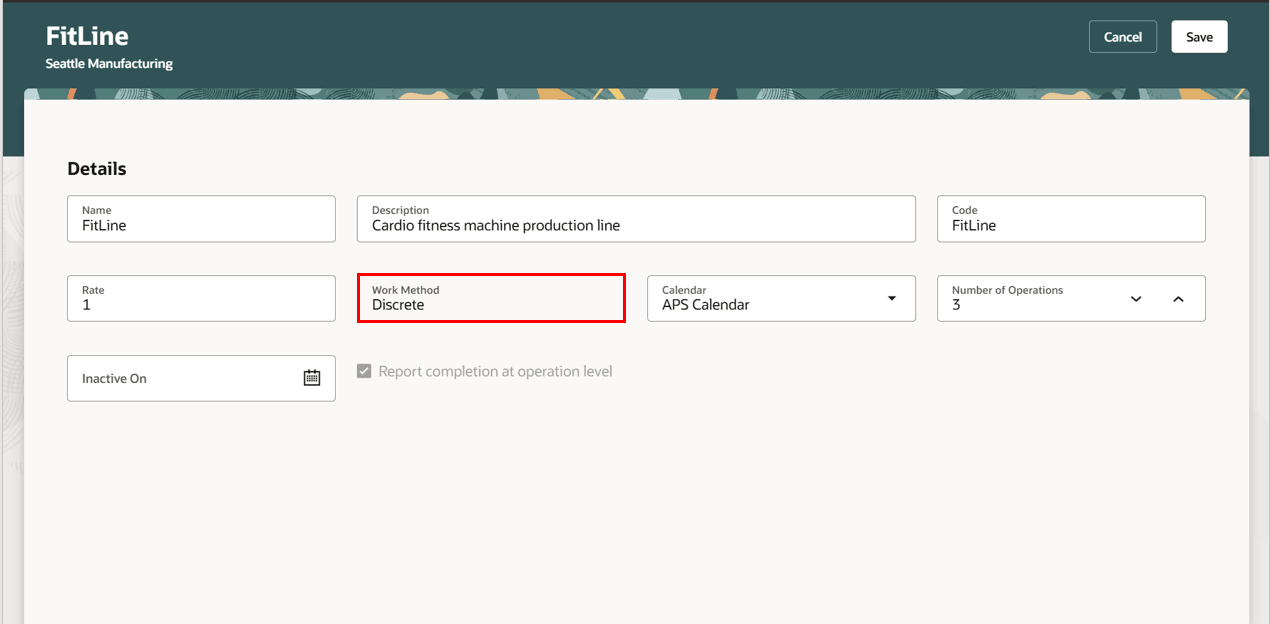
Discrete Production Line
Work Definitions:
Work definitions now support production line association for the discrete manufacturing work method. You can migrate your existing work definitions to a discrete production line with this association. Currently, production line association is supported only for standard discrete work definitions. You can't associate production lines with work definitions defined in contract manufacturing organizations.
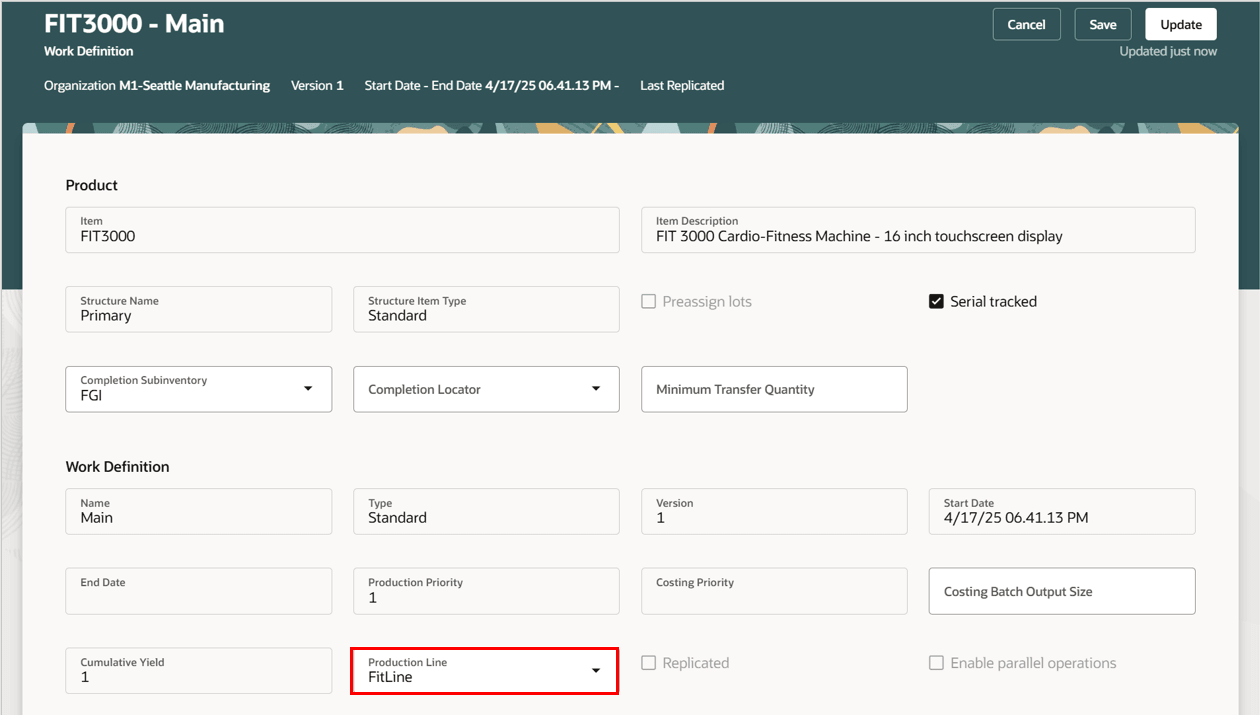
Work Definition Header with Production Line
Once a work definition is associated with a discrete production line, you can associate work definition operations with the line operations of the production line.
- Line operations should be linked only to count-point operations and must follow a sequential order.
- The line operation sequence can't be associated with:
- Resequenceable operations
- Supplier operations
- Parallel operations
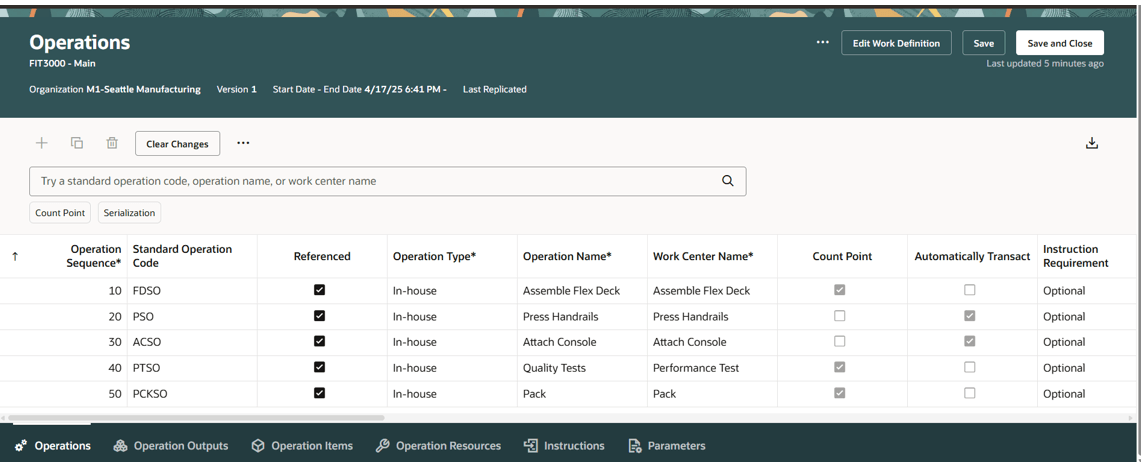
Work Definition Operations tab
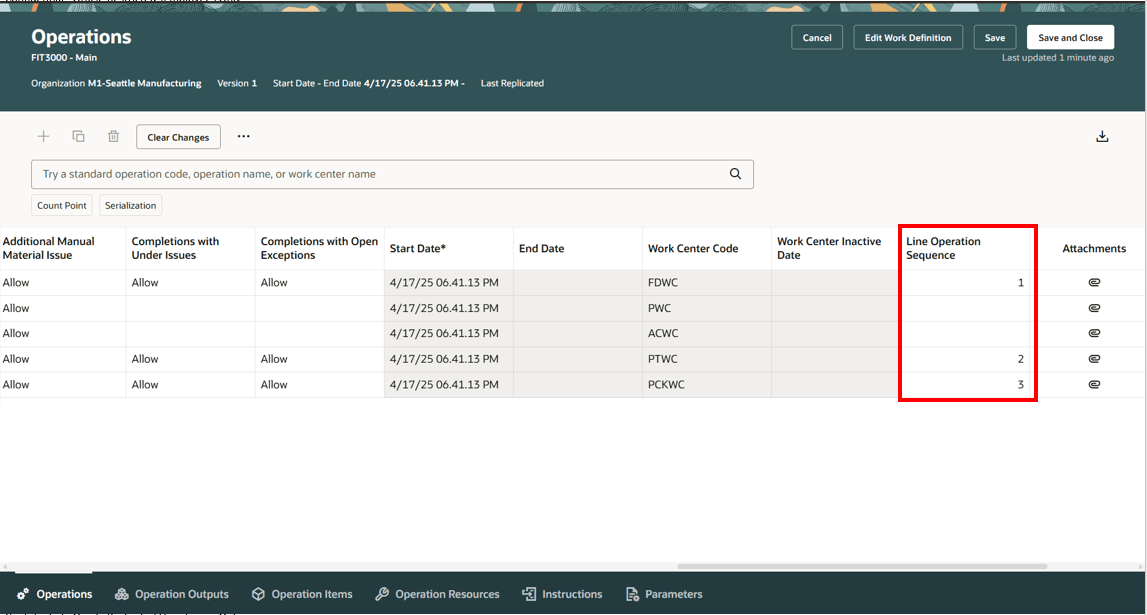
Work Definition Operations with Line Operation Sequence
Work Orders:
The context of the production line and the line operation sequence is carried over into downstream work orders created based on the work definitions.
- A discrete Production line can be referenced only for standard and nonstandard work orders based on work definitions.
- Rework and transform work orders do not support a discrete production line.
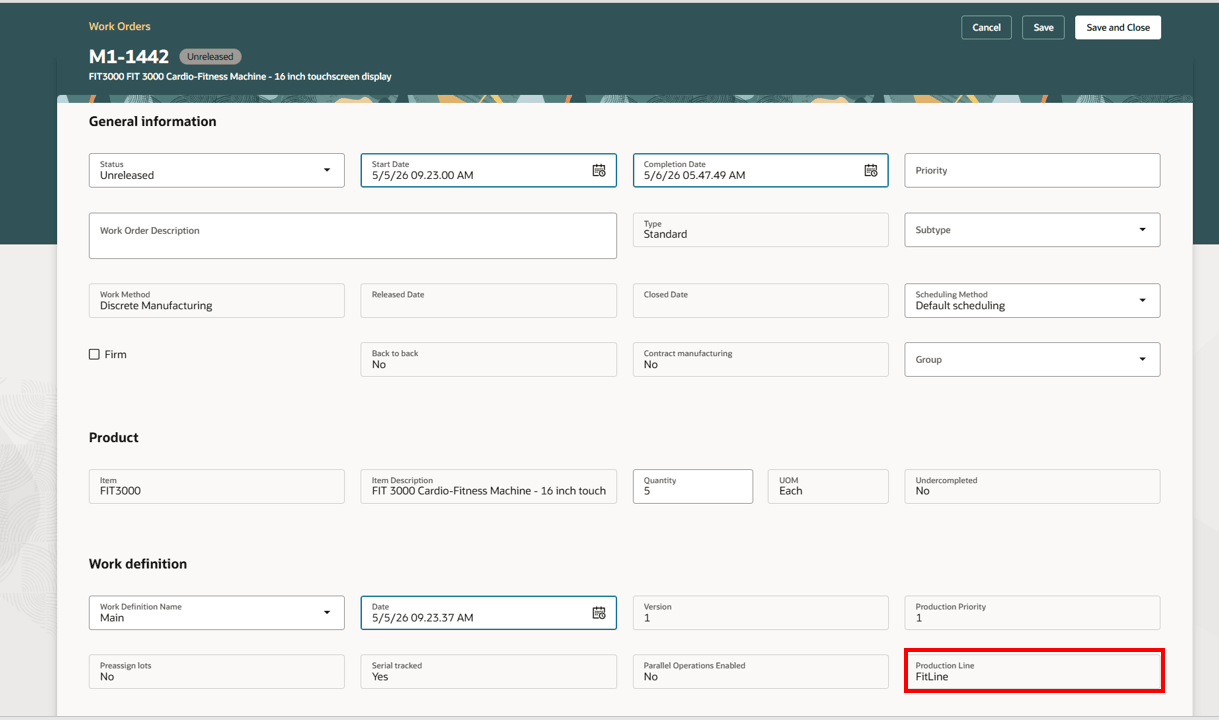
Work Order Header with Production Line
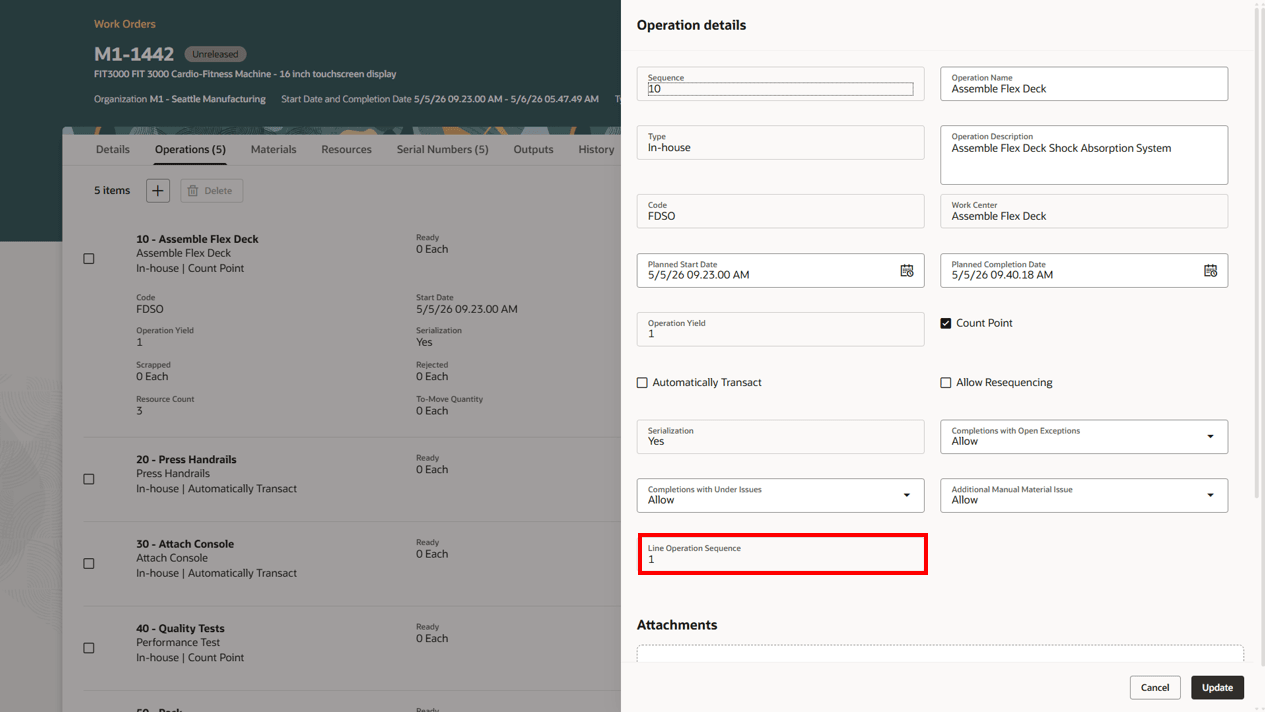
Work Order Operation with Line Operation Sequence
Work Order Schedule Summary
This view provides a weekly snapshot of the production line's capacity utilization.
When work orders are created from Planning or Order Management, the system identifies an appropriate date on which the full work order quantity can be accommodated, either on the requested date or on a prior day. If no suitable day with available capacity is found, then the work order is scheduled on the current date + 1 day, even if this results in an overload. Manually created work orders are always scheduled on the requested date, regardless of the line’s capacity utilization.
You can view the scheduled work orders for the production line by start or completion date. The metrics line capacity, planned quantity, and available capacity are shown in the context of the start date or completion date.
- Line capacity shows the number of units that can be produced on a given date. It's calculated as the line capacity multiplied by the available shift hours in the day.
- Planned capacity is the sum of total quantity of work orders on the given start date or completion date. All work order statuses are considered, except cancelled status and user defined statuses that are mapped to the cancelled status.
- Available capacity is the difference of the line capacity and the planned capacity.
- Past due quantity shows open work orders whose completion date is before the system date.
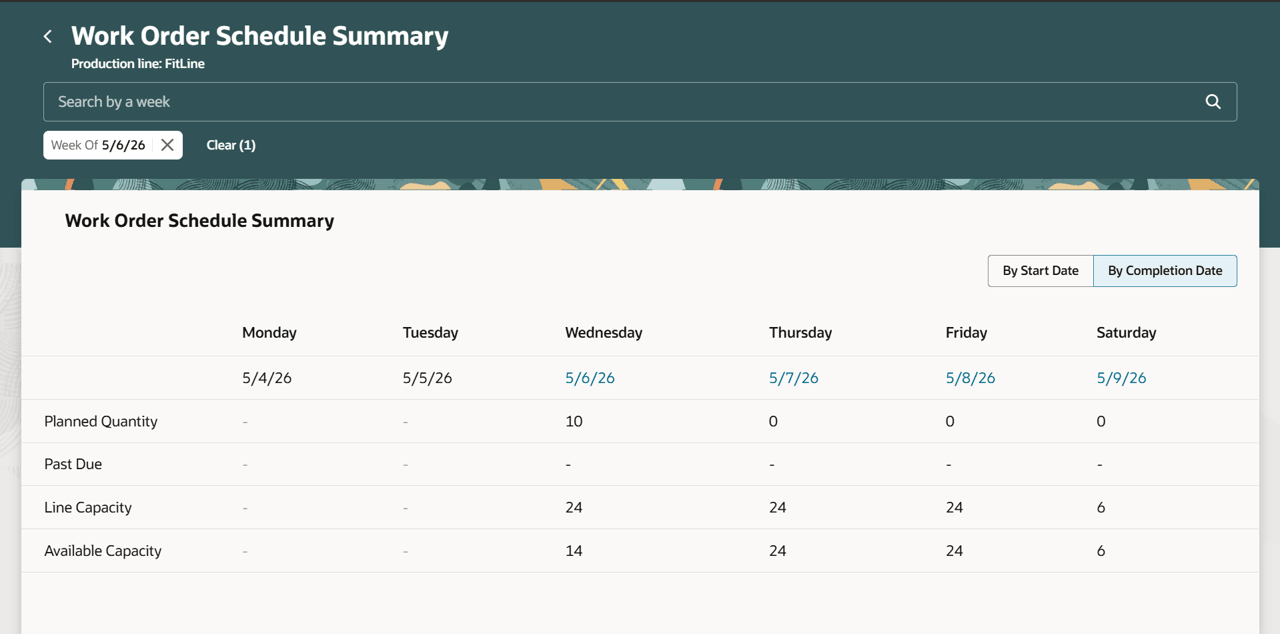
Scheduled Work Orders for the Production Line
You can drill down to the scheduled work orders page for a specific start or completion date by clicking the date. The drill-down page helps users balance the line’s capacity utilization by taking appropriate actions on the scheduled work orders. You can review quantity metrics in the header, filter work orders by status, and perform actions such as rescheduling, releasing, or placing work orders on hold.
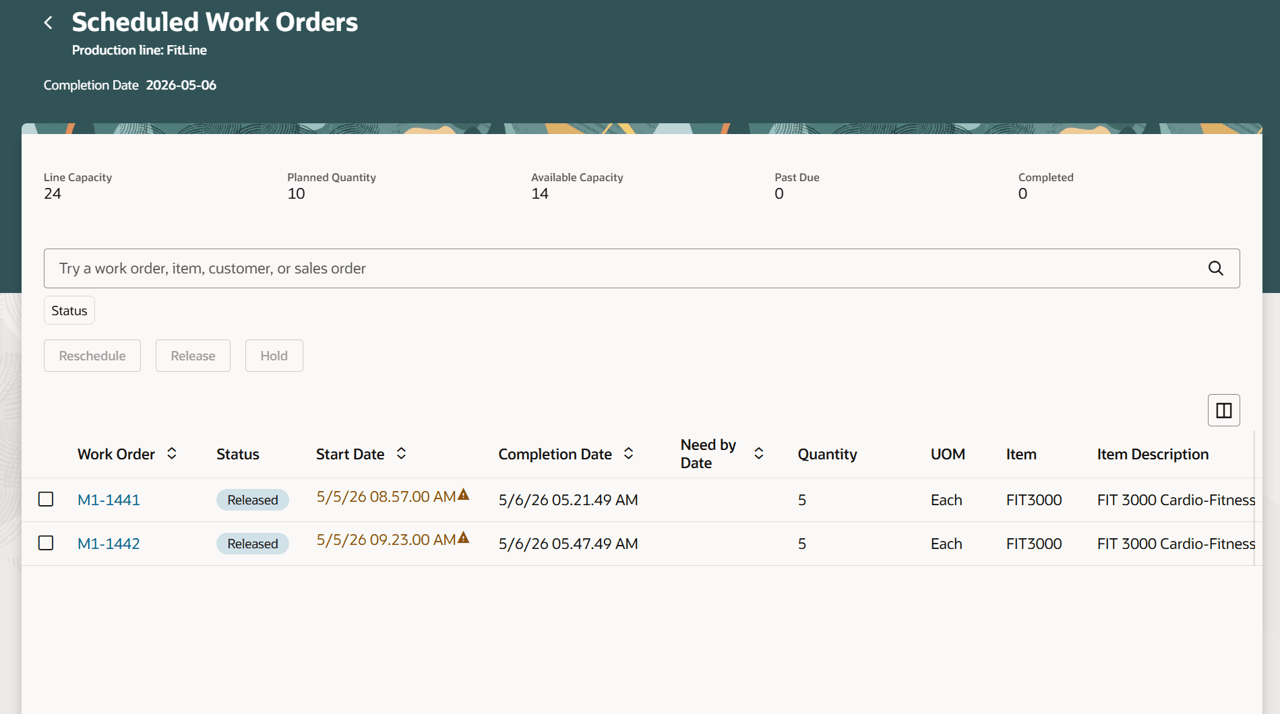
Scheduled Work Orders
Production Execution
You can perform real-time execution at workstations associated with the line operations of a production line using the Production Execution task.
The Production Execution user interface has been enhanced to report work order transactions in the context of the production line and the line operation sequence.
The next scheduled work order operation is determined based on the contextual line operation sequence. It must have a ready quantity greater than zero and belong to a work order that meets the following criteria:
- Has the earliest start date.
- Is not in Canceled or On Hold status.
- Is associated with the contextual production line.
All scheduled work order operations display the pending operations scheduled on the selected production line and associated with the contextual line operation.
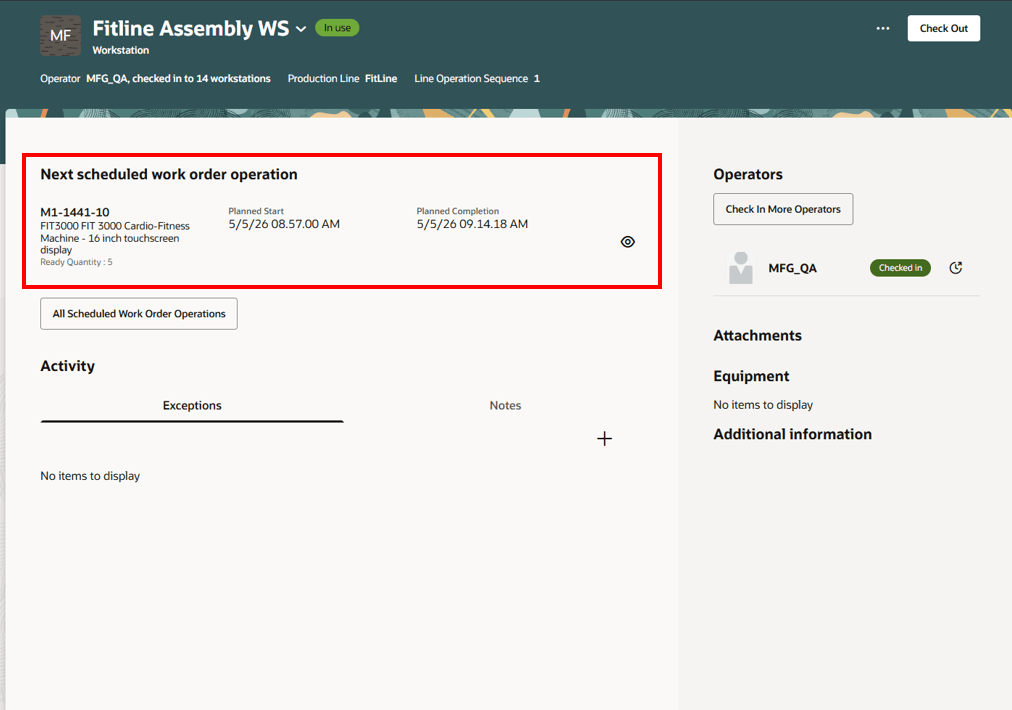
Workstation Based Reporting in Production Execution
Operations on a discrete line linked work order that aren’t tied to a specific line operation, or don’t have workstations defined, can still be executed in real time using workstation-less reporting. In this mode, you can search for work order operations by the production line or the line operation sequence number, and then initiate production execution.
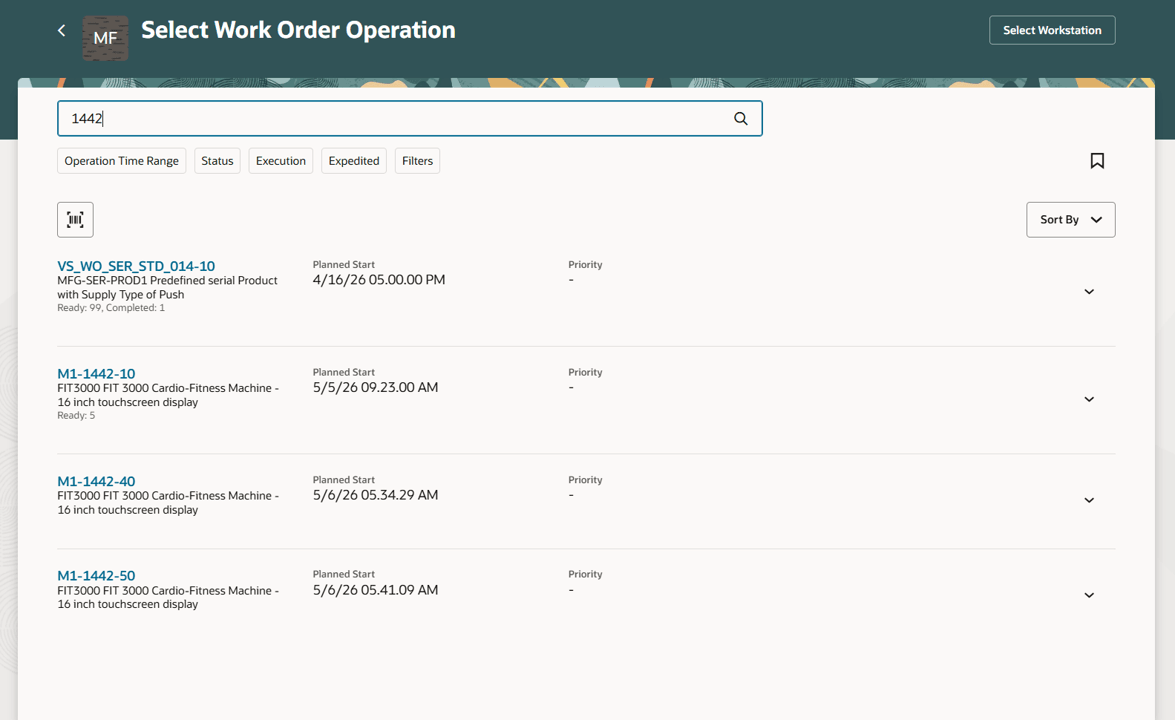
Workstation-less Reporting in Production Execution
Post production reporting has been enhanced to support post-facto execution of work order operations for work orders that reference a production line.
Mobile Reporting
Mobile reporting enables users to execute transactions either in the work order context or in the production line plus line operation sequence context. The option to select a production line appears only when discrete production lines have been defined in the organization.
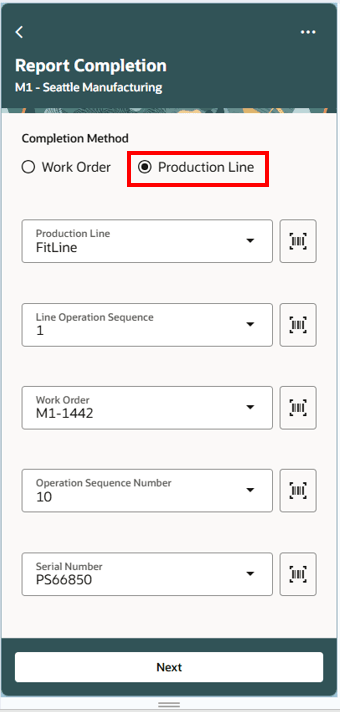
Mobile Reporting in Context of a Production Line
Production Supervision:
Discrete production line based work orders can be monitored using the Production Line Monitoring tab in the Production Supervision task.
Production supervisors can monitor production line performance, including OEE and its components. The following metrics are available for the production line during the current shift:
- Line capacity
- Completed quantity
- OEE
- Availability
- Performance
- Quality
- Downtime
- Open exceptions
In addition, supervisors can monitor completed and scrapped quantities in hourly buckets of the shift against the theoretical line capacity.
You can also view the scheduled work orders on the production line.
- The scheduled work orders list includes work orders in unreleased and released status, associated with the discrete production line in the context.
- The work orders are sorted by start date, in ascending order.
- A badge displays the appropriate status for past due, released, and unreleased work orders.
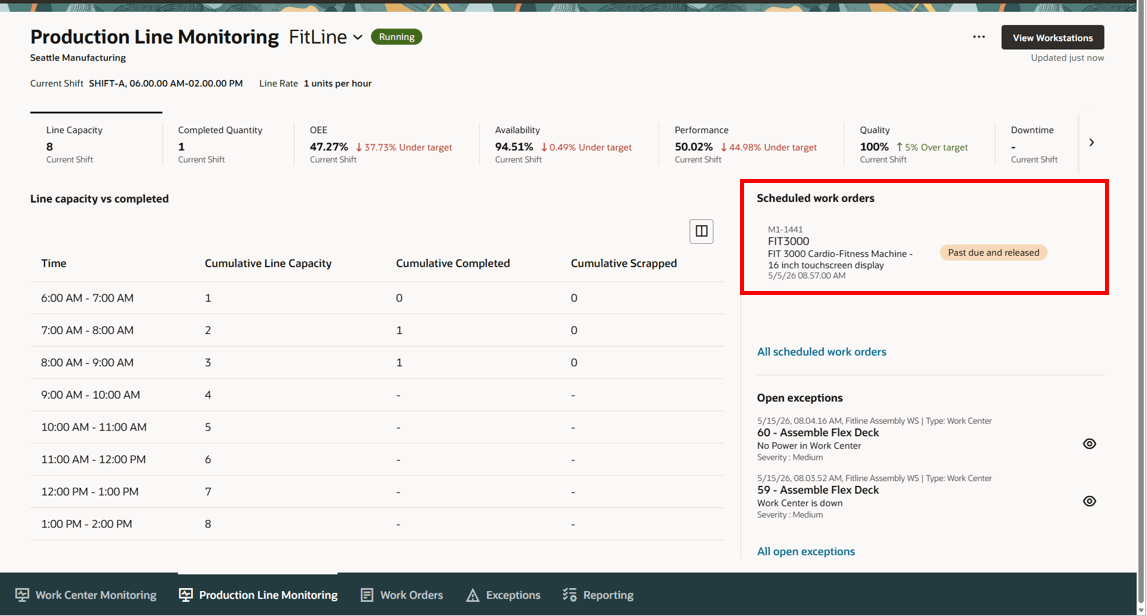
Scheduled Work Orders on a Production Line
You can view all the workstations associated with the production line. You can also view the operation in progress, operation quantities, and operators checked in on each workstation.
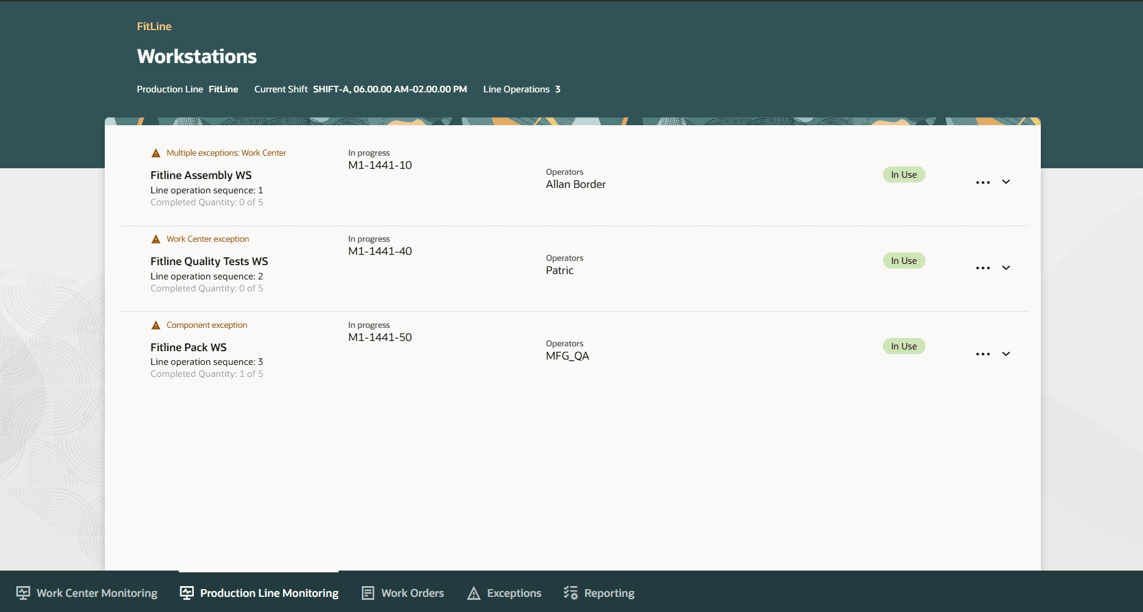
Workstations on a Production Line
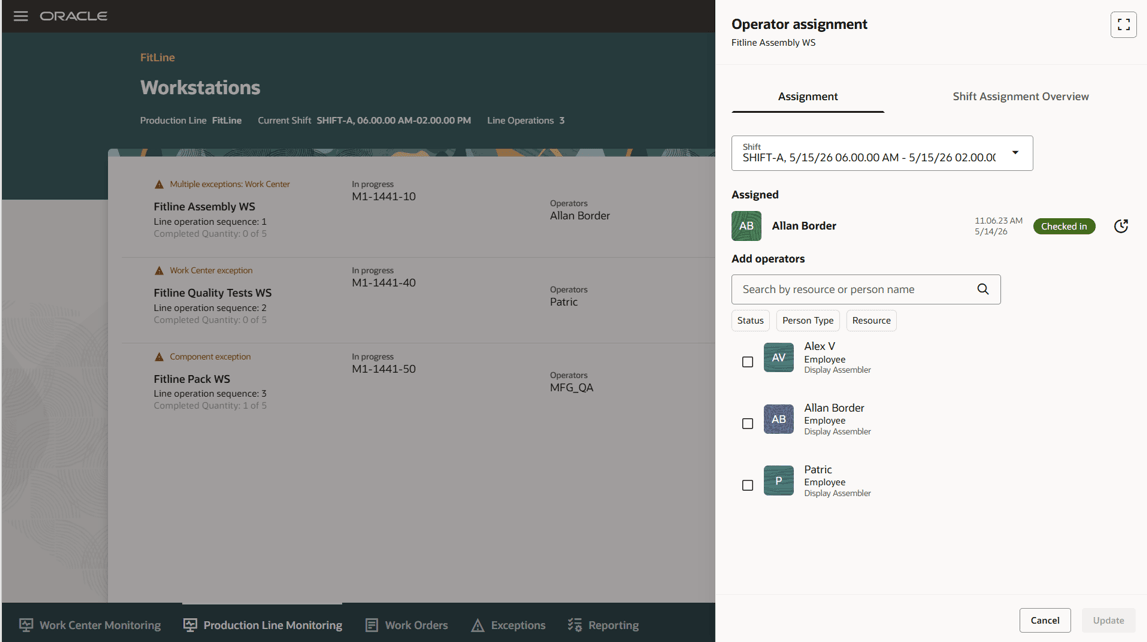
Operator Assignments for a Workstation
You can also view the next scheduled work order operation on the workstation of the production line.
The next scheduled operation is an operation from the pending scheduled work order list, having the earliest start date and a ready quantity greater than zero.
For the next scheduled operation, the item and planned start date are shown.
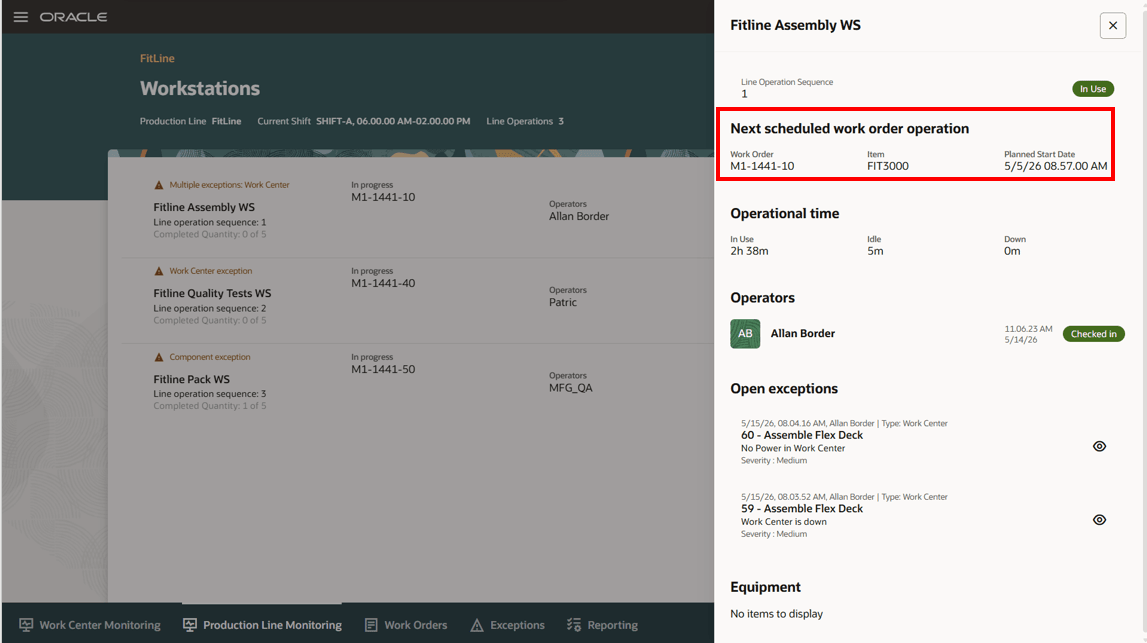
Next Scheduled Operation on a Workstation
This feature lets you define production lines and run discrete manufacturing directly against them. Manufacturers can plan and execute accurately by line, improve line-level capacity and utilization visibility, simplify execution reporting, and better align material supply with production.
Here's the demo of these capabilities:
Steps to enable and configure
Use the Opt In UI to enable this feature. For instructions, refer to the Optional Uptake of New Features section of this document.
Offering: Manufacturing and Supply Chain Materials Management No Longer Optional From: Update 27A
- Enable and configure production lines:
- This feature is enabled via Opt-in.
- Create a discrete production line with the work method set to discrete.
- Ensure that the line rate provides a line capacity of at least one unit per day (for example, line rate greater than 0.125 units per hour for an 8-hour shift).
- For discrete production lines, Report Completion at Operation Level is always set to Yes.
- For discrete production lines, the number of operations should be at least 1.
- Save the production line; the work method field becomes read-only once work definitions or work orders reference the production line.
- Associate work definitions and work orders:
- Use the production line list of values filters in work definitions and work orders to select only production lines with the appropriate work method.
- Create or update work definitions to associate with the production line, ensuring every count point operation has a line operation sequence.
- Create work orders based on these work definitions; production line is read-only and derived from the work definition.
- Schedule and monitor work orders:
- Schedule work orders using forward or backward scheduling; midpoint scheduling is blocked and disabled.
- Use slotting for autocreated, SCO, and planned work orders; manual work orders are excluded.
- Use production line filtering in the Manage Work Orders and Production Supervision interfaces to manage and monitor work orders.
- Enable production line monitoring to view discrete production line metrics including OEE and performance.
- Use Production Execution to view the production line and line operation sequence details alongside scheduled work orders.
Tips and considerations
- The feature works only with the Redwood User experience.
- Production line quantities are expected to be in whole integers. Line rates, work order quantities, product unit of measure, and operation transaction quantities must comply with this.
- In the current update, Supply Planning and Production Scheduling will continue to plan and schedule work orders with production line reference based on resource usages.
- Production Line
- A production line can be setup for either discrete or flow manufacturing and is not supported for contract or process manufacturing.
- A discrete production line must have at least one line operation.
- Line rate should ensure that line capacity per day is at least one. The inverse of the line rate represents the takt time of each line operation.
- The line operations can be associated with only the workstations associated with the given production line.
- Work Definition
- You can update an existing work definition to reference a production line and line operation sequences at the operation level.
- Every count point operation must have a line operation sequence associated. Line operation sequence can be repeated in a sequential order.
- Consider setting up the minimum transfer quantity to transfer across operations in the work definition header to move quantities in the production line in alignment with the takt time.
- As an implementation-enforced setup, ensure that the total operation resource usage for each line operation matches the takt time of the production line.
- Work Order
- Work Orders are slotted by the requested completion date and available capacity of the production line. Then, the work orders are backward scheduled from the slotted completion date.
- Work orders on a production line can be forward or backward scheduled. You cannot use midpoint rescheduling,
- Production line is derived from the work definition and can be associated only with discrete work orders. Production lines can't be associated for process and contract manufacturing work orders.
- Count point operations can't be added or deleted if the work order has a production line association.
- Production Supervision
- Production line-based work orders can be monitored using the Production Line Monitoring tab. The supervisor can monitor the production line performance, including OEE and its components.
- The Work Center Monitoring tab will filter out workstations associated with the discrete production line.
- Execution
- Operation transactions can be reported in real time, with or without workstation context, using the Production Execution task.
- Operation transactions can be reported on a post-facto basis, using Postproduction Reporting.
- Operation transactions can also be reported in real time, using Mobile Reporting.
- Reporting of material issue, return, scrap and return from scrap will continue to behave as before. The materials can be transacted in context of the work order operation, without providing the production line and the line operation sequence.
- Reporting of resource charge and reverse charge will continue to behave as before. The resources can be transacted in context of the work order operation, without providing the production line and the line operation sequence.
- Reporting of output transactions will continue to behave as before. The outputs can be transacted in context of the work order operation, without providing the production line and the line operation sequence.
- Move work in process transaction can be performed in context of the work order only and not the production line context.
Key resources
- Watch the Use Production Lines in Discrete Manufacturing demo.
- Refer to Redwood: Create and Edit Work Orders Using a New User Experience.
- Refer to Redwood: Manage Work Definitions Using a New User Experience.
- Oracle Fusion Cloud SCM: Refer to the Using Manufacturing guide, available on the Oracle Help Center.
- Oracle Fusion Cloud SCM: Refer to the Implementing Manufacturing and Supply Chain Materials Management guide, available on the Oracle Help Center.
Access requirements
Users who are assigned a configured job role that contains these privileges and codes can access this feature:
- Work Definition:
- Manage Work Definitions (WIS_MANAGE_WORK_DEFINITIONS_PRIV)
- Work Order Privileges:
- Manage Work Order Headers (WIP_MANAGE_WORK_ORDER_HEADERS_PRIV)
- Manage Work Order Operations (WIP_MANAGE_WORK_ORDER_OPERATIONS_PRIV)
- View Work Orders (WIP_VIEW_WORK_ORDERS_PRIV)
- Manufacturing Privileges:
- Manage Work Execution Work Area (WIP_MANAGE_WORK_EXECUTION_WORK_AREA_PRIV)
- Manage Scheduled Work Orders on a Discrete Production Line (WIP_MANAGE_WORK_ORDER_SCHEDULES)
- Manage Production Lines by Service (WIS_MANAGE_PRODUCTION_LINES_SERVICE)
- Get Production Lines by Service (WIS_GET_PRODUCTION_LINES_SERVICE)
Guided Journeys: Role Codes
- Use REST Service - Guided Journeys Read Only (Role Code ORA_PER_REST_SERVICE_ACCESS_GUIDED_JOURNEYS_RO)
- Use REST Service - Guided Journey Responses (Role Code ORA_PER_REST_SERVICE_ACCESS_GUIDED_JOURNEY_RESPONSES)
These privileges were available prior to this update.