AI Agentic App: Kanban Administration Workspace
Kanban administrators managing just-in-time material replenishment face ongoing challenges such as preventing stockouts, adapting to demand fluctuations, managing supply delays, and resolving process bottlenecks—all while ensuring a continuous material flow with minimal buffer.
The Kanban Administration Workspace is an AI-powered, agentic application that serves as a unified control center to proactively manage Kanban-based, just-in-time material replenishment. It enables you to:
- Detect stock anomalies by analyzing Kanban card statuses across pull sequences and highlighting potential shortages for timely replenishment action.
- Identify supply exceptions such as delays in Kanban movement and take timely corrective actions to expedite progress and prevent stockouts at points of use.
- Evaluate supplier performance by comparing actual delivery times against planned lead times, enabling adjustments to safety stock based on supplier variability, fostering collaboration to improve delivery reliability, and supporting decisions on alternative sourcing.
- Review and implement Kanban planning recommendations based on demand changes to prevent shortages and excess inventory.
- Take prioritized actions to prevent material shortages and easily communicate with suppliers to enhance delivery performance.
To access the Kanban Administration Workspace agentic application:
- Navigate to Supply Chain Execution.
- Under Quick Actions, select Show More to view the complete list of available actions.
- Select Kanban Administration Workspace under Kanban.

Quick Actions Menu: Kanban
The Kanban Administration Workspace is a centralized, context-aware solution for managing Kanban-based material replenishment. Built on Oracle AI Agent Studio, it uses Oracle Fusion Supply Chain Management data models to interpret operational data to deliver real-time, actionable insights. The agentic application uses specialized advisors to dynamically come up with recommendations and prioritized actions in a unified workspace, enabling efficient and proactive decision-making.
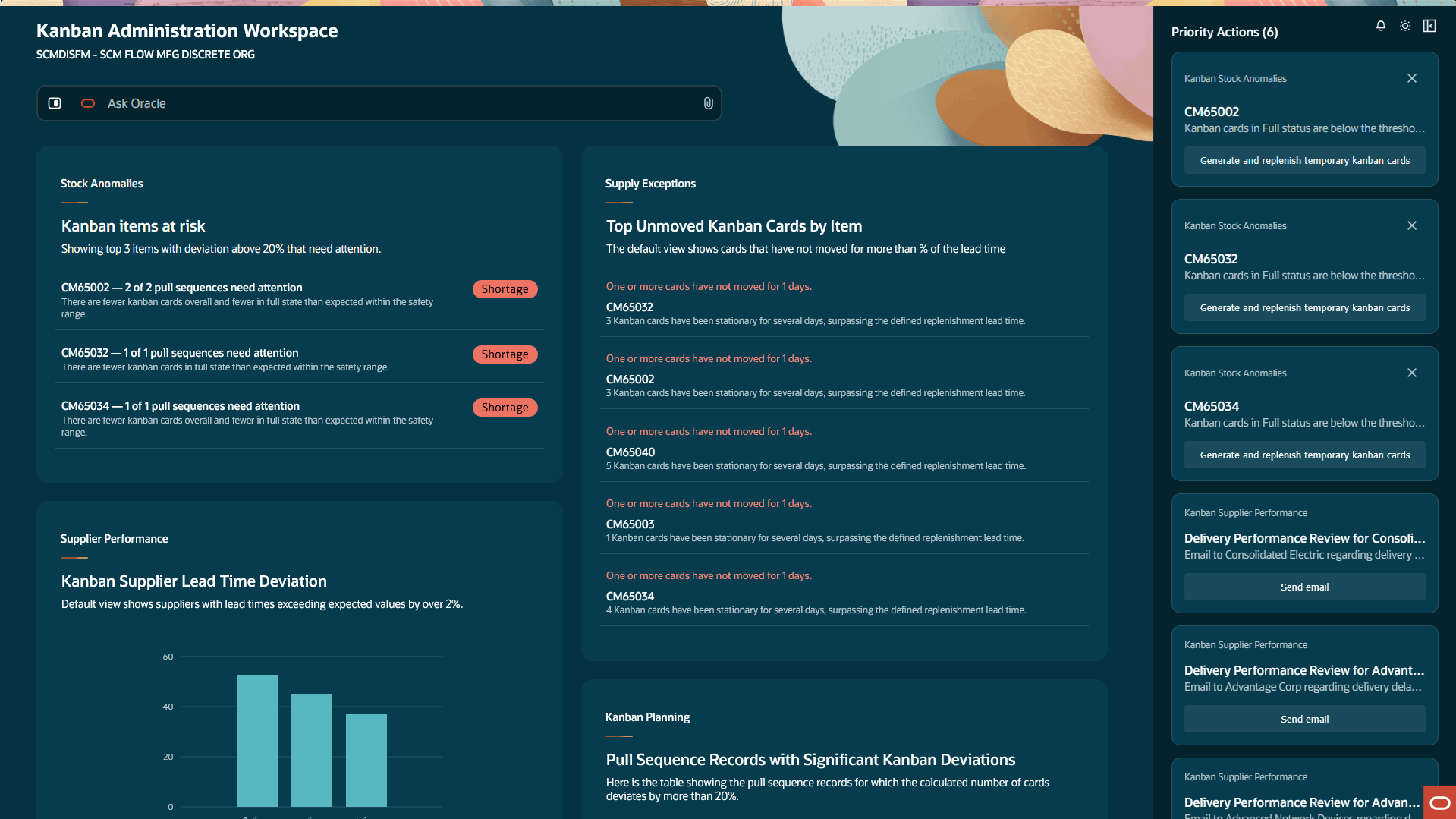
Kanban Administration Workspace
Kanban Administration Workspace contains the following sections:
Ask Oracle: Ask Oracle offers a conversational interface that intelligently routes queries to the appropriate advisor based on the context, delivering a synthesized response. For example, the query "Are there any shortages of Item A?" generates insights based on the response provided by the Stock Anomalies advisor.
Advisors: Advisors present insights using structured, dynamically rendered panels that provide contextual visibility into Kanban-based materials management. Each advisor displays information aligned to a specific area, and these displays get refreshed as the context evolves. The following advisors are supported in this update:
- Stock Anomalies
- Supply Exceptions
- Supplier Performance
- Kanban Planning
Priority Actions: The priority action list provides actionable steps such as generating and replenishing one-time Kanban cards to prevent stockouts. Communication actions, such as using auto-generated draft emails to suppliers to address delivery delays are also included.
Stock Anomalies
The Stock Anomalies panel helps monitor real-time stock positions at points of use to identify shortages and take timely replenishment action to maintain optimal levels. The system highlights the top three items with the most anomalies (based on pull sequence deviations), prioritizes them by severity, and recommends targeted actions such as generating and replenishing Kanban cards—to restore stock within safety thresholds.
The point of use for a pull sequence is considered to have material shortage if [(T-F)/T * 100] is greater than 20% (default threshold), where:
- T = Total Number of Kanban cards.
- F = Number of Kanban cards in "Full" status.
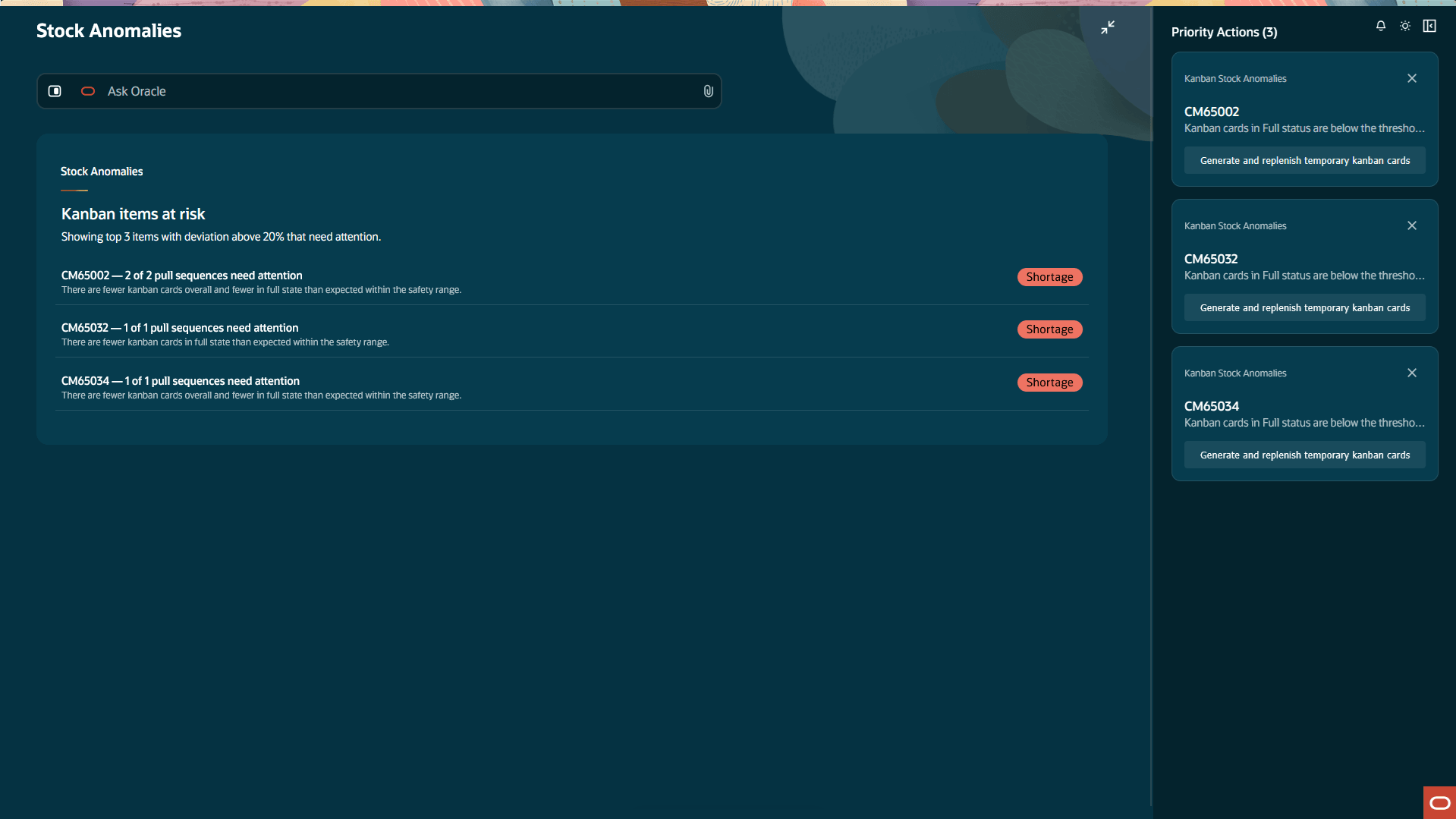
Stock Anomalies Advisor
For a given item, the advisor provides the ability to replenish new Kanban cards to manage material shortages at its points of use.
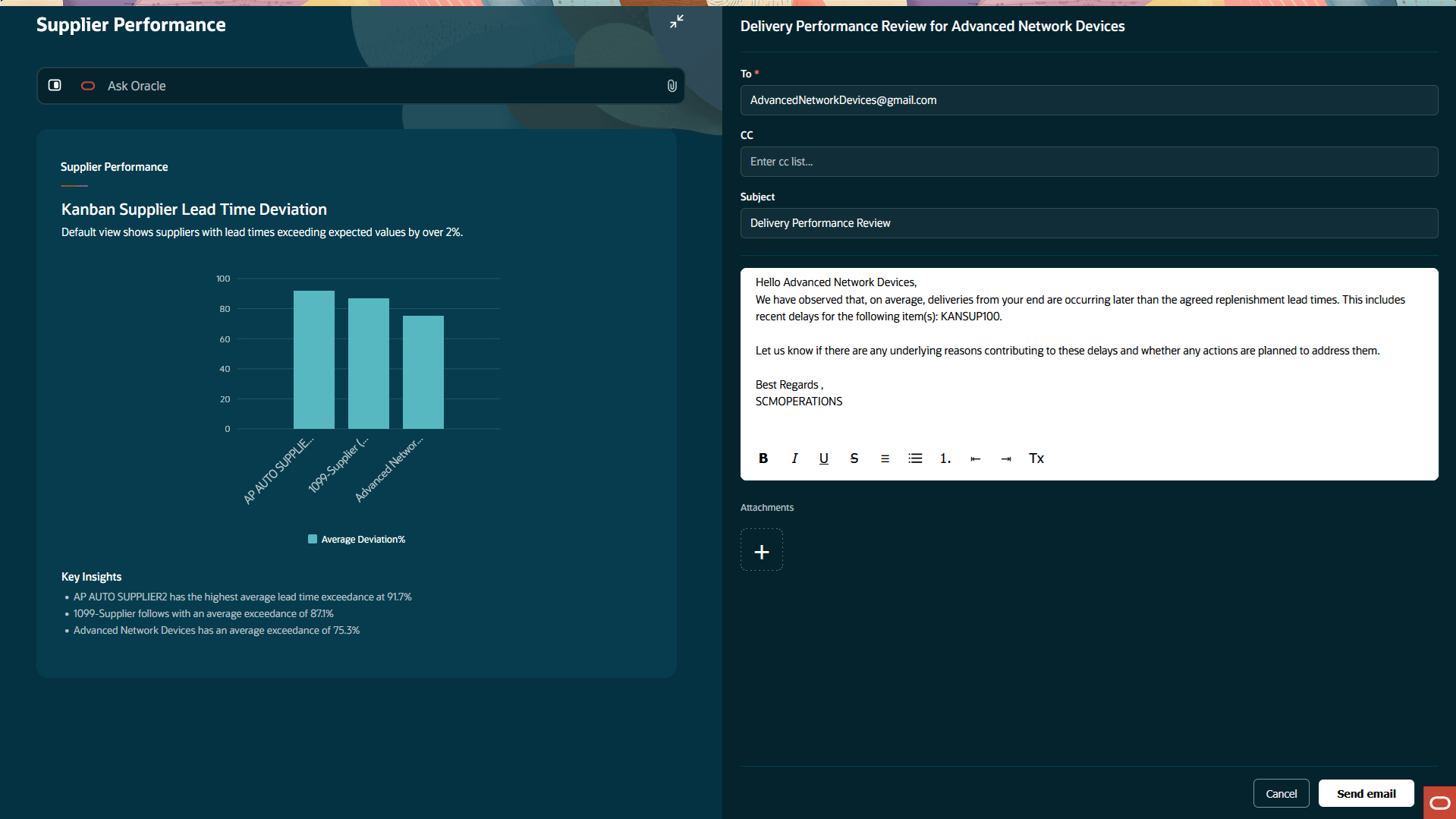
Replenish New Cards
Supply Exceptions
The Supply Exceptions panel displays the top five items with the longest duration of unmoved cards—defined as cards in “Empty” or “In Process” status that have not changed status for more than 2% (default threshold) of the replenishment lead time (in days) maintained in the corresponding pull sequence. Such delays may be caused due to damaged physical Kanban cards or issues in generating the related supply documents (e.g., purchase orders for supplier Kanbans), and could result in material shortages. This visibility supports root-cause analysis and enables timely corrective actions to accelerate flow.
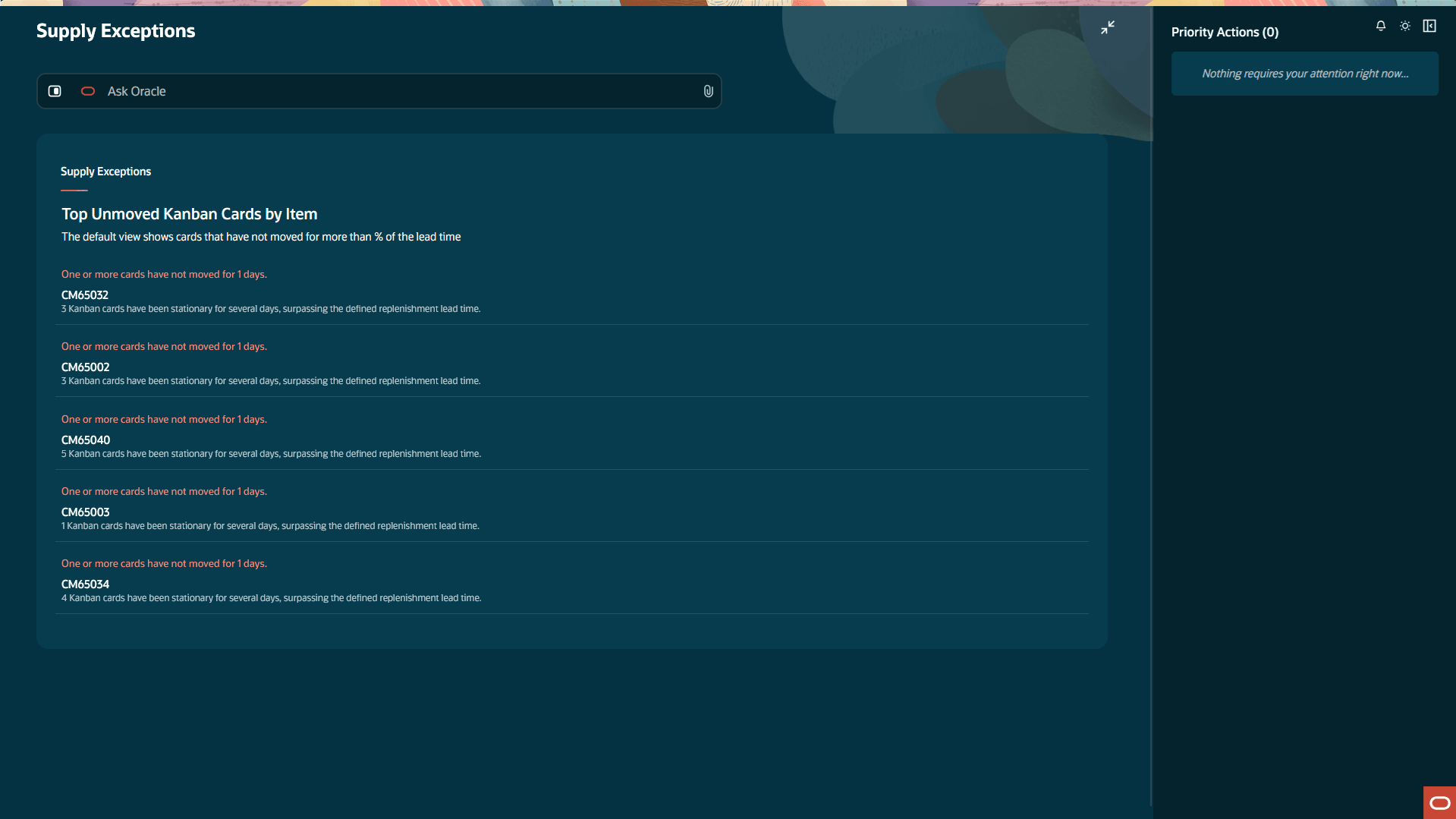
Supply Exceptions Advsior
For a given item, the advisor allows you to drill down to review unmoved Kanban cards and take actions to update their status and expedite progress.
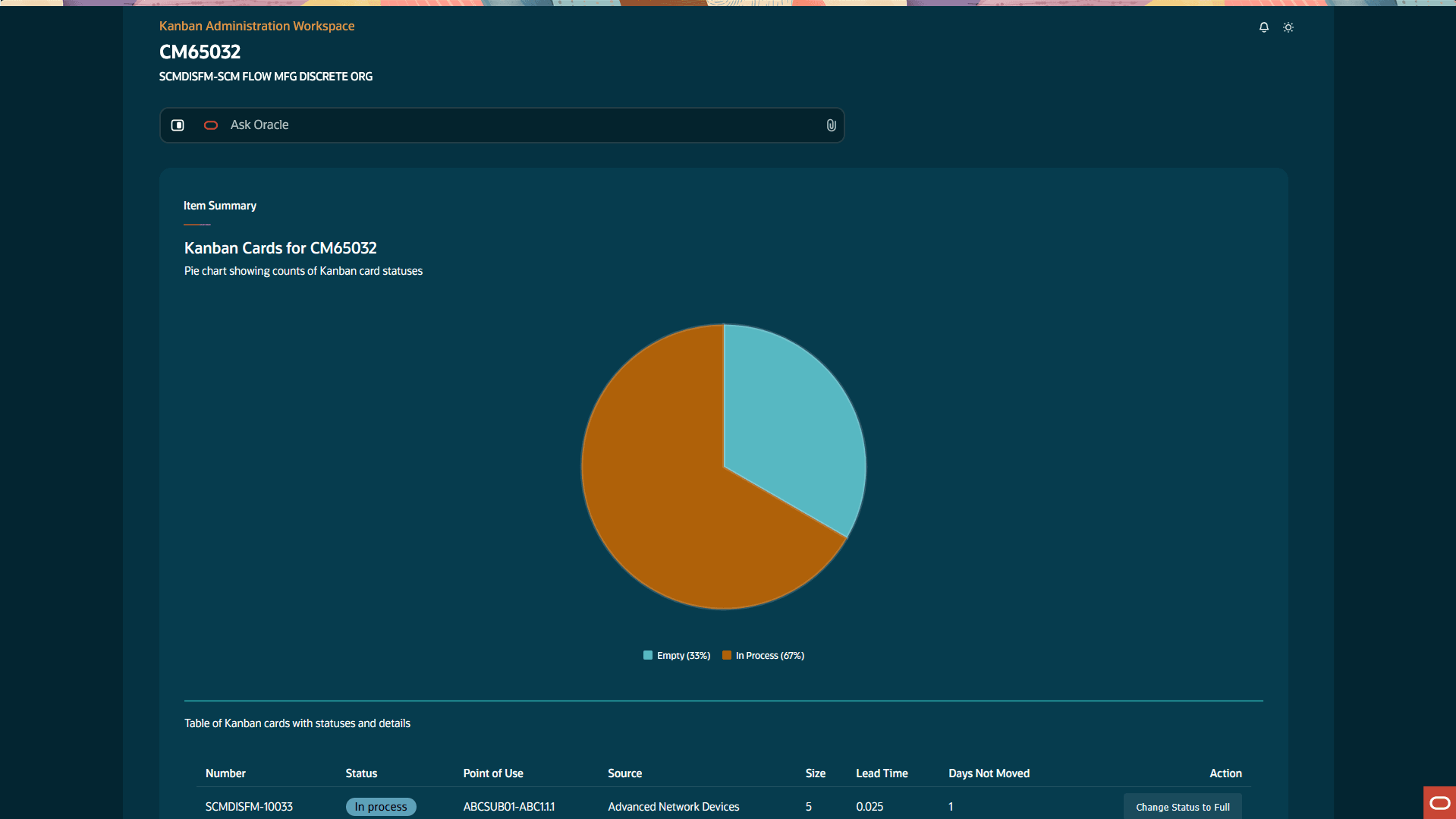
Unmoved Kanban Cards by Item
Supplier Performance
The Supplier Performance panel identifies the top five suppliers with replenishment delays exceeding the defined lead time beyond 2% (default threshold) related to Kanban card deliveries. It evaluates performance by analyzing delays in transitions from In Process to Full and aggregates these deviations at the supplier level. These insights provide a clear view of supplier reliability, enabling better performance assessment, informed safety stock adjustments, and effective decisions around supplier improvement or alternative sourcing.
Through auto-generated draft emails, the advisor enables faster and more intuitive communication with suppliers to improve delivery performance.
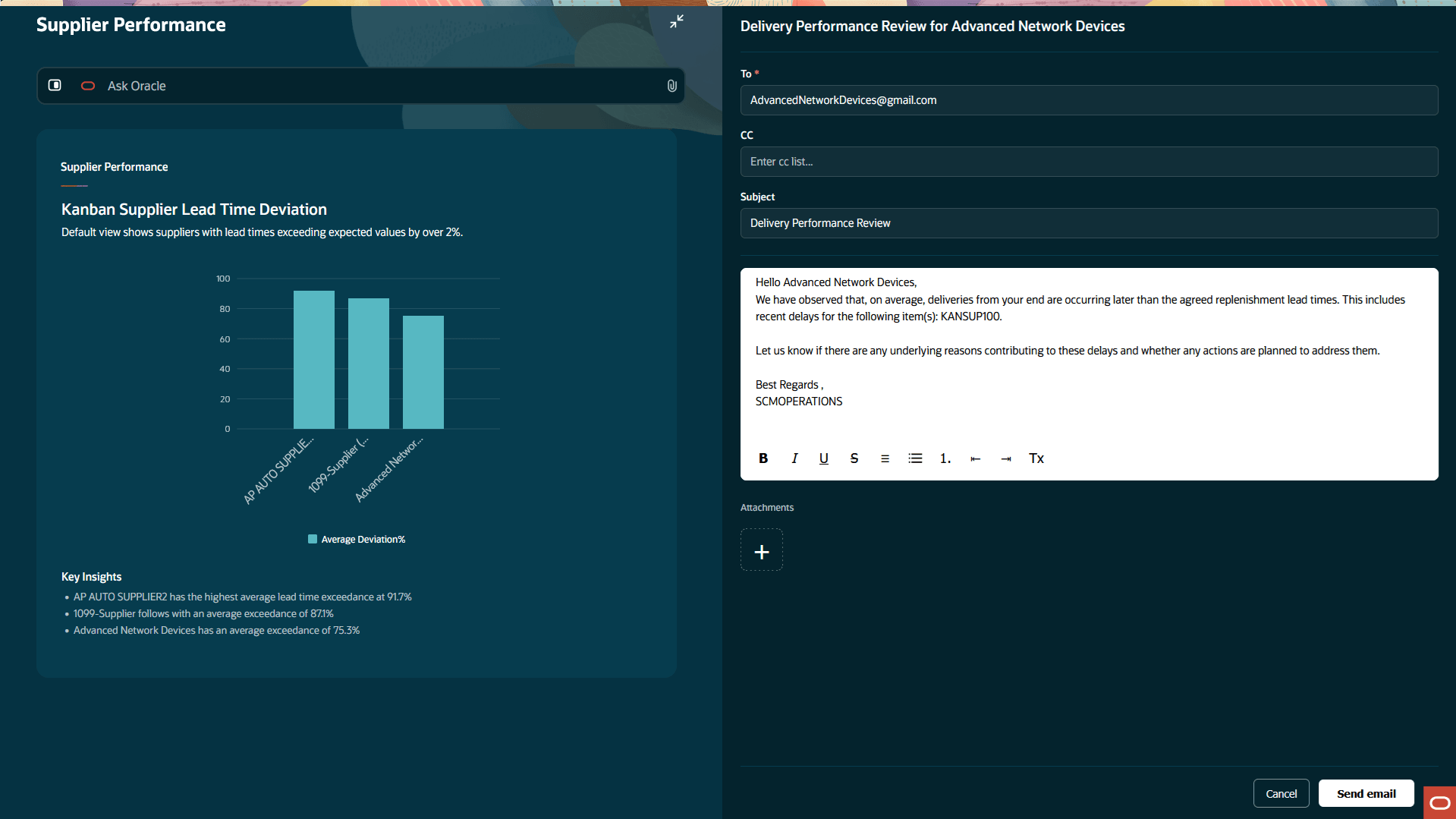
Supplier Performance
Kanban Planning
The Kanban Planning panel displays the top three pull sequence records where the calculated number of cards per pull sequence deviates by more than 20% (default threshold) from the current levels. It considers the most recent valid plan per pull sequence (or the next latest if already implemented). Plans are selected based on recency and applicability, with thresholds and future plans configurable via query. The advisor allows you to act on Kanban planning recommendations to align with demand changes, ensuring optimal inventory levels and avoiding both shortages and excess.
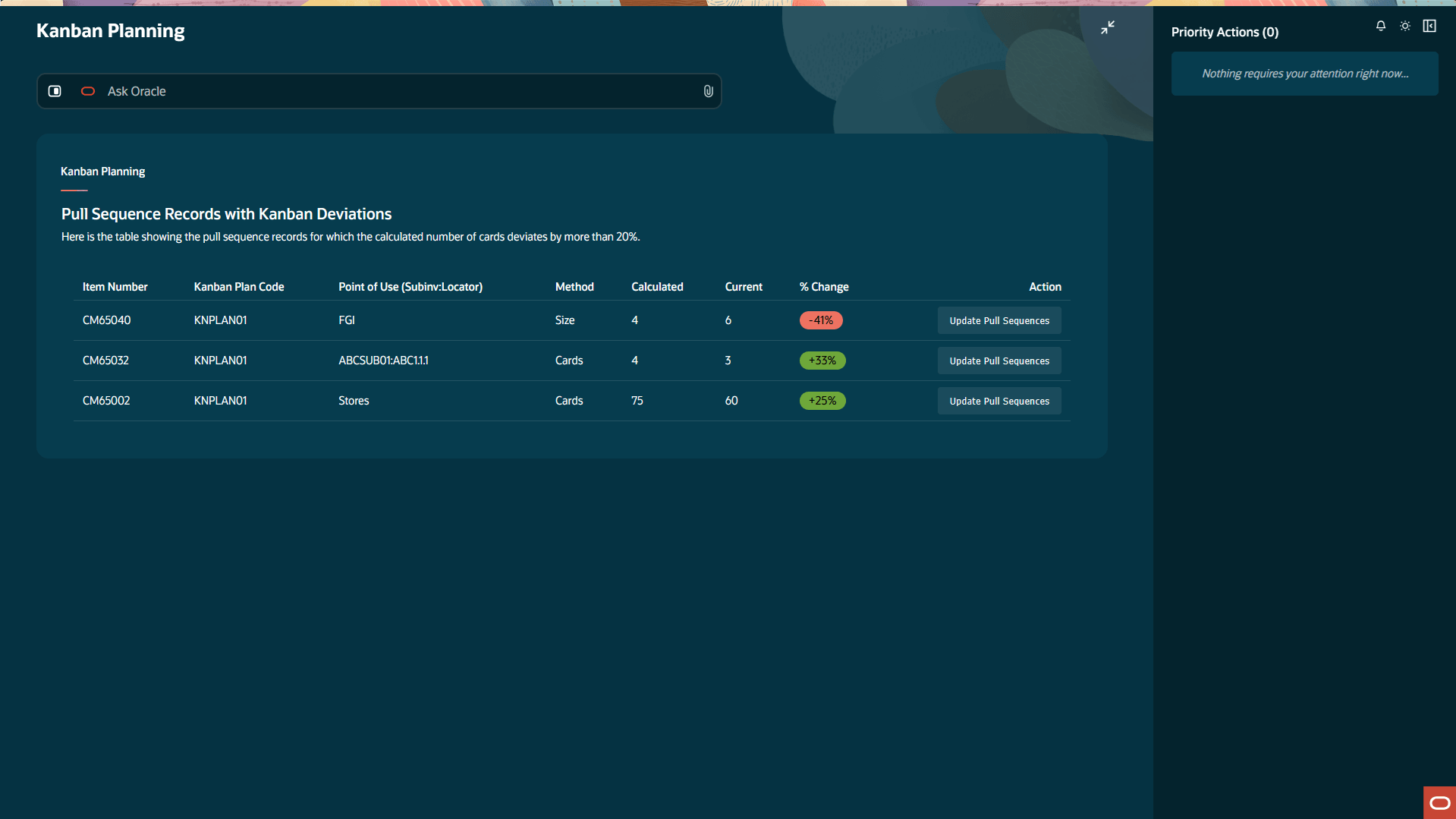
Kanban Planning
The Kanban Administrator Workspace enables faster decision-making and proactive just-in-time material replenishment through real-time, actionable insights. It helps prevent stockouts, enhances efficiency, and ensures smooth, uninterrupted material supply.
Here's the demo of these capabilities:
Steps to enable and configure
Follow these steps to use this feature:
Set up the profile option to enable the AI agentic app:
- In the Setup and Maintenance work area, search for and select the Manage Administrator Profile Values task.
- On the Manage Administrator Profile Values page, search for and select the ORA_WIS_KANBAN_ADMINISTRATION_WORKSPACE_AGENTIC_APP_ENABLED profile option code.
- In the Profile Values section, set the Site level to Yes.
- Click Save and Close. Changes in the profile value will affect users the next time they sign in.
Ensure that the user has the appropriate privileges, as listed under Access Requirements.
Tips and considerations
- AI-recommended priority actions must be reviewed for accuracy before execution to ensure that they align with your business requirements.
- Ask Oracle query responses are based on Kanban card and pull sequence details, not on on-hand quantities at points of use.
- The Kanban Planning panel displays information based on the Kanban plans executed in the background. At least one plan must be run and remain unimplemented for the data to appear in the panel.
- Information displayed across all panels is driven by predefined thresholds. You can use Ask Oracle to retrieve results based on different thresholds. For example, the Supply Exceptions panel by default shows the top five items with Kanban cards that have not moved for 2% of the replenishment lead time (in days). Using Ask Oracle, you can instead query for items where Kanban cards have not moved for 10% of the replenishment lead time.
Key resources
- Watch the AI Agentic App: Kanban Administration Workspace demo.
- Refer to the Oracle Fusion Cloud SCM: Using Manufacturing guide, available on the Oracle Help Center.
- Refer to the Oracle Fusion Cloud SCM: Implementing Manufacturing and Supply Chain Materials Management guide, available on the Oracle Help Center.
Access requirements
Users who are assigned a configured job role that contains the following privileges can access this feature:
- Kanban Administration Workspace Access Duty (ORA_WIS_KANBAN_ADMINISTRATION_WORKSPACE_DUTY)
This duty role is new in this update.
- View Pull Sequences and Kanban Cards Duty (ORA_WIS_VIEW_PULL_SEQUENCES_AND_KANBAN_CARDS_DUTY)
- Manage Kanban Replenishment Duty (ORA_WIS_MANAGE_KANBAN_REPLENISHMENT_DUTY)
- Execute Kanban Replenishment Duty (ORA_WIE_EXECUTE_KANBAN_REPLENISHMENT_DUTY)
These privileges were available prior to this update.