Use Process Manufacturing Terminology for Individual Manufacturing Plants, Business Intelligence Publisher, and Scheduled Processes
In the previous release, you could enable process manufacturing terminology by setting the appropriate administrator profile option (ORA_WIS_PROCESS_TERMINOLOGY_ENABLED). With this update, you can additionally control process manufacturing terminology at the manufacturing plant level. This lets you selectively enable or disable process-specific terminology for mixed-mode environments, which use both discrete and process manufacturing.
The process-specific terminology is automatically enabled for all plants that are enabled for process manufacturing if the profile option is set. You can use the new plant parameter Use process manufacturing terminology to control the terminology for a particular plant.
Process manufacturing terminology introduced for work definitions, work orders, and related manufacturing flows is now extended to Enterprise Scheduler Service (ESS) and Business Intelligence Publisher (BIP) reports. This ensures that process manufacturing terms such as recipes, ingredients, co-products, and by-products are consistently represented across both transactional pages and reporting outputs. The following terms are updated to provide a more consistent process manufacturing user experience:
| Current Term | Process Manufacturing Term |
|---|---|
| Work Definition | Recipe |
| Work Order | Batch |
| Primary Output | Primary Product |
| Operation Item | Ingredient |
| Operation Output | Product |
| Structure | Formula |
| Work Order Traveler | Batch Ticket |
With this enhancement, you can use the updated process manufacturing terminology in your scheduled reports, improving clarity and consistency when analyzing manufacturing data.
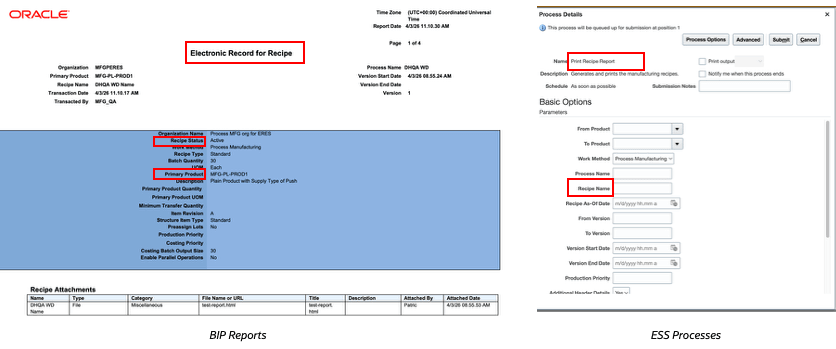
The following tables list the new scheduled processes and BIP Reports with names enhanced to match the terminology update:
| Report | Current Report Name | Process Manufacturing Report Name |
|---|---|---|
| BIP | Electronic Record for Work Order Operation Transaction | Electronic Record for Batch Operation Transaction |
| BIP | Electronic Record for Work Order Material Issue | Electronic Record for Batch Material Issue |
| BIP | ERES for Process Work Order Release | ERES for Process Batch Release |
| BIP | Electronic Record for Work Order Output Transaction | Electronic Record for Batch Output Transaction |
| BIP | Work Definition E-Record Report | Recipe E-Record Report |
| BIP | Work Definition Report | Recipe Report |
| BIP | Extensible Work Order Traveler Report | Extensible Batch Ticket Report |
| BIP | Components List | Ingredients List |
| BIP | Electronic Production Records | Electronic Production Records for Batches |
| BIP | Work Order Traveler | Batch Ticket |
| Process | Current Process Name | Process Manufacturing Process Name |
|---|---|---|
| ESS | Pick Materials for Work Orders | Pick Materials for Batches |
| ESS | Import Work Definitions | Import Recipes |
| ESS | Import Work Order Material Transactions | Import Batch Material Transactions |
| ESS | Import Work Order Operation Transactions | Import Batch Operation Transactions |
| ESS | Import Work Order Resource Transactions | Import Batch Resource Transactions |
| ESS | Import Work Orders | Import Batches |
| ESS | Process Item Structure Changes to Work Definitions | Process Formula Changes to Recipes |
| ESS | Assign Work Orders to Group | Assign Batches to Group |
| ESS | Mass Close Work Orders | Mass Close Batches |
| ESS | Reserve Materials for Work Orders | Reserve Materials for Batches |
| ESS | Print Work Definition Report | Print Recipe Report |
| ESS | Generate Extensible Work Order Traveler Report | Generate Extensible Batch Ticket Report |
| ESS | Print Components List | Print Ingredients List |
| ESS | Print Electronic Production Record | Print Electronic Production Record for Batches |
| ESS | Print Work Order Traveler | Print Batch Ticket |
Examples of BIP Report/Scheduled Process with Process Manufacturing Terminology:
Some of the benefits of this feature include:
- Industry-Familiar Experience: Offers an intuitive interface with common process manufacturing terminology across Redwood pages and reporting interfaces.
- Improved User Productivity: Enables users to efficiently handle batch-focused tasks.
- Consistent Experience: Provides consistent use of process manufacturing terminology across the UI and reports.
- Improved Reporting Experience: Improves report readability for process manufacturing users.
Steps to enable and configure
- In the Setup and Maintenance work area, click the Tasks icon.
- Click Search.
- Search for, and select the Manage Administrator Profile Values task.
- On the Manage Administrator Profile Values page, search for the profile option "ORA_WIS_PROCESS_TERMINOLOGY_ENABLED".
- Set the profile option value to "Yes" at the site level.
Use the new plant parameter, Use process manufacturing terminology to control the process manufacturing Redwood experience at the plant level. You can configure the parameter from the Manage Plant Parameters setup page if the Enable Process Manufacturing plant parameter is already available.

Tips and considerations
- Reports and scheduled processes use the new terminology based on the profile option setting.
- Scheduled processes and reports do not have a change in functionality, they function as before.
- Enabling the profile option enables process manufacturing terminology for all common pages, such as the home page and Ask Oracle.
- Manufacturing plants enabled for process manufacturing start using the process manufacturing terminology after the profile option is enabled.
To enable a manufacturing plant for process manufacturing, set the Enable Process Manufacturing flag to Yes under Manage Plant Parameters.- You can configure specific plants to show process manufacturing terminology by enabling the plant parameter "Use process manufacturing terminology". This plant parameter is enabled by default for plants that have process manufacturing enabled.
- Pages without the plant context show process terminology based on the profile option.
- Newly provisioned customer PODS with process enabled plants will have the profile option enabled by default.
Key resources
Use Process Manufacturing Terminology 26B: https://docs.oracle.com/en/cloud/saas/readiness/scm/26b/mfg26b/26B-mfg-wn-f43103.htm
Access requirements
No changes to privileges. If you have access to these pages, you will have access to this feature by default.