AI Agentic App: Production Readiness Workspace
Manufacturing engineers often rely on multiple systems, such as product management, production execution, and quality to assess data readiness and production performance. This fragmentation makes it difficult to identify master data issues, correlate production variances, and respond to recurring problems in a timely manner. Engineers need a unified, intelligent workspace that simplifies root cause analysis, prioritizes corrective actions, and reduces manual effort in maintaining production data.
Production Readiness Workspace is an AI-powered agentic application that enables manufacturing engineers to accurately maintain production data and continuously improve manufacturing processes by deriving actionable insights from production execution. The application provides key insights and recommended actions by combining work definition data, production execution signals, engineering changes, and shop floor feedback into a unified experience. The key capabilities include:
- Provides an AI-powered, unified workspace to monitor and improve production readiness across work definitions.
- Presents contextual insights within work definitions by analyzing recent production activity, including work orders, material and resource transactions, and shop floor feedback.
- Enables conversational insights through Ask Oracle by synthesizing inputs from multiple advisors.
- Delivers targeted insights through specialized advisors such as Work Definition Completion, Product Updates, and Continuous Improvement.
- Identifies master data gaps such as missing components, missing resources, and incorrect configurations, and recommends corrective actions.
- Highlights production variances and recurring issues using actual versus planned usage analysis and shop floor signals.
- Recommends priority actions based on production impact, upcoming work orders, and demand exposure.
- Supports faster root cause analysis and continuous improvement by correlating engineering changes, execution data, and operator feedback.
To access the Production Readiness Workspace:
- Navigate to Supply Chain Execution.
- Under Quick Actions, select Show More to view the complete list of available actions.
- Select Production Readiness Workspace under Work Definition.
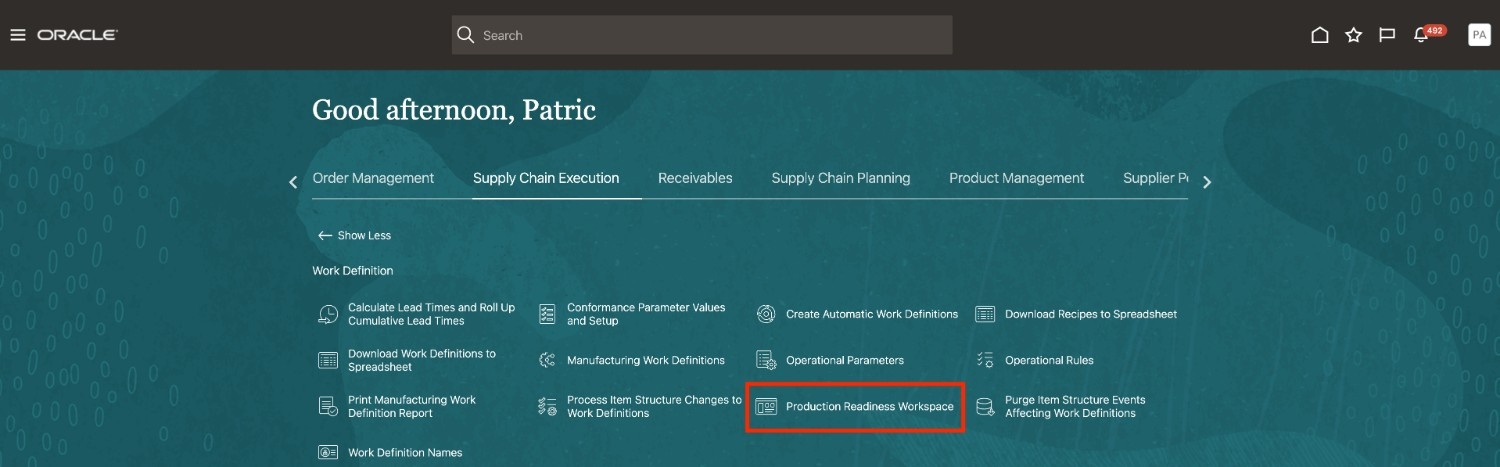
Quick Action Menu: Production Readiness Workspace
Production Readiness Workspace
Production Readiness Workspace provides a centralized, context-aware workspace that supports manufacturing engineers in maintaining accurate work definition and improving process readiness. It brings together insights across work definitions, production execution, product changes, and shop floor feedback to enable continuous monitoring, analysis, and correction of master data issues. The solution is built using Oracle AI Agent Studio and leverages Oracle Fusion Manufacturing data models to continuously interpret execution data and derive actionable insights. This AI agentic application comprises specialized advisors that collaborate to evaluate data completeness, detect variances, and identify improvement opportunities. These advisors dynamically generate UI panels to present prioritized insights, recommendations, and corrective actions in a unified workspace, enabling engineers to quickly resolve data issues, align work definitions with execution realities, and drive continuous improvement in manufacturing operations.
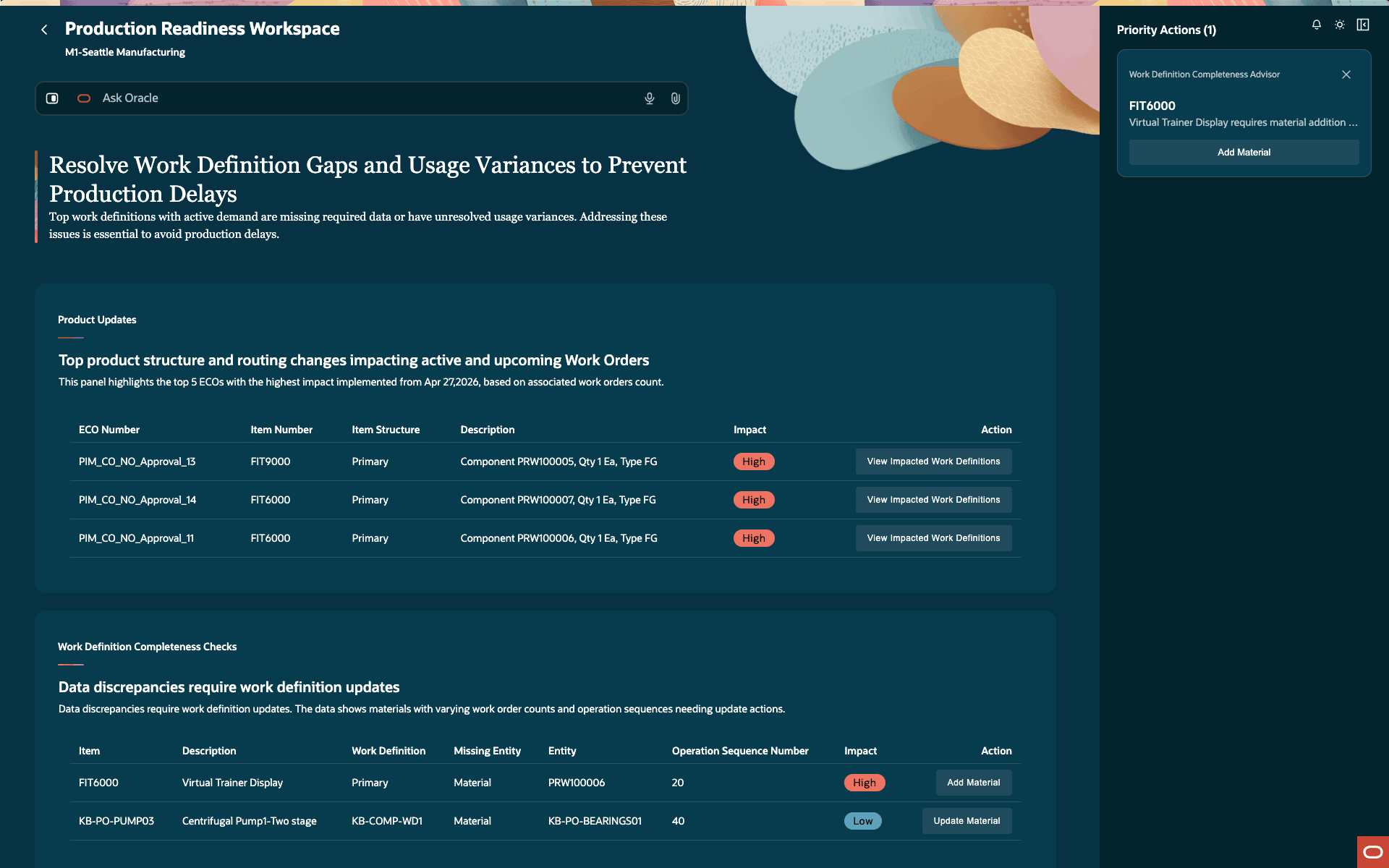
Production Readiness Workspace
Production Readiness Workspace contains the following sections:
Ask Oracle:
Ask Oracle provides a conversational interface that routes queries to one or more advisors based on the context. Responses are synthesized into a single, unified answer. For example, questions such as "What are the top five work orders with variance and must be fixed on priority?" or "Is work definition (PRINTERATO03) complete?" generate insights by analyzing work definition data, execution transactions, and shop floor feedback, and present a consolidated response along with the recommended actions.
Advisors:
Advisors present insights through structured information panels that provide contextual visibility into production data readiness and execution performance. These panels are dynamically rendered and continuously refreshed based on the latest production activity. Each advisor focuses on a specific aspect of production readiness. The following advisors are supported in this update:
- Work Definition Completion Advisor
- Product Updates Advisor
- Continuous Improvement Advisor
Priority Actions:
Advisors analyze data conditions and recommend actionable steps, such as adding missing components, assigning resources, updating material quantities or supply types, and aligning resource usage with actual execution. These system-generated recommendations are prioritized based on production impact, upcoming work orders, and demand exposure to help users quickly address critical issues.
Product Updates Advisor
The Product Updates Advisor presents a consolidated view of engineering changes and product updates that impact manufacturing processes. It monitors change orders, new product introductions, and item structure updates, and identifies work definitions that must be updated to reflect these changes. The advisor evaluates the effective dates of changes, the severity of the impact, and the presence of active or upcoming work orders to prioritize actions. It highlights impacted work definitions, associated work orders, and the nature of changes, such as component additions, replacements, or removals. The advisor recommends corrective actions, such as applying engineering changes to work definitions and synchronizing those updates to open work orders to ensure alignment with the latest product specifications. It also provides visibility into new product readiness by identifying missing resources or configuration gaps before production begins. For example, when for a new product such as Fitness Display Trainer (FIT9000), a new material (for example, pulse sensor) is introduced, the advisor verifies if the new material is defined in the work definition. If the material is not assigned, it highlights this as a readiness gap and recommends updating the work definition to include the required material before releasing to production.
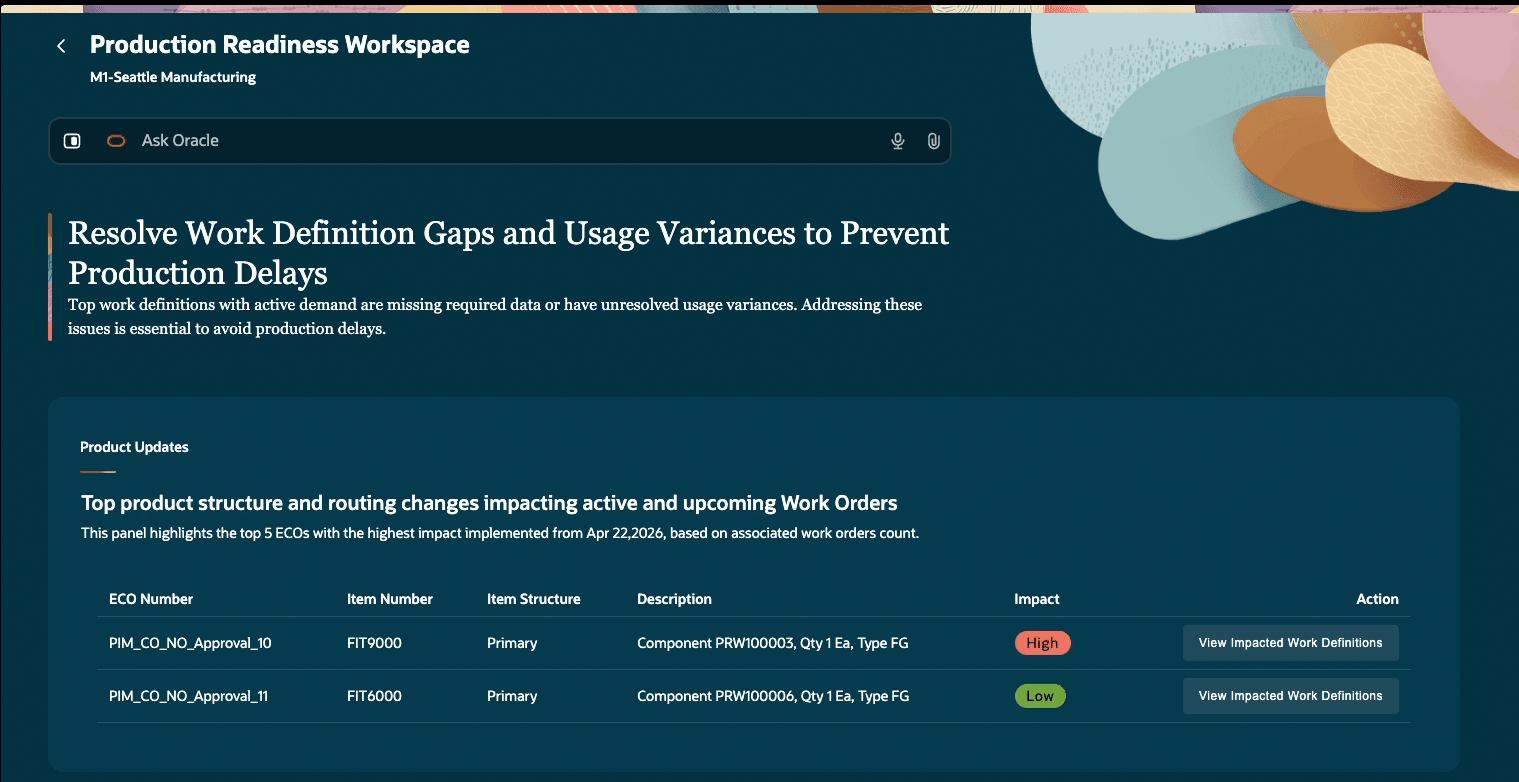
Product Updates Advisor
Work Definition Completion Advisor
The Work Definition Completion Advisor presents a prioritized view of work definitions that have missing or incomplete data, such as unassigned components or undefined resources. It evaluates work definitions used in recent and upcoming work orders and highlights issues based on their impact on production. The advisor identifies gaps in component allocation and resource assignment, and recommends corrective actions such as adding missing materials or resources to specific operations. It also provides visibility into affected work orders and enables users to take follow-up actions, such as synchronizing updated work definitions with existing work orders to ensure accurate downstream execution.
To identify missing material, the Advisor compares the item structure with the work definition and checking whether components with suggested operation sequences are assigned to the correct operations. Missing resource assignments are identified by analyzing actual production execution transactions and detecting resources that operators use through ad hoc transactions but are not formally defined in the work definition. The advisor then prioritizes these discrepancies based on production impact, such as active demand and upcoming work orders.
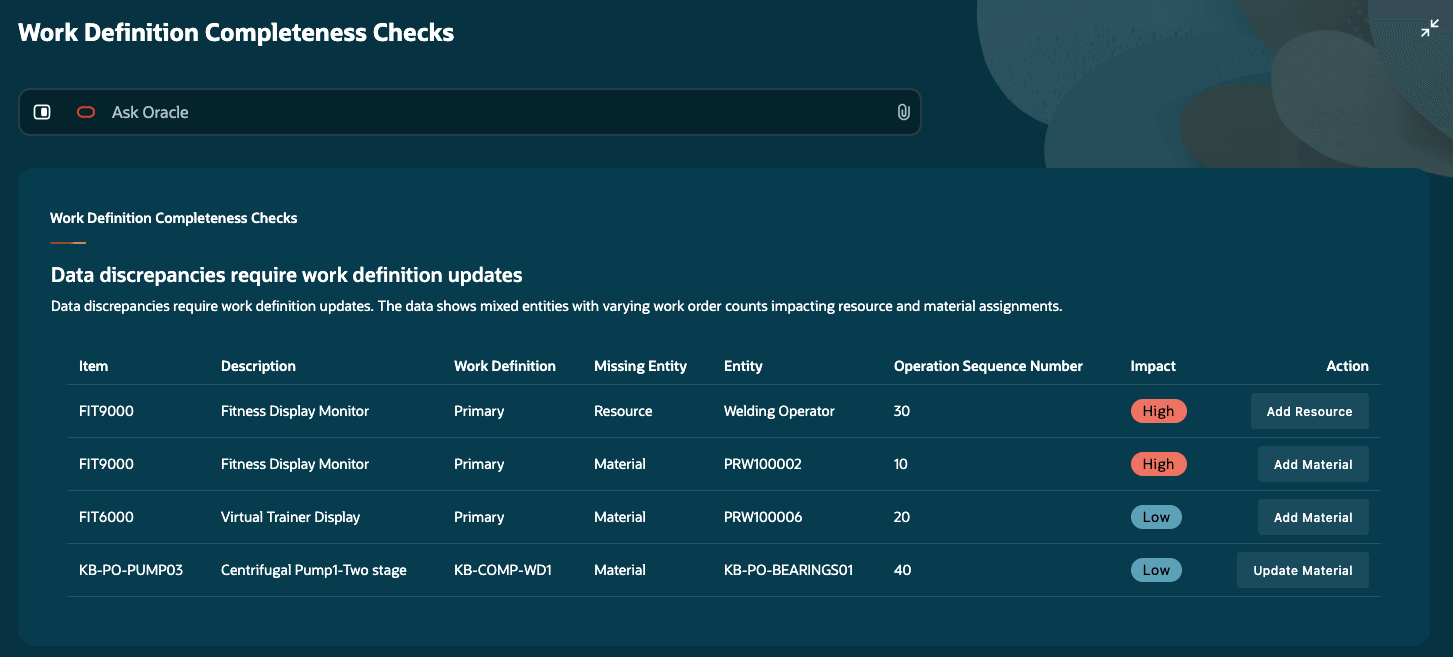
Work Definition Completion Advisor
Continuous Improvement Advisor
The Continuous Improvement Advisor analyzes recent production execution data to identify material and resource usage variances and recurring issues. It compares planned versus actual usage and correlates results with shop floor signals such as operator notes, shift summaries, and exceptions. The advisor distinguishes between master data issues and operational factors, and recommends corrective actions such as updating material quantities, or adjusting resource usage. These insights help manufacturing engineers perform faster root cause analysis and drive continuous improvement in production processes.
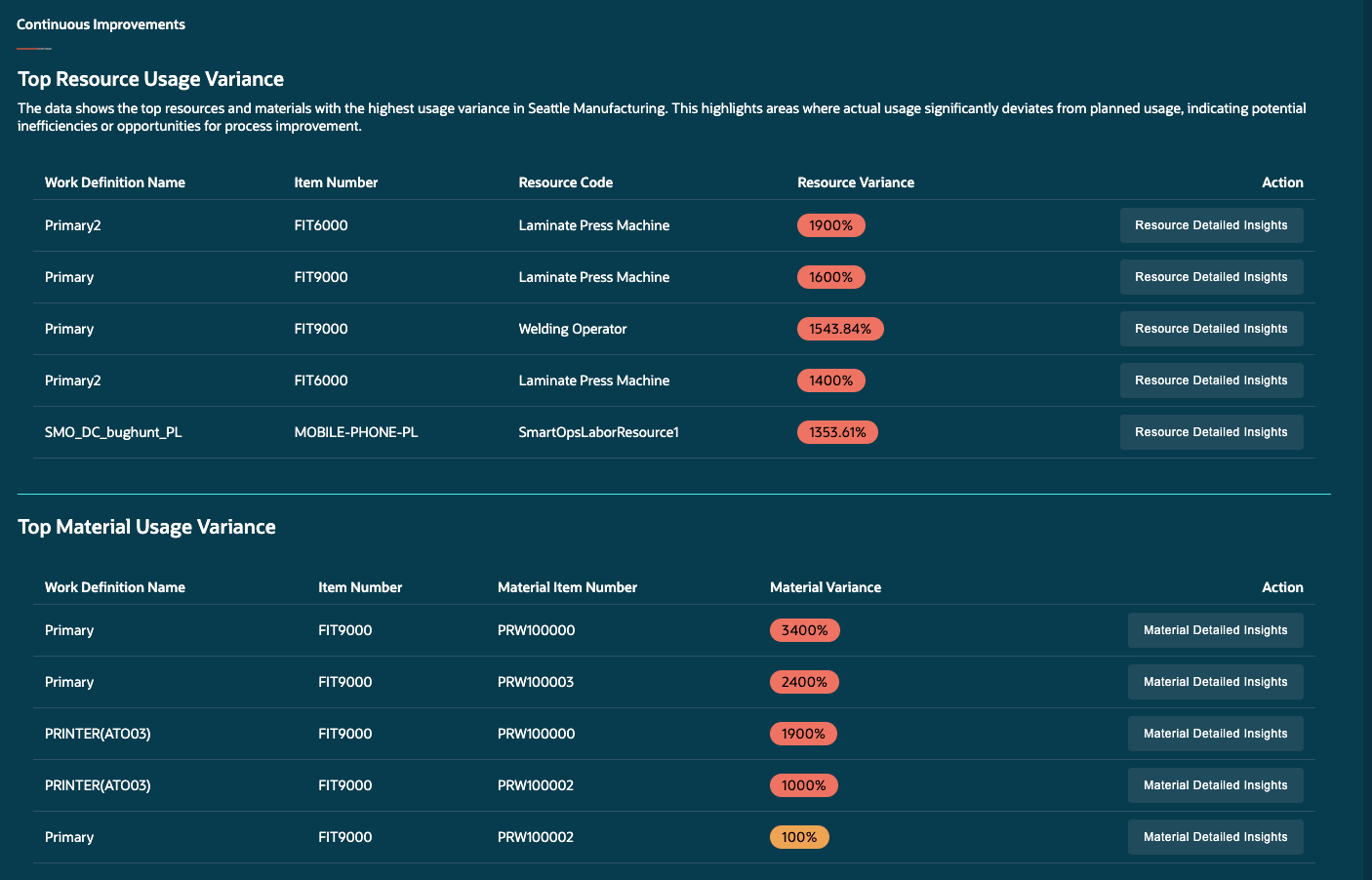
Continuous Improvement Advisor
This feature helps improve production efficiency and planning accuracy by ensuring reliable work definition data, enabling faster root cause analysis, reducing manual effort, and proactively preventing production errors and delays.
Here's the demo of these capabilities:
Steps to enable and configure
Follow these steps to use this feature:
Set up the profile option to enable the Production Readiness Workspace:
- In the Setup and Maintenance work area, search for and select the Manage Administrator Profile Values task.
- On the Manage Administrator Profile Values page, search for and select the ORA_WIS_PRODUCTION_READINESS_WORKSPACE_AGENTIC_APP_ENABLED profile option code.
- In the Profile Values section, set the Site level to Yes.
- Click Save and Close. Users must sign out and sign in again for the changes to take effect.
Ensure that the user has the appropriate privileges, as listed under Access Requirements.
To access the Production Readiness Workspace, select Show More from Quick Actions, and then select Production Readiness Workspace.
Tips and considerations
- Review Priority Actions first to identify work definition issues associated with upcoming work orders.
- Compare planned versus actual material and resource usage across work orders to identify recurring variances in production execution.
- Use Ask Oracle, operator notes, production exceptions, and shift summaries together when investigating recurring production issues and variances.
- Synchronize impacted work orders after updating work definitions so downstream work orders reflect the latest material, resource, and usage changes.
- Review recurring patterns across shifts, work orders, and operations to determine whether issues are related to work definition setup or shop-floor execution conditions.
Key resources
- Watch the feature demo for AI Agent: Production Readiness Workspace
- Oracle Fusion Cloud SCM: Using Manufacturing guide, available on the Oracle Help Center.
- Oracle Fusion Cloud SCM: Implementing Manufacturing and Supply Chain Materials Management guide, available on the Oracle Help Center.
Access requirements
Users who are assigned a configured job role that contains these privileges and codes can access this feature:
- Production Readiness Workspace access duty (ORA_WIS_PRODUCTION_READINESS_WORKSPACE_DUTY).
- View Work Definitions (WIS_VIEW_WORK_DEFINITIONS_PRIV)
- Sync Work Definition Changes with Existing Work Orders (WIS_SYNC_WORK_DEFINITION_CHANGES_TO_WORK_ORDER_PRIV)
- Manage Work Definitions (WIS_MANAGE_WORK_DEFINITIONS_PRIV)
- Manage Work Definitions by Service (WIS_MANAGE_WORK_DEFINITIONS_SERVICE_PRIV)
- Manage Work Order Headers (WIP_MANAGE_WORK_ORDER_HEADERS_PRIV)
Note: Production Readiness Workspace access duty (ORA_WIS_PRODUCTION_READINESS_WORKSPACE_DUTY) is a new access duty introduced for this feature, while the remaining listed privileges are existing privileges available in the application.