Redwood: Configure Decimal Precision for Quantity and Yield
We have now harmonized the use of decimal precision for structures and formulas with other SCM modules such as Inventory and Manufacturing by leveraging the standard inventory profile option. This allows you to configure the quantity and yield precision up to 30 decimal places using the profile option INV_QUANTITY_DECIMAL_PRECISION, ensuring consistent behavior across the supported applications, reports, and integrations. The configured precision applies to both positive and negative values.
When enabled, the configured precision is applied to key component attributes, including:
-
Quantity
-
Yield
-
Absolute Yield
-
Minimum Quantity
-
Maximum Quantity
-
Substitute Item Quantity
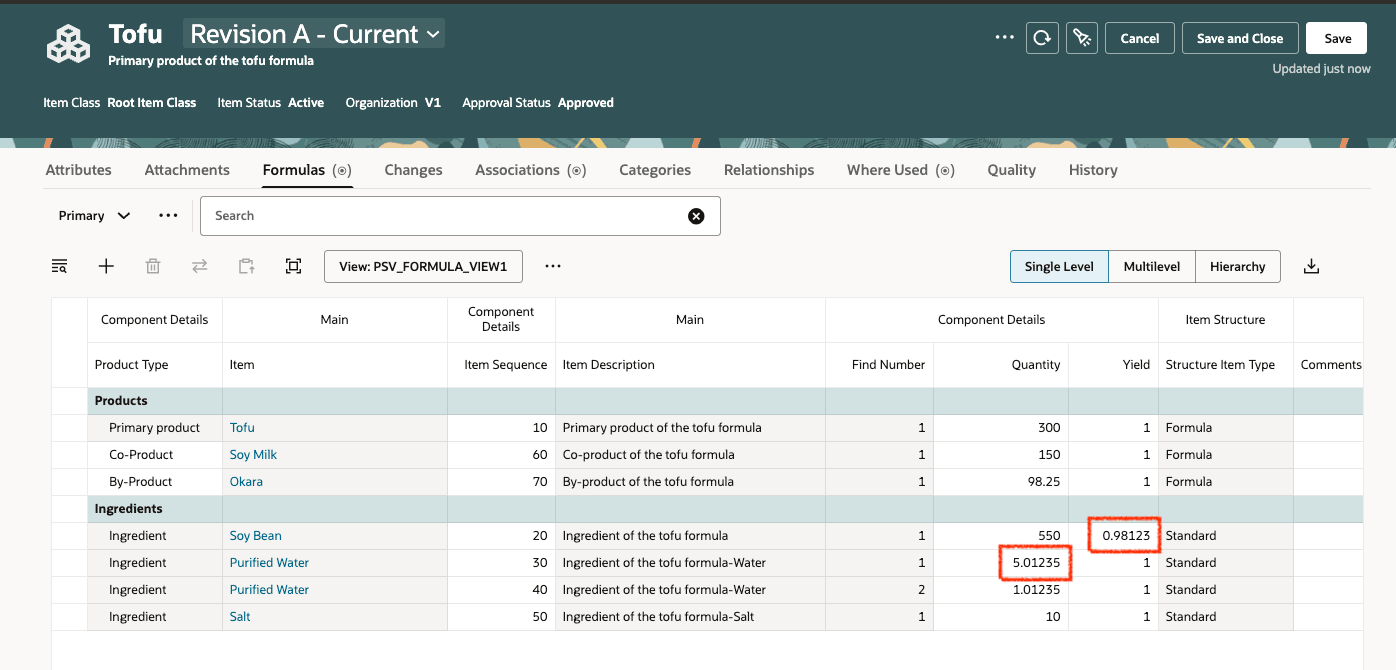
Decimal Precision Set to Five for Quantity and Yield in a Formula
The configured precision is honored in the supported Redwood applications as follows:
-
BOM components in change contexts (change orders, change requests, problem reports, and corrective actions)
-
Item Structure Report (only in the classic UI)
-
Change Summary Report
-
BOM Compare
-
History (or Audit) views - displayed values respect the configured precision.
This following product areas have also been extended to accept up to 30 decimal places for the attributes listed in this feature:
-
REST APIs (itemStructures and productChangeOrdersV2)
-
SOAP services
-
Item Import (FBDI)
This feature benefits your business by providing the following:
-
Consistency across SCM: Aligns precision handling with Inventory and Manufacturing, reducing discrepancies across modules, reports, and integrations.
-
Improved accuracy: Supports up to 30 decimal places for quantities and yields, enabling precise calculations for complex products and processes.
-
Fewer integration errors: Standardized precision minimizes rounding issues and data mismatches between applications.
-
Greater flexibility: Allows businesses to configure precision based on their specific operational and industry requirements.
-
Better decision-making: More accurate data improves planning, costing, and production outcomes.
-
Reduced rework: Eliminates inconsistencies that can lead to corrections, adjustments, or downstream errors.
Steps to enable and configure
Use the Opt In UI to enable this feature. For instructions, refer to the Optional Uptake of New Features section of this document.
Offering: Product Management
Before you opt in to this feature: Check the current data precision value using the profile option INV_QUANTITY_DECIMAL_PRECISION. Failure to do so may result in changes to existing data. For more information, refer to the Tips and Considerations section.
Tips and considerations
-
It is recommended to opt in to this feature only after evaluating how decimals are used in the attributes listed in this feature across the Oracle SCM applications such as Product Management, Inventory, Manufacturing, Order Management and Planning. Once you opt in, some of the changes with respect to decimals (in Product Management) can't be fully reversed when you opt out.
-
If you opt in to this feature and set the profile option INV_QUANTITY_DECIMAL_PRECISION to a value less than 10, the existing Quantity values with higher than 10 decimals will be rounded off to the value you set, resulting in loss of data.
-
When the existing inventory profile value is low
-
If you opt in when the decimal precision is already set to a lower value, such as 5, the existing precision values will be decreased.
-
If you require a higher precision value, increase the profile option value before you opt in. For example, 10.
-
If you opt out, any data that isn’t modified will retain it's original value, while any data that’s modified after opting in will retain the updated value (in this example: 5 decimals).
-
-
When the existing inventory profile value is high
-
If the decimal precision is already set to a higher value, such as 15, opt in to this feature only if this level of precision is desired.
-
If you opt in and modify the Quantity value, the updated value will be retained even after you opt out.
-
-
When you reduce the inventory profile value after you opt in
-
Existing Quantity and Yield values with higher precision will be rounded off to match the new value.
-
The initial higher-precision values can’t be restored once they’re rounded off.
-
You may opt out to reset the decimal precision to 10.
-
-
-
Modifying the profile option INV_QUANTITY_DECIMAL_PRECISION will also impact downstream Oracle applications such as Inventory, Manufacturing, and Costing, if you’re already using them.
-
If you have integrated your application with third party applications, modify the additional precession values according to your requirements to support the integration.
-
If you’re using Product Management for the first time, it is recommended that you opt in to the feature. Note that default value for the profile option INV_QUANTITY_DECIMAL_PRECISION is set to 5.
-
If you use Packs in classic interface, note that Quantity doesn’t honor the profile option.
-
For descriptive flexible attributes, the inventory profile option is ignored, decimal precision for these attributes is controlled by the configuration of the associated value set.
Key resources
-
Oracle Fusion Cloud SCM Using Product Development Guide, available on the Oracle Help Center.
-
Oracle Fusion Cloud SCM Using Product Master Data Management Guide, available on the Oracle Help Center.
-
Refer to the topic Profile Options Affecting Manufacturing in the Oracle Fusion Cloud SCM Implementing Manufacturing and Supply Chain Materials Management, available on the Oracle Help Center.
Access requirements
Users who are assigned a configured job role that contains these privileges can access this feature:
-
View Item Redwood Items (EGP_VIEW_REDWOOD_ITEM_PRIV)
-
View Item Redwood Structures (EGP_VIEW_REDWOOD_ITEM_STRUCTURE_PRIV)
-
View Item Redwood Changes (EGP_VIEW_REDWOOD_ITEM_CHANGE_PRIV)
-
View Item Redwood Quality (EGP_VIEW_REDWOOD_ITEM_QUALITY_PRIV)
-
Manage Item Redwood Items (EGP_MANAGE_REDWOOD_ITEM_PRIV)
-
Manage Item Redwood Structures (EGP_MANAGE_REDWOOD_ITEM_STRUCTURE_PRIV)
These privileges were available prior to this update.