Redwood: Alert Users of Incomplete Definition Tasks in New Item Requests
Redwood New Item Requests have been improved in the following ways:
-
When Mark Complete is used on an incomplete definition task, the application lists the required definition fields that have not yet been enriched for each item in the current task
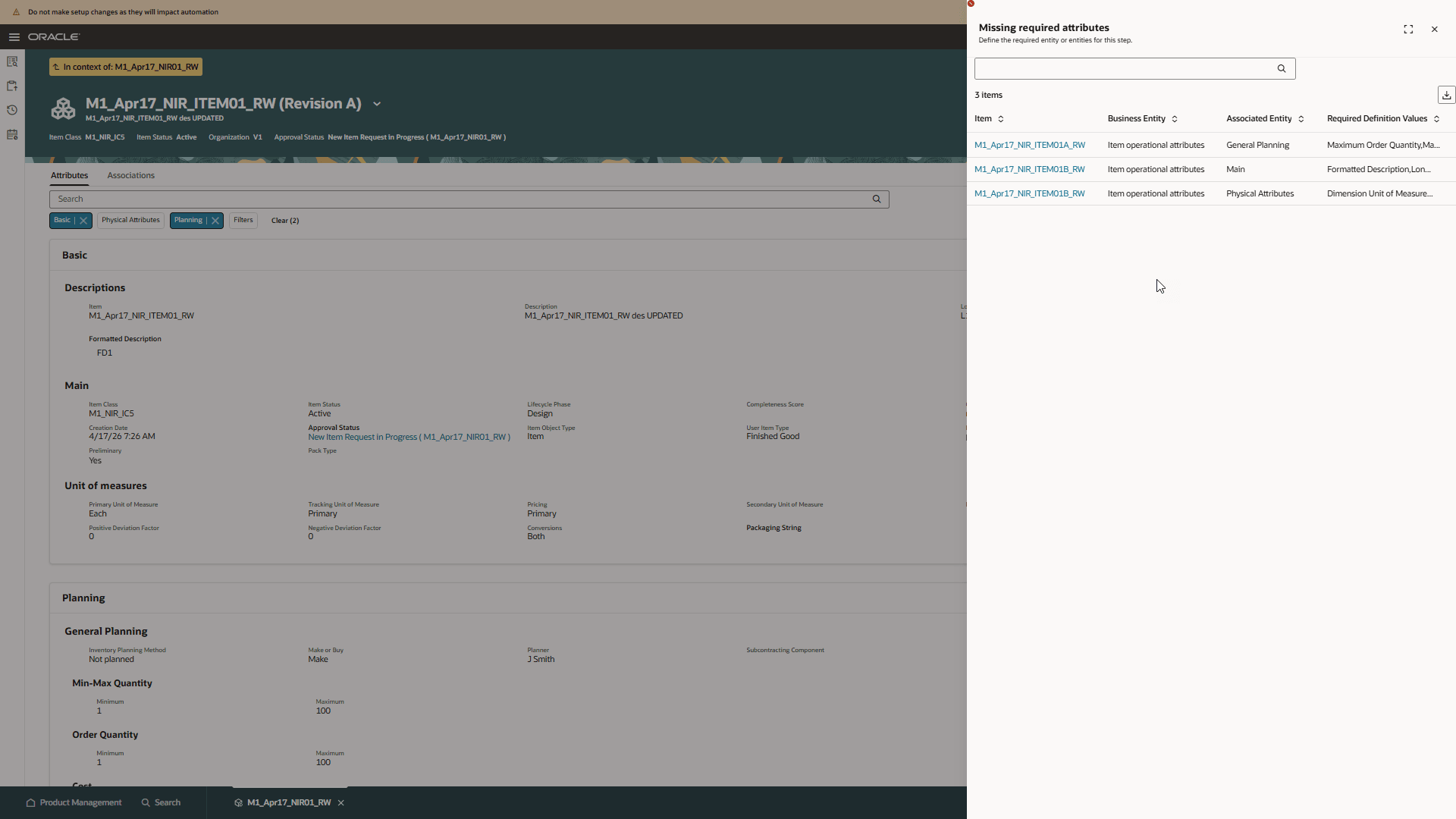
Mark Complete Required Definition Values
-
When an item is assigned to a New Item Request, the Submit action creates the request, sets its status to Open, and moves it to Definition if auto-promotion is configured.
-
Items in the Affected Items tab and in the Definition tables of the Workflow and Task tabs honor the data security configured using FND or access control list. By default, FND data security is used, and the behavior is the same as in the classic user interface.
-
In this release, the Definition table supports merged cells for the Step Sequence Number and Items columns when adjacent rows contain identical values.
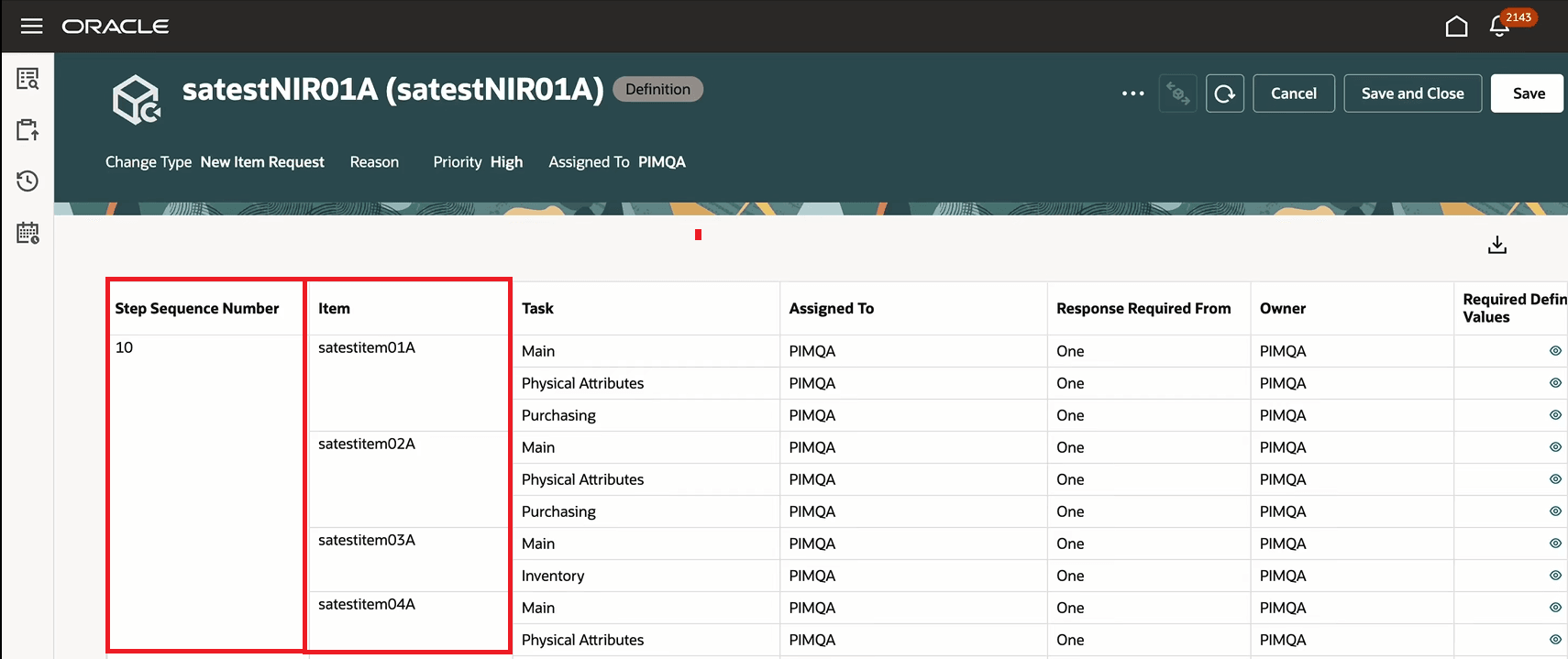
Merge Cell is supported in Definition Table
-
New item request data is secured so that the Workflow Approvals search exposes new item request information only to users who have View or Manage new item request access.
-
Workflow Approvals search is also enhanced to show new item request records. To see these records, you must configure attributes in the Workflow Approvals Index and the Views.
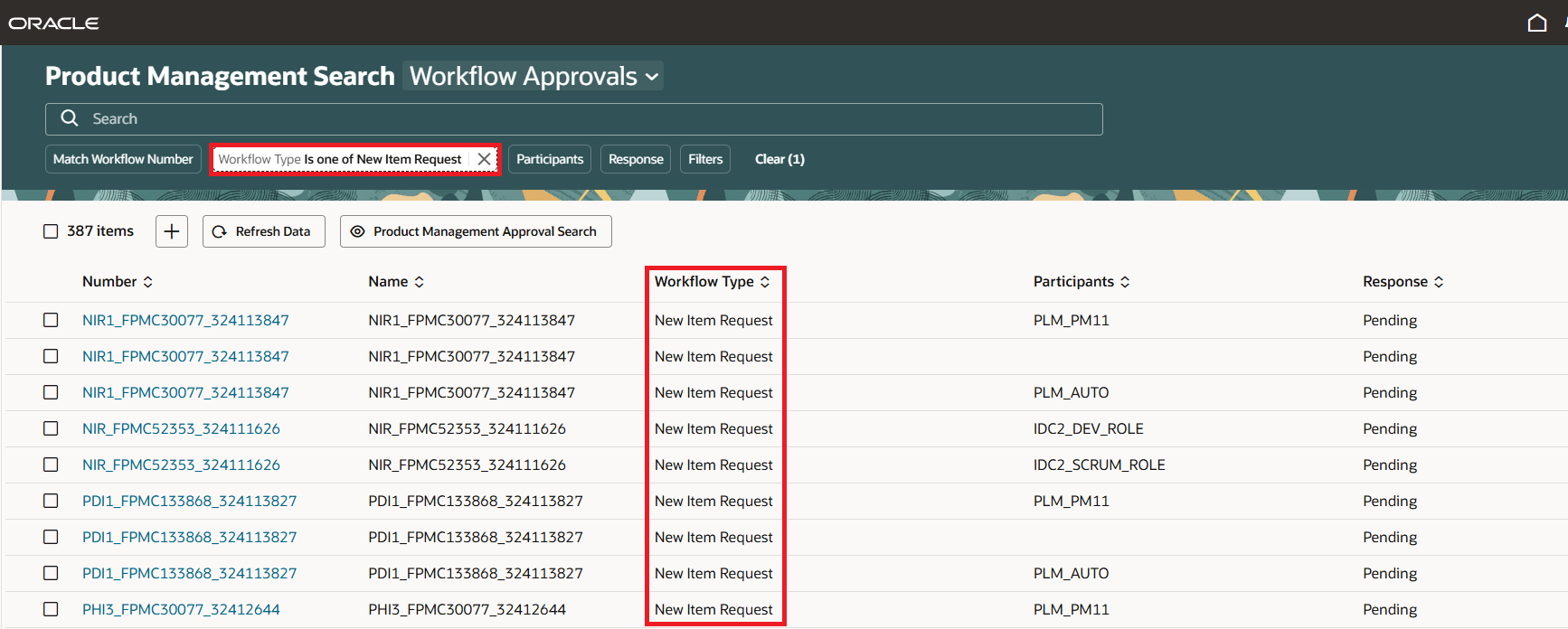
Data in Workflow Approvals Search
This feature benefits your business in the following ways:
-
Proactively prevents errors and rework by clearly identifying missing required fields when tasks are potentially marked complete prematurely
-
Accelerates item workflow enrichment with automated progression of new item requests into the definition stage, reducing manual steps
-
Strengthen data security and compliance with flexible security controls (FND or access control lists) that govern item visibility within workflows
-
Improve usability with a cleaner, more intuitive user interface (merged cells) that makes it easier to understand definition tasks and item groupings
-
Enable more precise access control by limiting workflow approvals visibility to users with appropriate privileges
-
Increase transparency and traceability with the enhanced Workflow Approvals search, which now includes new item requests for a more complete view of approval history.
Steps to enable and configure
Use the Opt In UI to enable this feature. For instructions, refer to the Optional Uptake of New Features section of this document.
Offering: Product Management
Feature: Redwood: Use Redwood-Style Definition Required Notifications
-
Set the administrator profile value for the profile option ORA_ACA_WORKFLOW_REDWOOD_ENABLED to Y.
-
Run the Upgrade Product Management Data Scheduled Process to view the existing new item requests in Workflow search and Workflow History Search. Here’s what you must select to complete the upgrade:
-
-
Upgrade Process: Execution
-
Functional Area: New Item Requests
-
Feature: Execute each of the following:
-
Ingest active new item requests as workflow
-
Upgrade new item request history
-
Update all data presence indicators
-
-
-
-
Update item index for new item requests in item picker
-
On the Index Management page, click the Item card.
-
On the Configure Index page, click More Actions (…) and select Enable attribute sets.
-
Search for Product Management New Item Picker.
-
Enable Product Management New Item Picker click Apply and click Save.
-
Rebuild the item index.
-
-
Enable the item for new item request using the Manage Item Classes task in the Setup and Maintenance work area. Also, configure the definition task, assign roles, and assign users for the new item request.
Tips and considerations
-
The workflow search and workflow history search require index and view configuration. Details can be found in the Key resources section.
-
If there are many rows of items and tasks in the Definition table and the Step Sequence Number scrolls out of view, hovering over the cell displays the correct step sequence number.
Key resources
Oracle Fusion Cloud SCM Using Product Master Data Management Guide, available on the Oracle Help Center.
Topics Configure Index, Configure Views, and Overview of Product Management Search in Oracle Fusion Cloud SCM Implementing Product Management Guide, available on the Oracle Help Center.
Access requirements
Users who are assigned a configured job role that contains these privileges can access this feature:
To view or edit new item requests on the new item request pages, or to access new item request notifications:
- View New Item Request (EGO_VIEW_NEW_ITEM_REQUEST_PRIV) or
- Manage New Item Requests (EGO_MANAGE_NEW_ITEM_REQUEST_PRIV)
To create new item requests from the search pages or when using links in Actions on the Product Management home page:
- Manage New Item Request (EGO_MANAGE_NEW_ITEM_REQUEST_PRIV)
- Access Change Types Using a REST Service (EGO_GET_CHANGE_TYPES_REST_PRIV)
To create a new item request from the item by using the Assign to action:
- Manage New Item Request (EGO_MANAGE_NEW_ITEM_REQUEST_PRIV)
-
Access Change Types Using a REST Service (EGO_GET_CHANGE_TYPES_REST_PRIV)
To approve or reject new item requests:
-
Approve New Item Request (EGO_APPROVE_NEW_ITEM_REQUEST_PRIV)
To move lines from an existing new item request to a new one:
-
Manage New Item Request (EGO_MANAGE_NEW_ITEM_REQUEST_PRIV)
To move lines from a new item request to an existing one:
-
Manage New Item Request (EGO_MANAGE_NEW_ITEM_REQUEST_PRIV)
To view the history tab on the new item request:
-
View Change History (EGO_VIEW_CHANGE_HISTORY_PRIV)
To search for new item requests on Redwood pages:
-
Get Search View REST (EGP_GET_SEARCH_VIEW_REST_PRIV)
-
GET Product Management Index REST (EGP_GET_PM_INDEX_REST_PRIV)
-
Access Product Management Change Search (EGO_VIEW_PRODUCT_MANAGEMENT_CHANGE_SEARCH_PRIV)
-
View New Item Request (EGO_VIEW_NEW_ITEM_REQUEST_PRIV) or
-
Manage New Item Requests (EGO_MANAGE_NEW_ITEM_REQUEST_PRIV)
To configure Business Rules on new item requests:
-
Manage Item Rule Set (EGO_MANAGE_ITEM_RULE_SET_PRIV)
These privileges were available prior to this update.