Redwood: Manage Supplier Registrations
Supplier registration streamlines supplier onboarding and improves completion rates for registrations with minimum support. Monitoring registrations helps supplier administrators identify delays and other issues faster to ensure success in onboarding suppliers. You can now monitor supplier registration activity using the improved Redwood experience.
This feature covers the following Redwood registration pages/flows:
- Supplier administrators to search supplier registrations
- Supplier administrators and registration approvers to view registration details
- Supplier administrators to edit registration to fix supplier creation errors and registration approvers to edit registration details
In the Supplier Management work area, a new Supplier Registrations task is now available which navigates to the new supplier registrations search page.
This page supports both, keyword-based search for looking up specific registrations and filter-based search to support light reporting requirements. With keyword search, you can find registrations using request number or company name. With filters, you can refine search results by applying filters on procurement BU, business relationship, source, and registration approval status. A metrics scorecard organizes registrations by approval status to help you take decisions on actions needed. Only applicable filters and search results are shown for each metric, optimizing the overall search experience.
The scorecard includes these metrics:
- Pending Approval: Display the count and list of registrations that are pending approval.
- Not Submitted: Displays the count and list of registrations that have not been submitted. You can select one or more registrations in this status for deletion.
- Error: Displays the count and list of registrations that have been approved, but didn't result in successful supplier creation. You can click on the Error link and drill down to view error details. After fixing the error, use Create Supplier action to create a supplier record from the registration request. You also have the option to cancel supplier creation for registrations in an error state.
- All: Displays the count of all registrations regardless of status.
Note that you will need to be a procurement BU agent to access a registration request in the respective procurement BU.
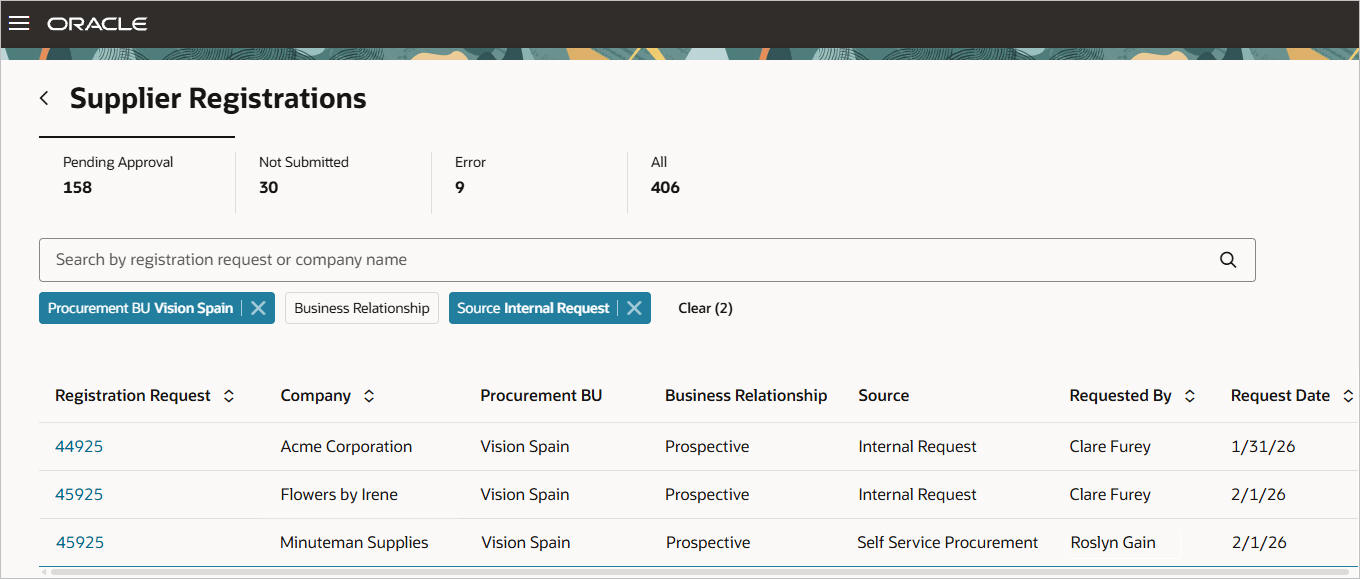
Supplier Registrations Search
In addition, you can view all the details of a supplier registration on a single page by selecting the request number of a specific registration in the search results. Information is well organized beginning with the request details, followed by details about the company including contacts, addresses, bank accounts, business classifications, products and services, and questionnaire details. This streamlined layout makes it easy for you to review key information at a glance and allows you to dive deeper into additional details when needed.
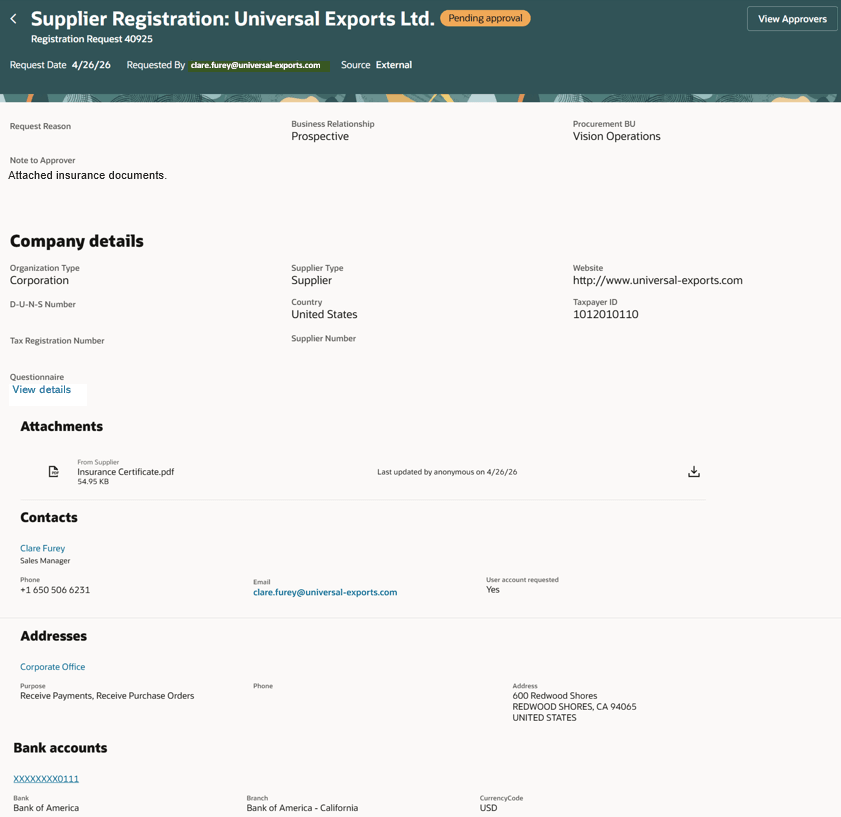
View Registration Page
A critical action on the registration details page is reviewing pending approvals to help administrators follow up with slow approvers. The View Approvers action opens a drawer with a full list of approvers for the registration. This provides full visibility on what approval actions have been taken or are pending.
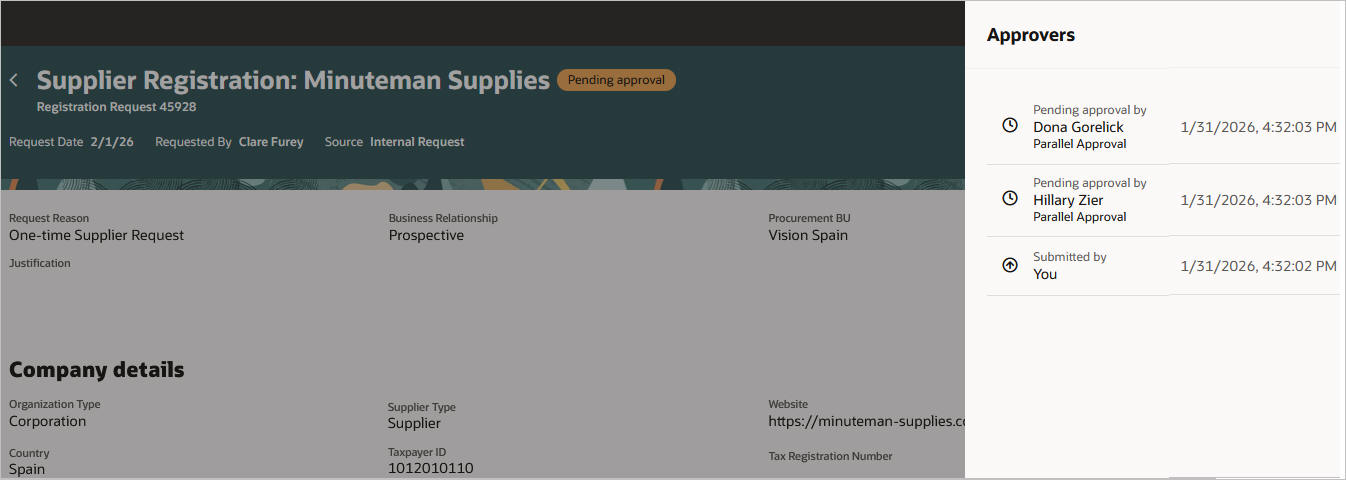
Drawer to View Approvers
Built-in support for guided journeys and business rules on the Supplier Registration Search, Edit Registration and View Registration pages gives you the flexibility to tailor supplier registration management to your organization’s unique needs. For example, you can publish a policy guide on the Supplier Registrations page on monitoring registration approvals and when to escalate. Or with business rules setup, you can easily hide the Additional Information section on the Edit and View Registration pages if your organization doesn't use descriptive flexfields for company details.
If you're using Internal Supplier Registration for employees to request suppliers the UI is now shared with the edit registration UI in this feature. This means the business rules configured for edit registration will apply to internal supplier registration as well.
Steps to enable and configure
As a prerequisite, deploy the Redwood external and/or internal registration flows.
To use this feature, enable the following profile options. For instructions on enabling a profile option, refer to the Set Profile Option Values topic.
- Enable the Redwood manage supplier registration pages (ORA_POZ_MANAGE_SUPPLIER_REGISTRATIONS_REDWOOD_ENABLED).
- Enable Redwood Supplier Management (ORA_POZ_SUPPLIER_MANAGEMENT_REDWOOD_ENABLED). This is an existing profile option, no action if already enabled.
Note: If you've already deployed Redwood internal registration flows and set up custom business rules and guided journeys under the page flow Registration - Start prior to the 26C update, you need to move them under the new page flow Registration Internal - Start because those under the Registration - Start flow will no longer be used after this new feature is enabled. For external registrations, there's no impact to existing business rules and guided journeys defined under Registration - Start.
After enabling this feature in update 26C, use the page flow Registration Internal - Start to configure business rules and guided journeys that will be shared between internal registration (internal user submitting a registration request), and edit registration (internal supplier admin or approver editing a registration request that's pending approval or has supplier creation error.) There is a condition parameter Registration Flow that allows you to further tailor the business rules just to edit registration.
To set up business rules and guided journeys for Supplier Registration Search, use the Registration - Search page flow and for view registration, use Registration - View.
The supplier registrations index must be configured by running the scheduled process, ESS job to create the index definition and perform the initial ingest to OSCS with the index name: fa-prc-poz-registrations.
Tips and considerations
- Settings in the functional setup manager task: Configure Supplier Registration will be honored on the View Registration and Edit Registration pages. For instance, if your organization has set products and services as hidden for registrations on this setup task, this section won't be visible on the View and Edit Registration pages.
- You can add OTBI-based KPIs and data visualizations on the Supplier Registrations Search page for enhanced registration monitoring. For details about how to add your own key performance indicators (KPIs) and visualizations to this page, see: Flexible Reporting in Redwood Dashboards.
- Edit registration request as an approver doesn't support supplier match results generated by Oracle Enterprise Data Quality.
Key resources
For information about using Oracle Visual Builder Studio to extend your Redwood application pages, see Oracle Fusion Cloud HCM and SCM: Extending Redwood Applications for HCM and SCM Using Visual Builder Studio.
Access requirements
Users who are assigned a configured job role that contains this existing privilege can access the Supplier Registrations Search page:
- Search Supplier Registration Request (POZ_SEARCH_SUPPLIER_REGISTRATION_REQUEST_PRIV)
Users who are assigned a configured job role that contains these existing privileges can access the Edit Registration page:
-
Edit Supplier Registration Request (POZ_EDIT_SUPPLIER_REGISTRATION_REQUEST_PRIV)
Users who are assigned a configured job role that contains these existing privileges can access the View Registration page:
-
View Supplier Registration Request (POZ_VIEW_SUPPLIER_REGISTRATION_REQUEST_PRIV)
-
View Supplier Registration Bank Account ( POZ_VIEW_SUPPLIER_REGISTRATION_BANK_ACCOUNT_PRIV)
Administrators who are assigned a configured job role that contains this existing privilege can edit the page layout to add KPIs and data visualizations:
- Edit Page Layout of the Supplier Management Page (POZ_EDIT_SUPPLIERS_LANDING_PAGE_LAYOUT_PRIV)
Administrators who are assigned a configured job role that contains these existing privileges can add OTBI-based KPIs and visualizations to the Visualization Configurations page for use on the Supplier Registrations Search page:
- View Data Visualization Configuration (ZCA_VIEW_DATA_VISUALIZATION_CONFIGURATION_PRIV)
- Manage Data Visualization Configuration (ZCA_MANAGE_DATA_VISUALIZATION_CONFIGURATION_PRIV)
To setup this feature, you'll need a configured job role that contains this existing privilege:
-
Administer Sandbox (FND_ADMINISTER_SANDBOX_PRIV) to personalize the Registrations Search, Edit Registration and View Registration pages in VB Studio.