Redwood: Confirm Supplier Business Classification
Accurate supplier business classification data is critical for reliable reporting on diversity spend and compliance. Incorrect classifications lead to poor data quality, misinformed decisions, and costly corrections. You now have a straightforward confirmation option when creating or editing classifications to validate the information entered. This reduces risk of bad data entering the system, saves time spent fixing errors, and improves confidence in supplier diversity metrics and reporting accuracy.
Internal users and supplier users can manage business classification information from the Supplier Management work area and Supplier Portal respectively. This feature improves accountability and data quality for supplier business classification updates by requiring users to explicitly confirm the classification details before saving changes.
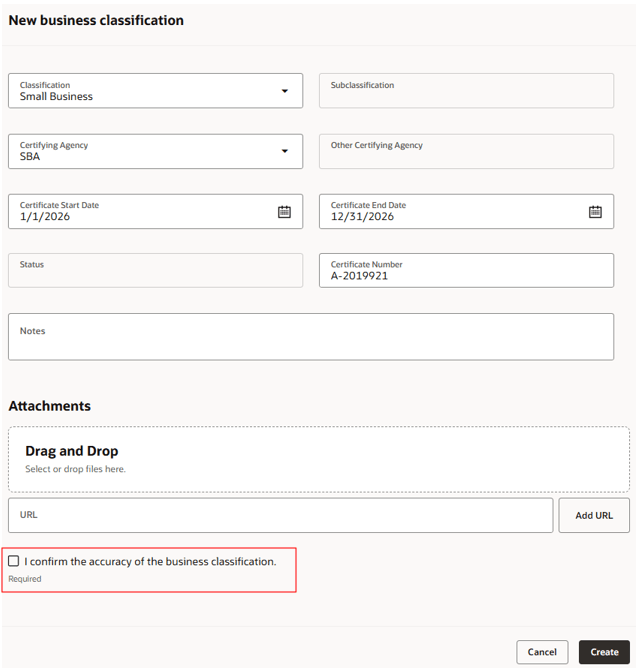
Supplier User Confirms New Business Classification Information
This feature is applicable to both supplier and internal users.
Steps to enable and configure
Follow these steps to enable this feature:
- In Oracle Visual Builder Business Rules, go to the layout for the supplier profile page flow you want to enable the feature:
- Suppliers - Profile - Edit
- Supplier Portal - Company Profile - Edit
- Locate the Confirmation attribute in the business classification layout.
- Set the Required property to Required. Set the Hidden property to Visible.
- Save and publish the changes.
To use this feature, enable the following profile options and feature opt-in as well. These are existing profile options and feature opt-in, no action if already enabled. For instructions on enabling a profile option, refer to the Set Profile Option Values topic.
- Enable Redwood Supplier Management (ORA_POZ_SUPPLIER_MANAGEMENT_REDWOOD_ENABLED).
- Enable Redwood Pages for Supplier Profile Enabled (ORA_POZ_SUPPLIER_PROFILE_REDWOOD_ENABLED).
- Enable Redwood Company Profile in Supplier Portal Pages Enabled (ORA_POS_COMPANY_PROFILE_SUPPLIER_PORTAL_REDWOOD_ENABLED)
- Opt in to feature Redwood: Enable the New Supplier Portal Home Page Experience under Procurement > Supplier Portal.
Key resources
For information about using Oracle Visual Builder Studio to extend your Redwood application pages, see Oracle Fusion Cloud HCM and SCM: Extending Redwood Applications for HCM and SCM Using Visual Builder Studio.
Access requirements
Users who are assigned a configured job role that contains this existing privilege can access VB Studio for extension:
- Administer Sandbox (FND_ADMINISTER_SANDBOX_PRIV)
Internal users who are assigned a configured job role that contains these existing privileges can manage business classification information:
- Maintain Supplier (POZ_MAINTAIN_SUPPLIER_PRIV)
- Maintain Supplier Business Classification (POZ_MAINTAIN_SUPPLIER_BUSINESS_CLASSIFICATIONS_PRIV)
Supplier users who are assigned a configured job role that contains these existing privileges can manage business classification information from Supplier Portal:
- Request Supplier Profile Change as Supplier (POZ_REQUEST_SUPPLIER_PROFILE_CHANGE_AS_SUPPLIER_PRIV)
- Request Supplier Business Classification Change as Supplier (POZ_REQUEST_SUPPLIER_BUSINESS_CLASSIFICATION_CHANGE_AS_SUPPLIER_PRIV)