Redwood: Assess Supplier Eligibility
Leverage the new user experience to manage supplier eligibility for sourcing based on assessment outcomes. A supplier's assessment gives you a consolidated summary of whether the supplier meets the required compliance criteria and has completed the necessary steps to become eligible to participate in sourcing negotiations. You can also allow users to override the assessed results to quickly allow or deny sourcing eligibility, giving you complete control over the process.
View Supplier Eligibility
The Supplier Eligibility page helps you quickly understand the supplier’s current sourcing eligibility before taking any action. To access the Supplier Eligibility page:
1. Go to your home page, then click Procurement > Supplier Qualification (New).
2. On the Supplier Qualification landing page, in the Actions section, select View all actions, and then select Research Suppliers (New).
3. On the Research Suppliers page, search for the supplier and select the corresponding Sourcing Eligibility icon to access the page.
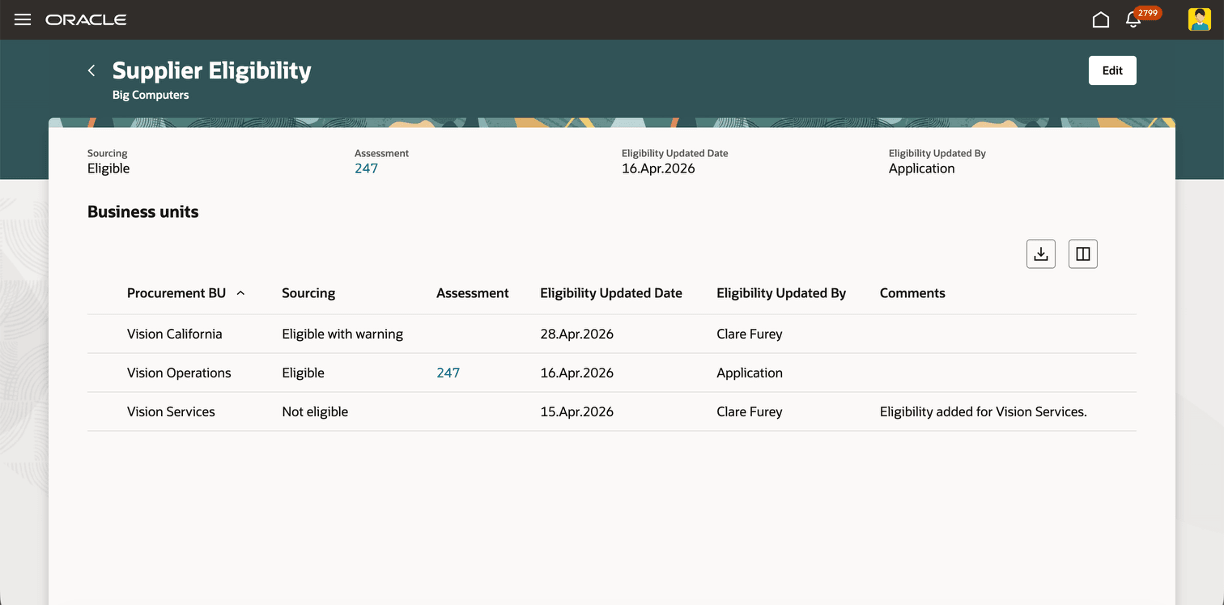
View Supplier Eligibility
The supplier-level sourcing eligibility is displayed in the header along with the associated assessment (when available), and the date when the eligibility was last updated.
The table in the Business units section shows the sourcing eligibility across business units (BUs). If an eligibility exists at the BU level, then it's used first to determine the sourcing eligibility of the supplier, else the header supplier-level eligibility is used. Select the assessment reference to navigate to the Assessment page to view and understand how eligibility was determined.
When an assessment is evaluated for a given supplier within a BU, and the sourcing eligibility is enabled in the associated qualification model, then the supplier's eligibility is determined based on the assessment outcome. If the associated qualification model also has Share eligibility enabled, then the overall supplier-level eligibility is also updated. Otherwise, only the BU-level eligibility is updated.
Edit Supplier Eligibility
On the Supplier Eligibility page, select Edit to update the sourcing eligibility.
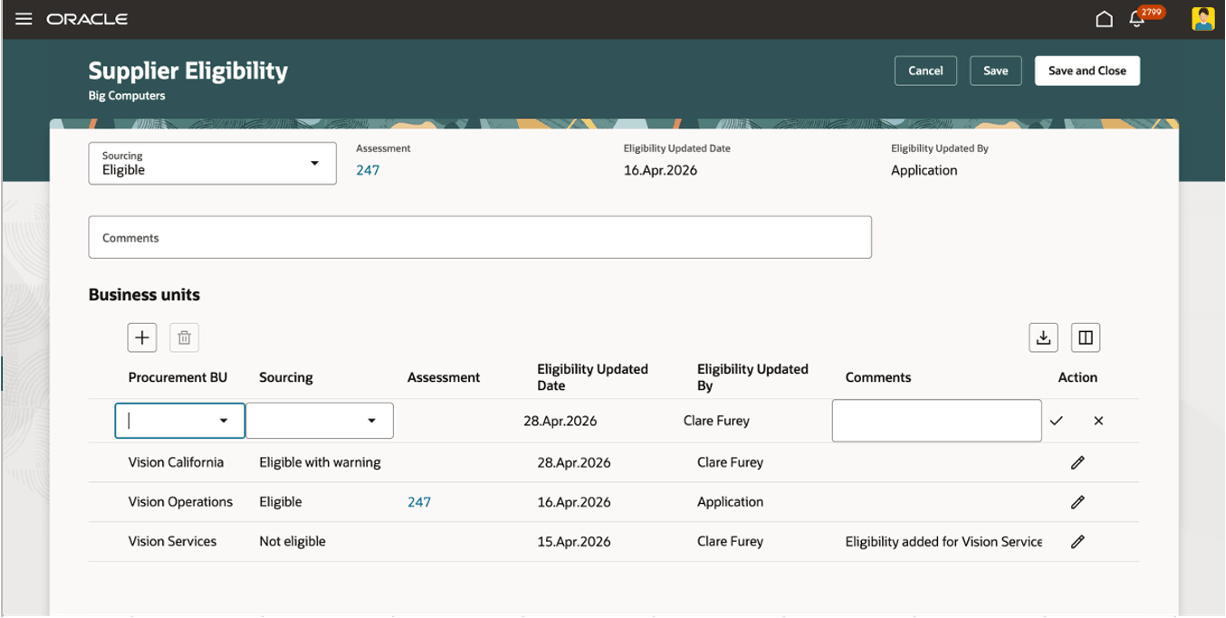
Edit Supplier Eligibility
You can update the overall supplier-level or BU-level eligibility and add comments to explain the change. You can also create a new BU-level sourcing eligibility entry by adding a new row for a BU and supplier's eligibility value in the field 'Sourcing'.
For example, if a supplier's assessment has expired and their eligibility needs to be updated, then you can modify the value and provide supporting comments. Similarly, if a supplier is evaluated for a new BU, then you can manually add the eligibility and use it during the sourcing process.
Steps to enable and configure
To use this feature, you must enable the following profile options.
- Redwood Supplier Qualification Page Enabled (ORA_POQ_SUPPLIER_QUALIFICATION_REDWOOD_ENABLED). Enable this existing profile option if you haven't already.
- Supplier Eligibility Redwood Enabled (ORA_POQ_SUPPLIER_ELIGIBILITY_REDWOOD_ENABLED). By default, this new profile option is disabled.
For instructions on enabling a profile option, refer to the Set Profile Option Values topic.
Tips and considerations
- To run an Assessment with a sourcing eligibility outcome you must enable eligibility in the qualification model in order to use it to assess supplier eligibility.
- Use the Share eligibility option when the supplier’s sourcing eligibility outcome should be shared with other BUs that haven't performed their own assessment.
Key resources
- For information about using Oracle Visual Builder Studio to extend your Redwood application pages, see Oracle Fusion Cloud HCM and SCM: Extending Redwood Applications for HCM and SCM Using Visual Builder Studio.
- Refer to Overview of Guided Journeys in the Oracle Fusion Cloud Human Resources: Implementing and Using Journeys guide, available on the Oracle Help Center.
- Refer to What's new for Update 20A: Assess Supplier Eligibility for Sourcing for setups related to qualification model.
- Refer to What's new for Update 26B: AI Agent: Research Suppliers with AI for setups related to the Research Suppliers page.
Access requirements
Users who are assigned a configured job role that contains these existing privileges can access this feature:
- View Supplier Eligibility (POQ_VIEW_SUPPLIER_ELIGIBILITY)
- Edit Supplier Eligibility (POQ_EDIT_SUPPLIER_ELIGIBILITY)
- View Supplier Assessment (POQ_VIEW_SUPPLIER_ASSESSMENT)
- Research Suppliers (PON_ANALYZE_NEGOTIATION_SUPPLIER)
- Research Suppliers Workflow Duty (ORA_DR_PON_RESEARCH_SUPPLIERS_WORKFLOW_DUTY)