Ensure Each Demand Order Consumes from a Single Forecast
You might have a situation where you are feeding multiple demand schedules to a supply plan with each demand schedule representing a forecast for a particular segment of your business. You can now limit forecast consumption so that each sales order consumes forecast from only one demand schedule per demand combination. This improves forecast accuracy by following the demand schedule order defined in the plan options user interface. It consumes from the top schedule first. If needed, it then moves to the next schedule. It also reduces the risk of overconsumption and incorrect MRP signals that can lead to stockouts or lost revenue. This behavior is supported across local, global, and product family forecasts in both unconstrained and constrained supply plans.
Prior to this update, if multiple demand schedules were present in a plan for a specific demand combination (such as Item and Organization), a sales order would independently consume forecast quantities from each schedule, even if its required quantity had already been fully consumed from a single demand schedule.
With this update, the sales order consumes the forecast in the sequence demand schedules are entered in the plan options. The forecast of the demand schedule which is top on the order is consumed first. If there are remaining forecasts to be consumed, Supply Planning proceeds to consume forecasts from the next demand schedule in order.
To enable the new behavior, you need to select the advanced plan option Consume demand schedule in sequence. By default, this option isn’t selected. The navigation is, Supply Chain Planning -> Select the plan -> Edit Plan Options -> Advanced supply options.
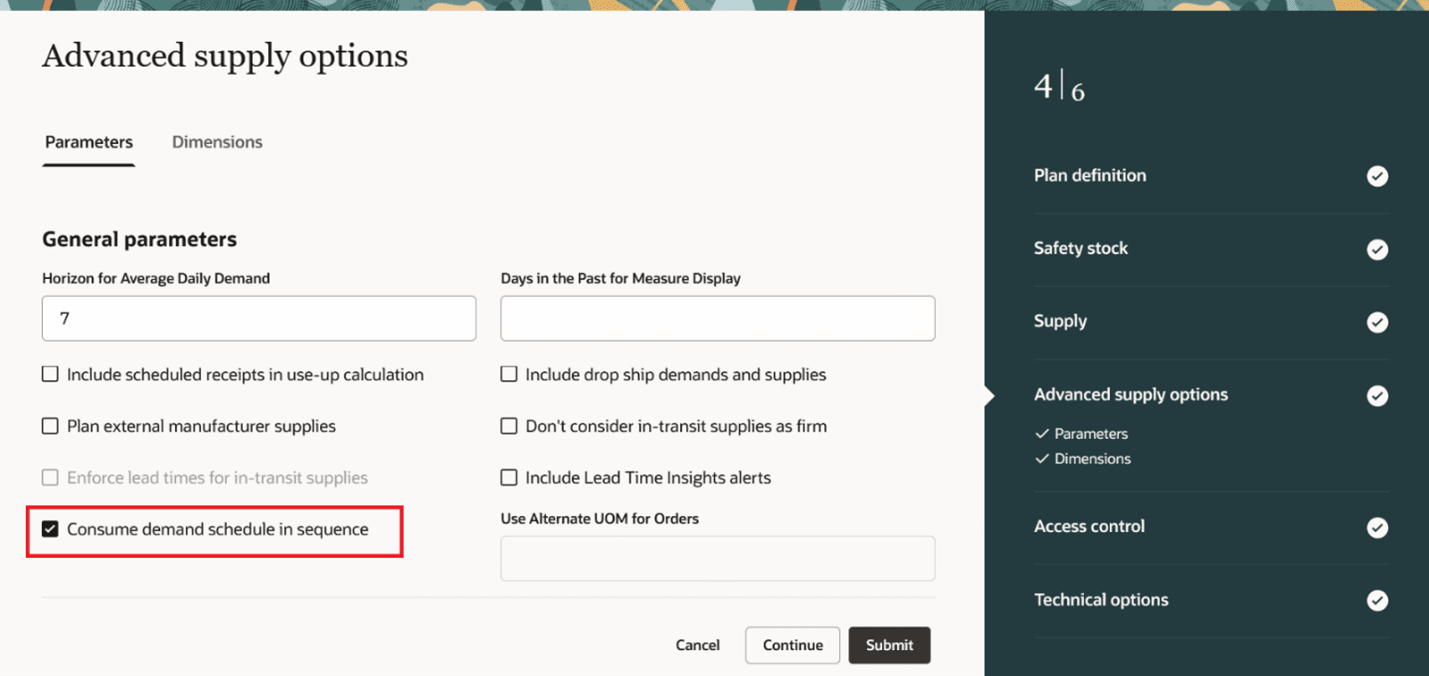
New Advanced Supply Option: Consume Demand Schedule in Sequence
Consider the following use case:
Use Case 1
Following are the demand schedules for a supply plan:
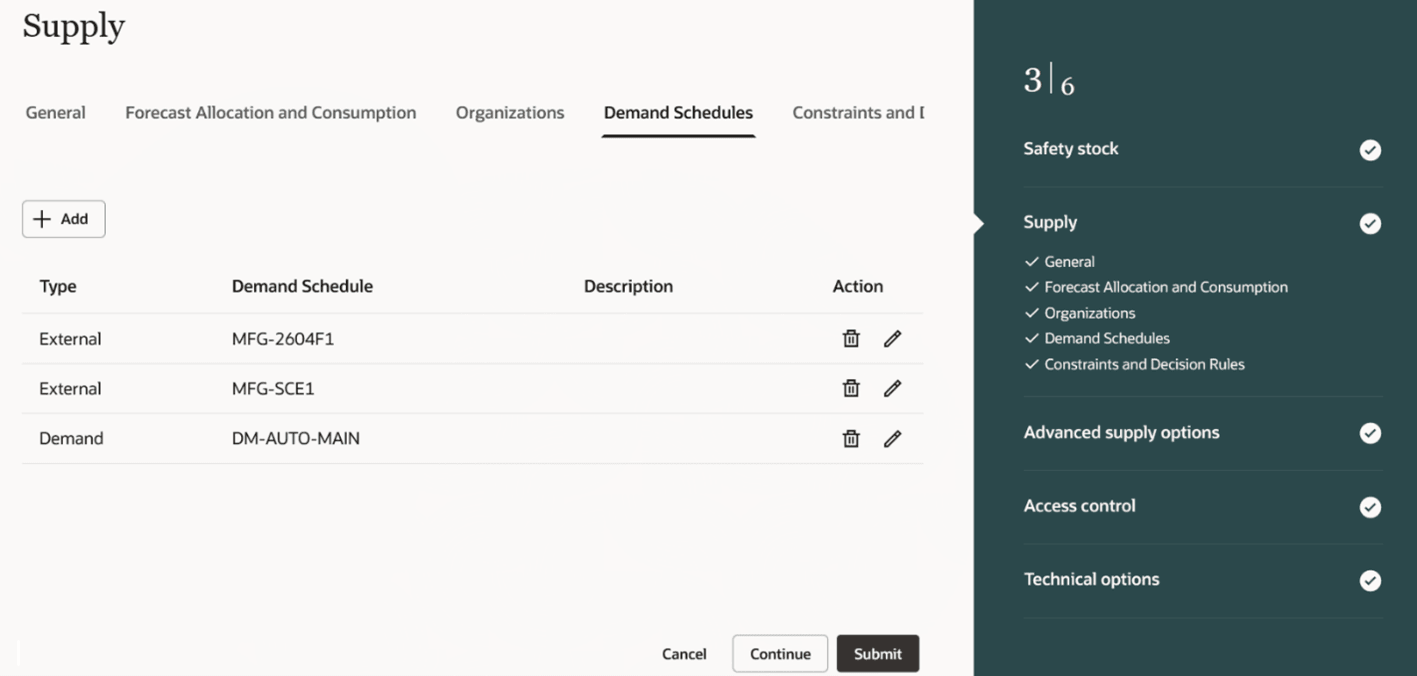
Demand Schedules for a Supply Plan
Following are the details of demand schedules in the plan. There is a sales order for item RA_ASSY in the organization M1 of quantity 100.
Demand Schedules
| Demand Schedule | Type | Ship to Consumption Level | Item | Organization | Gross Forecast |
|---|---|---|---|---|---|
| MFG-2604F1 | External | Item | RA_ASSY | M1 | 50 |
| MFG-SCE1 | External | Item | RA_ASSY | M1 | 60 |
| DM-AUTO-MAIN | Demand | Item | RA_ASSY | M1 | 120 |
After the plan run, the previous and new behavior, that is, with the plan option Consume demand schedule in sequence selected, are as shown in the table.
Previous and New Behavior
| Demand Schedule | Item | Organization | Net Forecast (Prior Behavior) | Net Forecast (New Behavior) |
|---|---|---|---|---|
| MFG-2604F1 | RA_ASSY | M1 | 0 | 0 |
| MFG-SCE1 | RA_ASSY | M1 | 0 | 10 |
| DM-AUTO-MAIN | RA_ASSY | M1 | 20 | 120 |
Previously, the sales order consumed the forecast quantities from each demand schedule independently. With this update, the sales order consumes the forecast from the first demand schedule as entered in the plan options. In this case, demand schedule MFG-2604F1 is first in the order, so it is consumed first and the entire forecast quantity of 50 is consumed. There is still more forecast quantity to be consumed as sales order is of quantity 100, so Supply Planning proceeds to consume the next demand schedule in order and consume the remaining forecast from MFG-SCE1. No forecast is consumed from the demand plan DM-AUTO-MAIN as sales order has consumed all the forecast.
Use Case 2
In the same setup as of use case 1, let’s consider that you want to change the sequence of consumption. For example, you want to consume the demand schedule MFG-SCE1 first, then demand plan DM-AUTO-MAIN and then MFG-2604F1. Then, you need to delete the demand schedule MFG-2604F1 from the plan options, save, and add it again. After doing this, the demand schedule sequence becomes:
Changed Demand Schedule Sequence
| Demand Schedule | Type | Ship to Consumption level | Item | Organization | Gross Forecast |
|---|---|---|---|---|---|
| MFG-SCE1 | External | Item | RA_ASSY | M1 | 60 |
| DM-AUTO-MAIN | Demand | Item | RA_ASSY | M1 | 120 |
| MFG-2604F1 | External | Item | RA_ASSY | M1 | 50 |
After the plan run, the net forecast after consumption is as follows:
Net Forecast after Consumption
| Demand Schedule | Item | Organization | Net Forecast (Prior Behavior) | Net Forecast (New Behavior) |
|---|---|---|---|---|
| MFG-SCE1 | RA_ASSY | M1 | 0 | 0 |
| DM-AUTO-MAIN | RA_ASSY | M1 | 20 | 80 |
| MFG-2604F1 | RA_ASSY | M1 | 0 | 50 |
Steps to enable and configure
You don't need to do anything to enable this feature.
Tips and considerations
- This feature is supported for both unconstrained and constrained supply plans.
- This feature is supported for Supply plan and Demand and Supply plan types.
- If the advanced plan option Consume demand schedule in sequence isn’t selected, then the plan will follow the behavior prior to this update.
Access requirements
Users who are assigned a configured job role that contains these privileges can access this feature:
- Monitor Supply Planning Work Area (MSC_MONITOR_SUPPLY_PLANNING_WORK_AREA_PRIV)
- Run Plan with Snapshot (MSC_RUN_PLAN_WITH_SNAPSHOT_PRIV)
- Edit Plans (MSC_EDIT_PLANS_PRIV)
These privileges were available prior to this update.