Net the Supplies and Demands Pooled Across Multiple Organizations in Constrained Supply Plans
Some supply chain networks have a central warehouse and closely clustered ancillary warehouses that are configured as separate inventory organizations in the execution systems. However, for planning purposes you want to treat these inventory organizations as one facility which means that the demand and supply need to be pooled across the cluster. With this update, you can now designate one organization as a central organization where the supply and demand across a set of organizations is pooled for the purpose of supply and demand netting. It’s assumed that there’s no business need to physically transfer inventory across organizations in the pool.
With this feature you can:
- Pool the supplies and demands across multiple child inventory organizations into one target or parent organization.
- Net the pooled supplies and demands in target or parent organization.
- Recommend planned orders in target or parent organization.
- Release planned orders to target parent organization or child inventory organizations.
- Net pooled supplies and demands with planning attributes including project and task in Attribute-Based Planning and Project-Driven Supply Planning.
Note: This feature is applicable to constrained supply plans and demand and supply plans.
The workflow is as follows:
- Ancillary warehouses or multiple inventory organizations are represented as subinventories to a central warehouse or single inventory organization. The central entity functions as the parent organization, while the subinventories function as child organizations.
- Supplies and demands from multiple organizations are pooled and netted at the parent organization level.
- Attribute-based netting rules are applied during the netting process for an attribute-based plan.
- Plan outputs are generated and made available for review and analysis at the parent organization or central warehouse level.
- Plan recommendations are generated at the parent organization level and can be released to either the parent inventory organization or the relevant child inventory organizations in Oracle Fusion Supply Chain Management.
- Project transfer recommendations from an attribute-based plan are generated and can be released to the parent inventory organization or to child inventory organizations in SCM.
To use this feature, do the following:
- On the Planning Source System page, select the parent organization for ancillary warehouses or child inventory organizations.
- Enter the modeled subinventory code for each child organization.
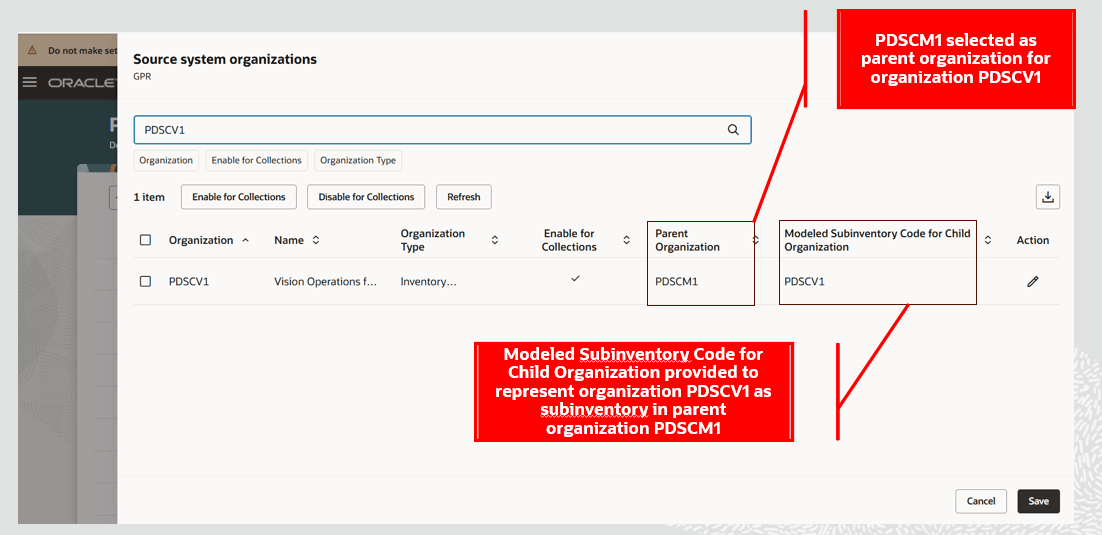
Setup Parent and Modeled Subinventory in Planning Source Systems
- Run Collect Planning Data for subinventories to populate modeled subinventory code in SCP.
- Create a constrained supply plan.
- Select the child and parent organizations in the plan scope.
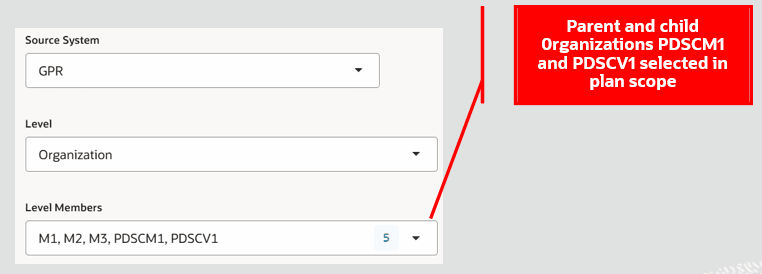
Parent and Child Organizations Selected in Plan Scope
- Select the plan option Net child organizations and parent organization as one.
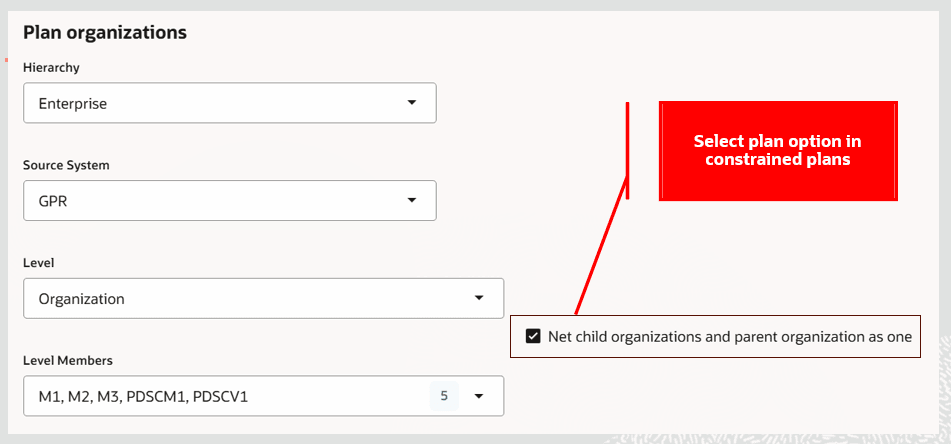
Plan Option Selected in Constrained Supply Plan
- Assign an attribute-based netting rule if you want to net pooled supplies and demands in attribute-based planning.
- Run the plan and review the plan output.
Analyzing plan output in Supplies and Demands
The Supplies and Demands page displays the pooled supplies and demands using the following additional columns:
- Child Organization Code: Organization code of the child organization from which supplies and demands are recast to the parent organization for pooling and netting.
- Subinventory Code of Child Organization: Subinventory code of the supplies in the child organization.
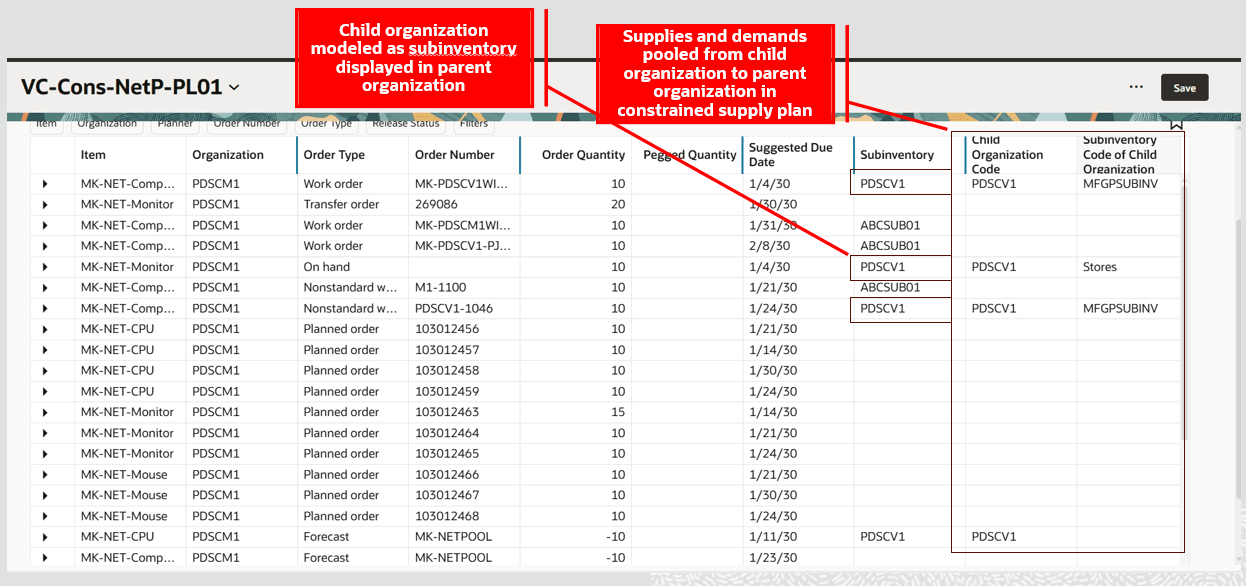
Supplies and Demands Pooled from Child Organization to Parent Organization and Planned in Constrained Supply Plan
In the given example, on hand supply at PDSCM1 for 10 units on 1st January 2030 is pooled from child organization PDSCV1 and displayed in modeled subinventory PDSCV1.
Similarly, for forecast MK-NETPOOL, demand on 11th January 2030 from child organization PDSCV1 is recast to parent organization PDSCM1 and planned. Note that the subinventory code of the child organization PDSCV1 is displayed for the forecast.
Planned orders are always recommended in the parent organization. In the example, planned orders are recommended in parent organization PDSCM1. You can either release planned orders to SCM in the parent organization or select the subinventory code of a child organization to release planned orders to create supplies in the child organization in SCM.
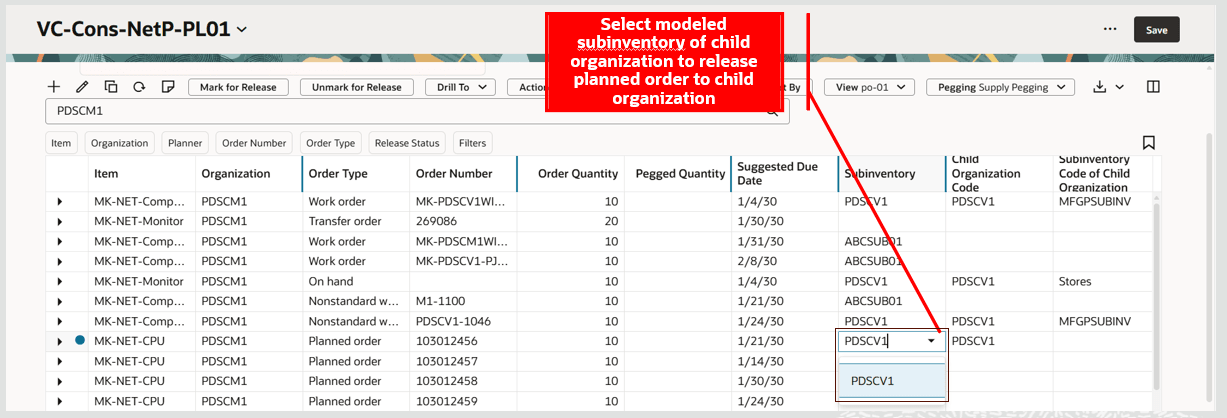
Select Modeled Subinventory of Child Organization to Release Planned Order to Child Organization
In the above example, select modeled subinventory PDSCV1 or the child organization PDSCV1 in parent organization PDSCM1 for the planned order to release planned order to SCM Cloud to create supply in PDSCV1 organization.
Additional details related to release of plan recommendations
- Rescheduled and canceled recommendations for supplies pooled from a child organization are released back to the specific child inventory organization.
- The release process refers to the subinventory code, child organization code in the Supplies and Demands view, and the association of child and parent organization in Manage Planning Source Systems to release reschedule and cancel recommendation to a specific child inventory organization in SCM Cloud.
- Release process also considers project transfer recommendations for pooled supplies in an attribute-based plan. The plan option Enable movement of supply between projects and tasks must be selected.
- Planned orders with null modeled subinventory code are always released to the parent inventory organization in SCM.
- Transfer planned orders can be released to SCM for child organizations that are assigned to different parent organizations.
Steps to enable and configure
You don't need to do anything to enable this feature.
Tips and considerations
- Reference entities are not pooled from child organizations to the parent organization.
- Reference entities like item structures, work definitions, resources, and sourcing defined for the parent organization are used while netting pooled supplies and demands.
- User-defined safety stock values from child organizations aren’t considered in the parent organization.
- Transfer orders between child organizations assigned to same parent organization or between a child organization and its parent organization aren’t considered in the planning process
- The child organization’s number of days for past due supplies and past due demands in Maintain Supply Network Model are used for considering past due supplies and demands for pooling to the parent organization.
- Assigning an organization as child organization to a parent organization in Manage Organization List doesn’t create an organization hierarchy for planning analytics. This setup is only applicable for pooling supplies and demands across organizations.
- This feature isn’t applicable to external source systems.
- Global forecasts are supported in plans enabled with Net child organizations and parent organization as one. However, you must ensure that the distribution assignment set for global forecasts has all the parent and child organizations included in the assignment set to pool the distributed forecasts from child organizations to the parent organization.
Key resources
Refer to the Release 22C feature Net the Supplies and Demands Pooled Across Multiple Organizations for additional details on this feature in unconstrained supply plans.
Access requirements
Users who are assigned a configured job role that contains these privileges can access this feature:
- Monitor Supply Planning Work Area (MSC_MONITOR_SUPPLY_PLANNING_WORK_AREA_PRIV)
- Monitor Demand and Supply Planning Work Area (MSC_MONITOR_DEMAND_AND_SUPPLY_PLANNING_WORK_AREA_PRIV)
These privileges were available prior to this update.