Redwood: Plan Supply for Forecasts Generated at Product Family Level
In manufacturing and distribution environments with many similar items, it is easier to plan at an aggregate level such as a product family. For such environments having automated mechanisms such as using planning percentages to disaggregate the forecast to individual items is simple. Oracle Fusion Supply Chain Planning now supports the end-to-end process for forecasting by product family in Demand Management and the forecast consumption mechanisms in supply planning process.
You can view and consume forecasts rolled up at the product family level, disaggregating net forecasts to individual items based on planning percentages in a supply plan. This update provides detailed forecast consumption insights and streamlines planning efforts by managing forecasts and sales orders at a broader product family level. It enhances operational efficiency by aligning supply plans with aggregated demand signals at the product family level.
A product family is a group of related products that share common features, components, technology, or market segments. Products within a family are typically designed to satisfy similar customer needs, streamline production, and enhance operational efficiency.
With this feature, you can:
- Define a separate hierarchy for product family or can choose an existing product hierarchy.
- Select any level above the Item level as a product family in the product hierarchy.
- Forecast at the product-family level in Demand Management and calculate planning percentages at the product-family level to member items.
- View and consume forecasts rolled up at the product family level and disaggregate the product family net forecasts to individual family members by the calculated planning percentages in a supply plan.
- View the consumption details in Forecast Consumption visualization.
Two new measures are added as part of this update.
- Product Family Gross Forecast
- Product Family Net Forecast
Product Family Gross Forecast measure contains the gross forecast at the product family level, while the Product Family Net Forecast contains the net forecast after consumption. Supply Planning rolls up the sales orders to the product family level and consumes the product family gross forecast. The above two measures are part of a new measure group, Product Family Planning. You must add these measures in the measure catalog to view the gross and net forecasts at product family level.
Let’s understand the feature through an example.
Following is the hierarchy in Product dimension, where Item is the lowest level and Category Level 1740835 is the highest level.
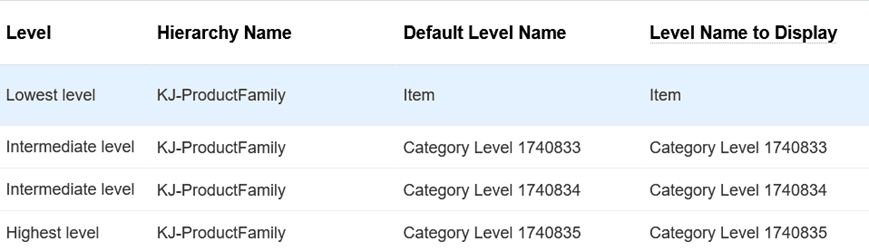
Product Hierarchy
Following is an example using the given hierarchy, where KJ-Automobiles is mapped to Category Level 1740835.
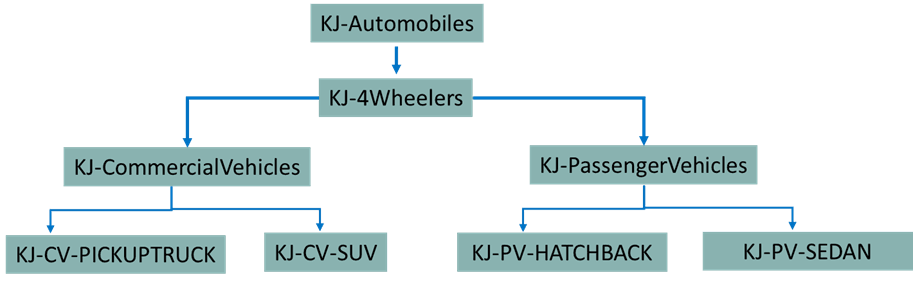
Example: Product Family
You can select any level above the Item level as Product Family. In this case, let’s select the KJ-4Wheelers as the product family.
You can configure a Demand Management plan to compute the forecast at product family level.
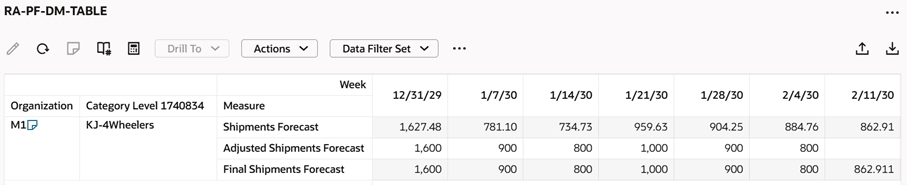
Product Family Forecast
Demand Management plan options are enhanced and now includes a new tab Product-Family Settings (Navigation: Plan options -> Demand -> Product-Family Settings tab). Select the option Product-family percentages to enable Demand Management to compute product family planning percentages.
You can define the history periods and calculation measure for this computation. You must select the hierarchy and hierarchy level for product family. It is defaulted from Hierarchy and Level from Scope tab (Navigation: Plan Options -> Plan definition -> Scope -> Plan Items). The product family forecast is computed at the hierarchy level of product family. You can select the Planning Percentage Calculation Level, such as Item or Item and Organization.
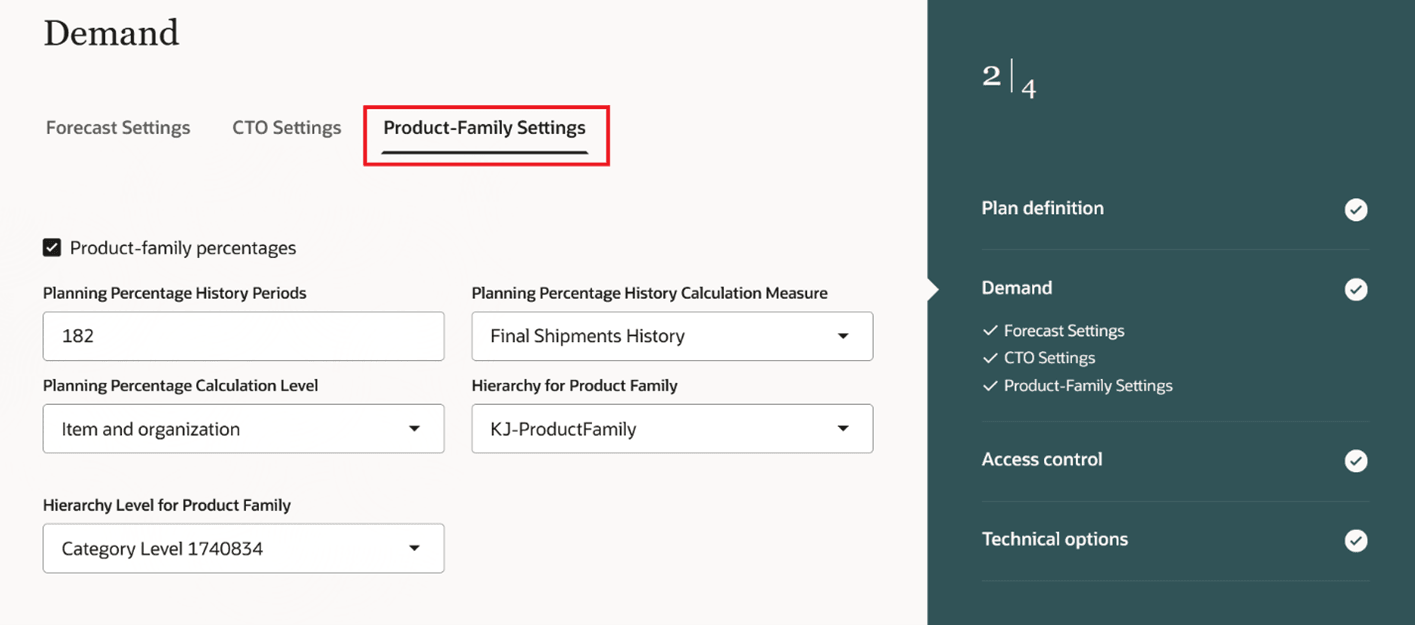
New Tab for Product Family Settings
Demand Management computes the planning percentages and populates into the new measures. There are three new measures for product family planning percentages. In this use case, the KJ-4Wheelers is selected as the product family and Category Level 1740834 is its corresponding level in the hierarchy KJ-ProductFamily.
Planning Percentage for Product Family: Planning percentage calculated for a product family by Oracle Fusion Demand Management. The measure indicates the percentage for the product family in the selected hierarchy level.
Adjusted Planning Percentage for Product Family: Override of the planning percentage calculated for a product family by Demand Management. The measure indicates the percentage after the override for the product family in the selected hierarchy level.
Final Planning Percentage for Product Family: Final planning percentage calculated for a product family by Demand Management. The measure indicates the percentage after the override for the product family in the selected hierarchy level.
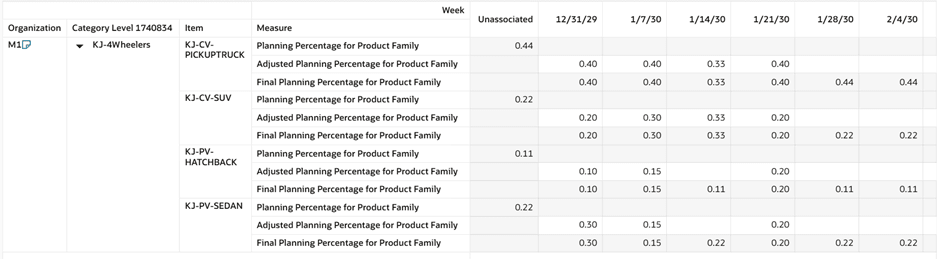
New Measures for Product Family Planning Percentages
The Final Planning Percentage for Product Family is read as a measure into Supply Planning. This measure is part of the measure group Planning Percentage for Product Family.
A new plan option is added into the Supply plan and Demand and Supply plan options (Navigation: Plan Options -> Supply -> Demand Schedules -> Edit -> Demand Measures) to publish the Final Planning Percentage for Product Family into Supply Planning.
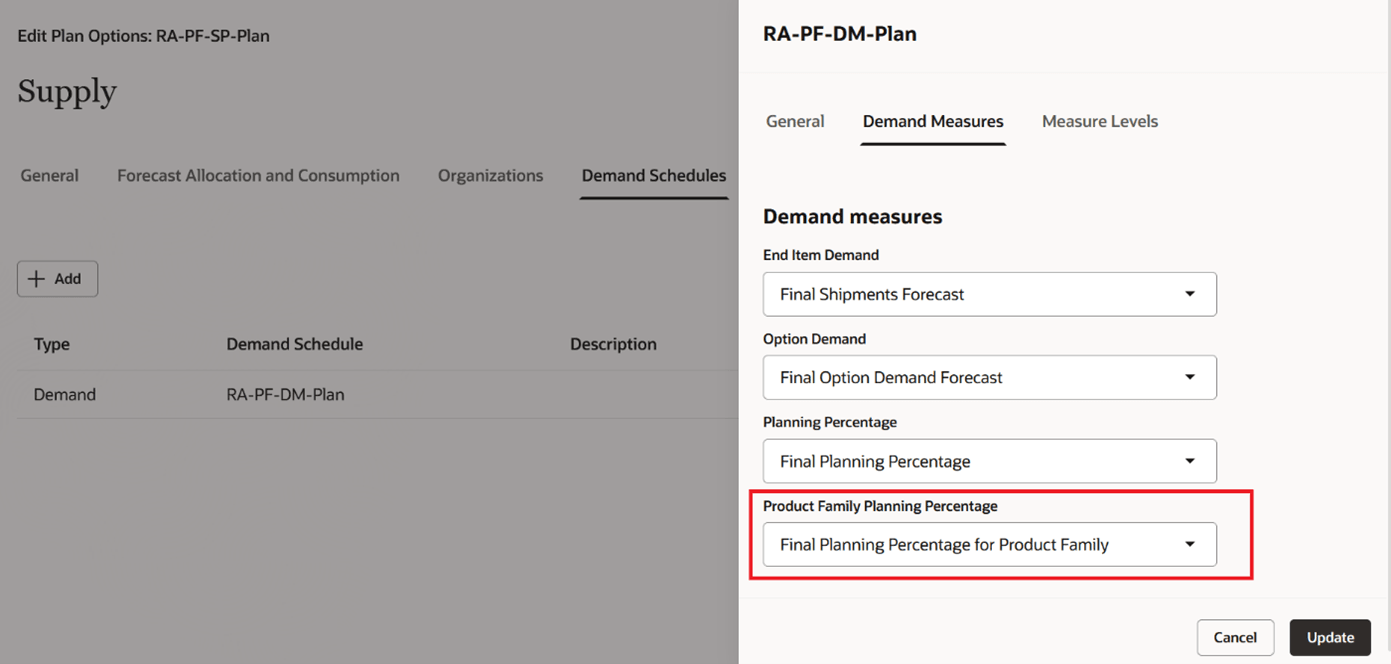
Publishing the Final Planning Percentage for Product Family to Supply Planning.
The above demand plan is fed as a demand schedule to a supply plan. If the values are populated for Hierarchy for Product Family and Hierarchy Level for Product Family in the input demand plan, then the supply plan defaults the same values in Product hierarchy and level in Measure Levels. The product level list of values contains two values, one is the Hierarchy Level for Product Family which is defaulted from input demand plan, and another is Item. This enables you to forecast at either the item or product-family level in the supply plan.
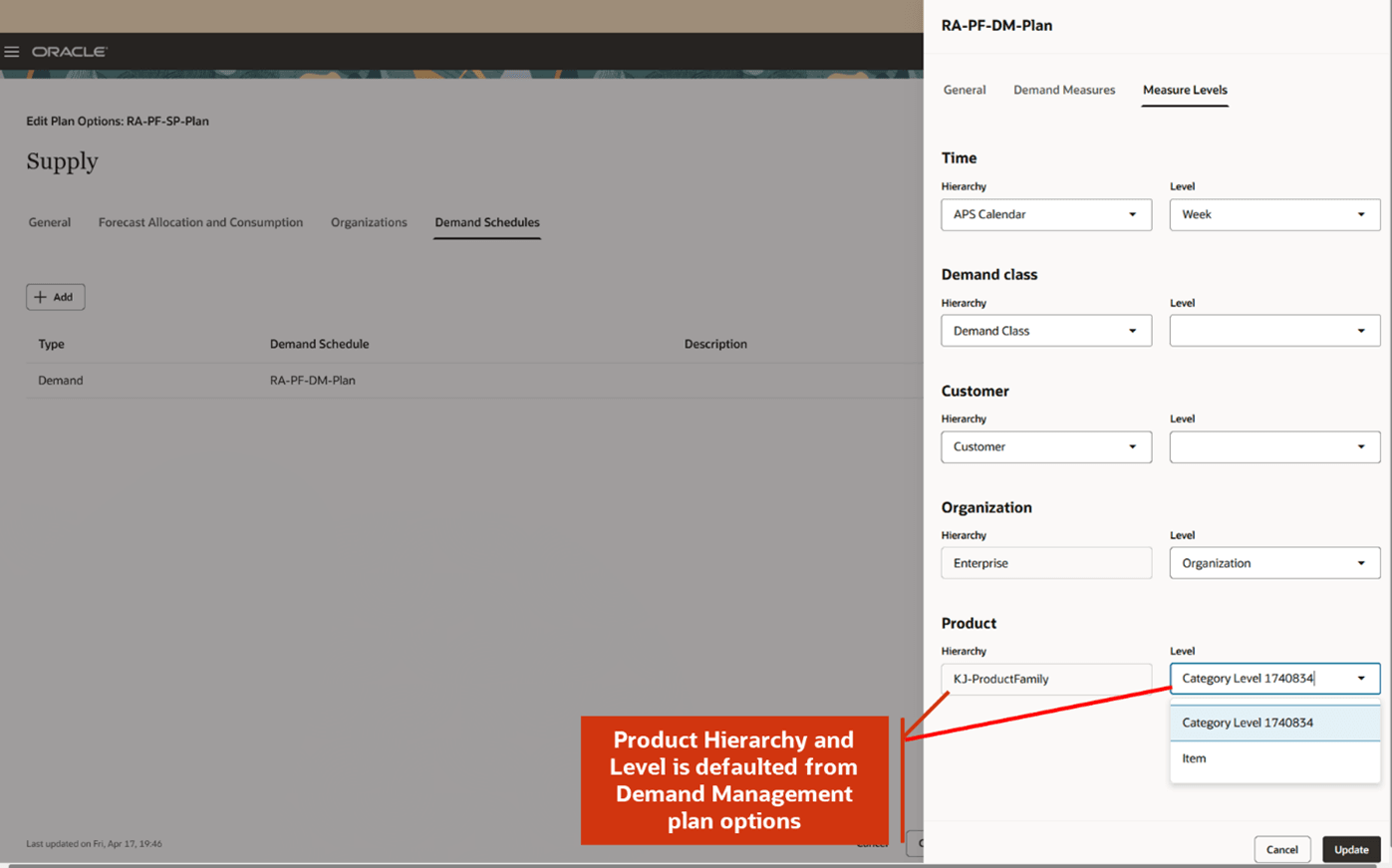
Measure Levels in Supply Plan Options.
If the plan type is Demand and Supply plan, then select the product level manually in the supply plan options and save the plan. Supply Planning plans the forecast at the selected measure levels.
Once the measure levels are selected, Ship-to Consumption Level is defaulted based on selection. If the Product Level is selected to any other level than Item, to plan at product family level, then Ship-to Consumption Level list of values shows Product Family else Item.
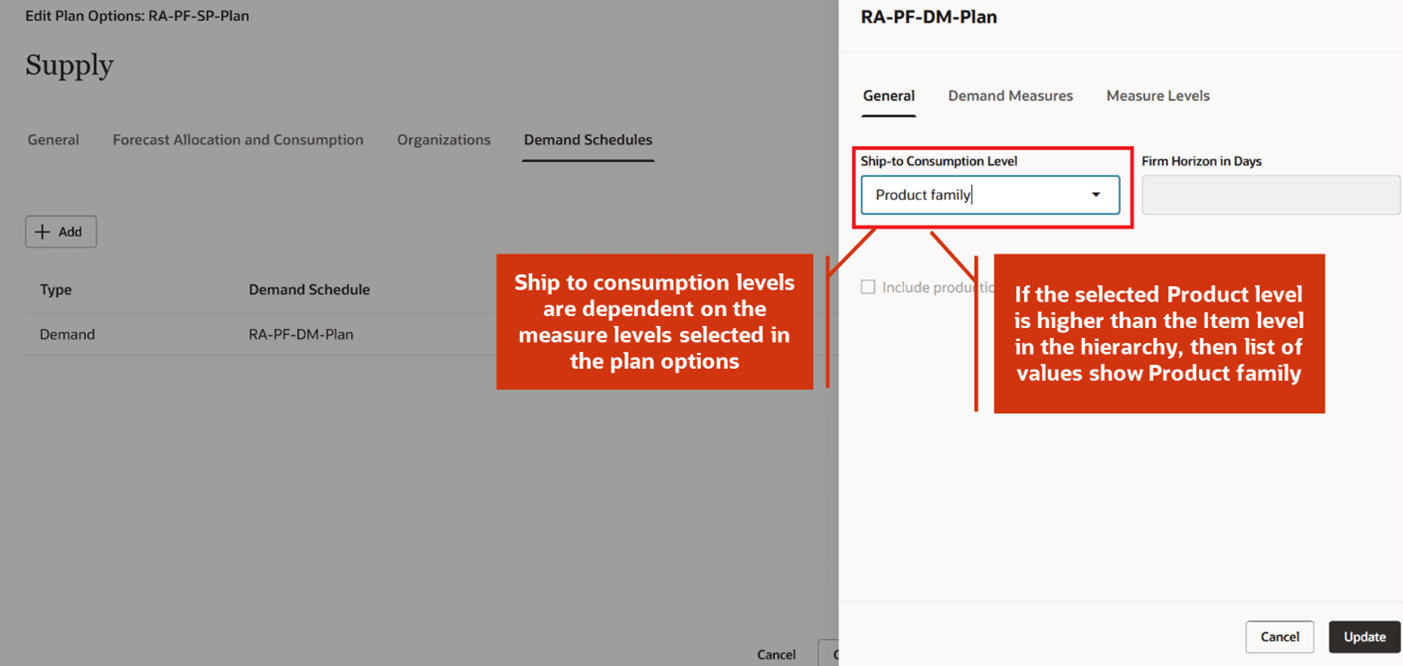
Ship-to Consumption Level
If the Ship-to Consumption Level is set to Product family, then Supply Planning rolls up the sales orders of member items to the product family level and consumes the forecast at that level. In this use case, the product family gross forecast on 1/21 is 1000. Since forecast spreading is on, the forecast is equally divided for quantity 200 from 1/21 to 1/15. There are various sales orders on member items of the product family on 1/21. The forecast consumption buckets are set to 3 days, and backward consumption days aren’t defined. Sales orders are rolled up to Ship-to Consumption level, i.e., Product family, and then consume the forecast. The total sales order quantity is 600, it consumed the forecasts from 1/21 till 1/23.
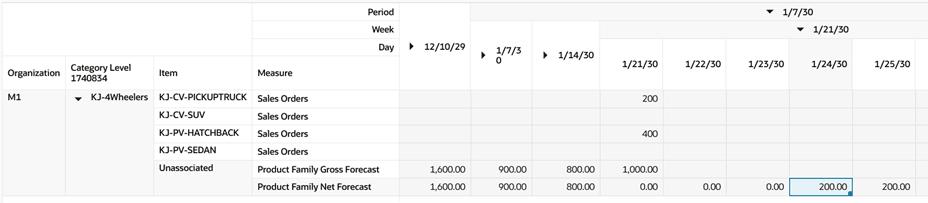
Product Family Forecast Consumption
You can view the aggregated picture in the collapsed view:

Aggregated View
Supply Planning distributes the Product Family Net Forecast to member items of the product family based on the Final Planning Percentage for Product Family.
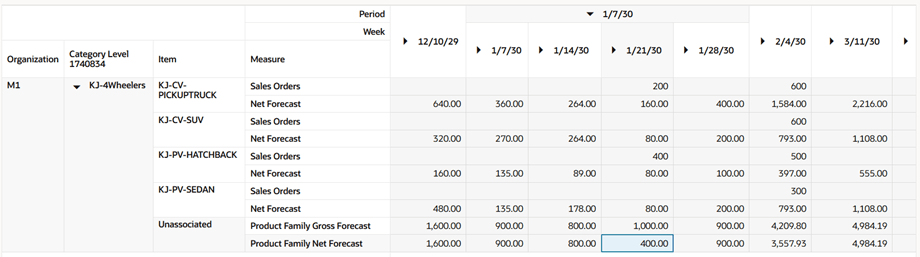
Forecast at Member Items of Product Family After Distribution
In this use case, the product family gross forecast on 1/21 is 1000, and the sales orders in this bucket are 600 units. After forecast consumption, the product family net forecast is 400. The Final Planning Percentage for Product Family to item KJ-CV_PICKUPTRUCK is 0.40 (40%). Supply Planning distributes the product family net forecast to member items based on planning percentages. The net forecast for item KJ-CV_PICKUPTRUCK is 400 * 0.40 = 160. Similarly, the net forecast for item KJ-CV-SUV is 400 * 0.20 = 80.
You can view the consumption details in the Forecast Consumption visualization. You can directly open the Forecast Consumption table and filter by various attributes, such as Consumed Forecast Family to view which all sales orders have consumed this product family.
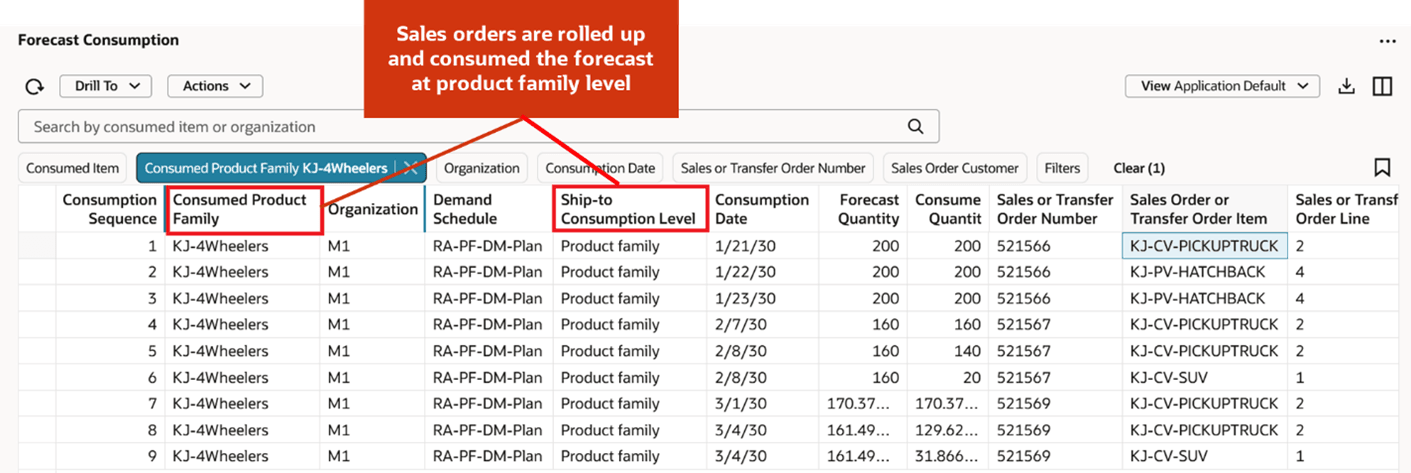
Forecast Consumption Table
You can also drill from Forecast Consumption table to Supplies and Demands to view the details of sales orders that have consumed the product family. The corresponding product family details are not displayed in Supplies and Demands table.
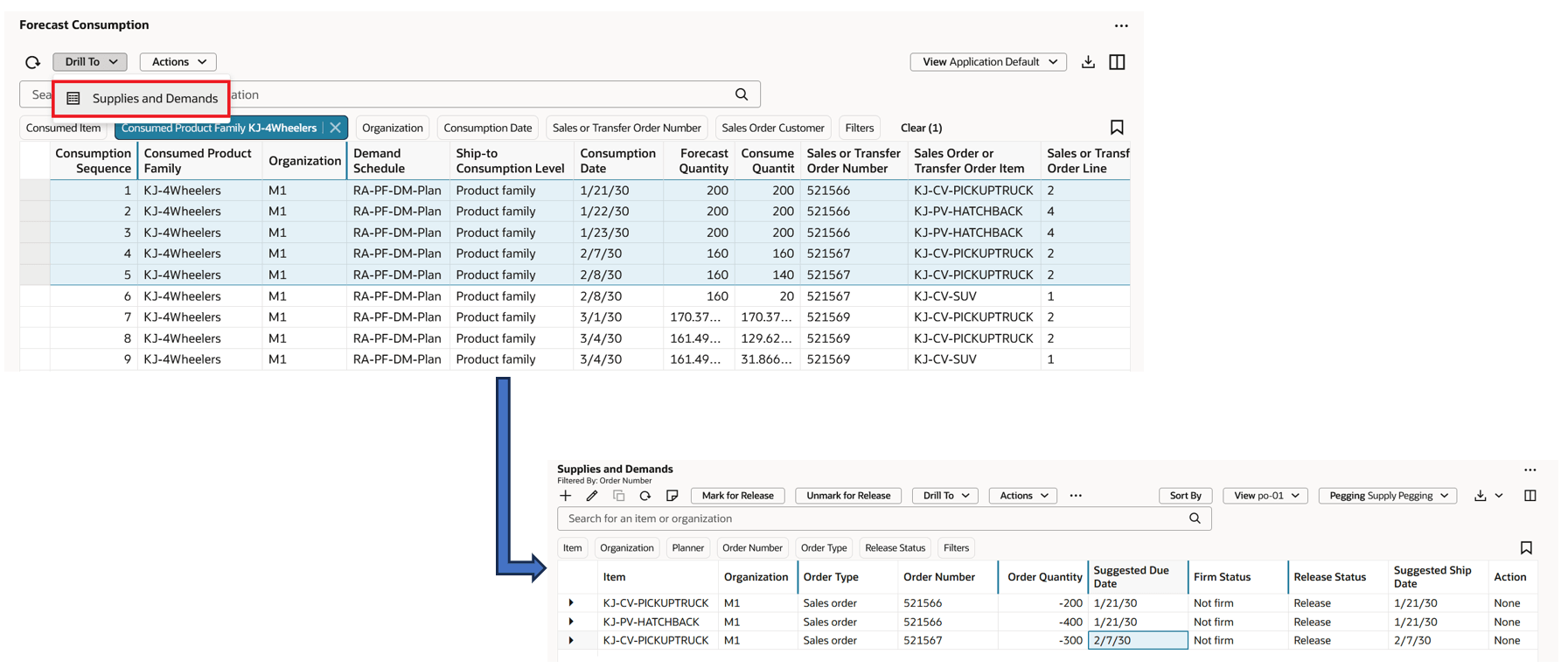
Drill to Supplies and Demands Table
Similarly, you can select the sales orders in Supplies and Demands table to drill to Forecast Consumption to view the product families consumed by these sales orders. If you select the distributed forecasts of member items of product family and drill to Forecast Consumption, it doesn’t display anything as consumption happened at the product family level.
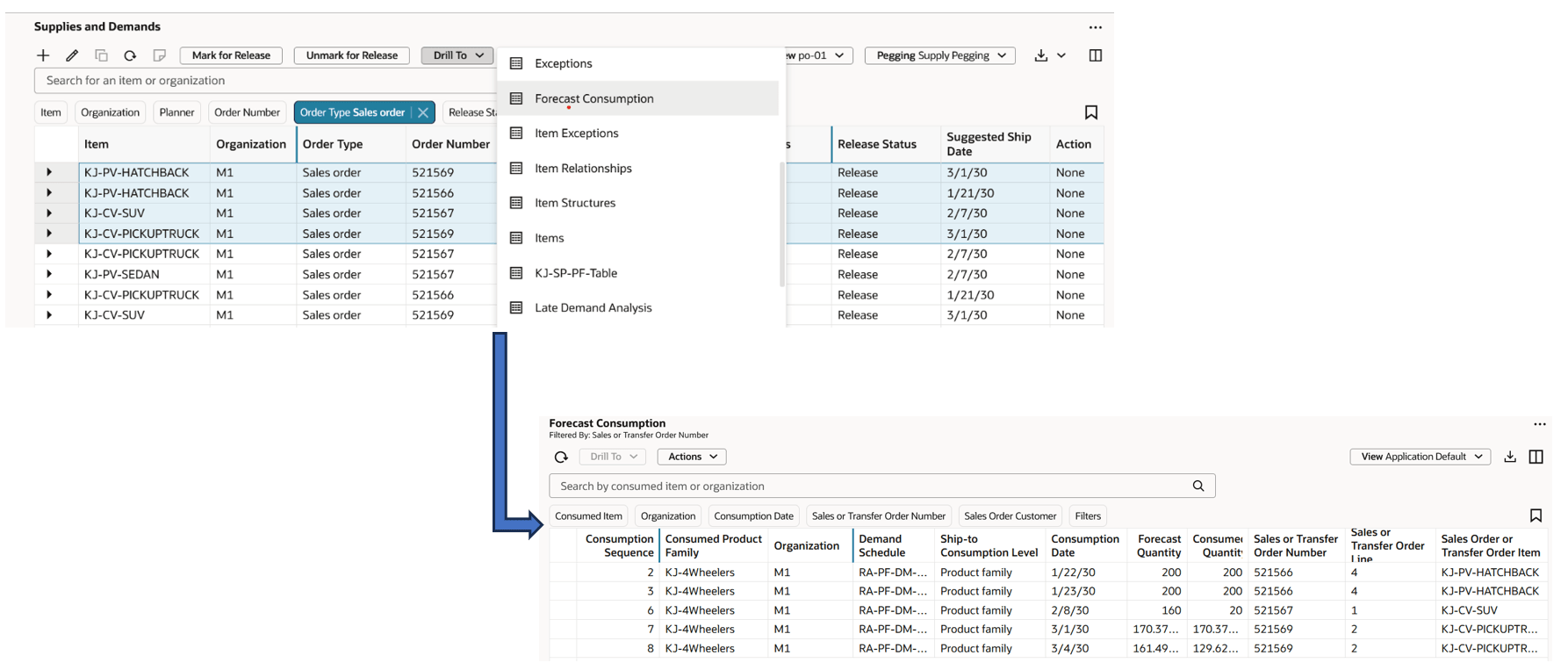
Drill from Supplies and Demands to Forecast Consumption
You can also view the consumption details of a product family for a specific bucket. You need to select a bucket in the measure Product Family Net Forecast, and drill to Forecast Consumption. In the pivot table configuration, the hierarchy should be the same as of product family, and the level should be the same or higher of the selected product family. In this use case, the hierarchy is KJ-ProductFamily and the level is Category level 170834.
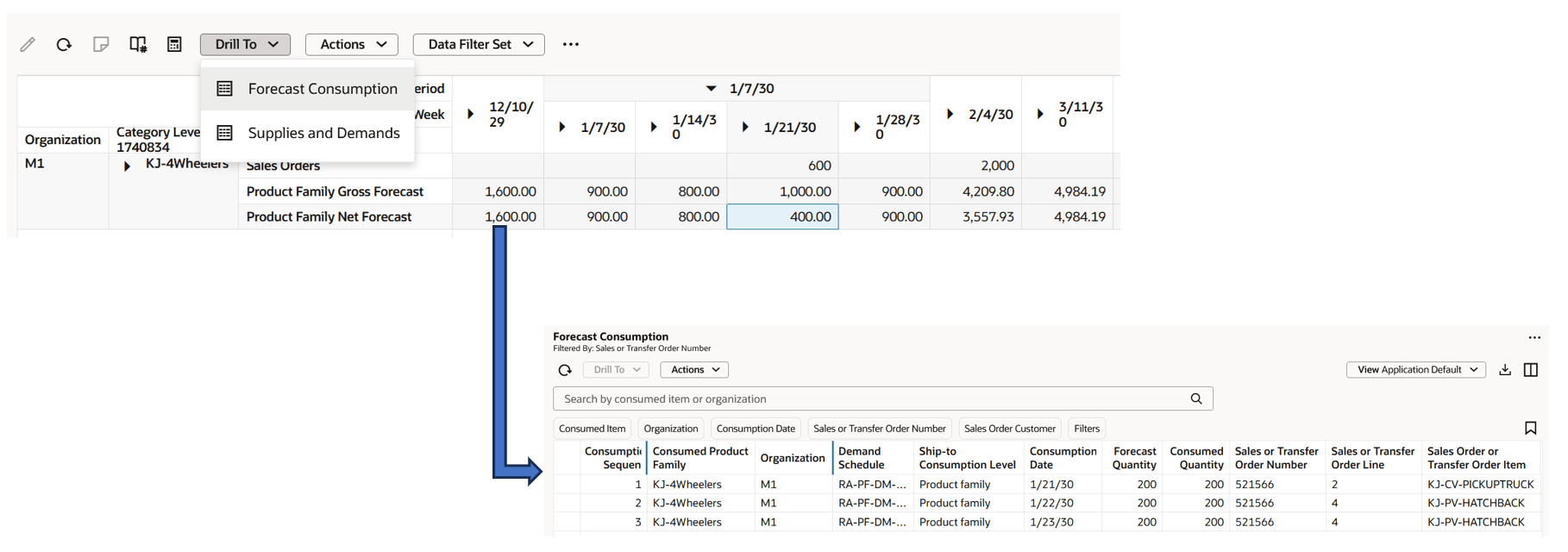
Drill from Pivot Table to Forecast Consumption
Steps to enable and configure
You don't need to do anything to enable this feature.
Tips and considerations
- This feature is supported for both unconstrained and constrained supply plans.
- This feature is supported for both Supply plan and Demand and Supply plan types.
- A demand plan is the only valid source for feeding product family forecasts into a supply plan.
- If you try to add another demand plan as a demand schedule with different product hierarchy or same product hierarchy with a different level (other than Item), then a message, Add demand schedules with the same product hierarchy and level is displayed.
- The hierarchy for product family must exist in Dimension Catalog.
- Ship-to Consumption Level list of values shows either Product Family or Item based on the selection made in measure levels for Product.
Key resources
Refer to the What’s New document Redwood: Calculate Planning Percentages for Product Families.
Access requirements
Users who are assigned a configured job role that contains these privileges can access this feature:
- Monitor Supply Planning Work Area (MSC_MONITOR_SUPPLY_PLANNING_WORK_AREA_PRIV)
- Run Plan with Snapshot (MSC_RUN_PLAN_WITH_SNAPSHOT_PRIV)
- Edit Plans (MSC_EDIT_PLANS_PRIV)
These privileges were available prior to this update.