Manage Inventory Optimization Plan Options
You can use a guided process to create a new inventory optimization plan and using the Plans page, you can view, search, and duplicate an existing inventory optimization plan. Additionally, you can define and manage inventory optimization plan options to improve accuracy and performance with tailored service levels and fulfillment lead times. You can:
- Configure plan scope by selecting segment groups and segments, ensuring that service level percentages and fulfillment lead times are set at the plan or segment level to tailor inventory targets.
- Specify the planning horizon using week or period buckets with defined start and end dates to align planning cycles with business needs.
- Configure safety stock calculations using multiple forecast error types such as Mean Absolute Deviation (MAD), Mean Absolute Percentage Error (MAPE), and Intermittent, applying smoothing options to refine stock levels.
- Align demand schedules with selected organizations and demand measures, supporting valid schedule types such as External, Demand Plan, and Sales and Operations Plan.
- Calculate safety stock quantities only for items with the Material Resource Planning (MRP) planned percent method, ensuring accurate inventory buffers.
With this update, you can increase inventory optimization effectiveness by aligning safety stock calculations with forecast error types and demand schedules.
Using the Plans task in the Supply Chain Planning work area, you can create a new inventory optimization plan, review the status of existing plans, or take actions such as editing plan options and running, duplicating, or archiving a plan.
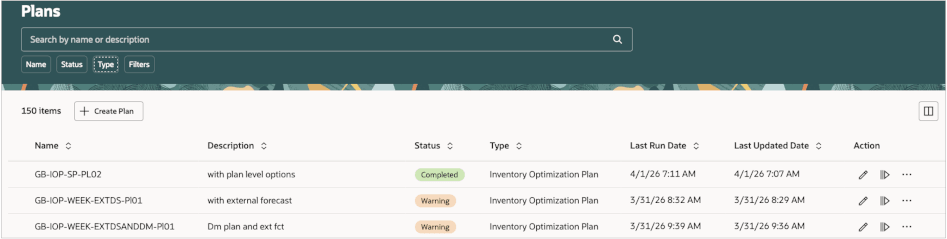
Manage Inventory Optimization Plans
When creating or editing a plan, you use a guided process that leads you through the various aspects of the plan. The following describes key attributes that are defined in this process.
General
In the initial step, you define the following key attributes on the General tab of the Plan definition page:
- Dimension Catalog: Specifies the collection of hierarchies used for analyzing the plan.
- Measure Catalog: Specifies the measures used for analyzing the plan. The value defaults to Default Inventory Optimization Planning Catalog, which already contains all the required measures to analyze a plan.
- Assignment Set: Specifies the sourcing assignment set.
- Exception Set: Specifies the exceptions that must be generated by the plan. Defaults to Inventory Planning Default, which already contains all the required exceptions to analyze the plan.
- Simulation Set (Optional): Can be used to override item attributes, such as user-defined safety stock quantity.
In addition, you can add your assumptions or other comments in the Notes link to create user-defined notes for later use. The notes you create here are retained across plan runs.
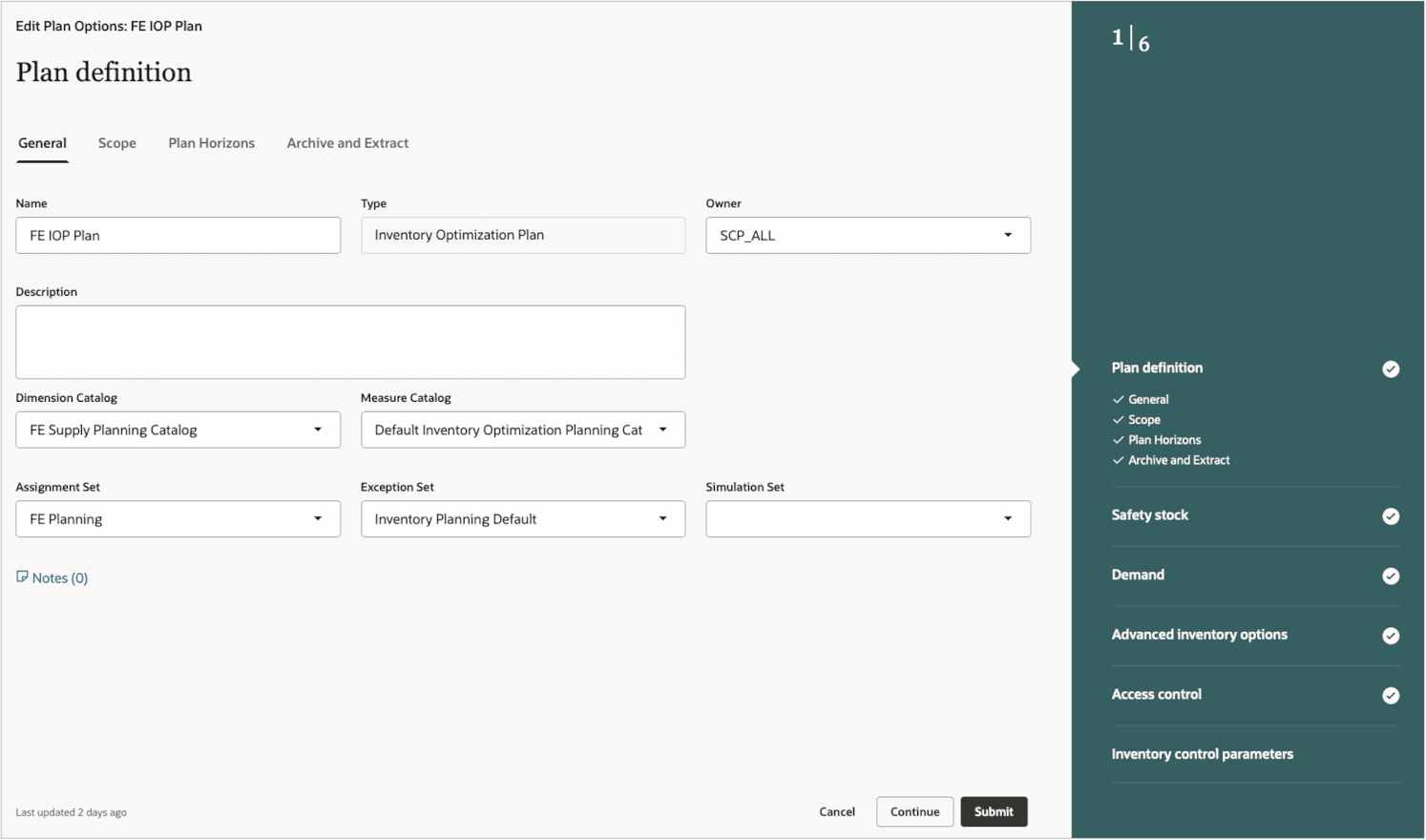
Inventory Optimization Plan Definition
Scope
Next you can configure the scope of the inventory optimization plan on the Scope tab.
- Plan organizations: Set up by using an Organization hierarchy and the members in that hierarchy.
- Hierarchy: Defaults to Enterprise.
- Source System: Specify a source system.
- Level: Can be Business Unit, Legal Entity, or Organization. Defaults to Organization.
- Level Members: Specify the appropriate members of the level specified.
- Inventory optimization planned item segments: The scope of an inventory optimization plan can only be specified using item segments. The required segment group and the segments must be created prior to creating the plan. Segment groups that have Product and Organization granularity only (and not Customer or Demand Class) will be available to use in an inventory optimization plan.
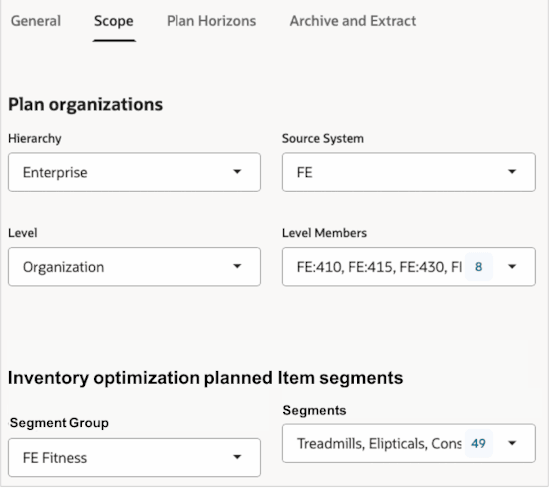
Inventory Optimization Plan Scope
Plan Horizon
You define the horizon of an inventory optimization plan and the planning buckets on the Plan Horizons tab. You can plan in all weekly buckets, or all period buckets, or a combination of both using any manufacturing calendar. Or you can plan entirely in month buckets, using the Gregorian calendar. When a plan is created in the middle of a bucket, the plan start date is always computed to be the start of the next complete bucket. The total number of buckets (across all types) in a plan is limited to 60.
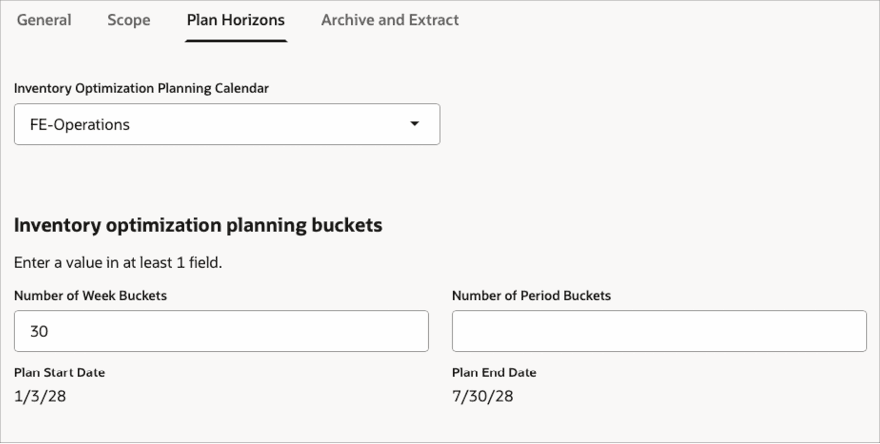
Inventory Optimization Plan Horizons
Archive and Extract
On the Archive and Extract tab, you can optionally configure a plan to be enabled for archiving. When such a plan is run, the measures included in the Measure Catalog for Archival attribute will be archived for reference and comparison purposes.
You can also optionally configure a plan to be enabled for extract. Such plans are exposed for extracting the relevant measures to a file or for reporting in Supply Chain Planning Subject Areas in Oracle Fusion SCM Analytics. Please refer to the documentation on Oracle Fusion SCM Analytics regarding how to use the data build reports. The measures that are enabled for extract are controlled by the Measure Catalog for Extract attribute.
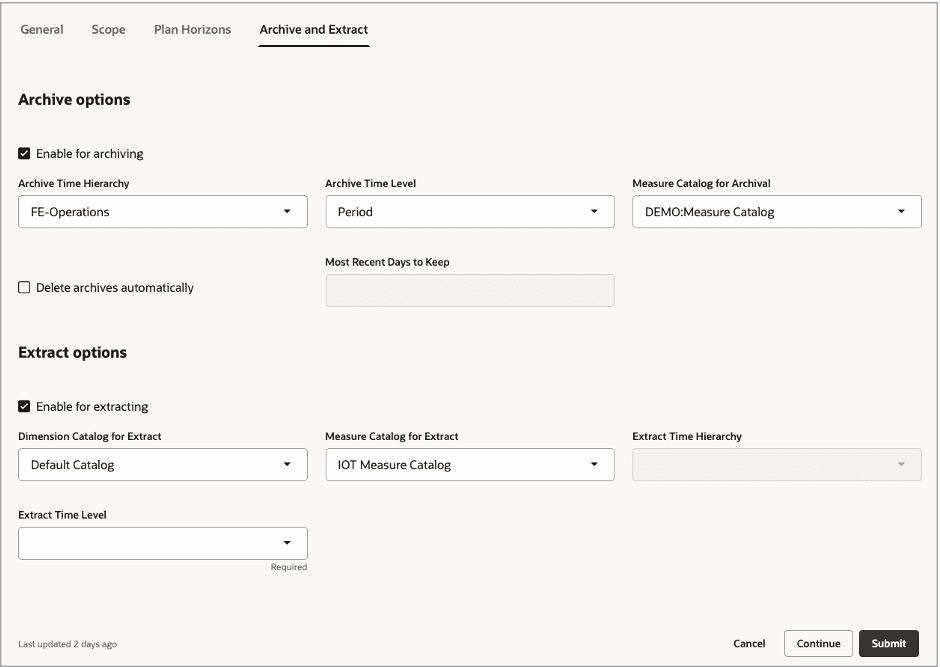
Archive and Extract Options
Safety Stock
The Safety stock step enables you to configure the following key parameters that influence calculation of safety stock, achieved service levels, and associated exceptions:
- Apply the override quantities for safety stock: When enabled, the plan considers the Safety Stock Quantity Override attribute of the items as an input in calculating achieved service levels and exceptions.
- Service Level Percentage: Specify a target service level for the overall plan. This is the percentage of demands to be satisfied fully within the demand fulfillment lead time from the demand due date. You can also override this for a specific segment included in the plan. The plan will respect the service level percentage for the segments specified and will also try to achieve the service level percentage specified for the overall plan.
- Fulfillment Lead Time: Specify a demand fulfillment lead time for the overall plan. You can also override this for a specific segment. This is optional and, if unspecified, is assumed to be 0.
- Inventory Budget Value: You can optionally specify a budget value in any user-defined currency, either for the overall plan or for any of the individual segments in the plan or for both. The plan will respect the budgets both for each segment as well as for the overall plan (for all segments combined) and will generate exceptions accordingly by comparing the inventory value with the specified budgets. Note that currently inventory optimization planning doesn’t constrain the safety stock to be limited by the specified budgets. This is used for reporting exceptions only.
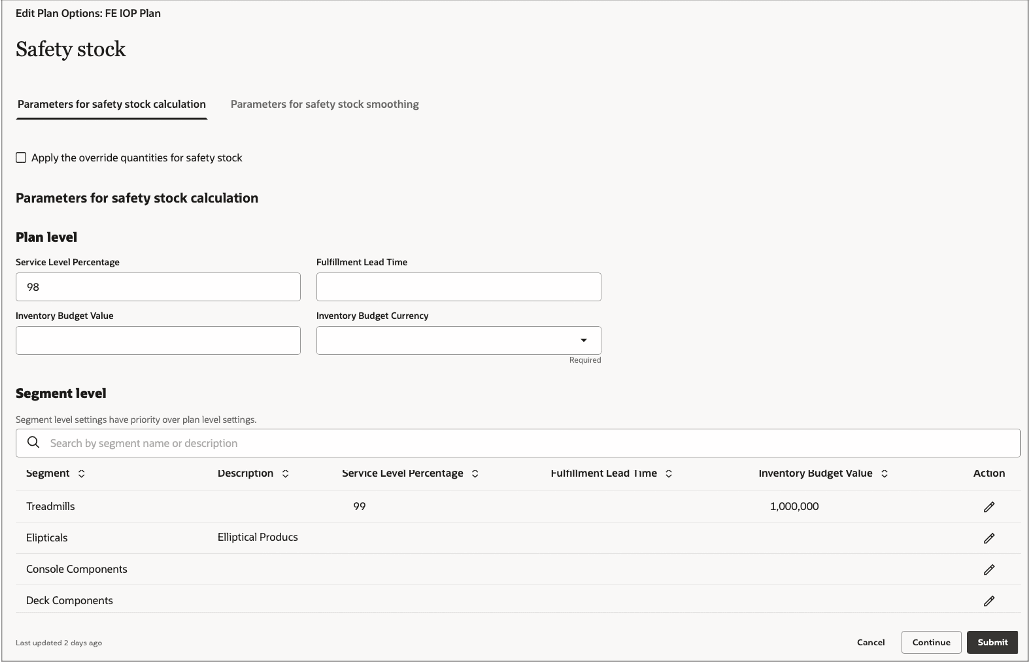
Safety Stock Parameters
Parameters for safety stock smoothing enable you to smooth out the safety stock profile for each item in the plan to avoid bullwhip effects in the supply chain. You can control the maximum percentage variation across two consecutive time windows in the plan. Duration of a time window is defined by the Safety Stock Change Interval in Days attribute. These two parameters control the allowed variation from the end of one time window to the beginning of the next time window.

Parameters for Safety Stock Smoothing
Demand
Inventory optimization planning uses only forecasted demand for planning safety stock. Sales order demand isn’t considered. You can input demand schedules of the following types:
- External Forecast (from any external system)
- Demand (from any demand management plan)
- Sales and Operations (from any sales and operations plan)
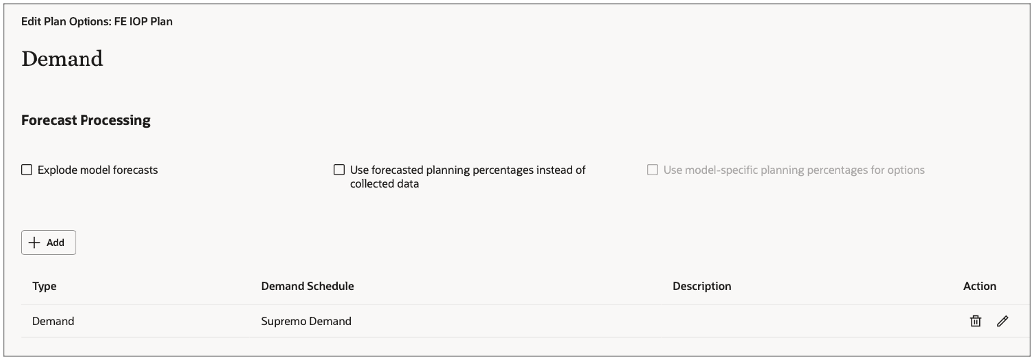
Demand Schedules
In the Demand step, you can also configure the following attributes when using a Demand (or Sales and Operations) type demand schedule:
Applicable to Demand Plans Only:
- Explode model forecasts: If enabled, inventory optimization planning will explode the model forecasts from a demand plan to the individual options.
- Use forecasted planning percentages instead of collected data: You can optionally enable use of time-phased planning percentages from a demand plan to explode the model forecasts. If this option isn’t enabled, the model item structure percentages are used to do the explosion.
- Option Demand: The name of the measure in the demand plan that represents the final exploded option forecast demand. This is relevant only when the Explode model forecasts attribute isn’t enabled.
- Planning Percentage: The name of the measure in the demand plan that represents the final planning percentages for each option item. This is relevant only when the Explode model forecasts attribute is enabled.
Applicable to Demand Plans and Sales and Operations Plans:
- End Item Demand: The name of the measure in the demand plan that represents the final forecast demand, for example, Final Shipments Forecast.
- Forecast Error Type for Nonintermittent Demand: Specify either MAD or MAPE as the type of demand variability to be used.
- Measure for MAD or MAPE: The name of the measure that contains the variability. Defaults to either Shipments Forecast MAD or Shipments Forecast MAPE, depending on what was selected for the Forecast Error Type for Nonintermittent Demand attribute.
- Measure for Intermittent Demand: Measure that indicates whether an item-location demand is intermittent.
- Measure for Average Interarrival Time: The name of the measure that contains the value of average time between consecutive demand occurrences for lumpy demand.
- On the Measure Levels tab, you can configure the levels at which the forecast is used as an input from the demand plan or sales and operations plan.
- The Organization and Product dimensions always default to Organization and Item respectively
- Demand class and Customer dimensions can be optionally enabled. When these are enabled, the gross forecast from the input plan is read at those specified granularities.
- The time dimension can be specified to use any time hierarchy in the source demand plan and at any level. The gross forecast is then read at that level and spread to each planning bucket in the inventory optimization plan.
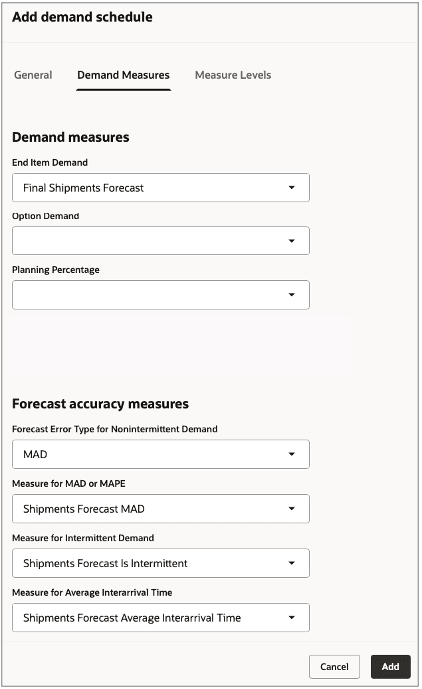
Demand Measures
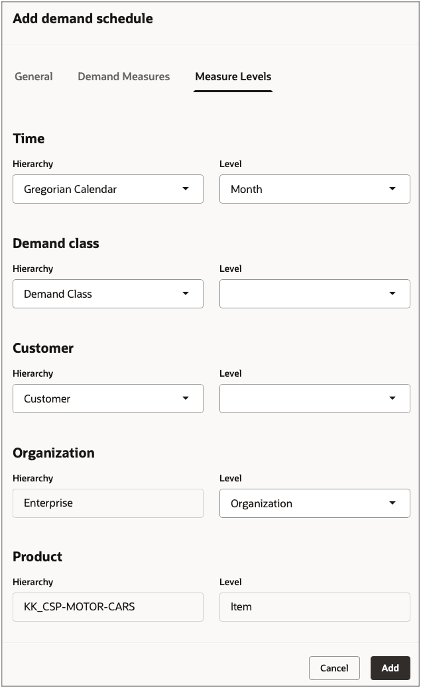
Demand Measure Levels
Steps to enable and configure
You don't need to do anything to enable this feature.
Key resources
For information on Oracle Fusion SCM Analytics and the Supply Chain Planning Subject Areas, please refer to: https://docs.oracle.com/en/cloud/saas/analytics/26r1/fascm/fusion-supply-chain-planning.html.
Access requirements
Users who are assigned a configured job role that contains these privileges can access this feature:
- View Plan Options (MSC_VIEW_PLAN_OPTIONS_PRIV): Allows you to view the plan options only.
- Edit Plan Options (MSC_EDIT_PLAN_OPTIONS_PRIV): Allows you to view and edit the plan options.
These privileges were available prior to this update. The Inventory Optimization Planner job role already includes these privileges.