Replan an Inventory Optimization Plan for User-Specific Edits
You can now replan an inventory optimization plan by respecting user-specified edits. You can override time-phased inventory measures, such as adjusted safety stock quantity, adjusted target service level, and adjusted lead time variability, to refine inventory optimization plans. After adjustments, replanning shows weekly impacts on inventory information, enabling assessment before saving final values. User-specific edits remain visible and editable across plan runs, preserving overrides for ongoing refinement. This includes adjustments to procurement, transit, and manufacturing lead time variability, with final values saved for future inventory optimization plan runs.
With this update, you can increase planning accuracy and improve decision making by enabling overrides of key inventory measures and preserving adjustments for continuous refinement.
This enhancement enables you to interactively edit, save, and preserve overrides on key inventory planning measures within the inventory optimization plan. You can now modify measure values in specific time buckets, run the plan to evaluate the impact, and retain those edits for future reference, thereby enabling a more iterative and responsive planning experience.
For example, in an Inventory Plan view, you can edit the Adjusted Safety Stock Quantity in specific time buckets to respond to a change in demand, to cover a supply risk, or to override inventory policy-based calculations. After updates, you can save and run the plan to see projected inventory and supply impacts, and you can have those edits preserved across subsequent plan runs.
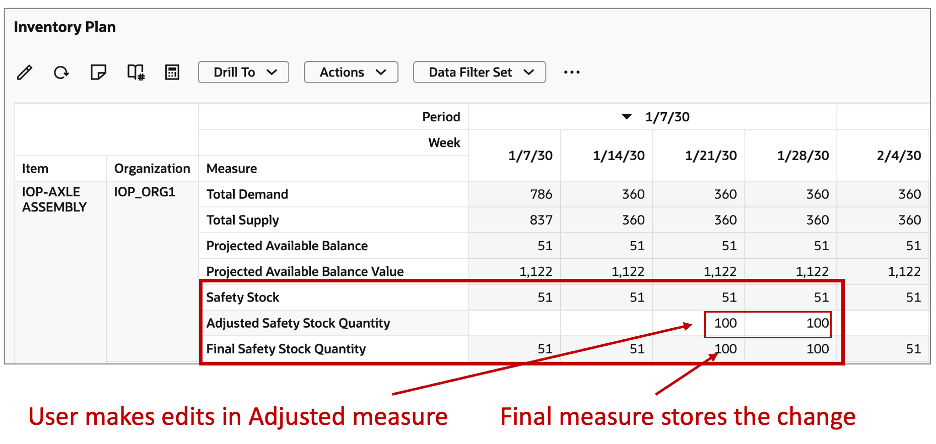
Illustration of User Adjusted Safety Stock Measure
The following illustration depicts the lifecycle of an editable measure across plan runs—showing the initial plan state, how your overridden value is captured in the adjusted measure, and how that edit is preserved and carried forward into subsequent plan runs through the final measure.
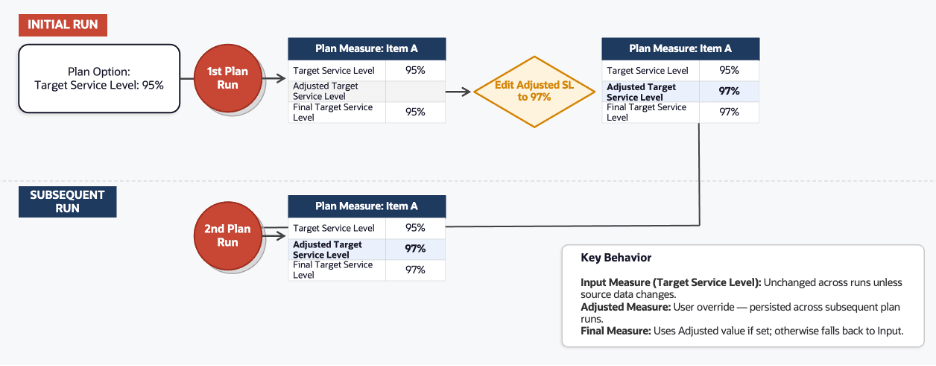
Illustration of Lifecycle of an Editable Measure
How Editable Measures Work
Each user-adjustable measure is composed of a set of three measures—an input measure, an adjusted measure, and a final measure—that work together to capture the original plan value, the overridden value, and the value ultimately used by the planning engine.
Example of Measure Types
| Measure Type | Example | Behavior |
|---|---|---|
| Input Measure | Target Service Level | This measure displays the original value sourced from plan input data and remains unchanged across plan runs unless the underlying source data is updated. |
| Editable Measure | Adjusted Target Service Level | You can enter or overwrite values after a plan run. The entered value is retained and remains visible and editable across subsequent plan runs. |
| Expression Measure (Final) | Final Target Service Level | If a value is entered in an adjusted measure, the final measure uses that value; otherwise, it falls back to the original input measure value. The final measure is what the planning engine uses in the next plan run. |
Supported Editable Measures
The measures shown in the following table support user edits in an inventory optimization plan. Each measure has a corresponding Adjusted (editable) measure and a Final (expression) measure that’s used by the planning engine, post adjustments.
Supported Editable Measures
| Input Measure | Adjusted Measure | Final Measure | Purpose |
|---|---|---|---|
| Safety Stock | Adjusted Safety Stock Quantity | Final Safety Stock Quantity | This final measure is used by downstream applications (Example: Supply Planning, Sales and Operations Planning) as the final safety stock when this inventory optimization plan is used as a demand schedule. |
| Target Service Level | Adjusted Target Service Level | Final Target Service Level | Allows you to modify service level assumptions, run the plan to assess time-phased inventory. |
| Procurement Lead Time Variability | Adjusted Procurement Lead Time Variability | Final Procurement Lead Time Variability | Supports overriding supplier lead time variability, running the plan to evaluate different sources. |
| Transit Lead Time Variability | Adjusted Transit Lead Time Variability | Final Transit Lead Time Variability | Enables you to adjust transportation variability parameters, run the plan to evaluate different scenarios. |
| Manufacturing Lead Time Variability | Adjusted Manufacturing Lead Time Variability | Final Manufacturing Lead Time Variability | Allows modification of production lead time variability, run the plan to analyze time-phased inventory impact. |
| Demand Fulfillment Lead Time | Adjusted Demand Fulfillment Lead Time | Final Demand Fulfillment Lead Time | Supports adjusting fulfillment lead time assumptions, running the plan to assess impact on the safety stock recommendations. |
Steps to enable and configure
You don't need to do anything to enable this feature.
Tips and considerations
- Initial plan run: All adjusted measures are null by default on the first plan run.
- Subsequent plan runs: Any values entered by the user after the initial plan run are retained and persisted in the plan across subsequent runs when executed with snapshot.
- The adjusted measures persist in all subsequent plan runs unless you edit them or make them null by deleting the values. You can mass delete these values at a period level or all-plan level to remove your adjustments and revert the plan to the initial state.
- Item Attributes: Item Attributes aren’t directly editable within inventory optimizations plans. Item Attributes can be edited in simulation sets and used as input into inventory optimization plans.
Access requirements
Users who are assigned a configured job role that contains this privilege can access this feature:
- MSC_RUN_PLAN_WITH_SNAPSHOT_PRIV
This privilege was available prior to this update.